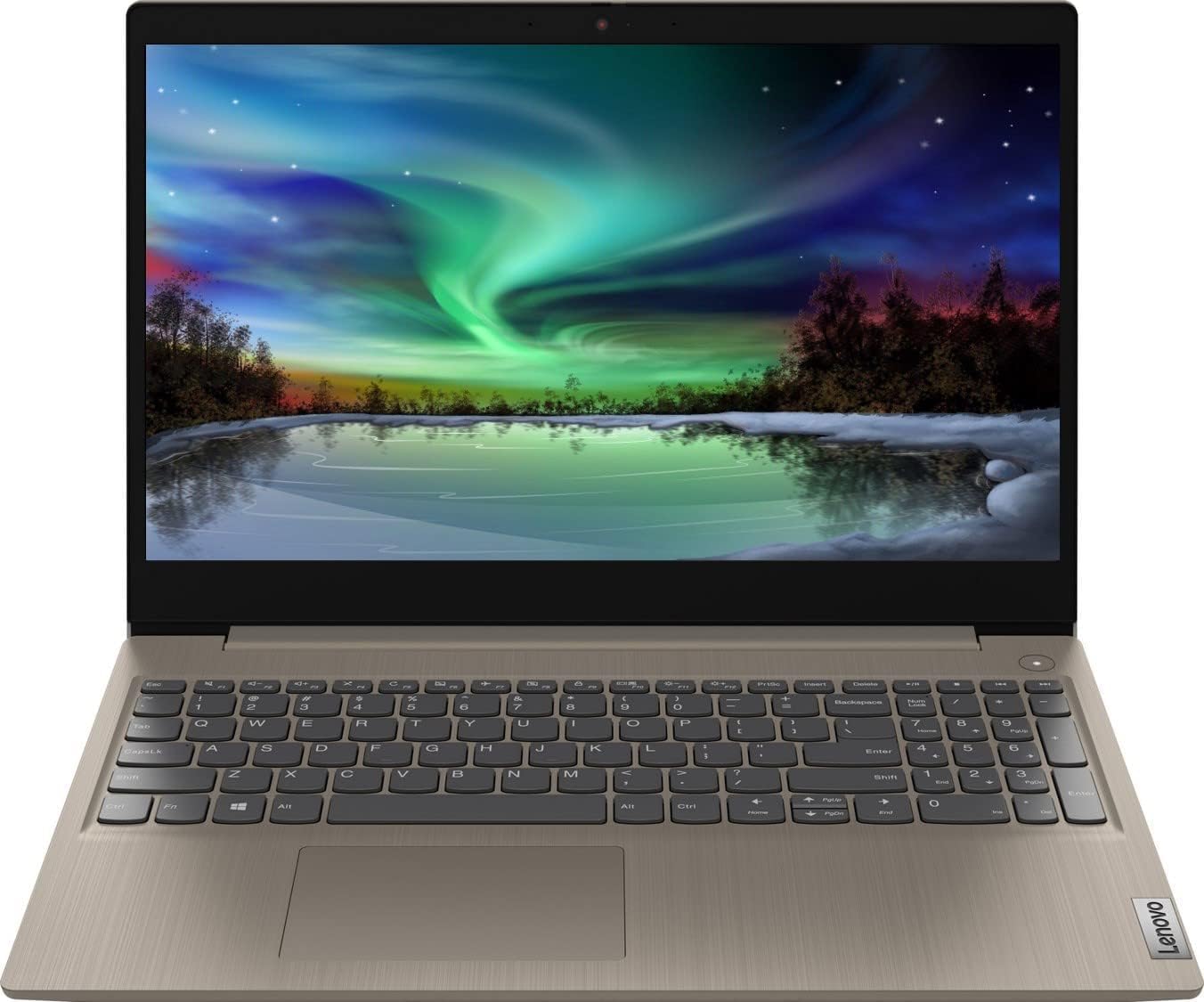
Lenovo 2022 Ideapad 3 Laptop, 15.6" HD Touchscreen, 11th Gen Intel Core i3-1115G4 Processor, 8GB DDR4 RAM, 256GB PCIe NVMe SSD, HDMI, Webcam, Wi-Fi 5, Bluetooth, Windows 11 Home, Almond
Want the best price and purchase timing?
Our AI advisor analyzes real-time pricing across all channels to find you the best deal.
AI Verdict
This is a basic, lightweight web-browsing machine for students and casual users who want a touchscreen on a strict budget, but you have to accept a low-resolution display.
If you just need a cheap laptop for web browsing and word processing, the 8GB of RAM and 256GB SSD provide enough snap for basic tasks. The 1366 x 768 display is a major compromise that makes multitasking cramped and media consumption less enjoyable.
Look for a model with a 1920 x 1080 (FHD) IPS display and a quad-core processor like an Intel i5 or Ryzen 5 if you plan to stare at the screen all day.
Regret Score™
Medium RiskLower is better — measures purchase-regret risk from real buyer complaints, review credibility, and product maturity
Issues discovered after purchase
Critically weak dimension
Amazon rating vs actual quality
Chance this product isn't for you
Pros
- 256GB PCIe NVMe SSD boots Windows 11 in seconds and loads apps much faster than older hard drives
- The 15.6-inch touchscreen is highly responsive for scrolling and tapping through web pages
- Weighs just 4.07 pounds, making it surprisingly portable for a full-size 15-inch laptop
- Includes a physical privacy shutter over the 720p webcam
- The Almond finish hides fingerprints well and looks more premium than standard black plastic
Cons
- The 1366 x 768 resolution is severely outdated, making text look pixelated and colors appear washed out
- No keyboard backlighting makes typing in dim rooms frustrating
- The dual-core i3-1115G4 processor maxes out quickly if you open more than a dozen Chrome tabs or try heavy photo editing
- Battery life rarely hits the advertised 7 hours, with most users getting closer to 4 hours of active web browsing
Dimension Scores
The dual-core i3-1115G4 and 8GB RAM are strictly for basic web browsing and office tasks.
The 1366 x 768 resolution is outdated, and the TN panel suffers from washed-out colors and poor viewing angles.
Real-world battery life hovers around 4-5 hours, which won't get you through a full workday away from an outlet.
At 4.07 pounds, it's reasonably light for a 15.6-inch laptop, though the all-plastic chassis feels cheap.
Best For
- High school students typing essays in Google Docs and doing web research
- Casual home users paying bills, checking email, and watching YouTube at a desk
- Remote workers who only need to run basic web apps and occasional Zoom calls
Not Recommended For
- Photographers or video editors who need accurate colors and high resolution
- Gamers looking to play anything more demanding than basic 2D indie titles
- Outdoor use, as the screen doesn't get bright enough to fight sunlight
Watch Out For
- The screen resolution is only 1366 x 768, meaning you have significantly less screen real estate than a standard 1080p display.
- It ships with Windows 11 Home in S Mode, so you have to manually opt out in the Microsoft Store before you can install apps like Google Chrome.
- The included charger uses a bulky, outdated barrel plug instead of modern USB-C.
- The RAM is partially soldered, limiting your upgrade options if you want to add more memory later.
Full Specifications
| RAM | 8 GB DDR4 |
| ASIN | B08B6F1NNR |
| Brand | Lenovo |
| Color | Almond |
| Series | IdeaPad 3 81X800ENUS |
| Voltage | 3.7 Volts |
| Batteries | 1 Lithium Ion batteries required. |
| CPU Model | Core i3 |
| Processor | 3 GHz core_i3 |
| Hard Drive | 256 GB SSD |
| Model Name | IdeaPad 3 81X800ENUS |
| Item Weight | 4.07 pounds |
| Screen Size | 15.6 Inches |
| Memory Speed | 3.4 GHz |
| Power Source | Battery Powered |
| Chipset Brand | Intel |
| Wireless Type | 802.11ac |
| Hard Disk Size | 256 GB |
| Processor Brand | Intel |
| Special Feature | Anti Glare Coating |
| Card Description | Integrated |
| Operating System | Windows 11 |
| Flash Memory Size | 256 GB |
| Hardware Platform | PC |
| Item model number | Ideapad |
| Screen Resolution | 1366 x 768 pixels |
| Optical Drive Type | no dvd |
| Product Dimensions | 14.3 x 9.9 x 0.8 inches |
| Computer Memory Type | DDR4 SDRAM |
| Graphics Coprocessor | Intel UHD Graphics |
| Hard Drive Interface | PCIE x 4 |
| Number of Processors | 2 |
| Max Screen Resolution | 1366x768 Pixels |
| Graphics Card Ram Size | 8 GB |
| Item Dimensions LxWxH | 14.3 x 9.9 x 0.8 inches |
| Rear Webcam Resolution | 720 Pixels |
| Graphics Card Description | Integrated |
| Ram Memory Installed Size | 20 GB |
| Standing screen display size | 15.6 Inches |
| Average Battery Life (in hours) | 7 Hours |
What Buyers Say
The most consistent shock for buyers is realizing how pixelated a 1366 x 768 resolution looks on a large 15.6-inch screen in the 2020s. Despite the poor display, users are genuinely impressed by how snappy the laptop feels for basic tasks, thanks to the 256GB NVMe SSD and 8GB of RAM. The touchscreen functionality is frequently praised as a saving grace that makes navigating Windows 11 much easier. Many complain about the bulky wall-wart charger and the lack of keyboard backlighting. The Almond color gets unexpected love for looking much more premium than standard budget black.
“Screen looks like its from 2010 but it boots up super fast and the touch screen works great for my online classes, just wish the battery lasted longer than 4 hours.”
Common Praise
- The touchscreen is highly responsive and makes scrolling through long documents easy
- Boot times are incredibly fast, usually hitting the login screen in under 10 seconds
- The Almond finish looks professional and doesn't show greasy fingerprints
- The physical webcam slider provides peace of mind for privacy
- The keyboard has good travel and feels comfortable for long typing sessions
Common Complaints
- The 1366 x 768 screen resolution makes text look fuzzy and colors appear washed out
- Battery life drains rapidly during video calls, often dying in under 3 hours
- The lack of a backlit keyboard makes typing at night very difficult
- The charger is a bulky block that takes up too much space on a power strip
- Viewing angles are terrible, requiring you to tilt the screen perfectly to see clearly
Ownership Tips
- The plastic chassis flexes noticeably if you pick the laptop up by one corner
- You have to manually switch out of Windows 11 S Mode to install basic apps like Google Chrome or Zoom
- The speakers are located on the bottom, so sound gets muffled if you use it on a bed or couch
Frequently Asked Questions
Does this laptop have a backlit keyboard?
No, the keyboard on this specific model is not backlit. You will need a well-lit room to see the keys clearly.
Can I play games like Minecraft or Sims 4 on this?
You can play them on low settings, but don't expect great performance. The integrated Intel UHD graphics and dual-core i3 processor are not built for gaming.
Does it have a CD/DVD drive?
No, it does not include an optical drive. You will need to buy an external USB DVD drive if you want to use discs.
Can I charge it via USB-C?
No, this laptop requires the included proprietary Lenovo barrel charger. The USB ports are for data transfer only.
Is the RAM upgradeable?
Yes, but only partially. One 4GB stick is soldered to the motherboard, while the other 4GB is in a removable slot that you can swap out for a larger stick.
How long does the battery actually last?
Lenovo claims up to 7 hours, but expect around 4 to 5 hours of real-world use like web browsing and video streaming.
Buying Guide
When buying a budget laptop, you are always trading one feature for another. Here, you are getting a responsive touchscreen and fast storage, but you are sacrificing screen sharpness and battery life. If you just need a cheap machine to check emails, pay bills, and watch YouTube, this will do the job perfectly. But if you stare at spreadsheets all day or want to watch movies in high definition, the low-resolution screen will drive you crazy.
1366 x 768 HD Resolution
This is the number of pixels on the screen. 1366 x 768 is like watching an old non-HD TV—text will look a bit fuzzy, and you can't fit as many windows on the screen side-by-side compared to a standard 1080p display.
Intel Core i3-1115G4
Think of the processor as the laptop's engine. This dual-core i3 is like a reliable 4-cylinder car—great for driving around town (web browsing), but it will struggle if you try to tow a heavy boat (video editing or gaming).
8GB DDR4 RAM
RAM is your laptop's short-term memory or desk space. 8GB is the bare minimum you want for Windows 11; it lets you keep about 10-15 browser tabs open before the computer starts slowing down.
256GB PCIe NVMe SSD
This is your storage closet. An NVMe SSD is incredibly fast, meaning your laptop turns on in seconds. 256GB is enough for basic documents and a few apps, but it will fill up quickly if you save a lot of videos or photos.
Alternatives
If the low-resolution screen is a dealbreaker, search for a 15.6-inch laptop with a '1920 x 1080 FHD IPS' display and an Intel Core i5 or AMD Ryzen 5 processor.
You Might Also Like

Apple 2026 MacBook Air 13-inch Laptop with M5 chip: Built for AI, 13.6-inch Liquid Retina Display, 16GB Unified Memory, 512GB SSD, 12MP Center Stage Camera, Touch ID, Wi-Fi 7; Midnight
$600+This 2.71-pound MacBook Air with a 13.6-inch Liquid Retina display and M5 chip is for users needing powerful AI capabilities and up to 18 hours of battery life.

Apple 2026 MacBook Pro Laptop with Apple M5 Pro chip with 18-core CPU and 20-core GPU: Built for AI, 16.2-inch Liquid Retina XDR Display, 24GB Unified Memory, 1TB SSD, Wi-Fi 7; Space Black
$600+This 16.2-inch MacBook Pro with an 18-core M5 Pro CPU and 20-core GPU is for professionals needing extreme AI performance and up to 27 hours of battery life.

Apple 2026 MacBook Air 15-inch Laptop with M5 chip: Built for AI, 15.3-inch Liquid Retina Display, 16GB Unified Memory, 512GB SSD, 12MP Center Stage Camera, Touch ID, Wi-Fi 7; Midnight
$600+This 3.32-pound MacBook Air with an M5 chip and 15.3-inch Liquid Retina display is for users needing powerful AI capabilities and up to 18 hours of battery life.

HP OmniBook 5 16” Touchscreen AI Laptop – Intel Core Ultra 7 Processor, 16GB RAM, 1TB SSD, Windows 11, Copilot AI, Wi-Fi 6E, Backlit Keyboard, Silver
$600+This 16-inch touchscreen laptop with an Intel Core Ultra 7, 16GB LPDDR5 RAM, and 1TB SSD is for users needing a mid-range AI-accelerated machine for productivity and light creative tasks.