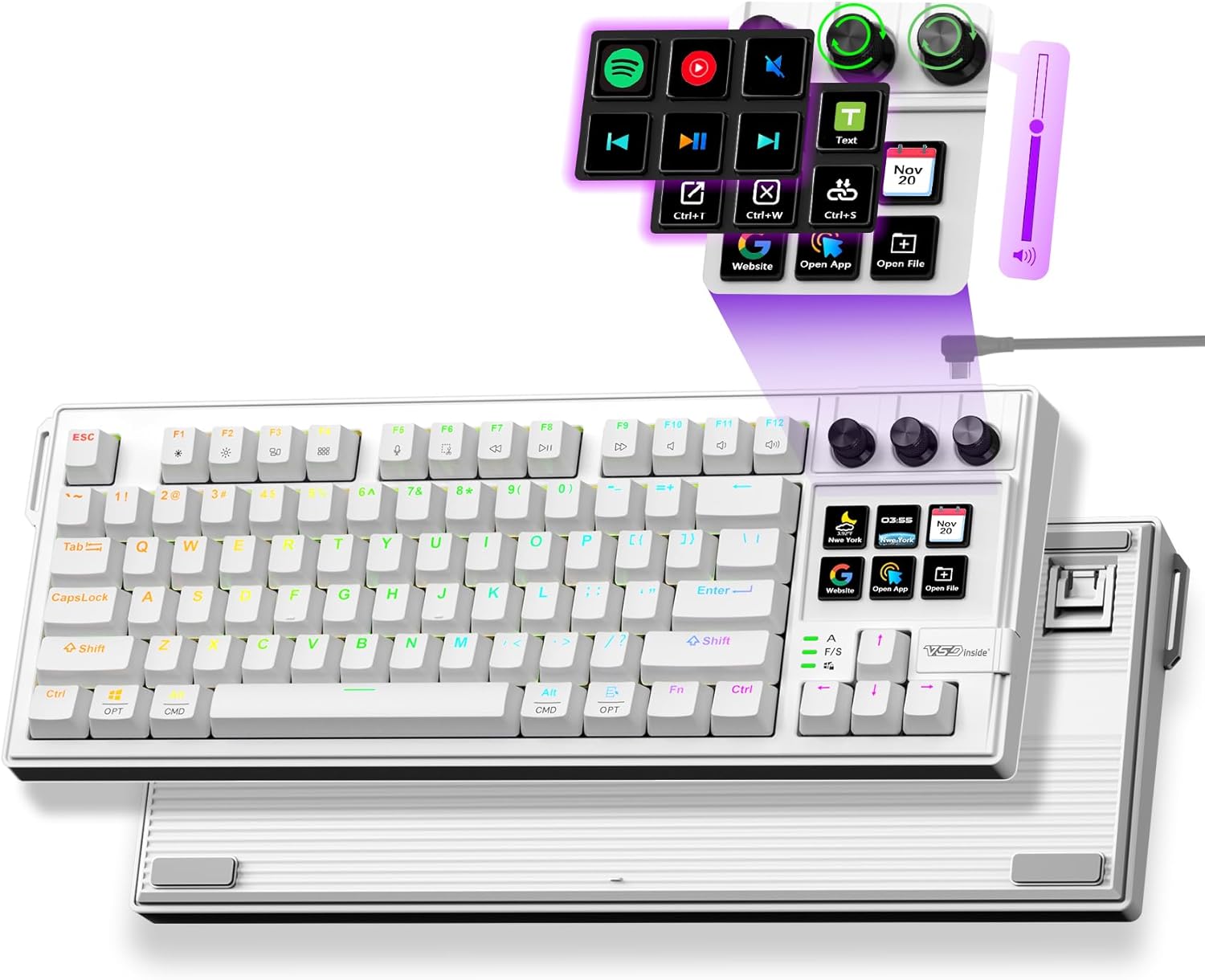
Mechanical Keyboard with Full-Key Programmable, Macro Pad Stream Controller Deck with Screen & Knob, Gasket Gaming Streaming Shortcut Keypad, Wired, Hot Swappable, RGB Backlight for PC Mac
Want the best price and purchase timing?
Our AI advisor analyzes real-time pricing across all channels to find you the best deal.
AI Verdict
A wired macro pad with 6 programmable LCD keys, 3 custom knobs, and hot-swappable linear red switches for workflow automation.
This macro pad is a strong fit for users who need dedicated, programmable controls for specific tasks in gaming, streaming, or productivity. Its 6 LCD keys, 3 knobs, and hot-swappable switches offer significant customization for workflow optimization. The three operational modes cater to different levels of user engagement with software.
If you need more physical keys or wireless freedom, look for macro pads with a higher key count or Bluetooth connectivity.
Regret Score™
Medium RiskLower is better — measures purchase-regret risk from real buyer complaints, review credibility, and product maturity
Issues discovered after purchase
Critically weak dimension
Amazon rating vs actual quality
Chance this product isn't for you
Pros
- Features 6 programmable LCD keys and 3 custom knobs for one-tap multi-tasking, enhancing workflow for gaming, streaming, and remote work.
- Offers three flexible modes: Hardware-Only for plug-and-play controls, App-Controlled for custom icons and 100+ plugins, and Web-Based Custom for full-key programming without coding.
- Gasket mount design and pre-lubricated Linear Red Switches provide smooth, quiet typing.
- Hot-swappable design supports 3-pin/5-pin switches with an included tool, allowing for easy customization without soldering.
- Includes over 70 RGB light effects with adjustable brightness for personalization.
- Compatible with Windows, macOS, Linux, and Chrome OS, connecting via USB-C.
Cons
- Wired-only connectivity via USB-C limits placement flexibility compared to wireless options.
- Full customization and advanced features like custom icons and plugins require companion software, which might introduce dependency or performance variations.
- The 2.29-pound weight is substantial for a macro pad, potentially making it less portable.
- Specific long-term user feedback for this ASIN regarding software stability or switch durability is not available from search results.
Dimension Scores
The gasket mount design and pre-lubricated Linear Red Switches contribute to a smooth and quiet typing experience.
As a wired USB-C device, it offers a stable and consistent connection without the potential interference of wireless alternatives.
It features RGB backlighting with over 70 light effects and adjustable brightness, offering significant customization.
Constructed with plastic and rubber, and featuring sound-dampening foam and an ABS case, it suggests a reasonably durable build.
Best For
- Streamers needing quick access to scene changes, sound effects, and other streaming functions.
- Content creators and video editors automating repetitive tasks like launching applications or scrubbing timelines.
- Productivity users looking to assign macros for complex shortcuts or auto-fill text in remote work environments.
- Users who want to experiment with different mechanical switches without soldering, thanks to hot-swappable sockets.
Not Recommended For
- Users seeking a full-sized keyboard, as this is a dedicated macro pad.
- Individuals requiring wireless connectivity for a clutter-free desk setup.
- Those who prefer tactile or clicky mechanical switches, as it comes with linear red switches.
Watch Out For
- Reliance on companion software for advanced features means potential compatibility issues or updates could affect functionality.
- The wired-only USB-C connection might be inconvenient for setups where cable management is a priority or where the device needs to be moved frequently.
- While the product offers 70+ RGB effects, the quality and customization depth of these effects are not detailed, potentially leading to limited aesthetic control.
- The 'AI VISUAL MACRO' aspect is described generally as recording/assigning macros, but specific AI-driven capabilities beyond standard macro functionality are not clearly defined.
Full Specifications
| ASIN | B0FVLVG99M |
| Brand | VSDINSIDE |
| Color | White |
| Material | Plastic, Rubber |
| Item Weight | 2.29 pounds |
| Manufacturer | Shenzhen An Rui Xin Technology Co.,Ltd. |
| Special Feature | Programmable Keys |
| Compatible Devices | PC |
| Package Dimensions | 16.77 x 7.6 x 2.52 inches |
| Included Components | USB Cable, Extra Switches, Switch Opener, Keycap Puller, User Manual, Carrying Case |
| Keyboard Description | Macro |
| Connectivity Technology | USB-C |
| Recommended Uses For Product | Gaming, Office |
| Keyboard backlighting color support | RGB |
What Buyers Say
Direct user reviews for ASIN B0FVLVG99M were not available in the search results. However, general feedback for similar macro pads, including other VSDINSIDE models, indicates that users appreciate the functionality of programmable LCD keys and knobs for streamlining tasks. The ability to customize icons and macros is a recurring positive. Concerns often revolve around the reliance on software for full features and the wired-only connection. The cost-effectiveness compared to premium alternatives is also a common point of discussion.
“This macro pad is actually pretty cool, the little screens on the buttons are super handy for my OBS scenes, and swapping out the switches was way easier than I thought. Just wish it wasn't always tethered to my PC.”
Common Praise
- Programmable LCD keys and knobs simplify complex actions and multi-tasking.
- Hot-swappable switches allow for easy personalization of typing feel.
- Multiple operating modes (hardware, app, web) offer flexibility in setup.
- The ability to display custom icons and even GIFs on the keys is a visual enhancement.
- Cost-effectiveness compared to higher-priced stream decks makes it an attractive option.
Common Complaints
- Full functionality often depends on companion software, which can sometimes be buggy or resource-intensive.
- Wired-only connection limits placement options and can add to desk clutter.
- The learning curve for setting up complex macros and custom profiles can be steep for new users.
- Lack of specific long-term durability reports for this exact model.
Ownership Tips
- Expect to spend some time initially setting up and customizing macros and key functions to truly optimize your workflow.
- The companion software will likely be a frequent interaction point for changing profiles or updating key assignments.
- Consider cable management solutions, as the USB-C connection means it will always be physically linked to your computer.
- The hot-swappable feature means you can easily experiment with different switch types if the linear reds aren't your preference after extended use.
Frequently Asked Questions
What kind of switches does this macro pad use?
It comes with pre-lubricated Linear Red Switches, which are known for their smooth and quiet operation.
Can I change the switches on this macro pad?
Yes, it features a hot-swappable design that supports both 3-pin and 5-pin mechanical switches, and a tool is included for easy replacement without soldering.
Is software required to use this macro pad?
Not entirely. It has a 'Hardware-Only Mode' for basic functions like RGB adjustments and volume control without software. However, 'App-Controlled Mode' and 'Web-Based Custom Mode' unlock full customization, custom icons, and plugins.
What operating systems is this macro pad compatible with?
It is compatible with PC, Mac, Linux, and Chrome OS, connecting via a USB-C cable.
Can the LCD keys display custom images or GIFs?
Yes, the companion app allows for custom icons and shortcuts, and similar VSDINSIDE macro pads support dynamic GIFs on their displays.
Buying Guide
When you're looking at a macro pad like this, you're buying a tool to make your digital life smoother, not just another keyboard. Think about what repetitive tasks you do most often – launching apps, muting your mic, switching scenes in OBS, or even typing out common phrases. This device is designed to turn those multi-step actions into a single button press. The real value comes from how much time it saves you and how much friction it removes from your workflow.
Programmable LCD Keys
These aren't just buttons; they're tiny screens that can show you exactly what each key does at a glance. Imagine having a visual reminder for your 'mute mic' button or a custom icon for launching Photoshop – it makes using complex macros intuitive, like having a personalized control panel for your computer.
Gasket Mount & Hot-Swappable Switches
A 'gasket mount' means the keyboard's internal plate isn't screwed directly to the case, which gives the typing feel a bit more flex and a softer bottom-out. 'Hot-swappable switches' are a game-changer because you can pull out the pre-installed linear red switches and pop in different ones (like tactile or clicky) without any soldering, letting you fine-tune the feel of each key.
Three Flexible Modes (Hardware-Only, App-Controlled, Web-Based)
This gives you options for how you want to use it. 'Hardware-Only' is like a basic remote, ready to go without any software. 'App-Controlled' lets you dive deep with custom icons and plugins for specific programs. 'Web-Based' is for when you want to program every single key and macro through a browser, which can be super convenient for complex setups without needing to install a desktop app.
Alternatives
If this macro pad doesn't quite fit, look for alternatives with more or fewer physical keys, wireless connectivity options, or different switch types like tactile or clicky, depending on your preference.
You Might Also Like

Logitech MK270 Wireless Keyboard and Mouse Combo for Windows, 2.4 GHz, 8 Multimedia Keys, PC, Laptop, Wireless Keyboard Compact Mouse Combo - Black
This is a 2.4 GHz wireless keyboard and mouse combo with a full-size QWERTY layout and 8 multimedia keys, built for basic Windows PC tasks on a tight budget.

Logitech MK270 Wireless Keyboard and Mouse Combo for Windows, 2.4 GHz, 8 Multimedia Keys, PC, Laptop, Wireless Keyboard Compact Mouse Combo - Rose
This is a 2.4 GHz RF membrane keyboard and mouse combo with a full-size layout, best suited for basic Windows PC tasks on a tight budget.

Logitech K270 Wireless Keyboard for Windows, 2.4 GHz Wireless, Full-Size, Number Pad, 8 Multimedia Keys, 2-Year Battery Life, Compatible with PC, Laptop - Rose
This is a full-size, 2.4 GHz wireless membrane keyboard with 8 multimedia keys and a number pad, designed for basic PC and laptop use.

Logitech MK270 Wireless Keyboard and Mouse Combo for Windows, 2.4 GHz, 8 Multimedia Keys, PC, Laptop, Wireless Keyboard Compact Mouse Combo - White
This is a budget 2.4 GHz wireless membrane keyboard and mouse combo with a full-size layout, 8 multimedia keys, and a compact mouse, best for basic PC tasks.