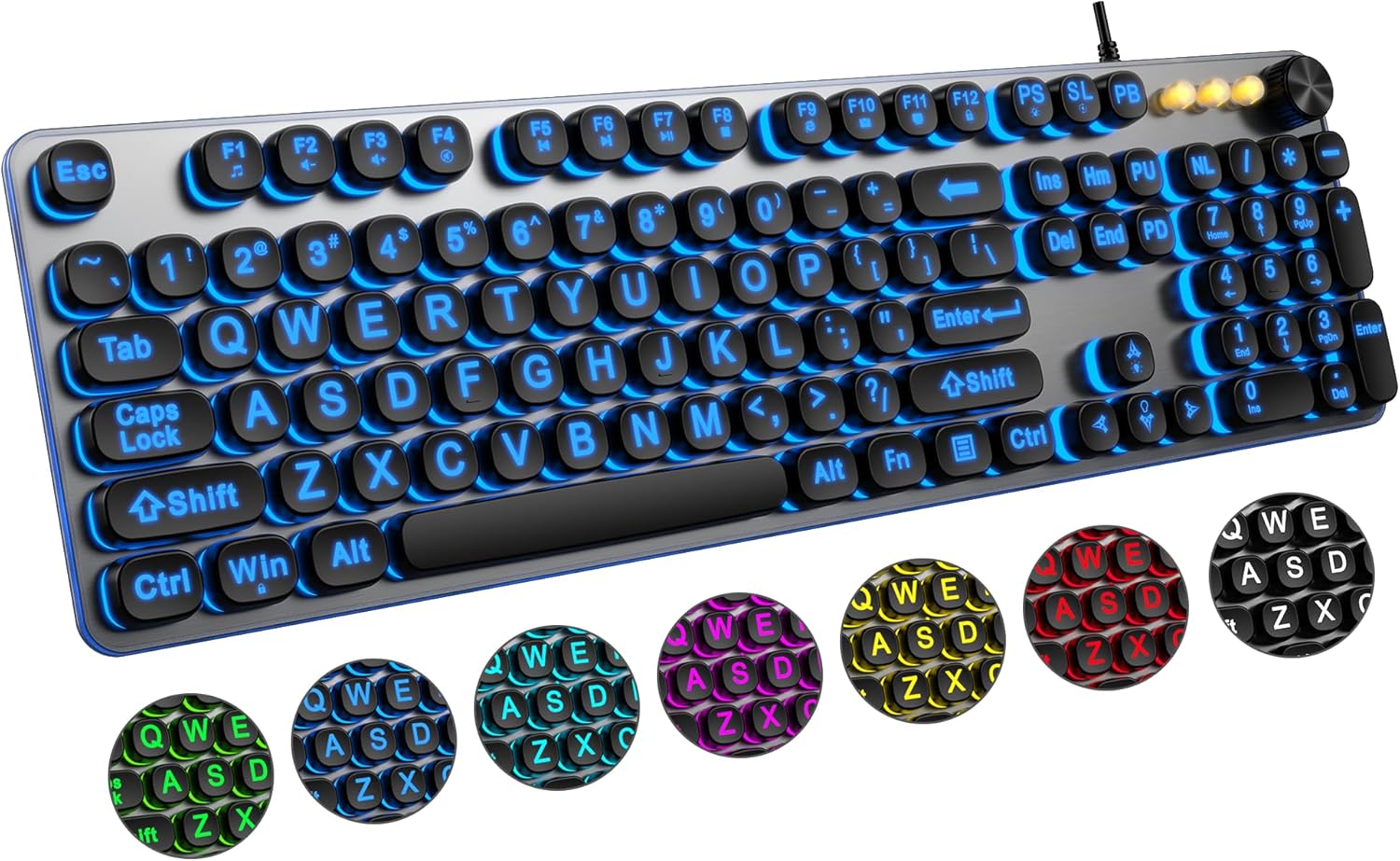
Large Print Backlit Keyboard with 7-Color Backlit, Wired USB Lighted Computer Keyboards Oversize Letters Keys Easy to See, Illuminated Keyboard for PC, Laptop,Windows Desktop
Want the best price and purchase timing?
Our AI advisor analyzes real-time pricing across all channels to find you the best deal.
AI Verdict
This wired, full-size USB keyboard offers 4x larger print and 7-color backlighting, ideal for users prioritizing visual clarity over typing performance.
This keyboard is a situational fit because its large print and adjustable 7-color backlighting directly address the needs of users with visual challenges or those working in low-light conditions. However, the reported issues with key responsiveness and durability make it less suitable for general, everyday typing where consistent performance is critical.
If key responsiveness and durability are paramount, look for keyboards with mechanical switches or membrane keyboards with higher key travel and actuation force specifications, and check for user reviews specifically mentioning consistent typing feel over time.
Regret Score™
High RiskLower is better — measures purchase-regret risk from real buyer complaints, review credibility, and product maturity
Issues discovered after purchase
Critically weak dimension
Amazon rating vs actual quality
Chance this product isn't for you
Pros
- Keys feature print 4x larger than traditional keyboards, significantly aiding visual clarity for users.
- Backlighting offers 7 colors and 4 brightness levels, adjustable for comfortable typing in low-light conditions.
- Wired USB connection ensures a plug-and-play setup without requiring drivers or batteries.
- Includes a full-size layout with a numeric keypad and a multimedia control knob for convenient volume adjustment.
- Features a foldable stand on the back to improve wrist posture and reduce fatigue during prolonged use.
- The crater mechanism under each key contributes to an almost silent typing experience.
Cons
- Keys are reported to be mushy and unresponsive, often requiring forceful presses to register input.
- Users frequently experience sticky keys, missed characters, or double letters while typing.
- Backlight settings, including chosen color and brightness, reportedly reset to default upon computer restart.
- Durability is a concern, with reports of key coatings wearing off quickly and units failing within a few months.
- Multimedia keys may not be fully compatible with macOS systems, limiting functionality for some users.
Dimension Scores
Keys are reported to be mushy and unresponsive, often requiring forceful presses to register, leading to a 'nightmare' typing experience for fast typists.
As a wired USB keyboard, it offers a direct connection with no latency, ensuring a very fast response speed.
It provides 7 different colors and 4 brightness levels, making it convenient to type in low-light environments, though settings reset on restart.
Durability is a significant concern, with reports of key coatings wearing off quickly and units failing within a few months.
Best For
- Individuals with visual impairments who benefit from oversized key legends.
- Seniors or elderly users requiring easier-to-see keys for comfortable use.
- Typing in dimly lit environments due to its adjustable backlighting.
- Users who prefer a wired, plug-and-play setup without concerns about battery life.
Not Recommended For
- Fast typists or those who prefer a light, responsive, and tactile key feel.
- Users who frequently restart their computer and expect consistent backlight settings.
- Individuals prioritizing long-term durability and consistent key performance.
- Mac users who rely heavily on all multimedia keys, as compatibility may be limited.
Watch Out For
- Keys can be mushy and unresponsive, with some users needing to 'slam the keys straight down to get a letter to register'.
- Durability issues include key coatings rubbing off quickly and some units becoming 'useless junk in no time'.
- Backlight settings do not save, resetting to a default 'rainbow mode' after every computer restart.
- The typing experience is described as a 'nightmare' for fast or light typists due to missed or double letters.
Full Specifications
| ASIN | B0F594GMXS |
| Brand | QUASIO |
| Material | Silicone |
| Item Weight | 1.59 pounds |
| Switch Type | Tactile |
| Manufacturer | QUASIO |
| Power Source | USB Powered |
| Special Feature | Ergonomic |
| Compatible Devices | Laptop |
| Package Dimensions | 17.76 x 5.98 x 1.73 inches |
| Included Components | Keyboard, Mouse |
| Keyboard Description | Multi Functional |
| Connectivity Technology | usb |
| Recommended Uses For Product | Everyday Use |
What Buyers Say
Many users are drawn to this keyboard for its genuinely large print and customizable 7-color backlighting, which are a real help for visibility in low light or for those with visual impairments. However, a significant number of users report frustrating issues with the actual typing experience, describing keys as mushy, unresponsive, or prone to sticking, leading to frequent typos. The backlighting, while visually appealing, doesn't retain its settings after a restart, forcing users to reconfigure it every time. Furthermore, there are recurring complaints about the keyboard's durability, with key legends fading and units failing prematurely.
“Dude, the big letters are awesome for my grandma, but seriously, the keys feel like I'm typing on mashed potatoes and the lights reset every time I turn my PC on, it's so annoying.”
Common Praise
- Key legends are 4x larger than standard, making them easy to see.
- 7-color backlighting with adjustable brightness is effective for typing in dim conditions.
- Plug-and-play USB connection means no setup hassle or battery management.
- The full-size layout includes a numeric keypad, which is convenient for data entry.
- Features a foldable stand for improved wrist comfort during use.
- Typing is described as almost silent due to the crater key mechanism.
Common Complaints
- Keys often feel mushy and require excessive force to register, leading to missed inputs.
- Users frequently encounter sticky keys, double letters, or letters that don't register at all.
- Backlight settings, including chosen color and brightness, reset every time the computer is restarted.
- Key durability is poor, with coatings rubbing off and units failing within a few months of use.
- The space bar and overall key placement can be problematic, causing frequent typing errors.
- The typing experience is considered 'horrible' for anyone attempting to type quickly or lightly.
Ownership Tips
- The 'silent click' feature might be true, but it comes at the cost of tactile feedback and key responsiveness.
- Expect to manually reset your preferred backlight color and brightness after every system reboot.
- The 'spill-resistant' claim is a feature highlight, but user reviews don't specifically confirm its effectiveness in real-world scenarios.
- The multimedia knob is handy, but Mac users might find some functions don't work as expected.
- The 'silicone' material for the keyboard might contribute to the mushy key feel if it refers to the keycaps or internal membrane.
Frequently Asked Questions
Does this keyboard require batteries?
No, it's a wired USB keyboard and connects directly to your computer, so it doesn't need batteries or charging.
Can I change the backlight colors and brightness?
Yes, it features 7 different backlight colors and 4 levels of brightness, which can be adjusted or turned off.
Is this keyboard compatible with Mac computers?
It is compatible with Mac operating systems, but some users have noted that multimedia keys may not be fully compatible.
Do the backlight settings save after I turn off my computer?
No, user reports indicate that the backlight settings, including color and brightness, reset to a default mode after restarting the computer.
Is this keyboard quiet when typing?
Yes, the keyboard uses an effortless crater mechanism under each key, designed to make typing almost silent.
Buying Guide
When you're looking at a large print keyboard, you're usually prioritizing visibility over raw typing performance. You need to decide if the benefit of easily readable keys outweighs potential compromises in key feel or durability. A wired connection means no battery worries, but also less flexibility in placement.
Large Print (4x larger)
This means the letters and numbers on each key are significantly bigger, making them much easier to identify, especially for those with impaired vision. Think of it like reading a children's book versus a newspaper.
7-Color Backlight
This isn't just for aesthetics; it illuminates the keys, which is crucial for typing in dim lighting. Having multiple colors and brightness levels lets you customize it to what's easiest on your eyes.
Wired USB Connectivity
This ensures a direct, stable connection to your computer without needing batteries or dealing with wireless interference. It's like plugging in a lamp – it just works when connected.
Crater Mechanism
This refers to the type of switch under each key. It's designed to provide a quieter typing experience compared to traditional mechanical switches, but can sometimes lead to a softer, less tactile key feel.
Alternatives
If you need a more responsive and durable typing experience, look for keyboards with mechanical switches or higher-quality membrane switches that explicitly mention tactile feedback, even if it means sacrificing some of the large print or advanced backlighting features.
You Might Also Like

Logitech MK270 Wireless Keyboard and Mouse Combo for Windows, 2.4 GHz, 8 Multimedia Keys, PC, Laptop, Wireless Keyboard Compact Mouse Combo - Black
This is a 2.4 GHz wireless keyboard and mouse combo with a full-size QWERTY layout and 8 multimedia keys, built for basic Windows PC tasks on a tight budget.

Logitech MK270 Wireless Keyboard and Mouse Combo for Windows, 2.4 GHz, 8 Multimedia Keys, PC, Laptop, Wireless Keyboard Compact Mouse Combo - Rose
This is a 2.4 GHz RF membrane keyboard and mouse combo with a full-size layout, best suited for basic Windows PC tasks on a tight budget.

Logitech K270 Wireless Keyboard for Windows, 2.4 GHz Wireless, Full-Size, Number Pad, 8 Multimedia Keys, 2-Year Battery Life, Compatible with PC, Laptop - Rose
This is a full-size, 2.4 GHz wireless membrane keyboard with 8 multimedia keys and a number pad, designed for basic PC and laptop use.

Logitech MK270 Wireless Keyboard and Mouse Combo for Windows, 2.4 GHz, 8 Multimedia Keys, PC, Laptop, Wireless Keyboard Compact Mouse Combo - White
This is a budget 2.4 GHz wireless membrane keyboard and mouse combo with a full-size layout, 8 multimedia keys, and a compact mouse, best for basic PC tasks.