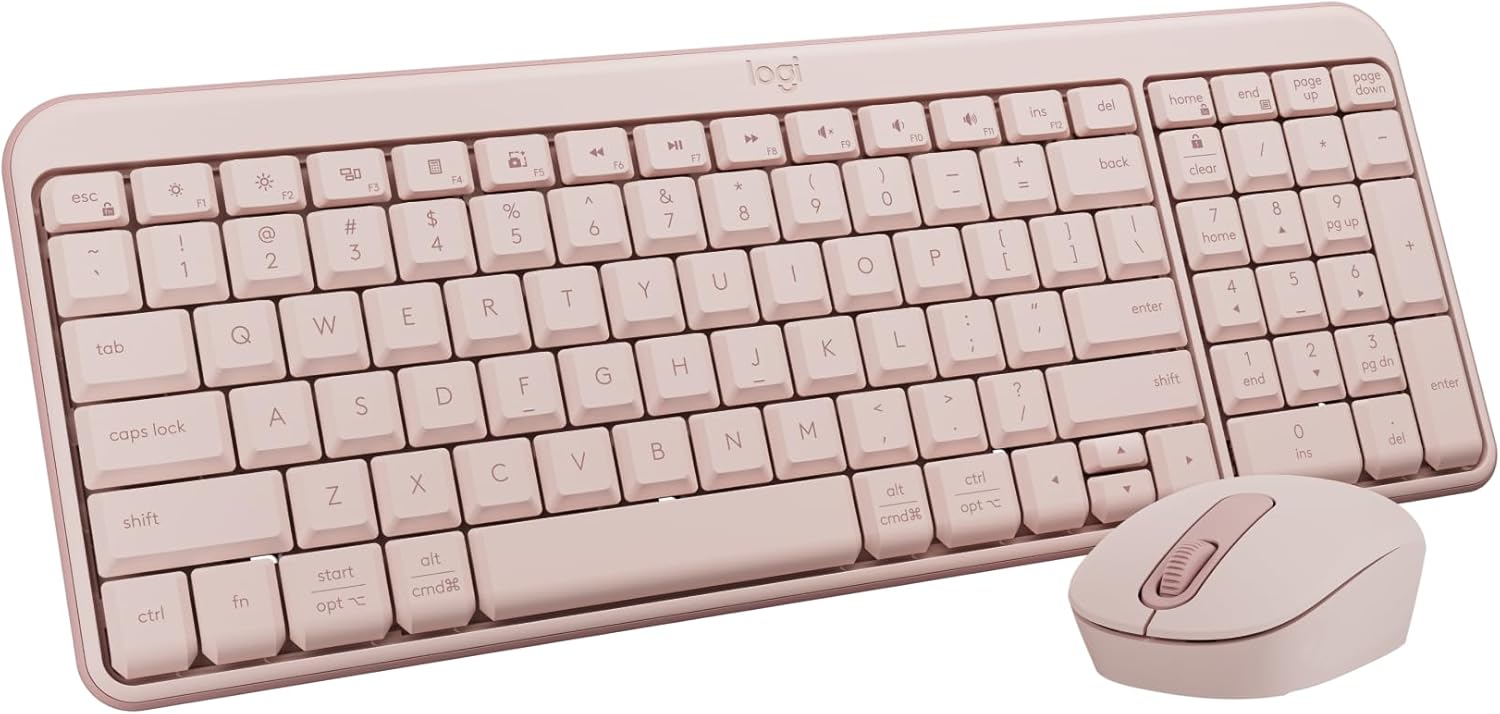
Logitech MK250 Bluetooth Wireless Mouse and Keyboard Combo: Fast & Easy Connectivity, Compact Wireless Keyboard, Ambidextrous Mouse, Durable Build - Windows/MacOS - Rose
Want the best price and purchase timing?
Our AI advisor analyzes real-time pricing across all channels to find you the best deal.
AI Verdict
A Bluetooth keyboard and mouse combo with deep-profile keys and a compact layout, designed for basic computing and portability.
This combo is a situational fit because its Bluetooth connectivity and compact design are great for specific portable or minimalist setups, especially with its 12-month keyboard battery life. However, the small mouse and non-standard keyboard layout mean it won't suit everyone's ergonomic preferences or advanced use cases.
If this isn't enough, look for a combo with a larger, ergonomic mouse (e.g., 120mm+ length) and a full-size keyboard with a standard layout and dedicated media keys.
Regret Score™
High RiskLower is better — measures purchase-regret risk from real buyer complaints, review credibility, and product maturity
Issues discovered after purchase
Critically weak dimension
Amazon rating vs actual quality
Chance this product isn't for you
Pros
- Connects via Bluetooth wireless technology, freeing up USB ports.
- Keyboard features a spill-resistant design, tested for up to 60 ml liquid spillage.
- Keyboard offers a 12-month battery life, and the mouse up to 1 year.
- Compact keyboard includes a number pad, arrow keys, and F-key shortcuts.
- Plastic parts are made with a minimum of 66% (mouse) and 64% (keyboard) recycled plastic.
- Mouse has a smooth ambidextrous shape for either hand.
Cons
- Mouse is small (100x60x38 mm, 76g) which can feel too compact for users with larger hands.
- Mouse lacks forward/back buttons, which some users find essential.
- Keyboard layout isn't standard, requiring an adjustment period for some users.
- Keyboard's adjustable tilt-legs lack grips when extended, causing it to slide on some surfaces.
Dimension Scores
The keyboard features deep-profile keys and a tactile membrane that feels less mushy than some other membrane keyboards.
It offers frustration-free Bluetooth wireless technology that pairs in seconds and maintains a stable connection up to 10 meters.
The product specifications and reviews do not mention any backlighting feature for the keyboard.
The combo is built for quality with a spill-resistant keyboard and plastic parts made from a minimum of 64% recycled materials.
Best For
- Setting up a clutter-free workspace without USB dongles.
- Users needing a quiet keyboard for office or shared environments.
- Portable setups for laptops or tablets due to compact size and Bluetooth connectivity.
- Basic computing tasks like typing documents and web browsing.
Not Recommended For
- Competitive gaming due to membrane keys and lack of specialized features.
- Users with large hands who prefer a full-sized, contoured mouse.
- Anyone who frequently uses mouse forward/back buttons for navigation.
Watch Out For
- The mouse's small size (100x60x38 mm) can be awkward for larger hands, leading to a claw grip for comfort.
- Keyboard's adjustable tilt-legs don't have grips when extended, causing the keyboard to float or slide on a desk.
- The keyboard's layout isn't entirely standard, which can take time to adjust to, especially coming from a mechanical keyboard.
- Requires both AA and AAA batteries (one AA for the mouse, two AAA for the keyboard), meaning you'll need different spares.
Full Specifications
| ASIN | B0F37L2DRC |
| Brand | Logitech |
| Color | Rose |
| Series | MK250 Keyboard & Mouse |
| Batteries | 2 AAA batteries required. (included) |
| Item Weight | 13.4 ounces |
| Manufacturer | Logitech |
| Power Source | Battery Powered |
| Special Feature | Lightweight, Portable |
| Operating System | Chrome OS, Windows 10.11 or later, macOS 12 or later |
| Hardware Platform | Mac, PC |
| Item model number | 920-013512 |
| Compatible Devices | Laptop, Personal Computer, Tablet |
| Product Dimensions | 18.03 x 5.98 x 1.73 inches |
| Item Dimensions LxWxH | 18.03 x 5.98 x 1.73 inches |
| Connectivity Technology | Bluetooth |
What Buyers Say
Users frequently highlight the effortless Bluetooth pairing process, often noting it connects in seconds without needing drivers. The keyboard's quiet operation is a recurring positive, making it suitable for shared spaces. While the compact design with a numpad is appreciated for saving desk space, the mouse's small size is a common point of contention for those with larger hands.
“Honestly, the Bluetooth setup was so fast, I was shocked. But man, this mouse is tiny, my hand cramps after an hour, wish it had side buttons too!”
Common Praise
- Easy and fast Bluetooth pairing, connecting in a matter of seconds.
- Keyboard is super quiet, solving issues with noisy typing in office environments.
- Compact keyboard still includes a full numpad and arrow keys, saving desk space.
- Long battery life claims (12 months for keyboard, 1 year for mouse) are a significant convenience.
- Spill-resistant keyboard design provides peace of mind against minor accidents.
Common Complaints
- Mouse is too small for users with larger hands, making it feel awkward or requiring a claw grip.
- Lack of forward/back buttons on the mouse is a missing feature for some users.
- Keyboard's non-standard layout requires an adjustment period for comfortable typing.
- Keyboard's extended tilt-legs lack rubber grips, causing it to slide on smooth surfaces.
- Requires different battery types (AA for mouse, AAA for keyboard) for replacements.
Ownership Tips
- The keyboard's 'tactile' membrane feel is a pleasant surprise for those used to mushier budget options.
- The ambidextrous mouse design, while inclusive, limits contouring, making it less ergonomic for specific hand shapes.
- The compact layout means some keys might be in slightly different positions than a full-size keyboard, requiring muscle memory adjustment.
- The quiet operation of both devices makes a noticeable difference in reducing office noise.
Frequently Asked Questions
Does the Logitech MK250 combo work with Mac and Windows?
Yes, the MK250 connects via Bluetooth to both Mac and Windows devices, as well as ChromeOS.
Is the MK250 suitable for gaming?
It's not designed for high-end gaming, but it can work for casual or light competitive gaming due to its responsiveness.
How long do the batteries last in the keyboard and mouse?
Logitech claims the keyboard battery lasts up to 12 months, and the mouse battery lasts up to 1 year, though actual life varies with use.
Does this combo require a USB dongle?
No, it connects directly via Bluetooth wireless technology, so no dongle or USB port is needed for connectivity.
Is the keyboard spill-resistant?
Yes, the K250 keyboard has a spill-resistant design, tested to withstand up to 60 ml of liquid spillage, but it should not be immersed.
Buying Guide
When you're looking at a keyboard and mouse combo, you need to think about how you'll connect it, how much space you have, and what kind of typing and clicking you actually do. Bluetooth is great for freeing up USB ports, but your device needs built-in Bluetooth. Compact designs save space but might compromise on ergonomics or key layout. Consider if you need a numpad or specific mouse buttons, as not all combos include them.
Connectivity: Bluetooth
This means it connects wirelessly to your computer, laptop, or tablet without needing a small USB receiver. It keeps your USB ports open for other things, which is super handy if you have a thin laptop with limited ports, but your device must have Bluetooth built-in.
Keyboard Battery Life: 12 months
This tells you how often you'll need to change the batteries. A 12-month life means you can probably forget about it for most of the year, which is a big convenience compared to devices that need charging every few weeks.
Spill-resistant design
This is like a little insurance policy for your keyboard. If you accidentally knock over a small drink (up to 60 ml for this one), the keyboard is designed to keep working, preventing a costly replacement.
Alternatives
If this combo doesn't fit, look for a wireless combo with a 2.4 GHz USB receiver for devices without Bluetooth, or a full-size ergonomic mouse (e.g., 120mm+ length) with at least 5 programmable buttons for more advanced use.
You Might Also Like

Logitech MK270 Wireless Keyboard and Mouse Combo for Windows, 2.4 GHz, 8 Multimedia Keys, PC, Laptop, Wireless Keyboard Compact Mouse Combo - Black
This is a 2.4 GHz wireless keyboard and mouse combo with a full-size QWERTY layout and 8 multimedia keys, built for basic Windows PC tasks on a tight budget.

Logitech MK270 Wireless Keyboard and Mouse Combo for Windows, 2.4 GHz, 8 Multimedia Keys, PC, Laptop, Wireless Keyboard Compact Mouse Combo - Rose
This is a 2.4 GHz RF membrane keyboard and mouse combo with a full-size layout, best suited for basic Windows PC tasks on a tight budget.

Logitech K270 Wireless Keyboard for Windows, 2.4 GHz Wireless, Full-Size, Number Pad, 8 Multimedia Keys, 2-Year Battery Life, Compatible with PC, Laptop - Rose
This is a full-size, 2.4 GHz wireless membrane keyboard with 8 multimedia keys and a number pad, designed for basic PC and laptop use.

Logitech MK270 Wireless Keyboard and Mouse Combo for Windows, 2.4 GHz, 8 Multimedia Keys, PC, Laptop, Wireless Keyboard Compact Mouse Combo - White
This is a budget 2.4 GHz wireless membrane keyboard and mouse combo with a full-size layout, 8 multimedia keys, and a compact mouse, best for basic PC tasks.