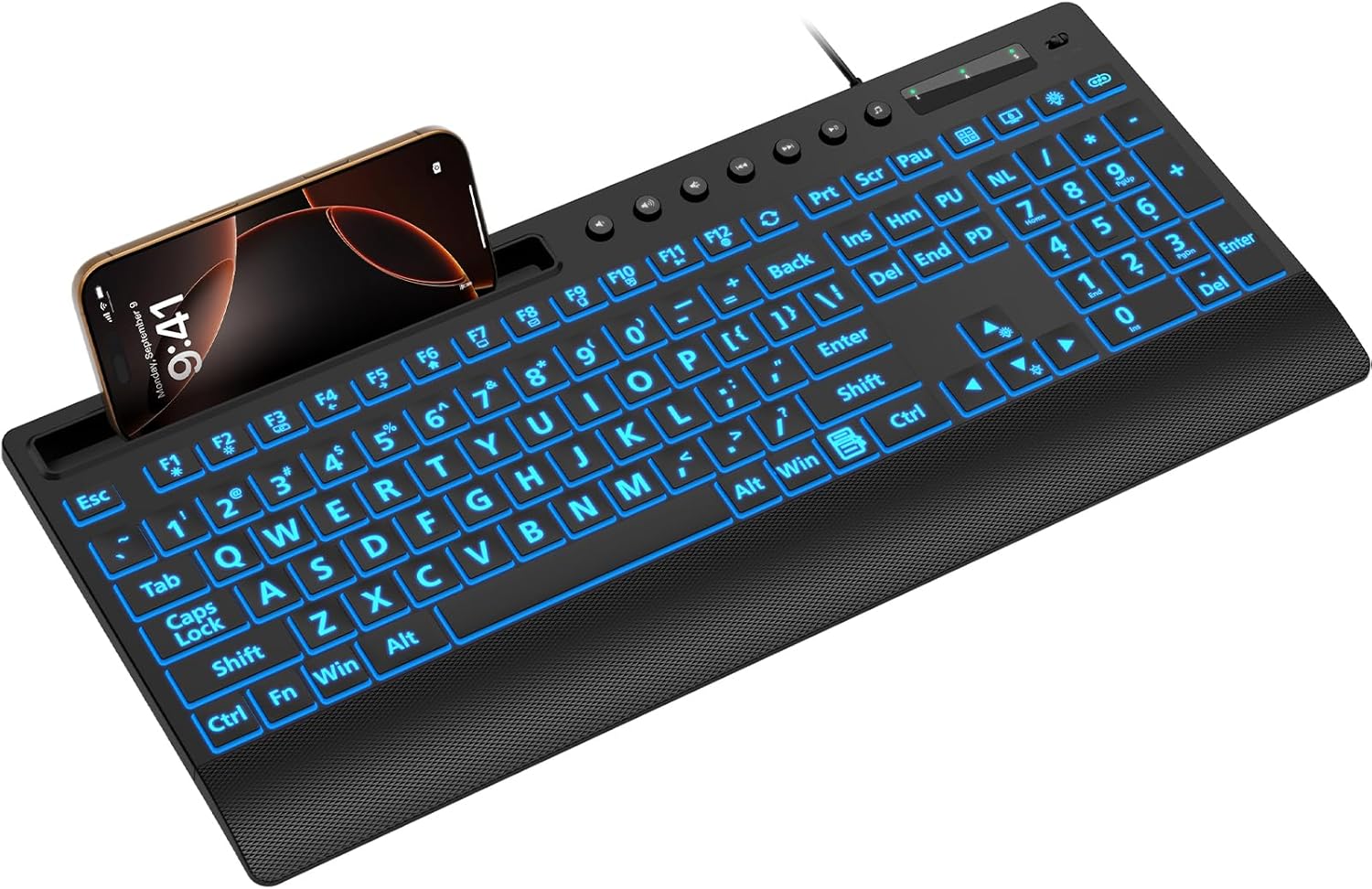
SABLUTE Large Print Wired Backlit Keyboard with Backlight Memory Function, 7-Color Auto-Cycling & Static Single LED, Computer Keyboard with Phone Holder & Wrist Rest, Quiet Crater Keys for PC Laptop
Want the best price and purchase timing?
Our AI advisor analyzes real-time pricing across all channels to find you the best deal.
AI Verdict
This is a full-size, wired USB-A keyboard with 3X larger key legends and 7-color RGB backlighting, designed for users with visual difficulties or those needing a phone holder.
This keyboard is a strong fit for its niche of large-print, backlit accessibility, especially with the integrated phone holder. However, its reported issues with typing feel and durability mean it's a situational fit for general use, particularly if typing speed or precision is important.
If typing feel and durability are critical, look for keyboards with mechanical switches or higher-quality membrane designs, even if it means sacrificing the large print or phone holder.
Regret Score™
Very High RiskLower is better — measures purchase-regret risk from real buyer complaints, review credibility, and product maturity
Issues discovered after purchase
Critically weak dimension
Amazon rating vs actual quality
Chance this product isn't for you
Pros
- Key legends are 3X larger than standard, making them clear and easy to identify for users with visual difficulties.
- Features a built-in phone and tablet holder that accommodates devices under 11.5 inches for multitasking.
- Includes an integrated wrist rest and foldable stand to reduce hand fatigue during extended typing.
- Offers 7 backlight colors and 2 lighting modes (static + gradient) with 3 brightness levels for visibility in low-light conditions.
- Wired USB-A connectivity ensures a stable connection with no reported latency.
- Plug-and-play functionality means no drivers or batteries are required.
Cons
- Users report keys can feel mushy and unresponsive, leading to missed or double letters.
- The backlight memory function is inconsistent, with settings often resetting after a computer restart.
- Durability is a concern, with reports of key coatings rubbing off and units failing within months.
- The typing experience is described as poor for fast or light typists due to key issues.
- Multimedia keys may not be fully compatible when used with Mac OS.
Dimension Scores
User feedback consistently describes the keys as mushy, unresponsive, and prone to missed or double inputs, making for a poor typing experience for fast typists.
As a wired USB-A keyboard, it offers a direct and stable connection with no reported latency, ensuring consistent input.
While offering 7 colors and 3 brightness levels, the backlight memory function frequently fails, resetting settings upon reboot, which detracts from its utility.
Multiple users report poor durability, with key legends wearing off and units failing within a few months of ownership.
Best For
- Elderly individuals or those with visual impairments needing highly visible key legends.
- Users who require a dedicated phone or tablet stand directly on their keyboard for easy access.
- Environments where a quiet typing experience is prioritized, like libraries or shared offices.
- Budget-conscious buyers who need basic wired functionality with backlighting.
Not Recommended For
- Fast touch typists or users who demand precise, responsive key feedback.
- Anyone needing consistent backlight settings that persist across reboots.
- Users who prioritize long-term durability and robust build quality.
- Mac users who rely heavily on all multimedia key functions.
Watch Out For
- The 'backlight memory function' often fails, with backlight settings resetting to a default rainbow mode after a computer restart, forcing users to re-adjust them.
- Keys are frequently described as 'mushy' and 'unresponsive', leading to frustrating typing errors like missed or double characters.
- Durability is a significant issue; some users report key legends wearing off quickly and the keyboard becoming non-functional within a few months of use.
- The space bar and other key placements can feel off, causing users to frequently hit the wrong keys and make typos.
Full Specifications
| ASIN | B0F2M72VPK |
| Brand | SABLUTE |
| Color | Black |
| Style | Classic |
| Language | Altaic Languages |
| Item Weight | 1.81 pounds |
| Manufacturer | SABLUTE |
| Item model number | KC782 |
| Compatible Devices | Laptop, Mac (Note: Multimedia keys may not be fully compatible with Mac OS), PC, Windows |
| Product Dimensions | 16.85 x 7.44 x 1.42 inches |
| Keyboard Description | Large Print Backlit Keyboard with Backlight Memory Function, Wrist Plam, 7-Color Lighted,Phone Stand |
| Connectivity Technology | USB-A |
| Recommended Uses For Product | At Home, Business, Education, Elderly, Office Workers, Student, The visually impaired |
| Keyboard backlighting color support | RGB |
What Buyers Say
Despite its appealing large-print keys and integrated phone holder, this SABLUTE keyboard struggles with fundamental keyboard performance. Many users find the keys mushy and unresponsive, leading to frequent typing errors and a frustrating experience for anyone who types regularly. The advertised backlight memory function often doesn't work, forcing users to re-select their preferred settings after every computer restart. Furthermore, there are recurring complaints about the keyboard's durability, with key legends wearing off and units failing prematurely.
“Man, I really wanted to like this for the big letters, but typing on it is a nightmare, feels like I'm fighting the keys and the lights reset every time I turn my PC on. So annoying.”
Common Praise
- The oversized key legends are genuinely helpful for individuals with visual impairments, making typing much easier to see.
- The integrated phone and tablet holder is a convenient feature for multitasking, keeping devices upright and visible.
- The variety of 7 backlight colors and adjustable brightness levels are appreciated for typing in dim environments.
- The wired USB-A connection provides a reliable, lag-free typing experience.
- The included wrist rest and foldable feet contribute to a more comfortable typing posture.
Common Complaints
- Keys are often described as 'mushy' and 'unresponsive', making accurate and fast typing difficult.
- The backlight settings frequently reset to a default mode after a computer reboot, despite claiming a memory function.
- Durability is a major concern, with reports of key legends fading and the keyboard ceasing to function after only a few months.
- Some users experience 'sticky' keys or keys that register double inputs, leading to constant corrections.
- The placement of the space bar and other keys can feel awkward, causing frequent mistypes.
Ownership Tips
- After a few weeks, the 'quiet crater keys' can start to feel inconsistent, with some keys becoming noticeably softer or stiffer than others.
- The large print, while initially clear, shows signs of wear and fading on frequently used keys within a couple of months.
- The phone holder is more stable for phones than for larger tablets, which can feel a bit top-heavy.
- The backlight brightness, even at its highest setting, might not be sufficient in brightly lit rooms, but is adequate in dim conditions.
- The integrated wrist rest, while present, is a hard plastic and doesn't offer much cushioning for prolonged use.
Frequently Asked Questions
Does this keyboard require batteries?
No, this is a wired keyboard that connects via USB-A, so it draws power directly from your computer and does not require any batteries or charging.
Can I use this keyboard with a Mac?
Yes, it is compatible with Mac OS, but be aware that some multimedia keys may not function fully or as expected on Mac systems.
How do I change the backlight colors and brightness?
You can adjust the 7 colors and 3 brightness levels using a single key, making it simple to switch between static and gradient modes.
Is the wrist rest removable?
The product specifications and images indicate the wrist rest is integrated into the keyboard's design and is not removable.
Will the large print wear off the keys?
Some users have reported that the key coatings, including the large print, can wear off relatively quickly with consistent use, impacting visibility.
Buying Guide
When you're looking at keyboards, especially budget ones, you need to think about what you'll actually be doing with it. If you're just pecking out short emails or need those big letters, a basic model like this might work. But if you're typing all day, the feel of the keys and how long it lasts are way more important than flashy lights or a phone stand.
Large Print Keys
This means the letters and numbers on the keys are significantly bigger than on a standard keyboard. It's like reading a large-print book; it makes it much easier to see what you're typing, especially if your eyesight isn't perfect.
Backlight Memory Function
This feature is supposed to remember your chosen backlight color and brightness settings even after you turn off your computer. If it works, you don't have to set it up again every time you start typing, which is a small convenience that adds up.
Wired USB-A Connectivity
This just means the keyboard plugs directly into your computer with a standard USB cable. It's simple, reliable, and you don't have to worry about batteries or wireless interference, but it does mean you're tethered to your desk.
Alternatives
If typing precision and durability are your main concerns, search for keyboards with mechanical switches or higher-quality membrane switches, and prioritize models with a proven track record of consistent performance and build quality.
You Might Also Like

Logitech MK270 Wireless Keyboard and Mouse Combo for Windows, 2.4 GHz, 8 Multimedia Keys, PC, Laptop, Wireless Keyboard Compact Mouse Combo - Black
This is a 2.4 GHz wireless keyboard and mouse combo with a full-size QWERTY layout and 8 multimedia keys, built for basic Windows PC tasks on a tight budget.

Logitech MK270 Wireless Keyboard and Mouse Combo for Windows, 2.4 GHz, 8 Multimedia Keys, PC, Laptop, Wireless Keyboard Compact Mouse Combo - Rose
This is a 2.4 GHz RF membrane keyboard and mouse combo with a full-size layout, best suited for basic Windows PC tasks on a tight budget.

Logitech K270 Wireless Keyboard for Windows, 2.4 GHz Wireless, Full-Size, Number Pad, 8 Multimedia Keys, 2-Year Battery Life, Compatible with PC, Laptop - Rose
This is a full-size, 2.4 GHz wireless membrane keyboard with 8 multimedia keys and a number pad, designed for basic PC and laptop use.

Logitech MK270 Wireless Keyboard and Mouse Combo for Windows, 2.4 GHz, 8 Multimedia Keys, PC, Laptop, Wireless Keyboard Compact Mouse Combo - White
This is a budget 2.4 GHz wireless membrane keyboard and mouse combo with a full-size layout, 8 multimedia keys, and a compact mouse, best for basic PC tasks.