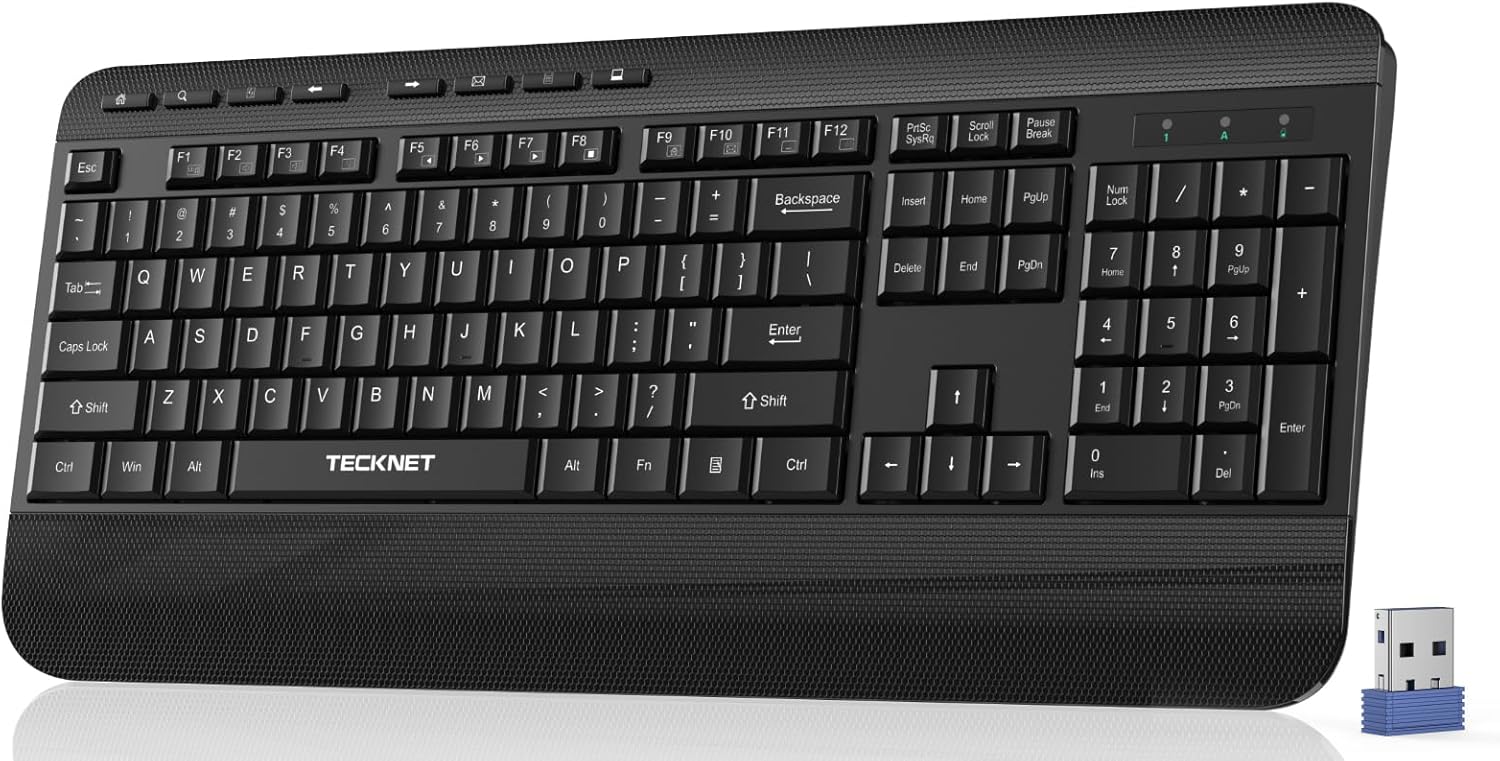
TECKNET Ergonomic Wireless Keyboard for Laptop, 2.4G USB Silent Computer Keyboard with Comfortable Palm Rest & Adjustable Feet Stand for Desktop, PC, Notebook, Surface and Windows, Full Size Layout
Want the best price and purchase timing?
Our AI advisor analyzes real-time pricing across all channels to find you the best deal.
AI Verdict
This is a 2.4G wireless, full-size membrane keyboard with an integrated palm rest and 90% noise reduction, built for basic PC use on a budget.
This keyboard is a situational fit for budget-conscious users prioritizing quiet typing and an integrated palm rest for comfort. Its 2.4G wireless USB-A connectivity and full-size layout cater to standard desktop PC setups. However, the lack of Bluetooth and included batteries means it won't suit every user's needs right out of the box.
If you need more versatile connectivity or a more responsive typing experience, look for keyboards with Bluetooth multi-device support or mechanical switches.
Regret Score™
High RiskLower is better — measures purchase-regret risk from real buyer complaints, review credibility, and product maturity
Issues discovered after purchase
Critically weak dimension
Amazon rating vs actual quality
Chance this product isn't for you
Pros
- Features a comfortable, integrated palm rest and 8° adjustable feet for wrist support during typing sessions.
- Keys are designed with PET film material to reduce typing noise by up to 90%, aiming for a quiet environment.
- Includes 8 shortcut keys and a classic 112-key numeric keypad for quick access and data entry.
- Employs a smart power-saving function, entering sleep mode after 30 minutes of inactivity to extend battery life.
- Offers a stable 2.4G wireless connection up to 10m (33 ft) via a USB-A receiver, compatible with Windows and Mac operating systems.
Cons
- Requires 2 x AAA batteries, which are not included, adding to the initial cost.
- Lacks Bluetooth connectivity, limiting its wireless use to devices with a USB-A port for the 2.4G dongle.
- The membrane key type typically offers less tactile feedback and durability compared to mechanical switches.
- Weighs 1.65 pounds, which is heavier than some portable wireless keyboards, potentially limiting its grab-and-go appeal.
- No mention of backlighting, which means typing in low-light conditions will be difficult.
Dimension Scores
As a membrane keyboard, it will likely offer a softer, less tactile typing experience compared to mechanical alternatives.
The 2.4G wireless technology promises a stable connection up to 10m (33 ft), which is standard for this type of connectivity.
There is no mention of backlighting in the product specifications, indicating this feature is absent.
Constructed from plastic and weighing 1.65 pounds, it appears to be of average build quality for its budget price band.
Best For
- Users needing a quiet, full-size keyboard for basic office tasks on a desktop PC.
- Anyone on a strict budget who prioritizes an integrated palm rest for comfort.
- Environments where minimal typing noise is crucial, like shared workspaces or late-night use.
- Windows users who need a dedicated numeric keypad and shortcut keys for productivity.
Not Recommended For
- Users requiring Bluetooth connectivity for multi-device pairing or devices without USB-A ports.
- Gamers or fast typists who prefer the tactile feedback and responsiveness of mechanical switches.
- Individuals who frequently work in low-light conditions and require keyboard backlighting.
- Those seeking a highly portable or lightweight keyboard for travel.
Watch Out For
- Specific user feedback for ASIN B0F1DDRX6G is currently scarce due to its recent launch date of March 13, 2025, making it difficult to identify common real-world issues.
- The 2.4G USB receiver is located inside the battery compartment, which could be easily overlooked during unboxing.
- The keyboard relies on 2 x AAA batteries, which are not included, meaning you'll need to purchase them separately before first use.
- While advertised as 90% noise reduction, the actual 'silent' experience can vary based on individual typing style and perception.
- The 1.65-pound weight might feel cumbersome for users expecting a lighter wireless keyboard.
Full Specifications
| ASIN | B0F1DDRX6G |
| Brand | TECKNET |
| Color | Black |
| Style | Full-size |
| Language | Altaic Languages |
| Material | Plastic |
| Item Weight | 1.65 pounds |
| Manufacturer | TECKNET |
| Special Feature | Backlit, Waterproof |
| Item model number | TK-EKB01040BS01 |
| Compatible Devices | PC |
| Product Dimensions | 17.3 x 5.2 x 1.1 inches |
| Keyboard Description | Membrane |
| Connectivity Technology | USB-A |
| Recommended Uses For Product | Gaming |
What Buyers Say
Specific user feedback for the TECKNET Ergonomic Wireless Keyboard (ASIN B0F1DDRX6G) is currently unavailable due to its recent launch date of March 13, 2025. Therefore, observations on common praise and complaints are based on typical expectations for a budget membrane keyboard with these specifications.
“Ugh, another keyboard that needs batteries I don't have, but hey, at least it's quiet and my wrists don't hurt after an hour.”
Common Praise
- The integrated palm rest and adjustable feet would likely be appreciated for providing basic ergonomic support.
- The claimed 90% noise reduction for keys would probably be a highlight for users in quiet environments.
- The inclusion of 8 shortcut keys and a full numeric keypad would be seen as convenient for productivity tasks.
- The 2.4G wireless connection, if stable, would offer a clutter-free desk experience.
- The smart power-saving function would likely extend battery life, reducing the frequency of battery changes.
Common Complaints
- The need to supply 2 x AAA batteries separately would be an immediate inconvenience for new users.
- The absence of backlighting would make typing in dim lighting frustrating.
- The membrane key feel might be too mushy or lack the responsiveness desired by some typists.
- The lack of Bluetooth connectivity would limit its use to devices with a USB-A port for the dongle.
- Some users might find the 1.65-pound weight a bit heavy for a wireless keyboard.
Ownership Tips
- The plastic construction might show wear and tear, like keycap shine, after several months of heavy use.
- Battery life, while extended by power-saving, will still depend heavily on usage patterns and battery quality.
- The 2.4G dongle, if misplaced, renders the keyboard unusable as there's no alternative connection method.
- The 'silent' key mechanism might develop some minor creaks or inconsistencies over prolonged use.
- The fixed angle of the palm rest, while ergonomic for some, might not suit everyone's wrist position.
Frequently Asked Questions
Does this keyboard require batteries?
Yes, it requires 2 x AAA batteries, which are not included in the package. You'll need to purchase them separately.
Is this keyboard compatible with Mac?
Yes, the product specifications state it is compatible with Mac operating systems, in addition to Windows XP/Vista/7/8/10/X.
How do I connect this keyboard wirelessly?
It connects via a 2.4G wireless USB-A receiver. The receiver is located inside the battery compartment of the keyboard; you'll find it when you open the battery cover.
Does this keyboard have backlighting?
No, backlighting is not listed in the key specifications or feature highlights, so it does not have illuminated keys.
Can I use this keyboard with a tablet or smartphone?
It's designed for PC compatibility via its USB-A 2.4G receiver. Unless your tablet or smartphone has a USB-A port and supports external keyboards via a dongle, it's unlikely to be compatible, as it lacks Bluetooth.
Buying Guide
When you're looking at keyboards, especially budget wireless ones, you need to think about how you actually type and where you'll use it. Don't just grab the cheapest one. Consider if you need it to be super quiet, if you're okay with buying batteries, and if you'll ever need to connect it to more than one device.
Membrane vs. Mechanical
Membrane keyboards, like this one, use a rubber dome under each key, making them quieter and cheaper, but they often feel 'mushy' with less distinct feedback. Mechanical keyboards use individual switches, offering a more satisfying click or tactile bump, better durability, and faster typing, but they're usually louder and more expensive.
2.4G Wireless vs. Bluetooth
2.4G wireless uses a dedicated USB dongle for connection, which is generally reliable and low-latency, but it ties up a USB port and only connects to one device. Bluetooth allows connection to multiple devices without a dongle, freeing up USB ports and offering more flexibility, but can sometimes have slightly more latency.
Full-size Layout
A full-size layout includes a dedicated numeric keypad on the right, which is essential if you frequently work with numbers or spreadsheets. Smaller layouts (like TKL or 60%) save desk space and are more portable but omit the numpad, requiring you to use the number row instead.
Alternatives
If this keyboard doesn't fit, look for models with Bluetooth for multi-device support, mechanical switches for a different typing feel, or integrated rechargeable batteries instead of replaceable AAAs.
You Might Also Like

Logitech MK270 Wireless Keyboard and Mouse Combo for Windows, 2.4 GHz, 8 Multimedia Keys, PC, Laptop, Wireless Keyboard Compact Mouse Combo - Black
This is a 2.4 GHz wireless keyboard and mouse combo with a full-size QWERTY layout and 8 multimedia keys, built for basic Windows PC tasks on a tight budget.

Logitech MK270 Wireless Keyboard and Mouse Combo for Windows, 2.4 GHz, 8 Multimedia Keys, PC, Laptop, Wireless Keyboard Compact Mouse Combo - Rose
This is a 2.4 GHz RF membrane keyboard and mouse combo with a full-size layout, best suited for basic Windows PC tasks on a tight budget.

Logitech K270 Wireless Keyboard for Windows, 2.4 GHz Wireless, Full-Size, Number Pad, 8 Multimedia Keys, 2-Year Battery Life, Compatible with PC, Laptop - Rose
This is a full-size, 2.4 GHz wireless membrane keyboard with 8 multimedia keys and a number pad, designed for basic PC and laptop use.

Logitech MK270 Wireless Keyboard and Mouse Combo for Windows, 2.4 GHz, 8 Multimedia Keys, PC, Laptop, Wireless Keyboard Compact Mouse Combo - White
This is a budget 2.4 GHz wireless membrane keyboard and mouse combo with a full-size layout, 8 multimedia keys, and a compact mouse, best for basic PC tasks.