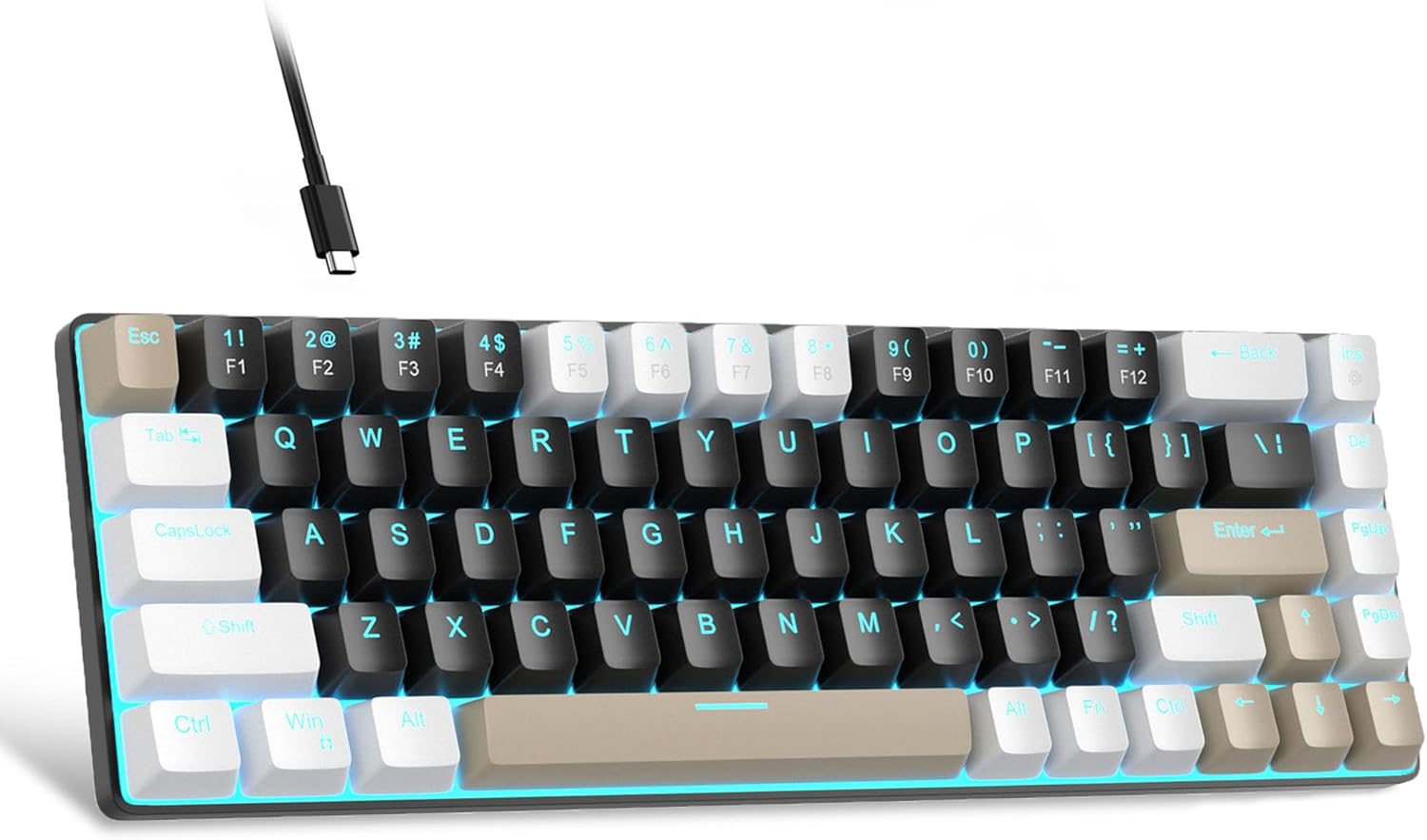
MageGee Portable 60% Mechanical Gaming Keyboard, MK-Box LED Backlit Compact 68 Keys Mini Wired Office Keyboard with Brown Switch for Windows Laptop PC Mac - Black/Coffee Color
Want the best price and purchase timing?
Our AI advisor analyzes real-time pricing across all channels to find you the best deal.
AI Verdict
A 68-key wired mechanical keyboard with brown switches and blue LED backlight, designed for budget-conscious users needing a compact setup.
This keyboard is a situational fit because its compact 68-key layout and brown mechanical switches offer a specific balance for budget-conscious users prioritizing space and tactile feedback. However, its wired-only nature and non-hot-swappable switches limit its appeal for those needing more flexibility or customization.
If you need wireless freedom or the ability to easily change switch types, look for keyboards explicitly stating 'wireless connectivity' or 'hot-swappable switches.'
Regret Score™
Medium RiskLower is better — measures purchase-regret risk from real buyer complaints, review credibility, and product maturity
Issues discovered after purchase
Critically weak dimension
Amazon rating vs actual quality
Chance this product isn't for you
Pros
- Compact 68-key layout saves desk space while retaining arrow and F-keys.
- Brown mechanical switches offer a balance of tactile feedback and quiet operation [Product Data].
- Features 16 customizable blue LED backlight modes with adjustable brightness.
- Full anti-ghosting on all 68 keys ensures accurate input during fast typing or gaming.
- Detachable USB cable enhances portability and simplifies cable management.
- Plug-and-play compatibility across Windows, Linux, and Mac without needing drivers.
Cons
- Wired-only connectivity limits placement flexibility.
- Backlighting is limited to a single blue color, not full RGB.
- Switches are soldered in place, preventing hot-swapping for customization or repair.
- Plastic construction, while sturdy, does not offer a premium feel.
- Some users report key input issues after a few months of use.
Dimension Scores
Brown mechanical switches offer tactile feedback, but some users report a clunky space bar and inconsistent key registration over time.
As a wired USB 2.0 keyboard, it provides a stable, plug-and-play connection without drivers.
It offers 16 blue LED backlight modes with adjustable brightness, but lacks RGB customization and is not particularly bright.
Constructed primarily from plastic, it feels sturdy for its price but some users note a 'low quality material on the back' and it doesn't feel premium.
Best For
- Gamers with limited desk space who still need dedicated arrow keys.
- Office users preferring a tactile, quieter mechanical switch for typing.
- Individuals who frequently transport their keyboard due to its compact size and detachable cable.
- Budget-conscious buyers seeking an entry-level mechanical keyboard experience.
Not Recommended For
- Users requiring wireless connectivity for a clutter-free setup.
- Those who demand full RGB lighting or extensive software customization.
- Enthusiasts who want to hot-swap switches for different typing experiences.
- Users who need a full-size keyboard with a dedicated number pad.
Watch Out For
- The 'W' key and other common gaming keys (A, D) reportedly stop registering consistently after about 3 months of use for some users.
- Some users experience keys not registering on the first press, requiring multiple attempts.
- The space bar can feel 'clunky' and 'less satisfying' compared to other keys.
- The switches are soldered, meaning you can't easily replace individual faulty switches or try different switch types without desoldering.
- The blue LED backlight is not particularly bright, especially in well-lit environments.
Full Specifications
| ASIN | B0DR4RS217 |
| Brand | MageGee |
| Color | Brown/Brown Switch |
| Style | Modern |
| Material | Plastic |
| Item Weight | 1.48 pounds |
| Manufacturer | MageGee |
| Special Feature | 60% Mechanical Design |
| Item model number | MKBox |
| Compatible Devices | Laptop, PC |
| Product Dimensions | 5.12 x 1.97 x 12.99 inches |
| Included Components | Keyboard |
| Keyboard Description | Mechanical |
| Connectivity Technology | USB |
| Recommended Uses For Product | Gaming |
What Buyers Say
Many users are drawn to this keyboard for its low price and compact form factor, appreciating the inclusion of arrow keys in a 60% layout. However, a recurring concern is the long-term reliability of key switches, with some reporting keys failing to register or requiring multiple presses after a few months of use. The blue LED backlighting is generally liked for its modes, but its single color and moderate brightness are noted limitations.
“Dude, it's cheap, it's small, and the brown switches feel pretty good for the price, but seriously, my 'W' key started acting up after like three months, super annoying when you're trying to game!”
Common Praise
- Compact 68-key layout saves desk space effectively.
- Dedicated arrow keys are present despite the small footprint.
- Brown switches provide a satisfying tactile typing experience [Product Data].
- Multiple blue LED backlight patterns are available.
- Detachable USB-C cable makes it easy to transport.
Common Complaints
- Keys, particularly common gaming keys like 'W', can become unresponsive after a few months.
- Some keys require repeated presses to register input.
- Space bar feels less satisfying and 'clunky' compared to other keys.
- Not hot-swappable, so switches cannot be easily replaced or upgraded.
- Backlighting is single-color blue and not very bright.
Ownership Tips
- The plastic build, while not premium, holds up reasonably well for the price point.
- The detachable USB-C cable is a practical feature for portability, but remember it's wired-only.
- The brown switches are quieter than blue switches but still provide a noticeable tactile bump [Product Data, 8].
- The blue LED backlight, while limited in color, offers enough patterns to keep things interesting.
- Some users report the included keycap puller is useful for swapping out the accent keys that come with some variants.
Frequently Asked Questions
Does this keyboard have RGB lighting?
No, this keyboard features a classic charming blue LED backlight only. It supports about 16 different blue lighting modes, but it does not have full RGB color options.
Are the switches hot-swappable?
No, the mechanical switches on this keyboard are soldered in place. You can change the keycaps, but not the switches themselves without desoldering.
Is this a wireless keyboard?
No, the MageGee MK-Box is a wired keyboard and connects via a detachable USB-C to USB-A cable.
Is it compatible with Mac?
Yes, it has extensive compatibility and is plug-and-play with Windows (2000, XP, ME, Vista, 7, 8), Linux, and Mac operating systems, requiring no drivers or software.
What kind of switches does it use?
This specific model uses brown mechanical switches, which are characterized by a quiet, tactile bump without a loud click, offering a balance between typing and gaming performance [Product Data].
Does it have anti-ghosting?
Yes, it features full anti-ghosting on all 68 keys, meaning all key presses will register accurately even when multiple keys are pressed simultaneously.
Buying Guide
When you're looking at mechanical keyboards, especially in the budget range, you need to think about what you *really* need. This isn't a fancy, customizable board, but it hits the basics. Focus on the switch type – brown switches are a middle ground, tactile but not super loud. Also, consider the layout; 60% with arrow keys is compact but might still feel cramped if you're used to a full-size board.
Mechanical Brown Switch
This means each key has its own physical switch, giving you a distinct 'bump' feedback when pressed, which many find satisfying for typing. Brown switches are a good all-rounder, quieter than clicky blue switches but still tactile, making them suitable for both gaming and office work without annoying everyone around you.
60% Compact Layout (68 Keys)
This keyboard is significantly smaller than a full-size board, saving a lot of desk space. It cuts out the number pad and some function keys, but this model cleverly keeps dedicated arrow keys and F-keys accessible via a function layer, which is a big win for gamers and coders who need those.
Wired USB Connectivity
This means you'll always have a cable connecting your keyboard to your computer. It ensures a stable, lag-free connection, which is crucial for gaming, but it also means less flexibility in placement and one more cable on your desk.
Alternatives
If you need wireless freedom or the ability to easily swap out switches for different typing feels, search for keyboards with 'Bluetooth' or '2.4GHz wireless' and 'hot-swappable mechanical switches.'
You Might Also Like

Logitech MK270 Wireless Keyboard and Mouse Combo for Windows, 2.4 GHz, 8 Multimedia Keys, PC, Laptop, Wireless Keyboard Compact Mouse Combo - Black
This is a 2.4 GHz wireless keyboard and mouse combo with a full-size QWERTY layout and 8 multimedia keys, built for basic Windows PC tasks on a tight budget.

Logitech MK270 Wireless Keyboard and Mouse Combo for Windows, 2.4 GHz, 8 Multimedia Keys, PC, Laptop, Wireless Keyboard Compact Mouse Combo - Rose
This is a 2.4 GHz RF membrane keyboard and mouse combo with a full-size layout, best suited for basic Windows PC tasks on a tight budget.

Logitech K270 Wireless Keyboard for Windows, 2.4 GHz Wireless, Full-Size, Number Pad, 8 Multimedia Keys, 2-Year Battery Life, Compatible with PC, Laptop - Rose
This is a full-size, 2.4 GHz wireless membrane keyboard with 8 multimedia keys and a number pad, designed for basic PC and laptop use.

Logitech MK270 Wireless Keyboard and Mouse Combo for Windows, 2.4 GHz, 8 Multimedia Keys, PC, Laptop, Wireless Keyboard Compact Mouse Combo - White
This is a budget 2.4 GHz wireless membrane keyboard and mouse combo with a full-size layout, 8 multimedia keys, and a compact mouse, best for basic PC tasks.