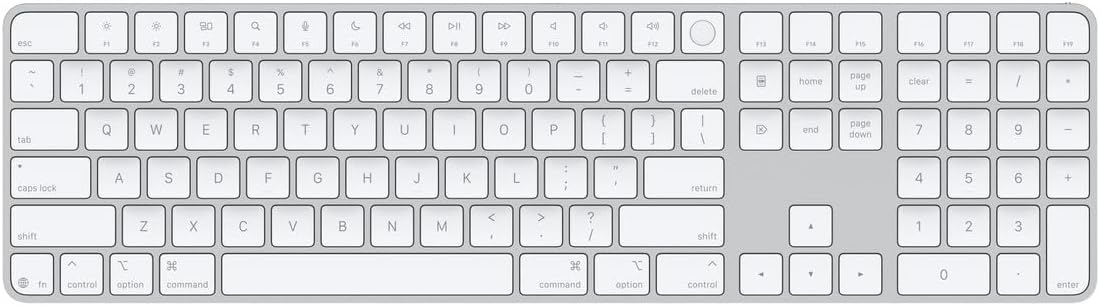
Apple Magic Keyboard with Touch ID and Numeric Keypad for Mac Models with Apple Silicon - US English - White Keys, Bluetooth, Bluetooth
Want the best price and purchase timing?
Our AI advisor analyzes real-time pricing across all channels to find you the best deal.
AI Verdict
A 1.37-pound full-size Bluetooth keyboard with Touch ID, a numeric keypad, and USB-C charging, designed for Mac models with Apple silicon.
This keyboard is a strong fit for Apple Silicon Mac users who prioritize seamless macOS integration, the convenience of Touch ID for secure authentication, and the productivity boost of a full-size layout with a numeric keypad. Its Bluetooth connectivity and month-plus battery life support a clean, wireless desk setup.
If you need backlighting or multi-device switching, look for keyboards that explicitly list those features, as this model lacks them.
Regret Score™
High RiskLower is better — measures purchase-regret risk from real buyer complaints, review credibility, and product maturity
Issues discovered after purchase
Critically weak dimension
Amazon rating vs actual quality
Chance this product isn't for you
Pros
- Integrated Touch ID provides fast, secure authentication for logins and Apple Pay on Apple Silicon Macs.
- Offers a comfortable and precise typing experience with shallow, quiet key travel similar to MacBook keyboards.
- Features a full-size layout with a numeric keypad and document navigation controls, beneficial for spreadsheets and finance applications.
- Rechargeable battery lasts about a month or more between charges, and can be used wired via USB-C while charging.
- Seamless integration with macOS, including accurate battery percentage display and easy pairing.
Cons
- Lacks backlighting, making it difficult to use in low-light environments.
- No multi-device pairing functionality, requiring manual re-pairing or cabling to switch between Macs.
- Fixed wedge angle and no tilt adjustment limit ergonomic customization for long typing sessions.
- Touch ID only functions with Mac models equipped with Apple silicon, not Intel-based Macs.
- The white keys and aluminum body are the only color option for this specific model, limiting aesthetic choice for dark setups.
Dimension Scores
Users consistently describe a comfortable, precise, and quiet typing experience with shallow key travel, similar to MacBook keyboards.
The Bluetooth connection is reported as reliable and rock-solid, connecting almost immediately to the computer.
The keyboard completely lacks backlighting, making it unsuitable for low-light conditions.
It features a premium Apple aesthetic with aluminum construction, feeling sturdy on a desk with minimal flex.
Best For
- Mac Studio or Mac mini users needing Touch ID and a numeric keypad for a desktop setup.
- Professionals in finance or data entry who frequently use spreadsheets and number-intensive applications.
- Users who prefer a low-profile, quiet typing experience similar to a MacBook's built-in keyboard.
Not Recommended For
- Users who require keyboard backlighting for working in dim conditions.
- Individuals who frequently switch the keyboard between multiple devices.
- Gamers or typists who prefer mechanical switches or significant key travel.
Watch Out For
- Touch ID is exclusive to Apple Silicon Macs; it won't work on older Intel Macs, even if the keyboard connects via Bluetooth.
- The keyboard has no backlighting, which is a common feature on many competitors and can be frustrating in low-light settings.
- Switching between different paired Macs requires unpairing and re-pairing, or connecting via USB-C, as there are no dedicated multi-device switching buttons.
- The fixed, low-profile design with no tilt adjustment can lead to discomfort during extended typing for some users.
- Some users report the key feel on the black full-sized variant (not this white model, but a similar product) to be less satisfying, suggesting trying it out if possible.
Full Specifications
| ASIN | B0DL731QNW |
| Brand | Apple |
| Color | White Keys |
| Style | USB-C |
| Language | English |
| Batteries | 1 Lithium Ion batteries required. (included) |
| Item Weight | 1.37 pounds |
| Manufacturer | Apple |
| Special Feature | Hotkeys and Media Keys, Lightweight, Rechargeable |
| Item model number | MXK73LL/A |
| Compatible Devices | Mac models with Apple silicon |
| Product Dimensions | 17.6 x 5.04 x 0.75 inches |
| Included Components | Magic Keyboard with Touch ID and Numeric Keypad, USB Cable |
| Keyboard Description | Standalone |
| Connectivity Technology | Bluetooth |
| Recommended Uses For Product | Business, Education, Everyday Use, Gaming, Photo Editing |
| Keyboard backlighting color support | Single Color |
What Buyers Say
The biggest takeaway here is how much people value the Touch ID, especially for quickly logging in or using Apple Pay on their Apple Silicon Macs; it's a game-changer for many. The typing experience gets a lot of love for feeling just like a MacBook keyboard, which is a huge plus for consistency. However, the lack of backlighting is a recurring frustration, and the inability to easily switch between multiple devices is a real pain point for some. Despite its high price, the seamless integration with macOS and the convenience of Touch ID often outweigh these drawbacks for dedicated Apple users.
“Okay, so I shelled out for this thing, and yeah, it's pricey, but that Touch ID? Seriously, I can't go back. Logging in is instant, and the keys feel just like my MacBook, which I love. Just wish it lit up at night, that's my only real gripe.”
Common Praise
- Touch ID for quick and secure logins and Apple Pay is incredibly convenient.
- Typing feel is comfortable, precise, and quiet, mirroring MacBook keyboards.
- Extended layout with numeric keypad and full-size arrow keys is great for productivity.
- Excellent battery life, often exceeding a month on a single charge.
- Seamless integration and pairing with macOS devices.
Common Complaints
- No backlighting, which is a significant omission for a keyboard in this price range.
- Lack of multi-device switching makes it cumbersome to use with more than one Mac.
- Fixed angle and low-profile design can be uncomfortable for some during long typing sessions.
- Touch ID only works with Apple Silicon Macs, not older Intel models.
- Considered expensive compared to other wireless keyboards.
Ownership Tips
- The battery life is genuinely impressive; it often lasts longer than the advertised month.
- You'll quickly realize how much you rely on Touch ID once you start using it, making other keyboards feel outdated.
- The lack of backlighting becomes a real issue if you work in dimly lit rooms, forcing you to rely on muscle memory.
- If you have multiple Apple devices, the absence of quick-switch buttons is a constant minor annoyance.
- The low-profile design, while familiar, might require a wrist rest for extended comfort if you're used to more angled keyboards.
Frequently Asked Questions
Does this keyboard have backlighting?
No, the Apple Magic Keyboard with Touch ID and Numeric Keypad does not feature backlighting.
Will Touch ID work with my Intel-based Mac?
No, the Touch ID feature on this keyboard is only compatible with Mac models that have Apple silicon. The keyboard will still function via Bluetooth with Intel Macs, but Touch ID will not.
How long does the battery last?
The rechargeable battery is designed to power the keyboard for about a month or more between charges.
Can I use this keyboard with multiple Macs?
While you can pair it with different Macs, it lacks dedicated multi-device switching buttons, meaning you'll need to manually unpair and re-pair or connect via USB-C to switch between devices.
Is the typing experience similar to a MacBook?
Yes, many users report that the typing feel, with its shallow key travel and quiet operation, is very similar to the built-in keyboard on a MacBook.
Does it come with a charging cable?
Yes, Apple includes a braided USB-C to USB-C cable in the box for charging and wired connection.
Buying Guide
When you're looking at a keyboard like this, you're really buying into the Apple ecosystem. The big draw is the Touch ID, which is super convenient for unlocking your Mac and authenticating purchases, but only if you have an Apple Silicon Mac. Think about how much you type numbers; if it's a lot, the numeric keypad is a must-have. Also, consider your lighting conditions, because this keyboard won't light up for you.
Touch ID
This is like having a fingerprint scanner built right into your keyboard. It lets you log into your Mac and approve things like Apple Pay with just a touch, saving you from typing passwords repeatedly.
Compatible: Mac models with Apple silicon
This means the special features, specifically Touch ID, will only work with newer Macs that have Apple's M1, M2, or M3 chips, not older Intel-based Macs. It's a hardware limitation.
Layout: full-size
A full-size layout includes a dedicated numeric keypad on the right side, just like a traditional desktop keyboard. This is crucial if you work with numbers, spreadsheets, or data entry, as it's much faster than using the number row.
Connectivity: Bluetooth
Bluetooth means it connects wirelessly to your Mac without needing a USB dongle, keeping your desk tidy. It also means you can use it with other Bluetooth-enabled devices, though Touch ID will be Mac-specific.
Alternatives
If this keyboard doesn't fit, look for wireless keyboards with multi-device switching for seamless transitions between computers, or models with adjustable tilt and backlighting for better ergonomics and low-light usability.
You Might Also Like

Logitech MK270 Wireless Keyboard and Mouse Combo for Windows, 2.4 GHz, 8 Multimedia Keys, PC, Laptop, Wireless Keyboard Compact Mouse Combo - Black
This is a 2.4 GHz wireless keyboard and mouse combo with a full-size QWERTY layout and 8 multimedia keys, built for basic Windows PC tasks on a tight budget.

Logitech MK270 Wireless Keyboard and Mouse Combo for Windows, 2.4 GHz, 8 Multimedia Keys, PC, Laptop, Wireless Keyboard Compact Mouse Combo - Rose
This is a 2.4 GHz RF membrane keyboard and mouse combo with a full-size layout, best suited for basic Windows PC tasks on a tight budget.

Logitech K270 Wireless Keyboard for Windows, 2.4 GHz Wireless, Full-Size, Number Pad, 8 Multimedia Keys, 2-Year Battery Life, Compatible with PC, Laptop - Rose
This is a full-size, 2.4 GHz wireless membrane keyboard with 8 multimedia keys and a number pad, designed for basic PC and laptop use.

Logitech MK270 Wireless Keyboard and Mouse Combo for Windows, 2.4 GHz, 8 Multimedia Keys, PC, Laptop, Wireless Keyboard Compact Mouse Combo - White
This is a budget 2.4 GHz wireless membrane keyboard and mouse combo with a full-size layout, 8 multimedia keys, and a compact mouse, best for basic PC tasks.