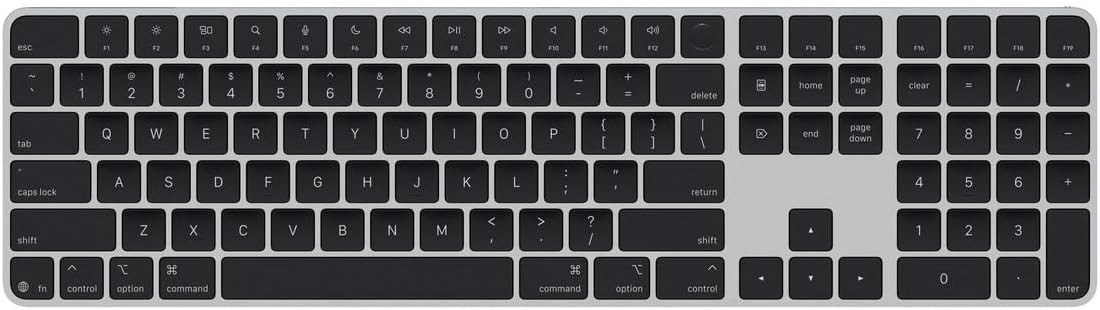
Magic Keyboard with Touch ID and Numeric Keypad for Mac Models with Apple Silicon - US English - Black Keys
Want the best price and purchase timing?
Our AI advisor analyzes real-time pricing across all channels to find you the best deal.
AI Verdict
A full-size Bluetooth keyboard with Touch ID for Apple Silicon Mac users prioritizing secure logins and a familiar typing feel.
This keyboard is a situational fit because its core strength, Touch ID, is exclusive to Apple Silicon Macs, and its typing experience, while familiar, lacks backlighting and ergonomic adjustments. It's tailored for a specific user within the Apple ecosystem who values seamless authentication over customization.
If this doesn't fit, look for keyboards with multi-device Bluetooth, adjustable tilt, and key backlighting.
Regret Score™
High RiskLower is better — measures purchase-regret risk from real buyer complaints, review credibility, and product maturity
Issues discovered after purchase
Critically weak dimension
Amazon rating vs actual quality
Chance this product isn't for you
Pros
- Touch ID provides fast, secure authentication for logins and Apple Pay.
- Full-size layout includes a numeric keypad and dedicated document navigation controls.
- Rechargeable battery powers the keyboard for about a month or more between charges.
- Seamless and instant Bluetooth connection with Apple devices.
- Typing feel is similar to MacBook keyboards, with stable scissor switches and precise key presses.
- USB-C port allows for charging and wired use, and includes a woven USB-C Charge Cable.
Cons
- No backlighting, making it difficult to use in low-light conditions.
- Fixed typing angle with no height or tilt adjustment.
- Lacks multi-device switching capabilities, requiring manual re-pairing or wired connection to switch between Macs or an iPad.
- Minimal key travel can lead to hand fatigue during extended typing sessions for some users.
- Touch ID functionality is limited to Mac models with Apple Silicon.
Dimension Scores
Scissor switches offer shallow but tactile feedback, similar to MacBook keyboards, but some users find the minimal key travel too short for extended use.
The Bluetooth connection is described as 'rock solid' and wakes from sleep almost instantly, providing a reliable wireless experience.
This keyboard has no backlighting, making it difficult to use in low-light conditions.
It features an aluminum body and is described as sturdy on a desk, contributing to a premium feel.
Best For
- Mac users needing fast, secure logins and Apple Pay authentication.
- Professionals using spreadsheets and finance applications with Apple Silicon Macs.
- Users who prefer a low-profile, quiet typing experience similar to MacBook keyboards.
- Anyone wanting a full-size keyboard that matches Apple's aesthetic.
Not Recommended For
- Users who frequently switch between multiple devices (e.g., Mac and PC).
- Anyone requiring keyboard backlighting for low-light environments.
- Individuals prone to hand fatigue from minimal key travel during long typing sessions.
Watch Out For
- No backlighting means typing in dim light is a guessing game.
- The fixed angle means you can't adjust the tilt, which some users find uncomfortable for long sessions.
- Minimal key travel can lead to hand fatigue after about 5 minutes of continuous typing for some users.
- Touch ID only works with Apple Silicon Macs; Intel Macs won't get that feature.
- No multi-device switching means you have to manually unpair/re-pair or use a cable to switch between Macs or an iPad.
Full Specifications
| ASIN | B0DL6L189W |
| Brand | Apple |
| Color | Black Keys |
| Style | USB-C |
| Language | English |
| Batteries | 1 Lithium Ion batteries required. (included) |
| Item Weight | 1.37 pounds |
| Manufacturer | Apple |
| Special Feature | Hotkeys and Media Keys, Lightweight, Rechargeable |
| Item model number | MXK83LL/A |
| Compatible Devices | Mac models with Apple silicon |
| Product Dimensions | 17.6 x 6 x 0.75 inches |
| Keyboard Description | Standalone |
| Connectivity Technology | Bluetooth |
| Recommended Uses For Product | Business, Education, Everyday Use, Gaming, Photo Editing |
| Keyboard backlighting color support | Single Color |
What Buyers Say
The biggest surprise is how many users still love this keyboard despite its lack of backlighting and ergonomic adjustments, mainly because of the Touch ID integration and the familiar MacBook-like typing experience. Many users highlight the convenience of Touch ID for quick logins and Apple Pay, especially for Mac Mini users. However, the absence of backlighting is a frequent point of frustration, making it hard to type in dim environments. The fixed typing angle also comes up as a comfort issue for some during long work sessions. While the build feels premium with its aluminum body, the minimal key travel can cause hand fatigue for heavy typists.
“Man, I shelled out for this thing and it doesn't even light up, but that Touch ID is so clutch for unlocking my Mac Mini, I guess I'm stuck with it.”
Common Praise
- Touch ID provides fast, secure authentication for logins and purchases.
- Seamless and instant Bluetooth connection with Apple devices.
- Typing feel is similar to MacBook keyboards, with stable scissor switches and precise key presses.
- Rechargeable battery lasts a month or more on a single charge.
- Full-size layout includes a numeric keypad and dedicated document navigation controls.
- USB-C port allows for charging and wired use.
Common Complaints
- No backlighting, making it difficult to use in low-light conditions.
- Fixed typing angle with no height or tilt adjustment.
- Lacks multi-device switching capabilities, requiring manual re-pairing or wired connection to switch between Macs or an iPad.
- Minimal key travel can lead to hand fatigue during extended typing sessions.
- Touch ID functionality is limited to Mac models with Apple Silicon.
- The black key version costs more than the white version.
Ownership Tips
- The battery life is genuinely long, often exceeding a month of daily use.
- The keyboard can be used wired via USB-C if the battery dies or for initial pairing.
- The black keys do a better job at hiding fingerprints compared to the white version.
- The lack of backlighting becomes a real annoyance in the evenings, forcing reliance on screen light.
- The fixed angle might require a wrist rest for comfort during long typing sessions to avoid wrist strain.
Frequently Asked Questions
Does it have backlighting?
No, this Magic Keyboard does not have backlighting, which can make typing difficult in low-light conditions.
Can I use it with an Intel Mac?
Yes, you can use it with an Intel Mac, but the Touch ID feature will not function; it's exclusive to Mac models with Apple Silicon.
How long does the battery last?
The rechargeable battery is designed to power the keyboard for about a month or more between charges.
Can I adjust the typing angle?
No, the keyboard has a fixed wedge angle and does not offer any tilt adjustment.
Is it good for gaming?
It features full-size arrow keys, but it's not specifically designed as a gaming keyboard and lacks features like mechanical switches or advanced backlighting often found in gaming-focused keyboards.
Can I connect it to multiple devices?
No, it lacks multi-device pairing buttons, meaning you'll need to manually unpair and re-pair or use a wired connection to switch between different Macs or an iPad.
Buying Guide
When you're looking at keyboards, especially for a Mac, think about how you log in, how much you type, and if you need to see keys in the dark. This one's tied into the Apple ecosystem pretty tight, so if you're all Mac, it'll feel right at home. But if you jump between devices or type for hours, some of its quirks might get annoying.
Touch ID
This isn't just a fingerprint scanner; it's how you securely log into your Mac and approve purchases with a single touch, saving you from typing passwords constantly.
Apple Silicon Compatibility
This means the special Touch ID feature only works with newer Macs that have Apple's own M-series chips, not older Intel-based Macs.
Full-size Layout
This includes a dedicated numeric keypad and separate arrow keys, which is crucial if you work with numbers or navigate documents frequently, unlike compact keyboards.
Bluetooth Connectivity
This lets the keyboard connect wirelessly to your Mac, freeing up USB ports, but it also means you're relying on its internal battery and a stable wireless signal.
Alternatives
If you need backlighting, multi-device support, or adjustable ergonomics, look for keyboards with those specific features, often from third-party brands.
You Might Also Like

Logitech MK270 Wireless Keyboard and Mouse Combo for Windows, 2.4 GHz, 8 Multimedia Keys, PC, Laptop, Wireless Keyboard Compact Mouse Combo - Black
This is a 2.4 GHz wireless keyboard and mouse combo with a full-size QWERTY layout and 8 multimedia keys, built for basic Windows PC tasks on a tight budget.

Logitech MK270 Wireless Keyboard and Mouse Combo for Windows, 2.4 GHz, 8 Multimedia Keys, PC, Laptop, Wireless Keyboard Compact Mouse Combo - Rose
This is a 2.4 GHz RF membrane keyboard and mouse combo with a full-size layout, best suited for basic Windows PC tasks on a tight budget.

Logitech K270 Wireless Keyboard for Windows, 2.4 GHz Wireless, Full-Size, Number Pad, 8 Multimedia Keys, 2-Year Battery Life, Compatible with PC, Laptop - Rose
This is a full-size, 2.4 GHz wireless membrane keyboard with 8 multimedia keys and a number pad, designed for basic PC and laptop use.

Logitech MK270 Wireless Keyboard and Mouse Combo for Windows, 2.4 GHz, 8 Multimedia Keys, PC, Laptop, Wireless Keyboard Compact Mouse Combo - White
This is a budget 2.4 GHz wireless membrane keyboard and mouse combo with a full-size layout, 8 multimedia keys, and a compact mouse, best for basic PC tasks.