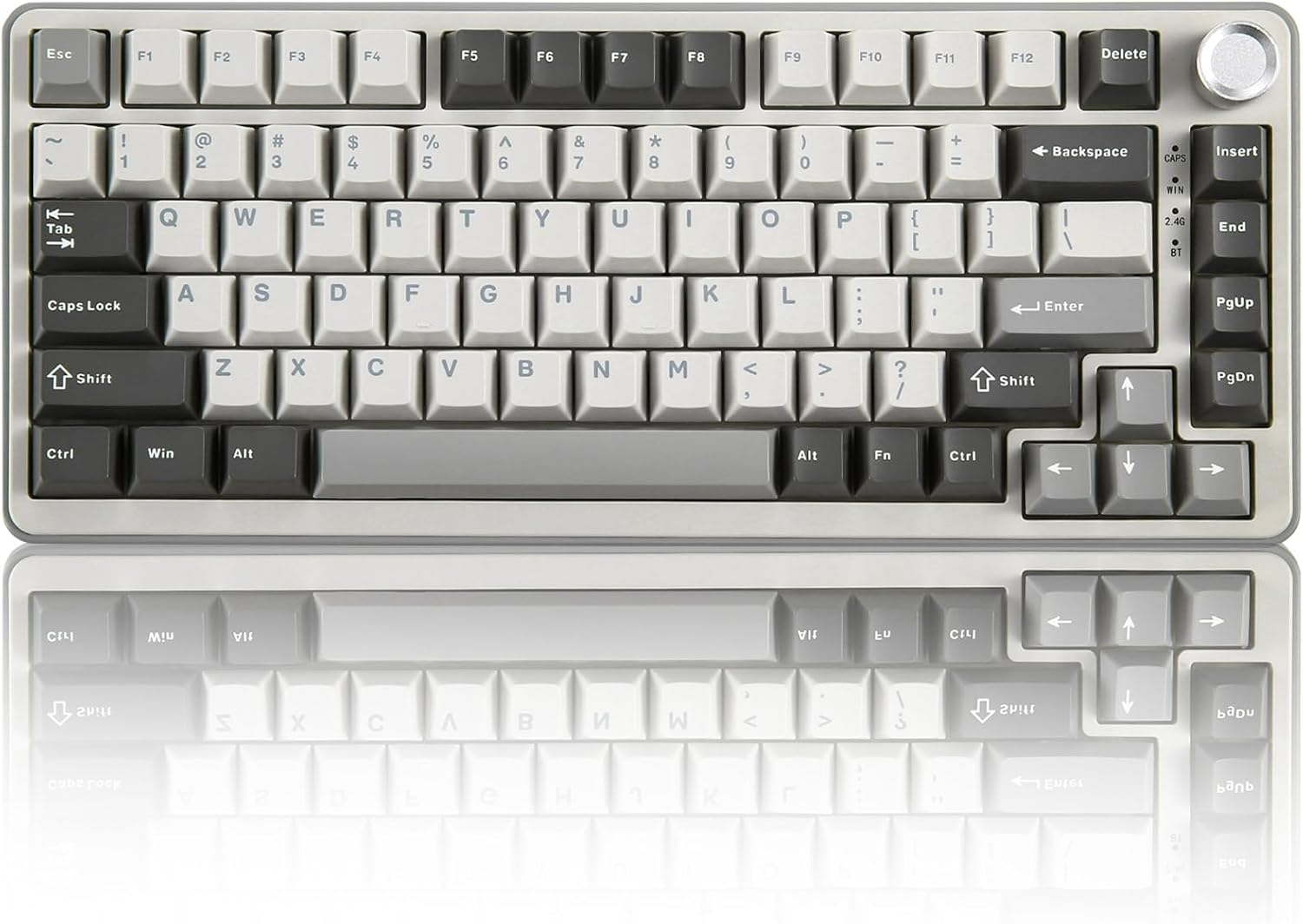
YUNZII B75 PRO Wireless Mechanical Keyboard,75% Layout with Knob,Hot Swap Gasket Custom Structure,Creamy Pre-lubed Switches,RGB Backlit,Bluetooth/Type-C/2.4G for Win/Mac(Milk Switch,Grey)
Want the best price and purchase timing?
Our AI advisor analyzes real-time pricing across all channels to find you the best deal.
AI Verdict
This is a 75% layout, hot-swappable mechanical keyboard with tri-mode connectivity and a 4000mAh battery, built for Windows users who prioritize typing feel over deep software customization.
This keyboard offers a premium typing experience with its gasket mount and pre-lubed switches, making it a strong contender for those prioritizing feel and sound. However, its Windows-centric software and reported wireless quirks make it a less ideal fit for Mac users or those needing robust, cross-platform customization and flawless wireless multi-device switching.
If deep customization and reliable multi-device Bluetooth are critical, look for keyboards with QMK/VIA support and confirmed stable Bluetooth profiles across operating systems.
Regret Score™
Medium RiskLower is better — measures purchase-regret risk from real buyer complaints, review credibility, and product maturity
Issues discovered after purchase
Critically weak dimension
Amazon rating vs actual quality
Chance this product isn't for you
Pros
- Features a gasket mount design with five-layer padding for a creamy typing sound and feel.
- Includes hot-swappable sockets compatible with 3-pin/5-pin switches for switch customization.
- Offers Bluetooth, 2.4GHz wireless, and Type-C wired connectivity for multi-device use.
- Comes with pre-lubed linear switches, contributing to smooth keystrokes and a pleasing acoustic signature.
- The 75% layout includes a multimedia control knob for adjusting sound level and RGB backlighting.
- South-facing RGB LEDs with over 20 built-in backlight modes provide visual customization.
Cons
- Proprietary software for key remapping and RGB customization is Windows-only, limiting Mac users.
- RGB settings do not persist after the keyboard is turned off and on, requiring manual re-selection of modes.
- Bluetooth multi-device switching may not function as expected, requiring wired or 2.4GHz dongle for work laptops.
- Wireless sleep-to-wake is slow, and the default sleep time is too quick, impacting responsiveness.
- Users have reported keyboard malfunctions, including delayed inputs and doubling, after using the RGB software.
Dimension Scores
The gasket mount design with five-layer padding and pre-lubed linear switches provides a smooth and 'creamy' typing experience.
It offers tri-mode connectivity (Bluetooth, 2.4GHz, wired), but some users report slow sleep-to-wake and non-functional Bluetooth multi-device switching.
Features south-facing RGB with over 20 modes and per-key customization via software, but settings do not save after power cycling.
The keyboard features a gasket mount structure and is reported to be sturdy, with a weight of 1.98 pounds.
Best For
- Gamers and typists who want a compact mechanical keyboard with a customizable typing feel.
- Users who primarily operate on Windows and enjoy experimenting with different mechanical switches.
- Individuals seeking a keyboard with a 'creamy' sound profile and gasket mount structure at an entry-level price.
- Anyone needing flexible connectivity options (wired, 2.4GHz, Bluetooth) for a single primary device.
Not Recommended For
- Mac users who require extensive key remapping or software-based RGB customization.
- Users who frequently switch between multiple Bluetooth devices and expect seamless transitions.
- Those who need a keyboard with QMK/VIA support for advanced, open-source programmability.
- Individuals sensitive to potential software-related malfunctions or inconsistent RGB settings.
Watch Out For
- The proprietary software is Windows-only, meaning Mac users cannot access advanced customization for key remapping or RGB effects.
- RGB settings do not save permanently; the backlight reverts to a default mode after the keyboard is powered off and on.
- Some users experienced keyboard malfunctions like delayed inputs, key doubling, and complete keyboard failure after using the RGB software.
- The wireless mode has a slow sleep-to-wake transition and a quick default sleep time, which can be adjusted via software but impacts immediate use.
- Bluetooth multi-device switching has been reported as non-functional by some users, requiring physical cable or dongle swaps for different computers.
Full Specifications
| ASIN | B0D17TN5FM |
| Brand | YUNZII |
| Color | Grey |
| Style | Gaming |
| Material | Plastic |
| Batteries | 1 D batteries required. (included) |
| Item Weight | 1.98 pounds |
| Manufacturer | YUNZII |
| Special Feature | Backlit, Hot-Swappable, Programmable Keys |
| Item model number | B75 PRO |
| Compatible Devices | Laptop, MAC, PC, Smartphone, Tablet |
| Package Dimensions | 14.65 x 7.8 x 2.72 inches |
| Keyboard Description | Hot Swappable Mechanical Keyboard |
| Connectivity Technology | Bluetooth/Type-C/2.4GHz Wireless |
| Recommended Uses For Product | Gaming |
| Keyboard backlighting color support | RGB |
What Buyers Say
The biggest surprise is how often users mention software-related issues, ranging from RGB settings not saving to complete keyboard malfunction after software interaction. Despite these software quirks, the keyboard consistently receives praise for its 'creamy' typing sound and feel, attributed to its gasket mount and pre-lubed switches. The tri-mode connectivity is a selling point, though Mac users should be aware of limited software support and potential Bluetooth multi-device switching problems.
“Man, this thing types like a dream, seriously, the sound is so satisfying. But why can't the RGB just stay where I put it? And that software almost bricked it, what the heck, Yunzii?!”
Common Praise
- The typing sound is 'creamy' and 'thocky,' especially the spacebar.
- The gasket mount structure and five-layer padding contribute to a satisfying typing feel.
- Hot-swappable switches allow for easy customization of typing experience.
- The 75% layout with a knob is compact yet functional, providing dedicated arrow and function keys.
- The RGB backlighting offers a variety of dynamic effects and per-key customization through software.
Common Complaints
- The customization software is only available for Windows, leaving Mac users with limited options.
- RGB settings do not save after the keyboard is turned off, requiring users to re-select their preferred mode.
- Some users experienced keyboard malfunctions, including input delays and the keyboard dying, after using the RGB software.
- Wireless sleep-to-wake is slow, and the default sleep time is too short.
- Bluetooth multi-device switching is reported to be unreliable or non-functional for some users.
Ownership Tips
- The keyboard's feet offer two different angle adjustments for ergonomic preference.
- The included USB-C cable is rubber and long enough for most setups, around 1.8m.
- Extra keycaps and switches are often included, which is useful for customization or replacements.
- The knob is primarily used for volume adjustment by many users, even though it has other functions.
- The keyboard's weight of 1.98 pounds contributes to a sturdy feel without being overly heavy.
Frequently Asked Questions
Does the YUNZII B75 PRO support Mac?
Yes, it is compatible with Mac for basic typing and connectivity. However, the proprietary software for advanced key remapping and RGB customization is Windows-only, so Mac users will miss out on those features.
Are the switches hot-swappable?
Yes, the keyboard features hot-swappable sockets compatible with both 3-pin and 5-pin mechanical switches, allowing you to change them without soldering.
How long does the battery last?
The keyboard has a built-in 4000mAh high-capacity battery, designed for extended usage times in wireless mode.
Can I customize the RGB lighting?
Yes, it has south-facing RGB LEDs with over 20 built-in backlight modes. You can customize effects and individual key RGB via the programmable Windows software.
Does it have a volume knob?
Yes, the 75% layout includes a multi-function knob that allows you to adjust the sound level and backlit effects, and can switch between gaming and office modes with a long press.
Is the typing sound 'creamy'?
Many users report a 'creamy' sound and a 'thock' sound, especially from the spacebar, due to the gasket mount design and five-layer padding.
Buying Guide
When buying a mechanical keyboard, you're looking for a balance between typing feel, connectivity, and customization. The 'gasket mount' means there's cushioning inside, making keystrokes softer and quieter. 'Hot-swappable' means you can easily change the switches (the mechanism under each key) without soldering, letting you fine-tune how it feels to type. 'Tri-mode connectivity' gives you options for how you connect it to your devices: wired for lowest latency, 2.4GHz wireless with a dongle for gaming, and Bluetooth for general wireless use.
Hot Swappable Mechanical Keyboard
This means you can pull out the switches under the keycaps and put in different ones without any soldering. Think of it like changing tires on a car – you can swap them out for different types (smoother, clickier, heavier) to match your preference without buying a whole new keyboard.
Gasket Custom Structure
Instead of screws holding the internal components directly to the case, gaskets (like soft washers) are used. This creates a more flexible, cushioned typing experience, often resulting in a deeper, more satisfying sound profile, sometimes described as 'creamy' or 'thocky'.
Tri-mode Connect (Bluetooth/Type-C/2.4G)
This gives you three ways to connect: a physical USB-C cable for zero latency, a 2.4GHz wireless dongle for a stable, low-latency wireless connection (great for gaming), and Bluetooth for connecting to multiple devices wirelessly without a dongle, like a tablet or phone.
75% Layout with Knob
A 75% layout is a compact design that keeps most essential keys (like function row and arrow keys) but removes the number pad and some less-used navigation keys. The knob is a convenient physical control, usually for volume or backlight brightness, which is faster than using function key combinations.
Alternatives
If you need robust software customization for Mac or guaranteed stable multi-device Bluetooth, look for keyboards that explicitly support QMK/VIA firmware or have dedicated Mac compatibility features and proven wireless stability.
You Might Also Like

Logitech MK270 Wireless Keyboard and Mouse Combo for Windows, 2.4 GHz, 8 Multimedia Keys, PC, Laptop, Wireless Keyboard Compact Mouse Combo - Black
This is a 2.4 GHz wireless keyboard and mouse combo with a full-size QWERTY layout and 8 multimedia keys, built for basic Windows PC tasks on a tight budget.

Logitech MK270 Wireless Keyboard and Mouse Combo for Windows, 2.4 GHz, 8 Multimedia Keys, PC, Laptop, Wireless Keyboard Compact Mouse Combo - Rose
This is a 2.4 GHz RF membrane keyboard and mouse combo with a full-size layout, best suited for basic Windows PC tasks on a tight budget.

Logitech K270 Wireless Keyboard for Windows, 2.4 GHz Wireless, Full-Size, Number Pad, 8 Multimedia Keys, 2-Year Battery Life, Compatible with PC, Laptop - Rose
This is a full-size, 2.4 GHz wireless membrane keyboard with 8 multimedia keys and a number pad, designed for basic PC and laptop use.

Logitech MK270 Wireless Keyboard and Mouse Combo for Windows, 2.4 GHz, 8 Multimedia Keys, PC, Laptop, Wireless Keyboard Compact Mouse Combo - White
This is a budget 2.4 GHz wireless membrane keyboard and mouse combo with a full-size layout, 8 multimedia keys, and a compact mouse, best for basic PC tasks.