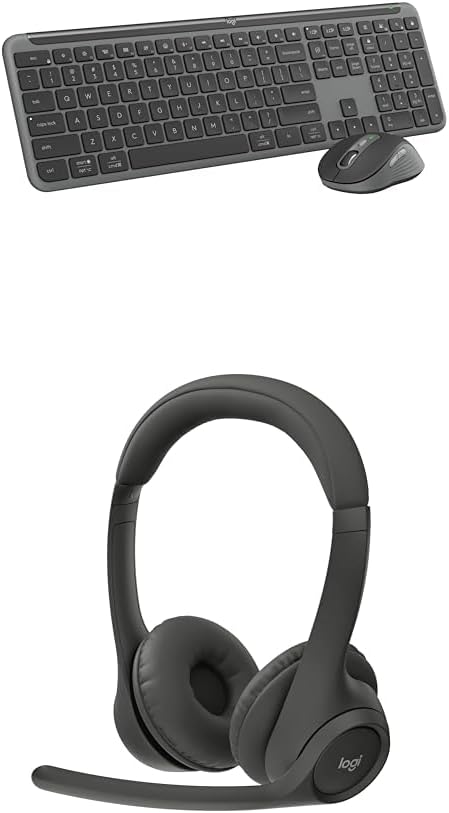
Logitech MK955 Signature Slim Wireless Keyboard and Mouse Combo, Bluetooth, Windows and Mac - Graphite + Zone 301 Wireless Bluetooth Headset, Compatible with Windows, Mac, iPadOS, Android – Graphite
Want the best price and purchase timing?
Our AI advisor analyzes real-time pricing across all channels to find you the best deal.
AI Verdict
A full-size Bluetooth keyboard and contoured mouse with multi-device switching and a noise-canceling headset, built for quiet, cross-device productivity.
The combo's multi-device switching and quiet operation, along with the noise-canceling headset, cater directly to users needing a streamlined, distraction-free experience across various platforms. The full-size keyboard and contoured mouse (for larger hands) provide comfort for extended use.
If multi-device switching isn't a priority, look for a combo with rechargeable batteries and keyboard backlighting for more convenience.
Regret Score™
Medium RiskLower is better — measures purchase-regret risk from real buyer complaints, review credibility, and product maturity
Issues discovered after purchase
Critically weak dimension
Amazon rating vs actual quality
Chance this product isn't for you
Pros
- Seamlessly switches between up to three devices (computer, tablet, phone) via Bluetooth or Logi Bolt.
- Keyboard features low-profile, laptop-style keys for quiet typing with SilentTouch technology, reducing click noise by up to 90%.
- Mouse offers precise line-by-line scrolling or super-fast scrolling with the SmartWheel.
- Customizable keys and shortcuts via the Logi Options+ App for Windows and macOS.
- Headset includes dual beamforming noise-canceling mics for clear conversations in noisy environments.
- Keyboard battery lasts up to 36 months (AAA batteries), mouse battery up to 24 months (AA battery).
Cons
- Keyboard lacks backlighting, making it difficult to use in low-light conditions.
- Mouse (M750 L Signature Plus) is designed for larger hands, potentially uncomfortable for users with smaller hands.
- Keyboard and mouse use disposable AAA/AA batteries, not rechargeable.
- Bluetooth connection might introduce lag for gaming, as noted by a user.
- Specific user feedback on the Zone 301 headset's audio quality or comfort is scarce in reviews.
Dimension Scores
The keyboard offers a familiar laptop-style typing experience with low-profile, quiet keys.
It connects wirelessly via Bluetooth 5.1 or the included Logi Bolt receiver, allowing seamless switching between three devices.
The keyboard does not feature any backlighting, making it unsuitable for dark environments.
The keyboard is described as sleek and solidly built, with the mouse made of recycled plastic, contributing to a sturdy feel.
Best For
- Users who frequently switch between a desktop, laptop, and mobile devices.
- Individuals working in shared or open office spaces needing quiet peripherals.
- Professionals requiring customizable shortcuts for enhanced workflow on Windows or macOS.
- Home office setups where a full-size keyboard with a number pad is essential.
Not Recommended For
- Gamers who prioritize minimal input lag and high responsiveness.
- Users who require keyboard backlighting for low-light conditions.
- Individuals with smaller hands seeking a compact or smaller-sized mouse.
Watch Out For
- The M750 L Signature Plus mouse is specifically designed for larger hands, which could lead to discomfort for users with smaller hand sizes.
- Keyboard and mouse rely on disposable AAA and AA batteries, requiring replacements after 36 months for the keyboard and 24 months for the mouse, instead of offering rechargeable options.
- While it supports Bluetooth, a user noted that Bluetooth might have lag for gaming.
- The keyboard does not include backlighting, making it difficult to use in dimly lit environments.
Full Specifications
| ASIN | B0D161KP5H |
| Brand | Logitech |
| Color | Graphite |
| Manufacturer | Logitech |
| Power Source | Battery Powered |
| Special Feature | Customizable Keys and Buttons, Noise-Canceling Mic |
| Operating System | Windows, macOS |
| Compatible Devices | Laptop, Personal Computer, Tablet |
| Connectivity Technology | Bluetooth |
What Buyers Say
Many users are really into how quiet this combo is, especially the keyboard's laptop-style keys and the mouse's silent clicks, which is a big win for shared spaces. The multi-device switching is also a huge hit, letting people jump between their computer, tablet, and phone without missing a beat. However, the lack of keyboard backlighting is a recurring disappointment, and some users might find the mouse a bit big if they have smaller hands.
“Dude, this combo is a lifesaver for my WFH setup, no more clacky keyboard driving my partner nuts, and switching between my work laptop and personal iPad is so smooth. Just wish the keyboard lit up at night, my eyes ain't what they used to be.”
Common Praise
- Keyboard's low-profile, laptop-style keys provide a comfortable typing experience.
- SilentTouch technology on both keyboard and mouse significantly reduces typing and clicking noise.
- Seamless switching between up to three connected devices (Windows, Mac, iPadOS, Android).
- Customizable keys and shortcuts through the Logi Options+ App enhance productivity.
- Mouse offers both precise line-by-line and super-fast scrolling with the SmartWheel.
- Headset's dual beamforming mics with noise-canceling algorithms provide clear call audio.
Common Complaints
- Keyboard lacks backlighting, making it difficult to use in low-light conditions.
- Mouse (M750 L Signature Plus) is designed for larger hands, which may not suit all users.
- Keyboard and mouse use disposable AAA/AA batteries instead of rechargeable ones.
- Bluetooth connection might not be ideal for gaming due to potential lag.
- Limited specific user feedback available for the Zone 301 headset component.
Ownership Tips
- The Logi Options+ app is pretty essential for getting the most out of the customizable keys and shortcuts.
- The 'L' in M750L for the mouse really means 'Large,' so if you have smaller hands, you'll notice it.
- Battery life is actually pretty long, so you won't be swapping out AAAs every month.
- The quiet clicks and typing are genuinely noticeable and appreciated in a quiet room.
- The headset's noise-canceling mic works surprisingly well for blocking out background chatter during calls.
Frequently Asked Questions
Does the keyboard have backlighting?
No, the K950 keyboard does not have backlighting, which might make it challenging to use in low-light settings.
Can I connect this combo to multiple devices?
Yes, you can seamlessly switch between up to three devices like your laptop, tablet, and smartphone with a single tap.
What kind of batteries does it use?
The keyboard uses two AAA batteries, lasting up to 36 months, and the mouse uses one AA battery, lasting up to 24 months.
Is the mouse suitable for small hands?
The M750 L Signature Plus mouse is designed for larger hands, so it might not be the most comfortable for users with smaller hands.
Does it work with Linux or ChromeOS?
Yes, the combo is compatible with Windows, macOS, Chrome OS, Linux, iPadOS, iOS, and Android.
How quiet is the typing and clicking?
The keyboard features SilentTouch technology for quiet typing, and the mouse has silent click technology, reducing noise by up to 90%.
Buying Guide
When you're looking at keyboard and mouse combos, especially with a headset, think about how you actually work. Do you jump between devices a lot? Then multi-device Bluetooth is key. Is your workspace quiet or shared? Then silent keys and clicks are a game-changer. And don't forget about the headset – a good mic can make or break your calls.
Multi-device switching
This means you can connect the keyboard and mouse to, say, your work laptop, your personal desktop, and your tablet, and switch between them with a button press. It's like having one remote control for three TVs.
SilentTouch technology
This is Logitech's fancy way of saying the keys and mouse clicks are super quiet. Imagine typing on a cloud instead of a loud old typewriter – less distraction for you and anyone around you.
Logi Options+ App
This is software that lets you customize what certain keys or mouse buttons do. Think of it like programming your TV remote to open Netflix with one button instead of navigating menus.
Noise-canceling mic
For the headset, this means the microphone actively tries to block out background sounds, so the people on your call hear *you*, not your dog barking or your kids playing.
Alternatives
If you need keyboard backlighting or prefer rechargeable batteries, look for combos that explicitly list those features. If gaming is a priority, consider options with a dedicated 2.4GHz dongle for lower latency.
You Might Also Like

Logitech MK270 Wireless Keyboard and Mouse Combo for Windows, 2.4 GHz, 8 Multimedia Keys, PC, Laptop, Wireless Keyboard Compact Mouse Combo - Black
This is a 2.4 GHz wireless keyboard and mouse combo with a full-size QWERTY layout and 8 multimedia keys, built for basic Windows PC tasks on a tight budget.

Logitech MK270 Wireless Keyboard and Mouse Combo for Windows, 2.4 GHz, 8 Multimedia Keys, PC, Laptop, Wireless Keyboard Compact Mouse Combo - Rose
This is a 2.4 GHz RF membrane keyboard and mouse combo with a full-size layout, best suited for basic Windows PC tasks on a tight budget.

Logitech K270 Wireless Keyboard for Windows, 2.4 GHz Wireless, Full-Size, Number Pad, 8 Multimedia Keys, 2-Year Battery Life, Compatible with PC, Laptop - Rose
This is a full-size, 2.4 GHz wireless membrane keyboard with 8 multimedia keys and a number pad, designed for basic PC and laptop use.

Logitech MK270 Wireless Keyboard and Mouse Combo for Windows, 2.4 GHz, 8 Multimedia Keys, PC, Laptop, Wireless Keyboard Compact Mouse Combo - White
This is a budget 2.4 GHz wireless membrane keyboard and mouse combo with a full-size layout, 8 multimedia keys, and a compact mouse, best for basic PC tasks.