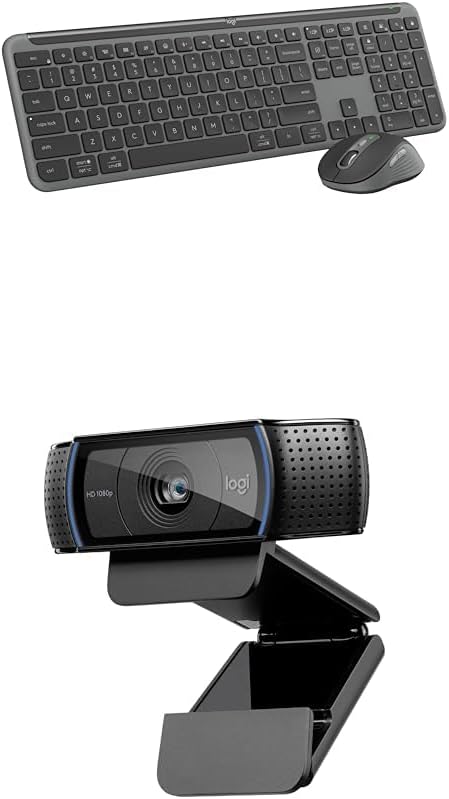
Logitech MK955 Signature Slim Wireless Keyboard and Mouse Combo, Bluetooth, Windows and Mac - Graphite + C920x HD Pro Webcam, Full HD 1080p, Works with Skype, Zoom, FaceTime, Hangouts, PC/Mac - Black
Want the best price and purchase timing?
Our AI advisor analyzes real-time pricing across all channels to find you the best deal.
AI Verdict
This is a Bluetooth keyboard and mouse combo with a 1080p webcam, built for multi-device users who need quiet typing and video calls without a privacy shutter.
This combo is a strong fit for anyone juggling multiple devices, offering seamless switching between up to three computers via Bluetooth or Logi Bolt. The quiet keyboard and mouse, plus a 1080p webcam, make it a practical choice for a blended work-from-home setup.
If you need more advanced ergonomics or a rechargeable battery, look for combos with dedicated ergonomic designs or integrated rechargeable power.
Regret Score™
Medium RiskLower is better — measures purchase-regret risk from real buyer complaints, review credibility, and product maturity
Issues discovered after purchase
Critically weak dimension
Amazon rating vs actual quality
Chance this product isn't for you
Pros
- Seamlessly switch the keyboard and mouse between up to three different devices, including Windows, Mac, ChromeOS, Linux, iPadOS, iOS, and Android, via Bluetooth or Logi Bolt receiver.
- Keyboard features a full-size layout with a number pad and keys labeled for both Windows and Mac, offering a familiar laptop-style typing experience.
- Both the keyboard and the M750 L Signature Plus mouse offer quiet typing and clicking, utilizing SilentTouch technology for the mouse.
- The included C920x HD Pro Webcam delivers Full HD 1080p video at 30 fps with stereo audio from dual microphones. [Product Specs]
- Customizable keys, buttons, and shortcuts are available through the Logi Options+ App for Windows and macOS.
- The keyboard runs on two AAA batteries for up to three years, and the mouse uses one AA battery for up to two years.
Cons
- The C920x HD Pro Webcam does not include a privacy shutter. [Product Specs]
- The keyboard lacks backlighting, which can make typing in low-light conditions difficult.
- The keyboard's adjustable feet only provide a half-inch angle change, and one user reported increased forearm strain compared to an ergonomic keyboard.
- The M750 L Signature Plus mouse, while contoured, is designed for larger hands, potentially making it less comfortable for users with smaller hands.
Dimension Scores
The keyboard offers a full-size, laptop-style typing experience with low-profile, subtly scooped keys, which some users find comfortable, though it's not ergonomic.
It offers both Bluetooth and Logi Bolt connectivity, with Logi Bolt providing secure wireless connections even in congested environments, and users report easy device switching.
The keyboard does not include any backlighting, which is a significant omission for use in dim lighting.
The keyboard feels durable and has a noticeable weight, and both the keyboard and mouse incorporate post-consumer recycled plastics and low-carbon aluminum.
Best For
- Home office setups with multiple computers (e.g., personal desktop and work laptop).
- Users who frequently switch between Windows and macOS devices.
- Individuals needing a quiet typing and clicking experience in shared workspaces.
- Remote workers requiring a 1080p webcam for video conferencing.
Not Recommended For
- Users who require an ergonomic keyboard and mouse for extended comfort.
- Anyone needing a webcam with a built-in privacy shutter for security.
- Gamers or users who require keyboard backlighting for low-light use.
Watch Out For
- The webcam does not come with a physical privacy shutter, so you'll need to rely on software or a third-party cover for privacy. [Product Specs]
- While the keyboard has adjustable feet, the angle change is minimal (about a half-inch), and one user found it less comfortable than an ergonomic keyboard, leading to forearm strain.
- The M750 L Signature Plus mouse is specifically designed for larger hands, which could lead to discomfort for users with smaller hands.
Full Specifications
| ASIN | B0D15W8YKT |
| Brand | Logitech |
| Color | Graphite |
| Manufacturer | Logitech |
| Power Source | Battery Powered |
| Special Feature | Customizable, Eco-friendly, Bundled Webcam with XSplit VCam License |
| Operating System | Windows, macOS |
| Compatible Devices | Laptop, Personal Computer |
| Connectivity Technology | Bluetooth |
What Buyers Say
The most surprising thing about this combo is how well it handles multi-device switching; users consistently praise the ability to jump between three computers with a single tap on both the keyboard and mouse. The quiet typing and clicking are also frequently mentioned as a major plus, making it suitable for shared spaces. However, the lack of keyboard backlighting is a recurring point of contention, and the webcam's missing privacy shutter is a definite oversight for some. [cite: 9, Product Specs] The mouse size also seems to be a point of discussion, with official sources stating it's for larger hands, which might not suit everyone.
“This combo is a lifesaver for my work-from-home setup, switching between my laptop and desktop is so smooth, but seriously, no backlight on the keyboard? And I gotta remember to cover the webcam myself, come on Logitech!”
Common Praise
- Effortless switching between up to three different computers or devices.
- Keyboard includes a full number pad and keys labeled for both Windows and Mac.
- Typing and mouse clicks are noticeably quiet.
- Logi Options+ App allows for extensive customization of keys and buttons.
- Keyboard battery lasts up to three years, and mouse battery lasts up to two years.
- Keyboard feels durable and has a substantial weight, preventing desk movement.
Common Complaints
- Keyboard does not have backlighting.
- Webcam lacks a physical privacy shutter. [Product Specs]
- Keyboard's non-ergonomic design can cause forearm strain for some users.
- Mouse is designed for larger hands, potentially uncomfortable for smaller hands.
- Logitech Flow software is needed to sync keyboard and mouse switching, not a single button press.
Ownership Tips
- The multi-device switching buttons on the keyboard and mouse are separate, requiring two presses to switch both if not using Logi Flow.
- The Logi Options+ app is essential for unlocking the full customization potential and managing device connections.
- The quiet clicks and typing are genuinely noticeable and appreciated in a quiet environment.
- The keyboard's slim profile and integrated number pad save desk space compared to separate components.
Frequently Asked Questions
Can I use this keyboard and mouse with both my Windows PC and my Mac?
Yes, the combo is compatible with both Windows and Mac operating systems, and the keyboard keys are even labeled for both. You can switch between up to three connected devices with a tap.
Does the webcam have a privacy cover?
No, the C920x HD Pro Webcam does not include a physical privacy shutter. [Product Specs]
Are the keyboard and mouse quiet?
Yes, both the keyboard and mouse are designed for quiet operation, with the mouse featuring SilentTouch technology for reduced click noise.
Can I customize the keys and buttons?
Absolutely. You can customize various keys, buttons, and shortcuts using the Logi Options+ App, which is available for Windows and macOS.
What kind of batteries does it use and how long do they last?
The keyboard uses two AAA batteries and can last up to three years. The mouse uses one AA battery and can last up to two years.
Buying Guide
When you're looking at a keyboard and mouse combo, especially one with a webcam, you need to think about how you actually work. Do you jump between a work laptop and a personal desktop all day? Then multi-device switching is huge. Are you on video calls constantly? A good webcam is key. And if you're in a shared space, how loud are your clicks and clacks? These little things make a big difference in your daily grind.
Multi-device connectivity (Bluetooth/Logi Bolt)
This means you can connect the keyboard and mouse to several different computers or tablets at once, like having one remote control for three TVs. You just tap a button to switch which device you're controlling, saving you from having multiple sets of peripherals cluttering your desk.
Full HD 1080p 30 fps Webcam
This is about the quality of your video calls. 1080p means a sharp, clear picture, and 30 frames per second means the video will look smooth, not choppy, making you look professional on Zoom or Teams. [Product Specs]
Logi Options+ App
Think of this as the brain of your peripherals. It lets you customize what certain keys or mouse buttons do, turning them into shortcuts for your most used actions. It's like programming your TV remote to jump straight to your favorite channel.
Alternatives
If you need an ergonomic design for wrist comfort, search for combos specifically marketed as 'ergonomic' with split keyboards or vertical mice. If backlighting is a must-have, look for keyboards that specify 'backlit keys' or 'adjustable backlighting'.
You Might Also Like

Logitech MK270 Wireless Keyboard and Mouse Combo for Windows, 2.4 GHz, 8 Multimedia Keys, PC, Laptop, Wireless Keyboard Compact Mouse Combo - Black
This is a 2.4 GHz wireless keyboard and mouse combo with a full-size QWERTY layout and 8 multimedia keys, built for basic Windows PC tasks on a tight budget.

Logitech MK270 Wireless Keyboard and Mouse Combo for Windows, 2.4 GHz, 8 Multimedia Keys, PC, Laptop, Wireless Keyboard Compact Mouse Combo - Rose
This is a 2.4 GHz RF membrane keyboard and mouse combo with a full-size layout, best suited for basic Windows PC tasks on a tight budget.

Logitech K270 Wireless Keyboard for Windows, 2.4 GHz Wireless, Full-Size, Number Pad, 8 Multimedia Keys, 2-Year Battery Life, Compatible with PC, Laptop - Rose
This is a full-size, 2.4 GHz wireless membrane keyboard with 8 multimedia keys and a number pad, designed for basic PC and laptop use.

Logitech MK270 Wireless Keyboard and Mouse Combo for Windows, 2.4 GHz, 8 Multimedia Keys, PC, Laptop, Wireless Keyboard Compact Mouse Combo - White
This is a budget 2.4 GHz wireless membrane keyboard and mouse combo with a full-size layout, 8 multimedia keys, and a compact mouse, best for basic PC tasks.