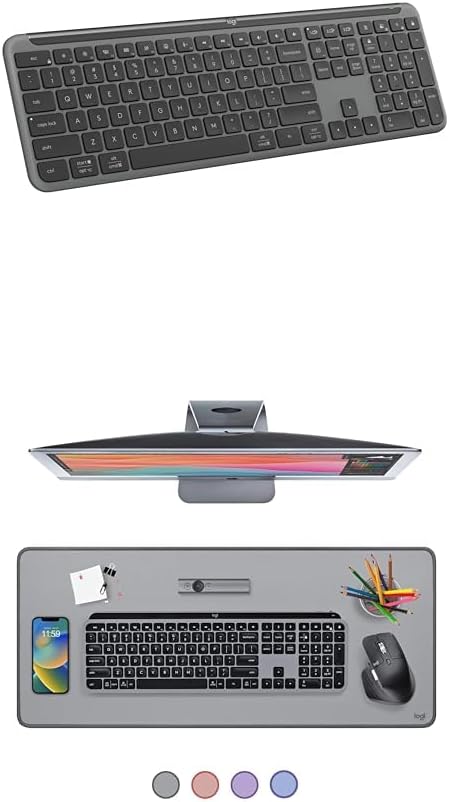
Logitech Signature Slim K950 Wireless Keyboard, Sleek Design, Switch Typing Between Devices, Quiet Typing, Bluetooth, Multi-OS, Windows, Mac, Chrome - Graphite + Desk Mat - Studio Series, Mid-Grey
Want the best price and purchase timing?
Our AI advisor analyzes real-time pricing across all channels to find you the best deal.
AI Verdict
This full-size, low-profile wireless keyboard with Bluetooth and a USB receiver lets you switch typing between three devices with a single tap.
This keyboard is a strong fit for anyone juggling multiple devices like a laptop, tablet, and phone, thanks to its quick three-device switching. Its quiet, low-profile keys mimic a laptop feel, making it comfortable for extended typing sessions in shared spaces. The included desk mat adds a nice touch for desktop protection and mouse glide.
If backlighting or a rechargeable battery are must-haves, look for keyboards explicitly listing those features.
Regret Score™
High RiskLower is better — measures purchase-regret risk from real buyer complaints, review credibility, and product maturity
Issues discovered after purchase
Critically weak dimension
Amazon rating vs actual quality
Chance this product isn't for you
Pros
- Seamlessly switches between three connected devices (computer, tablet, phone) with a single button tap.
- Keys are designed for quiet typing, suitable for shared workspaces.
- Customizable keys via the Logi Options+ App allow for personalized shortcuts and macros.
- Offers dual connectivity options: Bluetooth 5.1 and an included USB receiver.
- Powered by AAA batteries with a reported life of up to 36 months.
- Includes a slot for storing the USB wireless dongle within the keyboard.
Cons
- Lacks backlighting, which can be a drawback in low-light conditions.
- Uses non-rechargeable AAA batteries, requiring periodic replacement.
- Keycaps are described as feeling somewhat cheap, despite the overall sturdy build.
- Software customization for macros is somewhat limited compared to more premium keyboards.
- No option for a wired connection.
- Some users report issues with specific key functions (e.g., tilde key) when used with macOS.
Dimension Scores
The tactile scissor switches provide a satisfying, low-profile, laptop-style typing experience, though some find the plastic keys 'light and tappy'.
Users report smooth and reliable connections via both Bluetooth and the included USB receiver, with easy switching between devices.
The keyboard does not feature any backlighting.
The keyboard feels sturdy and has good overall build quality, but the keycap materials are noted as feeling somewhat cheap.
Best For
- Individuals who frequently switch between a computer, tablet, and phone for typing tasks.
- Office environments or shared spaces where quiet typing is preferred.
- Users who prefer a low-profile, laptop-style typing experience.
- Those prioritizing long battery life and the convenience of replaceable batteries over rechargeable options.
Not Recommended For
- Users who require keyboard backlighting for typing in dim environments.
- Heavy macro users needing extensive and complex software customization.
- Individuals who prefer a mechanical keyboard's distinct key feel and travel.
- Users who prefer a built-in rechargeable battery and wired connectivity options.
Watch Out For
- The keyboard does not include backlighting, making it difficult to use in low-light conditions.
- It relies on AAA batteries for power, which are not rechargeable and need to be replaced, with a reported lifespan of up to 36 months.
- The keycaps are noted to feel somewhat cheap, which might detract from the overall typing experience for some users.
- Some users have experienced minor glitches and crashes with the Logi Options+ software during installation or use.
- Specific key functions, such as the tilde key, have been reported to behave unexpectedly on macOS, even with software adjustments.
Full Specifications
| ASIN | B0D15SCM1N |
| Brand | Logitech |
| Color | Graphite |
| Series | Logitech Signature Slim Wireless Keyboard |
| Item Weight | 1.94 pounds |
| Manufacturer | Logitech |
| Power Source | Battery Powered |
| Special Feature | Spillproof |
| Operating System | Android, Mac OS, Windows |
| Compatible Devices | Laptop, Tablet |
| Package Dimensions | 17.52 x 6.02 x 1.22 inches |
| Connectivity Technology | Bluetooth |
What Buyers Say
The standout feature for most users is how easily you can jump between typing on your computer, tablet, and phone with just a button press. People really dig the quiet keys, saying it's perfect for not annoying anyone nearby, and the low-profile, laptop-like feel gets a lot of praise for comfort. The main recurring gripe is the lack of backlighting, and a few folks mentioned the keycaps feel a bit less premium than the rest of the keyboard.
“Okay, so I can literally switch from my work laptop to my iPad and then my phone in like two seconds, it's actually magic. But seriously, why no backlight, Logitech? My late-night typing is a struggle!”
Common Praise
- Quickly switches between up to three devices (PC, tablet, phone) with a single tap.
- Keys are noticeably quiet, making it ideal for shared workspaces or late-night use.
- The slim design and full-size layout are comfortable and don't take up too much desk space.
- Customizable keys through the Logi Options+ app offer useful shortcuts and productivity boosts.
- Impressive battery life of up to 36 months on AAA batteries means less frequent replacements.
- Includes a dedicated slot to store the USB receiver, preventing it from getting lost.
Common Complaints
- No backlighting, which is a significant miss for typing in dim conditions.
- Keycaps feel somewhat cheap and plasticky, despite the overall sturdy construction.
- Relies on non-rechargeable AAA batteries, which some users find less convenient than a built-in rechargeable option.
- Some users reported minor software glitches or crashes with the Logi Options+ app.
- Specific key functions, like the tilde key, can be problematic on macOS, even with software adjustments.
- The keyboard lacks a wired connection option.
Ownership Tips
- The 36-month battery life claim seems pretty accurate; you'll forget when you last changed the batteries.
- The little slot for the USB dongle is a lifesaver; I'd have lost that thing a dozen times by now.
- The Logi Options+ app is mostly good for customizing, but sometimes it acts a little weird, especially on Mac for specific keys.
- The desk mat is actually pretty useful for keeping your desk clean and giving your mouse a smooth ride.
- Even though the keycaps feel a bit light, the quietness is genuinely good for not disturbing others on calls.
Frequently Asked Questions
Does the Logitech Signature Slim K950 have backlighting?
No, the Logitech Signature Slim K950 keyboard does not feature backlighting.
Is the keyboard rechargeable?
No, the keyboard is not rechargeable. It is powered by AAA batteries, which are reported to last up to 36 months.
How many devices can I connect to the K950 keyboard?
You can connect and seamlessly switch between up to three devices, including computers, tablets, and phones.
Is the Logitech Signature Slim K950 compatible with Mac?
Yes, it is compatible with macOS, Windows, and ChromeOS. However, some users have reported issues with certain key functions on Mac.
Does it come with a USB receiver?
Yes, the keyboard includes a USB receiver for wireless connectivity, in addition to Bluetooth.
Buying Guide
When you're looking at keyboards like this, think about how many devices you actually use daily. If you're constantly jumping between your work laptop, a personal tablet, and your phone, the ability to switch with a single button is a game-changer. Also, consider your environment; a quiet keyboard means you won't annoy your coworkers or family during late-night sessions. Finally, low-profile keys feel more like a laptop, which is a preference for many.
Connectivity (Bluetooth / USB Receiver)
Having both Bluetooth and a USB receiver means you can connect to almost any device, old or new, without worrying about compatibility. Bluetooth is great for tablets and phones, while the USB receiver ensures a stable connection for desktops and laptops, especially if Bluetooth is finicky.
Multi-OS Compatibility
This isn't just about connecting; it's about the keyboard understanding your device. A keyboard that works with Windows, Mac, and ChromeOS means the special function keys (like volume or brightness) will work correctly across all your gadgets, saving you from fumbling with on-screen controls.
Full-size Layout
A full-size layout includes a dedicated number pad, which is crucial if you do a lot of data entry or calculations. It's like having all your tools laid out, rather than having to hunt for them in a menu.
Alternatives
If you need keys that light up in the dark, look for keyboards with 'backlighting' in their specs. If you hate replacing batteries, search for 'rechargeable wireless keyboards'.
You Might Also Like

Logitech MK270 Wireless Keyboard and Mouse Combo for Windows, 2.4 GHz, 8 Multimedia Keys, PC, Laptop, Wireless Keyboard Compact Mouse Combo - Black
This is a 2.4 GHz wireless keyboard and mouse combo with a full-size QWERTY layout and 8 multimedia keys, built for basic Windows PC tasks on a tight budget.

Logitech MK270 Wireless Keyboard and Mouse Combo for Windows, 2.4 GHz, 8 Multimedia Keys, PC, Laptop, Wireless Keyboard Compact Mouse Combo - Rose
This is a 2.4 GHz RF membrane keyboard and mouse combo with a full-size layout, best suited for basic Windows PC tasks on a tight budget.

Logitech K270 Wireless Keyboard for Windows, 2.4 GHz Wireless, Full-Size, Number Pad, 8 Multimedia Keys, 2-Year Battery Life, Compatible with PC, Laptop - Rose
This is a full-size, 2.4 GHz wireless membrane keyboard with 8 multimedia keys and a number pad, designed for basic PC and laptop use.

Logitech MK270 Wireless Keyboard and Mouse Combo for Windows, 2.4 GHz, 8 Multimedia Keys, PC, Laptop, Wireless Keyboard Compact Mouse Combo - White
This is a budget 2.4 GHz wireless membrane keyboard and mouse combo with a full-size layout, 8 multimedia keys, and a compact mouse, best for basic PC tasks.