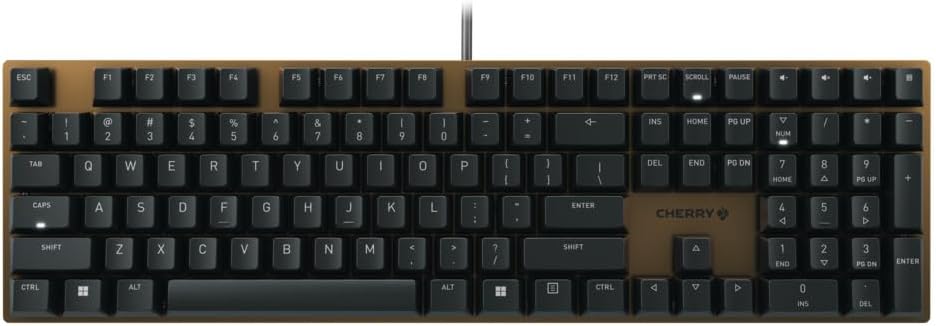
Cherry KC 200 MX Mechanical Office Keyboard with New MX2A switches. Modern Design with Metal Plate Frame. (Bronze W/MX2A Brown Switch)
Want the best price and purchase timing?
Our AI advisor analyzes real-time pricing across all channels to find you the best deal.
AI Verdict
This is a full-size, wired mechanical office keyboard with tactile Cherry MX2A Brown switches rated for 100 million keystrokes, built for focused typing without distractions.
This keyboard is a strong fit for office users who value a precise, tactile typing experience and robust build quality. Its Cherry MX2A Brown switches are designed for longevity and a satisfying feel, while the metal plate frame provides stability. The wired USB-A connection ensures consistent performance without battery concerns.
If you need wireless flexibility or full backlighting, look for mechanical keyboards with Bluetooth 5.0+ and per-key RGB or white LED backlighting.
Regret Score™
High RiskLower is better — measures purchase-regret risk from real buyer complaints, review credibility, and product maturity
Issues discovered after purchase
Critically weak dimension
Amazon rating vs actual quality
Chance this product isn't for you
Pros
- Features new CHERRY MX2A Brown switches, factory pre-lubricated for smoother operation and rated for 100 million keystrokes.
- Constructed with an anodized metal plate, contributing to its 2.29-pound weight and structural rigidity.
- Includes white LED indicators for CAPS, SCROLL, and NUM-lock keys, providing clear status feedback.
- Offers four dedicated media keys for volume control and a calculator shortcut above the number pad.
- Wired USB-A connectivity ensures a stable, low-latency 1ms connection with a 1,000 Hz polling rate.
- The full-size layout includes a number pad and a complete function row, suitable for data entry and productivity.
Cons
- Lacks full key backlighting, only offering white LED indicators on status keys.
- Wired-only USB-A connection means no wireless flexibility for desk setup.
- The Cherry Keys software for customization is Windows-only, limiting options for other operating systems.
- Does not include a wrist rest, which some users might prefer for extended typing sessions.
- Key legends are laser-etched, which can show wear over time compared to dye-sublimated keycaps.
Dimension Scores
The new Cherry MX2A Brown switches are factory pre-lubricated, offering a smoother, more responsive tactile typing experience with a 100 million keystroke lifespan.
As a wired USB-A keyboard, it provides an inherently stable connection with a 1ms response time and 1,000 Hz polling rate, eliminating wireless interference or battery concerns.
The keyboard lacks full backlighting, only featuring white LED indicators for CAPS, SCROLL, and NUM lock keys, which is below average for modern mechanical keyboards.
It features an anodized metal plate frame and weighs 2.29 pounds, giving it a sturdy and durable feel, with professional reviews noting its robust construction.
Best For
- Office environments where typing precision and durability are prioritized over flashy features.
- Users who prefer a tactile typing experience from Brown mechanical switches.
- Desktops needing a full-size layout for data entry and productivity tasks.
- Anyone seeking a robust, wired mechanical keyboard without wireless latency concerns.
Not Recommended For
- Users requiring full RGB or white backlighting for low-light conditions.
- Setups needing wireless connectivity or multi-device pairing.
- Individuals who frequently customize key bindings or macros beyond basic remapping on non-Windows systems.
- Gamers who might prefer linear switches or more advanced gaming-specific features.
Watch Out For
- No backlighting means you won't see key legends in dim lighting, only the CAPS/SCROLL/NUM lock indicators illuminate.
- The keyboard is wired-only via USB-A, so if your setup requires Bluetooth or a USB-C connection, you'll need adapters or a different keyboard.
- Customization software (Cherry Keys) is limited to Windows, meaning macOS or Linux users can't remap keys or create macros.
- At 2.29 pounds, it's heavier than many membrane keyboards, which might be a consideration if you move your peripherals frequently.
- Some users might find the 'naked' look with the metal base plate aesthetically pleasing, but it also means the keycaps sit higher, which some might find less comfortable without a wrist rest.
Full Specifications
| ASIN | B0CLHC34YW |
| Brand | Cherry |
| Color | Bronze W/MX2A Brown |
| Style | Music |
| Material | Metal |
| Item Weight | 2.29 pounds |
| Manufacturer | Cherry |
| Special Feature | MX2A Switches |
| Item model number | G80-3950LIBUS-2 |
| Compatible Devices | PC |
| Product Dimensions | 16.93 x 4.76 x 1.54 inches |
| Keyboard Description | Mechanical |
| Connectivity Technology | USB-A |
| Recommended Uses For Product | Gaming |
What Buyers Say
Many users are genuinely surprised by the premium feel and typing experience this keyboard delivers, especially considering its price point. The new MX2A Brown switches are frequently highlighted for their smoothness and tactile feedback, making typing a pleasure for extended periods. The minimalist design with the bronze metal plate also receives praise for its aesthetic appeal and structural integrity. However, the absence of backlighting is a consistent point of contention, and some users wish for wireless connectivity options. The dedicated media keys and calculator shortcut are often cited as practical additions for productivity.
“Okay, so I needed a new keyboard for work, nothing fancy, but I type a LOT. This Cherry with the Brown switches? Seriously, it's so much nicer than I expected for the money. The keys feel amazing, not mushy at all, and that metal plate makes it feel like it could survive a nuclear winter. Just wish it lit up at night, my office is kinda dark sometimes.”
Common Praise
- MX2A Brown switches feel incredibly smooth and precise for typing.
- The anodized metal plate gives the keyboard a high-quality, sturdy feel and appearance.
- Dedicated keys for volume control and calculator are convenient for daily use.
- The full-size layout is practical for office work and data entry.
- The overall minimalist design looks professional and uncluttered.
Common Complaints
- No backlighting at all, making it hard to see keys in dim lighting.
- Only wired connectivity, no wireless options like Bluetooth.
- The Cherry Keys software for customization is Windows-only.
- Some users miss having a wrist rest for comfort during long typing sessions.
- Key legends are laser-etched and might wear off over time with heavy use.
Ownership Tips
- The bronze finish on the metal plate holds up well to daily use, resisting fingerprints more than expected.
- The weight of 2.29 pounds keeps it firmly planted on the desk, even during intense typing sessions.
- The white LED indicators for lock keys are bright enough to be seen clearly, but their absence elsewhere is noticeable in low light.
- The cable is a standard USB-A, and while durable, it's not detachable, which can be a minor inconvenience for cable management.
- The tactile bump on the MX2A Brown switches remains consistent even after weeks of heavy use, without feeling scratchy.
Frequently Asked Questions
Does this keyboard have backlighting?
No, the Cherry KC 200 MX does not have full key backlighting. It only features white LED indicators for the CAPS Lock, SCROLL Lock, and NUM Lock keys to show their active status.
Is this a wireless keyboard?
No, this keyboard is wired-only and connects via a USB-A cable. It does not support Bluetooth or any other wireless connectivity.
What kind of switches does it use?
This model uses Cherry MX2A Brown mechanical switches. These are tactile switches, meaning you'll feel a bump when the key actuates, and they are rated for 100 million keystrokes.
Can I customize the keys or create macros?
Yes, you can customize some functions and create macros using the Cherry Keys software. However, this software is only available for Windows operating systems.
Is it loud for an office environment?
The MX2A Brown switches are tactile, which means they are generally quieter than clicky switches but will still produce an audible sound. If silence is critical, Cherry also offers a Silent Red switch variant for this model.
Buying Guide
When you're looking at mechanical keyboards, especially for office use, you need to think about how you type and what your environment is like. Mechanical switches offer a distinct feel and durability that membrane keyboards don't. This Cherry KC 200 MX uses 'Brown' switches, which give you a little bump when the key registers, letting you know it's actuated without having to press all the way down. This can make typing faster and more accurate for some people. Since it's wired, you won't have to worry about batteries, but you're tied to your desk.
CHERRY MX2A Brown Switches
These are the 'engine' of your keyboard. Brown switches are tactile, meaning you feel a small bump when you press them, which helps you know when a keypress has registered without bottoming out. This can reduce typing fatigue and increase accuracy, especially if you type for hours. They're also rated for 100 million keystrokes, which is a very long time.
Wired USB-A Connectivity
This means the keyboard plugs directly into your computer with a standard USB cable. It's super reliable, has no input lag (important for fast typists), and never needs batteries. The downside is you can't move it far from your computer, and it takes up a USB-A port.
Metal Plate Frame
The metal plate isn't just for looks; it adds significant rigidity and weight to the keyboard. This prevents flex while typing and makes the keyboard feel more premium and durable. It also helps dampen some of the switch sounds, contributing to a more solid typing experience.
Full-size Layout
A full-size keyboard includes a dedicated number pad on the right, a full function row (F1-F12), and navigation keys. This is crucial if you work with spreadsheets, data entry, or any task requiring frequent number input, as it speeds up your workflow considerably compared to compact keyboards.
Alternatives
If you need wireless freedom or want to type in the dark, look for mechanical keyboards with Bluetooth connectivity and full per-key backlighting. If you prefer a quieter typing experience, search for keyboards with 'silent' mechanical switches.
You Might Also Like

Logitech MK270 Wireless Keyboard and Mouse Combo for Windows, 2.4 GHz, 8 Multimedia Keys, PC, Laptop, Wireless Keyboard Compact Mouse Combo - Black
This is a 2.4 GHz wireless keyboard and mouse combo with a full-size QWERTY layout and 8 multimedia keys, built for basic Windows PC tasks on a tight budget.

Logitech MK270 Wireless Keyboard and Mouse Combo for Windows, 2.4 GHz, 8 Multimedia Keys, PC, Laptop, Wireless Keyboard Compact Mouse Combo - Rose
This is a 2.4 GHz RF membrane keyboard and mouse combo with a full-size layout, best suited for basic Windows PC tasks on a tight budget.

Logitech K270 Wireless Keyboard for Windows, 2.4 GHz Wireless, Full-Size, Number Pad, 8 Multimedia Keys, 2-Year Battery Life, Compatible with PC, Laptop - Rose
This is a full-size, 2.4 GHz wireless membrane keyboard with 8 multimedia keys and a number pad, designed for basic PC and laptop use.

Logitech MK270 Wireless Keyboard and Mouse Combo for Windows, 2.4 GHz, 8 Multimedia Keys, PC, Laptop, Wireless Keyboard Compact Mouse Combo - White
This is a budget 2.4 GHz wireless membrane keyboard and mouse combo with a full-size layout, 8 multimedia keys, and a compact mouse, best for basic PC tasks.