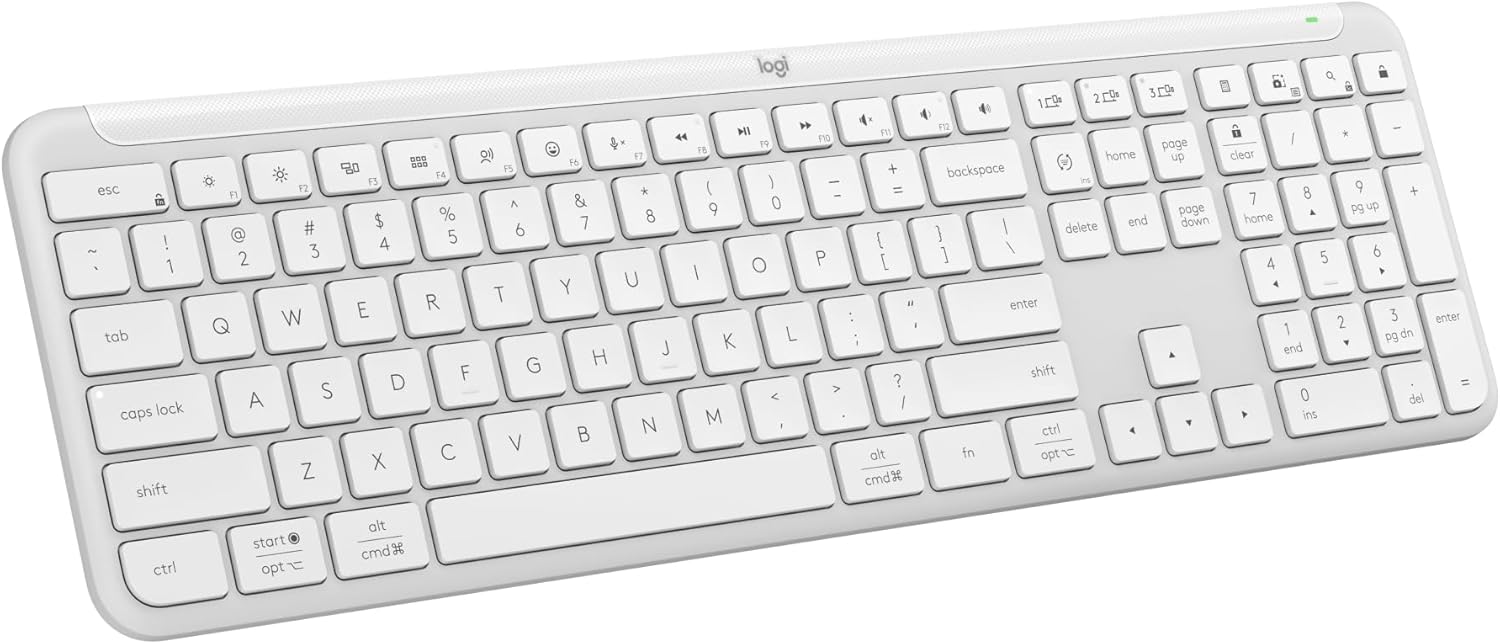
Logitech Signature Slim K950 Wireless Keyboard, Sleek Design, Switch Typing Between Devices, Quiet Typing, Bluetooth, Multi-OS, Windows, Mac, Chrome - Off-White
Want the best price and purchase timing?
Our AI advisor analyzes real-time pricing across all channels to find you the best deal.
AI Verdict
A 1.51-pound full-size Bluetooth 5.1 and Logi Bolt keyboard for multi-device users on Windows, Mac, and Chrome who need quiet, laptop-style typing.
This keyboard is a strong contender for users who prioritize multi-device switching and quiet operation across different operating systems, offering both Bluetooth 5.1 and a Logi Bolt receiver for flexible connectivity. However, the lack of backlighting and some reported software quirks make it a situational fit rather than a universal recommendation.
If backlighting is essential, look for keyboards explicitly listing 'backlit keys' or 'adjustable backlighting' in their specifications.
Regret Score™
High RiskLower is better — measures purchase-regret risk from real buyer complaints, review credibility, and product maturity
Issues discovered after purchase
Critically weak dimension
Amazon rating vs actual quality
Chance this product isn't for you
Pros
- Seamlessly switches typing between up to three devices (computer, tablet, phone) with a single tap.
- Customizable keys and Smart Actions are available via the Logi Options+ App on Windows and macOS.
- Features low-profile, laptop-style keys designed for quiet typing.
- Connects wirelessly via Bluetooth 5.1 or the included Logi Bolt USB receiver, offering flexible connectivity options.
- Offers up to 36 months of battery life using two AAA batteries.
- Constructed with recycled plastic, specifically 62% graphite and 48% off-white post-consumer recycled material.
Cons
- Lacks backlighting, making it difficult to use in low-light environments.
- The plastic materials, particularly the keycaps, can feel somewhat cheap despite the overall sturdy build.
- Some users have reported experiencing minor lag or connectivity problems.
- The Logi Options+ software can exhibit minor glitches or crashes during installation, and some key customizations are limited.
- While marketed as quiet, some users note a high-pitched plastic sound during typing.
Dimension Scores
Users describe a comfortable, responsive, laptop-style typing experience with low-profile scissor switches.
While generally smooth with both Bluetooth 5.1 and Logi Bolt, some users reported minor lag or connectivity problems.
The keyboard does not have backlighting, which is a significant omission for many users.
It's described as 'solidly built' and 'sturdy,' but the plastic materials, especially keycaps, can feel somewhat cheap.
Best For
- Users who frequently switch between a computer, tablet, and phone for typing tasks.
- Home or office environments where quiet typing is a priority to avoid disturbing others.
- Individuals working across multiple operating systems, including Windows, macOS, ChromeOS, iOS, and Android.
Not Recommended For
- Users who require keyboard backlighting for working in dim conditions.
- Gamers or those who prefer the distinct tactile feedback of mechanical switches.
- Users who prefer a built-in rechargeable battery over replaceable AAA batteries.
Watch Out For
- No backlighting is included, which is a common feature in its price range and a frequent user complaint.
- Some users experience minor lag or connectivity issues, which can be frustrating for critical typing tasks.
- The 'quiet typing' claim isn't universally accepted; some users specifically note a 'high-pitched sound' from the plastic keys.
- The Logi Options+ software can be buggy; one user reported it 'was not able to pair with Logitech options+, although the keyboard was WORKING FINE'.
- The tilde key behavior on Mac can be problematic, requiring software adjustments that don't always resolve the issue.
Full Specifications
| ASIN | B0C6XVCBGJ |
| Brand | Logitech |
| Color | Off White |
| Series | 920-012429 |
| Batteries | 2 AAA batteries required. (included) |
| Item Weight | 1.51 pounds |
| Manufacturer | Logitech |
| Special Feature | Ergonomic |
| Operating System | Windows, Macos |
| Hardware Platform | PC |
| Item model number | 920-012429 |
| Compatible Devices | Laptop |
| Product Dimensions | 17.08 x 5.31 x 0.91 inches |
| Item Dimensions LxWxH | 17.08 x 5.31 x 0.91 inches |
| Connectivity Technology | Bluetooth |
What Buyers Say
Many users are drawn to this keyboard for its ability to switch between three devices, which seems to work well across different operating systems. The quiet, laptop-like typing is a frequent highlight, making it suitable for shared spaces. However, the lack of backlighting is a common disappointment, and some find the 'quiet' claim doesn't fully eliminate plastic key noise. The Logi Options+ software, while powerful, occasionally presents minor glitches or pairing issues.
“I needed something for my work laptop and my personal iPad, and this thing actually switches fast, but man, I wish it lit up at night, my desk is dark.”
Common Praise
- Seamlessly switches between up to three connected devices (computer, tablet, phone).
- Quiet typing experience, making it suitable for office or shared environments.
- Comfortable, responsive, laptop-style keys with a low-profile design.
- Long battery life of up to 36 months using AAA batteries.
- Customizable keys and shortcuts via the Logi Options+ App.
Common Complaints
- No backlighting, making it difficult to use in low-light conditions.
- Materials, particularly the keycaps, can feel inexpensive.
- Some users experienced minor lag or connectivity issues.
- The 'quiet typing' still produces a noticeable 'high-pitched sound' from plastic keys for some.
- Logi Options+ software can be buggy or have limited customization for certain keys.
Ownership Tips
- The included Logi Bolt receiver often provides a more stable connection than Bluetooth for some users.
- The keyboard's weight of 1.51 pounds (or 685g with battery) feels sturdy but isn't ideal for frequent portability.
- The use of AAA batteries is a plus for those who dislike rechargeable keyboards that eventually lose battery capacity.
- The key layout automatically adjusts for Windows and Mac, which is handy for multi-OS users.
Frequently Asked Questions
Does this keyboard have backlighting?
No, the Logitech Signature Slim K950 does not feature backlighting.
How does it connect to devices?
It connects wirelessly via Bluetooth 5.1 or through the included Logi Bolt USB receiver.
Can I use it with multiple devices?
Yes, you can seamlessly switch typing between up to three connected devices, such as a computer, tablet, or phone, with a single tap.
What kind of batteries does it use?
The keyboard is powered by two AAA batteries, offering up to 36 months of battery life.
Is the typing truly quiet?
While designed for quiet typing, some users report a high-pitched sound from the plastic keys, though it's generally quieter than mechanical keyboards.
Is it compatible with Mac?
Yes, it is compatible with macOS, Windows, ChromeOS, iOS, and Android devices, and has key layouts for both Windows and Mac.
Buying Guide
When picking a keyboard like this, you need to think about how many devices you juggle daily. If you're constantly jumping between a laptop, tablet, and phone, quick switching is a game-changer. Also, consider your environment; if you type around others, how loud your keys are really matters. Finally, don't forget how you connect – Bluetooth is common, but a dedicated USB receiver can sometimes be more stable.
Connectivity (Bluetooth 5.1, Logi Bolt)
Multi-OS Compatibility (Windows, Mac, Chrome)
Layout (full-size)
Quiet Typing
Alternatives
If you need backlighting or a more premium typing feel, look for keyboards with 'backlit keys,' 'mechanical switches,' or 'rechargeable battery' in their descriptions.
You Might Also Like

Logitech MK270 Wireless Keyboard and Mouse Combo for Windows, 2.4 GHz, 8 Multimedia Keys, PC, Laptop, Wireless Keyboard Compact Mouse Combo - Black
This is a 2.4 GHz wireless keyboard and mouse combo with a full-size QWERTY layout and 8 multimedia keys, built for basic Windows PC tasks on a tight budget.

Logitech MK270 Wireless Keyboard and Mouse Combo for Windows, 2.4 GHz, 8 Multimedia Keys, PC, Laptop, Wireless Keyboard Compact Mouse Combo - Rose
This is a 2.4 GHz RF membrane keyboard and mouse combo with a full-size layout, best suited for basic Windows PC tasks on a tight budget.

Logitech K270 Wireless Keyboard for Windows, 2.4 GHz Wireless, Full-Size, Number Pad, 8 Multimedia Keys, 2-Year Battery Life, Compatible with PC, Laptop - Rose
This is a full-size, 2.4 GHz wireless membrane keyboard with 8 multimedia keys and a number pad, designed for basic PC and laptop use.

Logitech MK270 Wireless Keyboard and Mouse Combo for Windows, 2.4 GHz, 8 Multimedia Keys, PC, Laptop, Wireless Keyboard Compact Mouse Combo - White
This is a budget 2.4 GHz wireless membrane keyboard and mouse combo with a full-size layout, 8 multimedia keys, and a compact mouse, best for basic PC tasks.