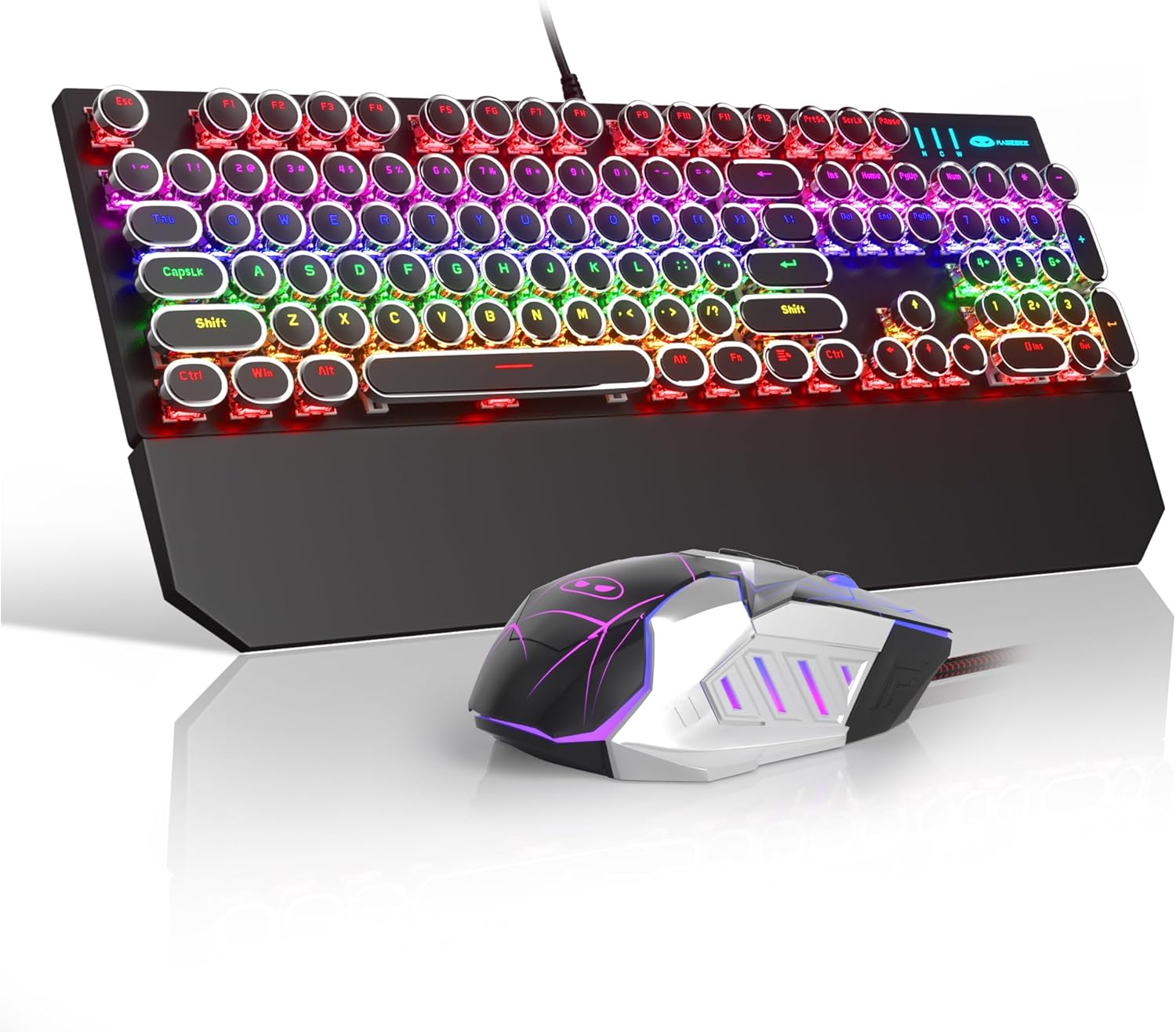
Retro Typewriter Keyboard and Mouse Combo, Cute Black Keyboard with Linear Red Switches, Full Size Wired Mechanical Gaming Keyboard, Cool Light Up Keyboard and Mouse for Gaming,Work,Mac,PC,Windows
Want the best price and purchase timing?
Our AI advisor analyzes real-time pricing across all channels to find you the best deal.
AI Verdict
This is a wired, full-size mechanical keyboard and mouse combo with linear red switches and retro-style round keycaps, designed for users prioritizing a unique aesthetic on a budget.
This combo is a situational fit because its primary appeal is the retro typewriter aesthetic and the inclusion of linear red mechanical switches at a budget price. The wired connectivity and specific keycap design mean it won't suit everyone, especially those prioritizing portability or traditional typing feel.
If the retro look isn't a priority, look for a mechanical keyboard with standard keycap profiles and wireless connectivity for more flexibility.
Regret Score™
Medium RiskLower is better — measures purchase-regret risk from real buyer complaints, review credibility, and product maturity
Issues discovered after purchase
Critically weak dimension
Amazon rating vs actual quality
Chance this product isn't for you
Pros
- Features linear mechanical red switches, which are quieter and offer fast action with minimal resistance, often preferred by gamers.
- Keyboard includes 104 anti-ghosting keys, supporting simultaneous key presses for gaming and fast typing.
- Mouse offers 6 adjustable speed levels (600/800/1200/1600/2400/3200 DPI) and 7 buttons for customizable control.
- Keyboard and mouse are plug-and-play compatible with a wide range of Windows operating systems (Win98 / 2000/ 7 / 8 / 10 / XP / Vista / ME) without needing drivers.
- Keycaps utilize a two-color injection molding process, which enhances durability and prevents legends from fading.
- Mouse features 8 lighting modes, including a 7-color circulatory breathing mode and 7 solid color breathing options.
Cons
- The wired USB connectivity limits placement flexibility compared to wireless alternatives.
- Round keycaps, while visually distinctive, can require an adjustment period and may lead to typing fatigue for some users during extended sessions.
- The keyboard's fixed incline, with only adjustable rear feet, offers limited ergonomic customization.
- Linear red switches, while quiet, lack the tactile bump that some users prefer for typing feedback.
- The 3.21-pound combined weight might be considered heavy for a keyboard and mouse combo, impacting portability.
Dimension Scores
The linear red mechanical switches offer a smooth keystroke, but the round keycaps can feel unfamiliar and reduce typing accuracy for some users, requiring an adjustment period.
Wired USB connectivity inherently provides a stable and consistent connection without concerns for battery life or wireless interference.
The mouse offers 8 lighting modes, including 7-color circulatory breathing and solid colors, but the keyboard's lighting features are not detailed enough to suggest advanced customization or RGB per-key lighting.
The keycaps use a durable two-color injection molding process, and the combined weight of 3.21 pounds suggests a somewhat substantial construction for a budget combo.
Best For
- Users seeking a distinctive retro aesthetic for their desk setup.
- Budget-conscious gamers who prefer quiet linear mechanical switches.
- Individuals needing a full-size keyboard with a dedicated number pad for data entry or productivity.
- Anyone who values simple plug-and-play functionality without software installations.
Not Recommended For
- Users who require wireless connectivity for a clutter-free desk or portability.
- Typists who prefer a tactile or clicky switch for more pronounced feedback.
- Individuals needing extensive ergonomic adjustments beyond basic tilt.
- Competitive gamers who demand advanced software customization for macros or complex lighting effects.
Watch Out For
- The round keycaps can feel unfamiliar and reduce typing accuracy initially, potentially causing frustration for users accustomed to standard square keycaps.
- Despite linear red switches being quieter than blue, the mechanical nature of the keyboard can still produce noticeable sound, which might be disruptive in quiet shared environments.
- The lack of advanced software means lighting modes and mouse button assignments are fixed to the hardware, limiting personalization options.
- The keyboard's fixed height at the front, even with adjustable rear feet, might not suit all wrist angles, potentially leading to discomfort during prolonged use.
Full Specifications
| ASIN | B0BZ8CHRLJ |
| Brand | Camiysn |
| Color | Black/Multicolor |
| Item Weight | 3.21 pounds |
| Manufacturer | Camiysn |
| Special Feature | Ergonomic |
| Compatible Devices | Gaming Console, Personal Computer |
| Package Dimensions | 17.68 x 8.35 x 2.24 inches |
| Connectivity Technology | Usb |
What Buyers Say
This combo leans heavily into its retro typewriter aesthetic, which is a major draw for many, but the unique round keycaps and linear red switches create a distinct typing experience that isn't for everyone. While the wired connection is reliable, the lack of advanced software customization for lighting or macros means what you see is what you get. The mouse offers a decent range of DPI settings and lighting modes for its price point. It's a statement piece that functions as a basic mechanical keyboard and mouse, rather than a high-performance peripheral set.
“Okay, so it looks super cute on my desk, like straight out of an old movie, but man, these round keys are messing with my typing speed! The mouse is fine, lights up cool, but I wish the keyboard had more light options. Still, for the price, it's a vibe.”
Common Praise
- The retro typewriter design with round keycaps is visually appealing and unique.
- Linear red mechanical switches provide a quiet and smooth typing experience.
- The mouse's adjustable DPI settings (up to 3200) are useful for different tasks.
- Plug-and-play functionality across various Windows versions makes setup simple.
- The two-color injection molded keycaps are durable and resist wear.
Common Complaints
- Round keycaps can be challenging to adapt to, leading to initial typing errors or slower speeds.
- The keyboard's fixed angle, even with adjustable feet, may not be ergonomically suitable for all users.
- The wired connection limits desk organization and portability.
- Lack of advanced software for keyboard lighting customization or macro programming.
- The mechanical switches, while linear, can still be louder than membrane keyboards, which might be an issue in shared spaces.
Ownership Tips
- The round keycaps require a conscious effort to adjust your finger placement, especially if you're a fast typist.
- The linear red switches are indeed quieter than clicky switches, but they still have a distinct mechanical sound that's different from a membrane keyboard.
- The wired connection, while reliable, means you're tethered to your PC, so cable management is something to consider.
- The mouse's lighting modes are a nice touch, but the keyboard's backlighting is more basic and less customizable than some RGB options.
- The weight of the combo (3.21 pounds) makes it feel substantial on the desk, preventing accidental sliding during use.
Frequently Asked Questions
Is this keyboard and mouse combo wireless?
No, both the keyboard and mouse in this combo connect via a wired USB cable. They are not wireless devices.
What kind of switches does the keyboard use?
The keyboard features linear mechanical red switches. These switches are known for their quiet operation and smooth, consistent keystrokes without a tactile bump.
Can I customize the lighting on the keyboard and mouse?
The mouse has 8 lighting modes, including a 7-color circulatory breathing mode and 7 solid color breathing options. The product description highlights 'Cool Light Up Keyboard and Mouse,' suggesting some lighting, but specific customization options for the keyboard are not detailed in the provided specs.
Is this combo compatible with Mac computers?
The product is listed as compatible with Gaming Console, Personal Computer, and specifically Windows operating systems (Win98 / 2000/ 7 / 8 / 10 / XP / Vista / ME). Mac compatibility is not explicitly stated in the specifications.
Are the keycaps removable or replaceable?
The keycaps are made with a two-color injection molding process for durability. While mechanical keycaps are generally removable, the unique round shape means finding compatible replacements might be challenging.
Does the mouse have adjustable DPI?
Yes, the mouse has 6 adjustable speed levels: 600/800/1200/1600/2400/3200 DPI, which can be adjusted using two dedicated speed buttons.
Buying Guide
When you're looking at a keyboard and mouse combo like this, you need to decide if the 'retro typewriter' look is truly what you want, because it dictates a lot of the experience. The round keycaps are a big part of that aesthetic, but they change how you type. Also, consider if wired connectivity works for your setup, or if you'd prefer the freedom of wireless.
Linear Red Switches
These switches offer a smooth, consistent press from top to bottom without a 'bump' or 'click' you might feel on other mechanical switches. They're often favored by gamers for quick, repeated presses and by those who prefer a quieter mechanical keyboard, but they don't provide tactile feedback for typing.
Full Size Layout
This means the keyboard includes a dedicated number pad on the right side, along with function keys and navigation clusters. It's ideal if you frequently work with numbers or prefer having all keys readily accessible, but it takes up more desk space than compact keyboards.
Wired USB Connectivity
A wired connection means you plug it directly into your computer's USB port. This provides a stable, lag-free connection without needing batteries or worrying about wireless interference, but it also means you'll have a cable on your desk.
Round Keycaps
These are the main visual element for the 'typewriter' look. While they look cool, the smaller, circular surface area can feel different under your fingertips compared to traditional square keycaps, potentially affecting typing speed and accuracy until you get used to them.
Alternatives
If you need wireless freedom or a more traditional typing feel, look for mechanical keyboards with Bluetooth or 2.4GHz wireless connectivity and standard square keycaps, possibly with tactile or clicky switches for more feedback.
You Might Also Like

Logitech MK270 Wireless Keyboard and Mouse Combo for Windows, 2.4 GHz, 8 Multimedia Keys, PC, Laptop, Wireless Keyboard Compact Mouse Combo - Black
This is a 2.4 GHz wireless keyboard and mouse combo with a full-size QWERTY layout and 8 multimedia keys, built for basic Windows PC tasks on a tight budget.

Logitech MK270 Wireless Keyboard and Mouse Combo for Windows, 2.4 GHz, 8 Multimedia Keys, PC, Laptop, Wireless Keyboard Compact Mouse Combo - Rose
This is a 2.4 GHz RF membrane keyboard and mouse combo with a full-size layout, best suited for basic Windows PC tasks on a tight budget.

Logitech K270 Wireless Keyboard for Windows, 2.4 GHz Wireless, Full-Size, Number Pad, 8 Multimedia Keys, 2-Year Battery Life, Compatible with PC, Laptop - Rose
This is a full-size, 2.4 GHz wireless membrane keyboard with 8 multimedia keys and a number pad, designed for basic PC and laptop use.

Logitech MK270 Wireless Keyboard and Mouse Combo for Windows, 2.4 GHz, 8 Multimedia Keys, PC, Laptop, Wireless Keyboard Compact Mouse Combo - White
This is a budget 2.4 GHz wireless membrane keyboard and mouse combo with a full-size layout, 8 multimedia keys, and a compact mouse, best for basic PC tasks.