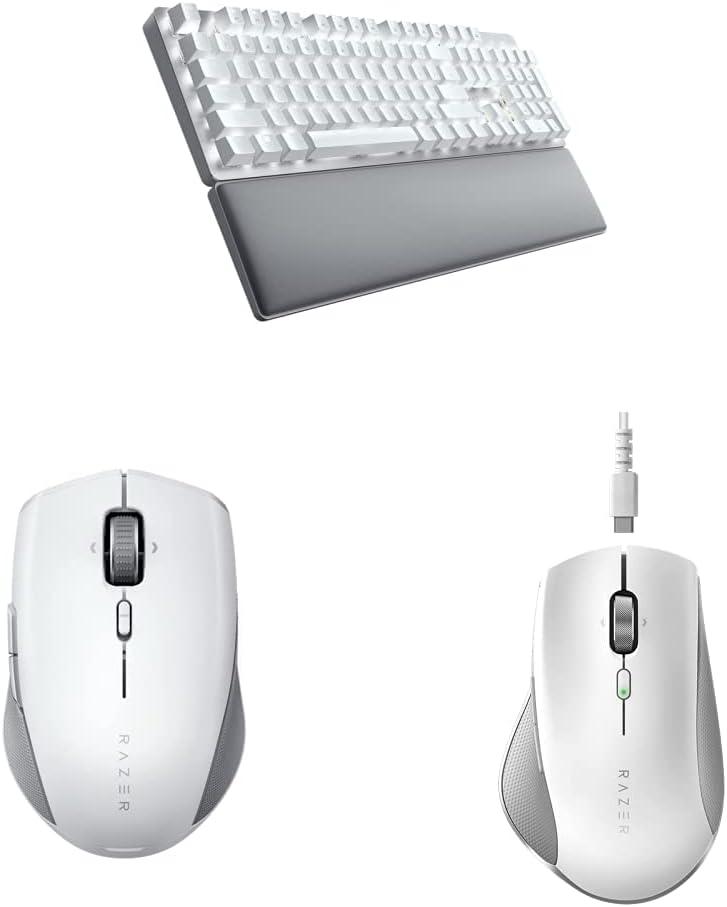
Razer Pro Type Ultra Wireless Mechanical Keyboard & Smart Controls & Pro Click Mini Portable Wireless Mouse, Sleek & Compact Design - HyperScroll Technology - Productivity Dongle
Want the best price and purchase timing?
Our AI advisor analyzes real-time pricing across all channels to find you the best deal.
AI Verdict
This is a wireless mechanical keyboard with linear switches and a compact mouse with silent clicks, designed for quiet PC and Android productivity setups.
This combo is a situational fit for users prioritizing quiet operation and multi-device connectivity on PC or Android, thanks to its silent mechanical switches and 4-device pairing. However, the keyboard's poor battery life with backlighting and reported keycap durability issues limit its appeal for all-day, illuminated use.
If constant backlighting and keycap durability are priorities, look for keyboards with longer illuminated battery life and PBT keycaps.
Regret Score™
Medium RiskLower is better — measures purchase-regret risk from real buyer complaints, review credibility, and product maturity
Issues discovered after purchase
Critically weak dimension
Amazon rating vs actual quality
Chance this product isn't for you
Pros
- Keyboard features silent mechanical switches with sound dampening foam, rated for 80 million clicks, for a quiet typing experience.
- Keyboard offers a soft, cushioned wrist support and two incline settings for ergonomic comfort during long typing sessions.
- Keyboard connects to up to 4 devices (3 Bluetooth, 1 USB receiver) and the mouse connects to up to 4 devices (Bluetooth or 2.4GHz receiver) for multi-device workflows.
- Mouse includes HyperScroll Technology, allowing free-spin, tactile, and tilt-click scrolling for efficient navigation.
- Mouse features silent mechanical switches, rated for 15 million clicks, which are almost practically silent compared to standard mice.
- Keyboard keycaps are ABS plastic with a fingerprint-resistant, soft-touch coating.
Cons
- Keyboard's white-only backlighting significantly reduces battery life from 214 hours (Bluetooth) to 13-14 hours when on full brightness.
- Keyboard keycap paint has been reported to wear off after 6 months of use.
- Mouse's compact size can cause hand cramping for users with larger hands.
- Some users report occasional missed keystrokes and spotty Bluetooth connection issues with the keyboard and mouse.
- Lack of macOS compatibility for some features limits its use for Mac users.
Dimension Scores
The keyboard features Razer Yellow linear mechanical switches with sound dampening foam and soft-touch ABS keycaps, providing a smooth and quiet typing experience.
While offering multi-device connectivity via HyperSpeed 2.4GHz and Bluetooth, some users report occasional missed keystrokes and spotty Bluetooth connections.
The keyboard has white-only backlighting with 16 brightness levels, which is functional but lacks color options and severely impacts battery life when active.
The keyboard features a plastic body with an aluminum top plate and ABS keycaps, but some users have reported the keycap paint wearing off after 6 months.
Best For
- Quiet office environments or work-from-home setups where noise reduction is critical.
- Users who frequently switch between multiple PC or Android devices.
- Individuals prioritizing ergonomic support during extended typing sessions.
- Users who need precise and varied scrolling options for documents and web pages.
Not Recommended For
- Mac users requiring full feature compatibility and seamless integration.
- Users with larger hands seeking an ergonomically shaped mouse.
- Anyone expecting long battery life with constant backlighting on the keyboard.
Watch Out For
- Keyboard keycap coating can wear off, with one user reporting paint coming off after 6 months.
- Keyboard battery life drops from 214 hours (Bluetooth) to only 13-14 hours when the white backlight is on full brightness.
- Mouse, weighing 111g with two AA batteries, can be reduced to 88g by using only one AA battery, but this halves the battery life.
- Some users experience intermittent connection issues, including missed keystrokes and unresponsive peripherals, even with the 2.4GHz dongle.
- The keyboard's Razer Yellow linear switches have a 1.2mm actuation point, which some users find too sensitive, leading to typing errors.
Full Specifications
| ASIN | B0BXNCGZ2H |
| Brand | Razer |
| Color | White |
| Manufacturer | Razer |
| Power Source | Battery Powered |
| Keyboard layout | QWERTY |
| Special Feature | Fingerprint-resistant |
| Hand Orientation | Ambidextrous |
| Operating System | Windows, macOS, Linux |
| Compatible Devices | PC |
| Connectivity Technology | Wireless (with USB receiver) |
| Recommended Uses For Product | Office |
What Buyers Say
The most surprising finding is the significant battery drain when the keyboard's backlight is used, dropping from over 200 hours to just 13-14 hours. Users also frequently mention the keyboard's keycap paint wearing off after only a few months of use, which is a durability concern. The mouse's compact size is a recurring point, with some finding it causes hand cramping. Despite being marketed as 'silent,' some users still find the keyboard switches louder than expected.
“Man, I bought this 'cause it said 'Pro' and 'Ultra' but the keycaps are already fading after like half a year, and if I want the lights on, the battery dies faster than my phone. The mouse is tiny too, my hand aches after a while. Wish I just got something else.”
Common Praise
- Keyboard's silent mechanical switches and sound dampening foam create a quiet work environment.
- The included soft, cushioned wrist rest significantly improves comfort for long typing sessions.
- Ability to connect both keyboard and mouse to multiple devices (up to 4) and switch easily is highly valued for productivity.
- Mouse's HyperScroll Technology with free-spin, tactile, and tilt-click modes makes navigation efficient.
- Mouse's silent mechanical switches are praised for being almost practically silent without feeling mushy.
Common Complaints
- Keyboard keycap paint wearing off after 6 months of use is a recurring durability issue.
- Keyboard battery life is drastically reduced to 13-14 hours when backlighting is on full brightness.
- Mouse's small, symmetrical design can lead to hand cramping for users with larger hands.
- Occasional missed keystrokes and spotty Bluetooth connections are reported for both peripherals.
- Lack of full macOS support is a drawback for many professional users.
- Keyboard's Razer Yellow switches are sometimes perceived as too sensitive, causing accidental inputs.
Ownership Tips
- The keyboard's 'silent' switches are quiet for mechanical, but not completely silent like membrane keyboards, which can be a surprise.
- The wrist rest, while comfortable, doesn't attach magnetically and just slides into place, which can shift during use.
- The mouse's ability to run on a single AA battery is useful for weight reduction, but you'll be swapping batteries more often.
- The white-only backlight is functional but doesn't offer the customization or aesthetic appeal of RGB, which might be a letdown for some.
- Connection issues can sometimes be resolved by adjusting Windows power settings for USB devices, but it's an extra step.
Frequently Asked Questions
Does this keyboard and mouse work with Mac?
The keyboard and mouse are compatible with PC and Android devices. Some users report a lack of macOS compatibility for certain features.
How long does the keyboard battery last with backlighting?
With the white backlight on full brightness, the keyboard battery lasts approximately 13-14 hours. Without backlighting, it can last up to 214 hours via Bluetooth or 207 hours via HyperSpeed.
Are the keyboard switches loud?
The keyboard uses Razer Yellow linear mechanical switches with sound dampening foam, designed for quiet operation. While generally quiet, some users accustomed to non-mechanical keyboards might still perceive them as louder than membrane switches.
Can I use the mouse with only one battery?
Yes, the mouse can operate with a single AA battery, reducing its weight from 111g to 88g. However, this will halve the battery life.
Does the keyboard come with a wrist rest?
Yes, the Razer Pro Type Ultra includes a soft, cushioned wrist support that aligns with the keyboard for ergonomic comfort.
Buying Guide
When you're looking at a keyboard and mouse combo, think about how you actually work. Do you type all day, or just occasionally? Do you need to switch between devices a lot? For a mechanical keyboard, the type of switch matters for how it feels and sounds. For a mouse, size and scroll wheel features can make a big difference in comfort and efficiency.
Mechanical Switches (Linear)
This means each key has its own switch, giving a consistent feel. 'Linear' means the keypress is smooth from top to bottom without a bump or click, like pressing a button on an elevator. It's often quieter and faster for rapid key presses, but some people miss the tactile feedback.
Multi-device Connectivity (HyperSpeed & Bluetooth)
This lets you connect the keyboard and mouse to several different computers or tablets at once. You can switch between them with a button, which is super handy if you use a work laptop and a personal desktop on the same desk, without needing to unplug and replug.
HyperScroll Technology
This is about the mouse's scroll wheel. It can do a super-fast, smooth 'free-spin' for long documents, a 'tactile' mode with clicks for precision, and even 'tilt-click' for scrolling sideways. Think of it like having different gears on a bike for different terrains.
Alternatives
If you need a keyboard with more durable keycaps, search for models with PBT keycaps. For better illuminated battery life, look for keyboards with more efficient backlighting or larger batteries. If you have larger hands, seek out ergonomically shaped mice with a larger form factor.
You Might Also Like

Logitech MK270 Wireless Keyboard and Mouse Combo for Windows, 2.4 GHz, 8 Multimedia Keys, PC, Laptop, Wireless Keyboard Compact Mouse Combo - Black
This is a 2.4 GHz wireless keyboard and mouse combo with a full-size QWERTY layout and 8 multimedia keys, built for basic Windows PC tasks on a tight budget.

Logitech MK270 Wireless Keyboard and Mouse Combo for Windows, 2.4 GHz, 8 Multimedia Keys, PC, Laptop, Wireless Keyboard Compact Mouse Combo - Rose
This is a 2.4 GHz RF membrane keyboard and mouse combo with a full-size layout, best suited for basic Windows PC tasks on a tight budget.

Logitech K270 Wireless Keyboard for Windows, 2.4 GHz Wireless, Full-Size, Number Pad, 8 Multimedia Keys, 2-Year Battery Life, Compatible with PC, Laptop - Rose
This is a full-size, 2.4 GHz wireless membrane keyboard with 8 multimedia keys and a number pad, designed for basic PC and laptop use.

Logitech MK270 Wireless Keyboard and Mouse Combo for Windows, 2.4 GHz, 8 Multimedia Keys, PC, Laptop, Wireless Keyboard Compact Mouse Combo - White
This is a budget 2.4 GHz wireless membrane keyboard and mouse combo with a full-size layout, 8 multimedia keys, and a compact mouse, best for basic PC tasks.