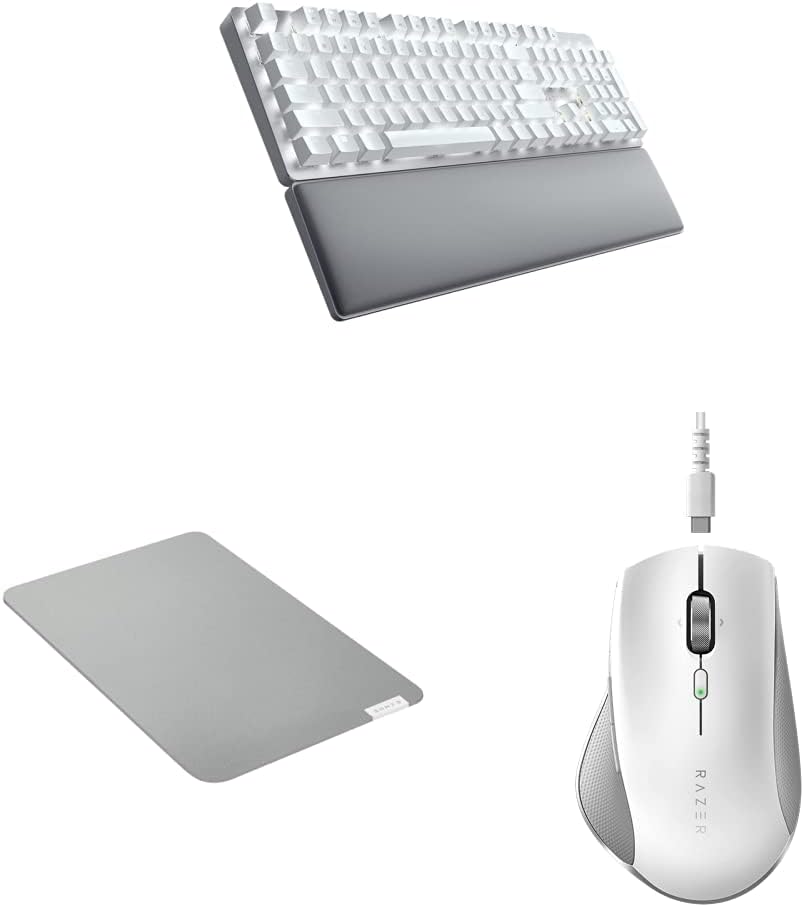
Razer Pro Type Ultra Wireless Mechanical Keyboard & Glide Soft Mouse Mat, Medium Size & Click Humanscale Wireless Mouse
Want the best price and purchase timing?
Our AI advisor analyzes real-time pricing across all channels to find you the best deal.
AI Verdict
This bundle offers a wireless mechanical keyboard with silent linear switches, an ergonomic mouse, and a thick mouse mat for quiet, comfortable PC productivity.
This bundle is a situational fit because while it offers specific ergonomic and quiet-typing features, user complaints about keycap durability, actual noise levels, and battery life with backlighting on are significant. The mouse and mat are generally well-received for comfort and tracking, but the keyboard has notable drawbacks that might not suit all users seeking a 'Pro' experience.
If quiet operation and keycap durability are paramount, look for keyboards with PBT keycaps and switches specifically designed for minimal sound, like silent tactile switches, and verify battery life claims with backlight on.
Regret Score™
Medium RiskLower is better — measures purchase-regret risk from real buyer complaints, review credibility, and product maturity
Issues discovered after purchase
Critically weak dimension
Amazon rating vs actual quality
Chance this product isn't for you
Pros
- Keyboard features silent mechanical switches and sound dampening foam for a quiet typing experience.
- Keyboard's ABS keycaps have a fingerprint-resistant, soft-touch coating for a cushioned feel.
- Keyboard includes a soft, cushioned wrist support that aligns perfectly to relieve wrist pressure.
- Mouse offers grippy rubber sides and a thumb wing for improved accuracy and ergonomics.
- Mouse has a long battery life, rated for 30 days via Bluetooth and 17 days via 2.4GHz receiver.
- Mouse mat is 3mm thick, high-density rubber foam providing cushioning and a sturdy base.
Cons
- Keyboard keycap paint can wear off after 6 months of use, with no affordable replacement keycaps available.
- Keyboard's 'silent' yellow linear switches are reported as loud by some users, with a metallic ping sound.
- Keyboard battery life is only 13 hours with backlighting on, significantly less than the 207-214 hours without.
- Keyboard automatically goes to sleep after 15 minutes, even with Synapse settings, causing slow re-pairing.
- Mouse's rubber grip material is not ideal for users with sweaty hands.
Dimension Scores
The keyboard's linear Razer Yellow switches are light and responsive, with soft-touch coated ABS keycaps and a cushioned wrist rest contributing to comfort for long typing sessions.
The keyboard offers multi-device connectivity via Bluetooth and 2.4GHz, but users report slow re-pairing and a forced 15-minute sleep mode that can interrupt workflow.
The keyboard has bright white backlighting, but secondary key functions are not illuminated, and key legends are hard to read at medium brightness settings.
While the keyboard is rated for 80 million clicks, user reports of keycap paint wearing off within 6 months indicate a significant durability issue for the keycaps themselves.
Best For
- Office workers needing a quieter mechanical keyboard for shared spaces.
- Users who type for extended periods and require ergonomic support for wrists.
- Individuals seeking a wireless setup that can connect to multiple devices (up to four).
- Productivity-focused users who appreciate a comfortable, ambidextrous mouse design.
Not Recommended For
- Users who frequently use macOS, as the keyboard has compatibility issues.
- Anyone expecting a truly silent mechanical keyboard, as user reports indicate it's louder than advertised.
- Users with larger hands or a palm grip for the mouse, as it may feel too small or bulky.
Watch Out For
- The keyboard's keycap legends are difficult to read when the white backlight is at medium brightness, and secondary key functions are not illuminated at all.
- Razer's Synapse 3 software, required for full customization, demands user registration and includes advertisements.
- The mouse uses a notched Micro-USB connector for charging, meaning only the included cable will fit properly.
- Keyboard's 'sensitive' yellow switches can lead to typing errors for those accustomed to switches with more resistance.
- The keyboard's warranty may not cover keycap wear in some regions, and replacement keycaps are not readily available or affordable.
Full Specifications
| ASIN | B0BXN9BKD5 |
| Brand | Razer |
| Color | White |
| Material | Plastic |
| Manufacturer | Razer |
| Power Source | Battery Powered |
| Special Feature | Fingerprint-resistant |
| Compatible Devices | PC |
| Included Components | Keyboard, Mouse |
| Keyboard Description | Indoor |
| Connectivity Technology | Wireless |
| Recommended Uses For Product | Office |
What Buyers Say
The most surprising finding is the widespread complaint about the keyboard's keycap paint wearing off quickly, often within six months, which directly contradicts the 'durable design' claim. Despite being marketed as 'silent,' many users found the yellow linear switches to be audibly loud, sometimes producing a metallic ping, making it less ideal for quiet office environments than suggested. The mouse, however, generally receives praise for its ergonomics, long battery life, and comfortable feel, though some find it too light or small. The mouse mat is consistently described as thick, durable, and comfortable.
“Ugh, the keyboard's keycaps are already losing their paint after only a few months, and it's definitely not 'silent' like they said, my coworkers can hear me typing from across the office! But the mouse is actually pretty sweet, super comfy for my hand.”
Common Praise
- Keyboard's soft-touch keycaps and wrist rest provide comfort during extended typing.
- Mouse's ergonomic shape with grippy sides and thumb wing reduces hand and wrist pain.
- Mouse has a very long battery life, with users reporting weeks of use on a single charge.
- Keyboard's ability to connect to up to four devices wirelessly is convenient for multi-system setups.
- Mouse mat's 3mm thick, high-density rubber foam provides good cushioning and a stable base.
- Keyboard's Razer Yellow switches are light and responsive, offering a good typing feel for some.
Common Complaints
- Keyboard keycap paint wears off prematurely, sometimes within half a year of use.
- Keyboard's 'silent' switches are actually loud, with a metallic sound, making it unsuitable for quiet settings.
- Keyboard's battery life is poor (13 hours) when backlighting is enabled.
- Keyboard automatically sleeps after 15 minutes, leading to frustrating delays and slow re-pairing.
- Mouse's rubber grip material can become slippery or uncomfortable for users with sweaty hands.
- Razer Synapse software is often criticized for requiring registration and containing ads.
Ownership Tips
- The keyboard's white backlight, while bright, makes secondary key functions invisible and primary legends hard to see at certain brightness levels.
- The mouse's unique Micro-USB charging port means you're stuck with the included cable, which can be a hassle if lost or damaged.
- The keyboard's 15-minute auto-sleep feature, even when configured in Synapse, can be disruptive if you frequently pause typing for meetings or reading.
- The mouse mat, while durable, is not water-resistant, so spills could be an issue.
- The 'sensitive' nature of the yellow switches on the keyboard can lead to more accidental keystrokes if you're a heavy-handed typist.
Frequently Asked Questions
Is the Razer Pro Type Ultra keyboard truly silent?
While Razer markets it with 'silent mechanical switches,' many users report the yellow linear switches are louder than expected, with some experiencing a metallic ping sound during typing.
How long does the keyboard battery last with backlighting?
With the white backlighting on, the keyboard's battery life is rated for only 13 hours. Without backlighting, it can last significantly longer, up to 214 hours.
Can I use the keyboard and mouse with multiple devices?
Yes, the keyboard can connect to up to four devices (three via Bluetooth and one via the 2.4GHz USB receiver). The mouse also supports both Bluetooth and 2.4GHz connectivity.
Are the keycaps on the Razer Pro Type Ultra durable?
User feedback indicates that the paint on the ABS keycaps can wear off after about 6 months of use, which is a significant durability concern.
Is the Razer Pro Click Humanscale mouse suitable for large hands?
Some users with larger hands or a palm grip have found the mouse to be too small or bulky, suggesting it might be better suited for claw or fingertip grip users.
Does the mouse mat have any special features?
The mat features a 3mm thick, high-density rubber foam for cushioning and a textured micro-weave cloth surface for accurate tracking. It also has an anti-slip base.
Buying Guide
When looking at a keyboard, mouse, and mat bundle like this, you're balancing comfort, performance, and durability for your daily tasks. For the keyboard, 'mechanical' means individual switches under each key, offering a distinct feel and often better longevity than membrane keyboards. 'Wireless' gives you freedom from cables but means you'll deal with batteries. For the mouse, 'ergonomics' refers to how well it fits your hand and supports natural wrist posture, crucial for long work sessions. The mouse mat's material and thickness impact both mouse tracking and wrist comfort.
Silent Mechanical Switches (Keyboard)
This spec means the keyboard uses mechanical switches designed to produce less noise than traditional mechanical switches. It's important if you work in a shared office or don't want to disturb others, but 'silent' can be subjective, so check user reviews for actual noise levels.
Soft-Touch Coated ABS Keycaps (Keyboard)
ABS is a common plastic for keycaps, and the 'soft-touch coating' is meant to provide a comfortable, grippy feel. However, coatings can wear off over time, revealing the underlying plastic and potentially making legends illegible, so durability is a factor here.
HyperSpeed Technology (Keyboard)
This is Razer's proprietary 2.4GHz wireless connection, designed for low latency and a stable connection. It's like a dedicated, super-fast lane for your keyboard's signals, which is important for responsiveness, especially if you also game.
Thick, High-Density Rubber Foam (Mouse Mat)
A thicker, denser mouse mat provides more cushioning for your wrist and forearm, which can reduce fatigue during long computer use. It also creates a more stable and consistent surface for your mouse to track on, like a smooth, even road for a car.
Alternatives
If keycap durability and true silent operation are critical, search for keyboards with PBT keycaps and specifically 'silent' or 'dampened' tactile switches. For a mouse, if you need infinity scroll or a heavier feel, look for models with those specific features.
You Might Also Like

Logitech MK270 Wireless Keyboard and Mouse Combo for Windows, 2.4 GHz, 8 Multimedia Keys, PC, Laptop, Wireless Keyboard Compact Mouse Combo - Black
This is a 2.4 GHz wireless keyboard and mouse combo with a full-size QWERTY layout and 8 multimedia keys, built for basic Windows PC tasks on a tight budget.

Logitech MK270 Wireless Keyboard and Mouse Combo for Windows, 2.4 GHz, 8 Multimedia Keys, PC, Laptop, Wireless Keyboard Compact Mouse Combo - Rose
This is a 2.4 GHz RF membrane keyboard and mouse combo with a full-size layout, best suited for basic Windows PC tasks on a tight budget.

Logitech K270 Wireless Keyboard for Windows, 2.4 GHz Wireless, Full-Size, Number Pad, 8 Multimedia Keys, 2-Year Battery Life, Compatible with PC, Laptop - Rose
This is a full-size, 2.4 GHz wireless membrane keyboard with 8 multimedia keys and a number pad, designed for basic PC and laptop use.

Logitech MK270 Wireless Keyboard and Mouse Combo for Windows, 2.4 GHz, 8 Multimedia Keys, PC, Laptop, Wireless Keyboard Compact Mouse Combo - White
This is a budget 2.4 GHz wireless membrane keyboard and mouse combo with a full-size layout, 8 multimedia keys, and a compact mouse, best for basic PC tasks.