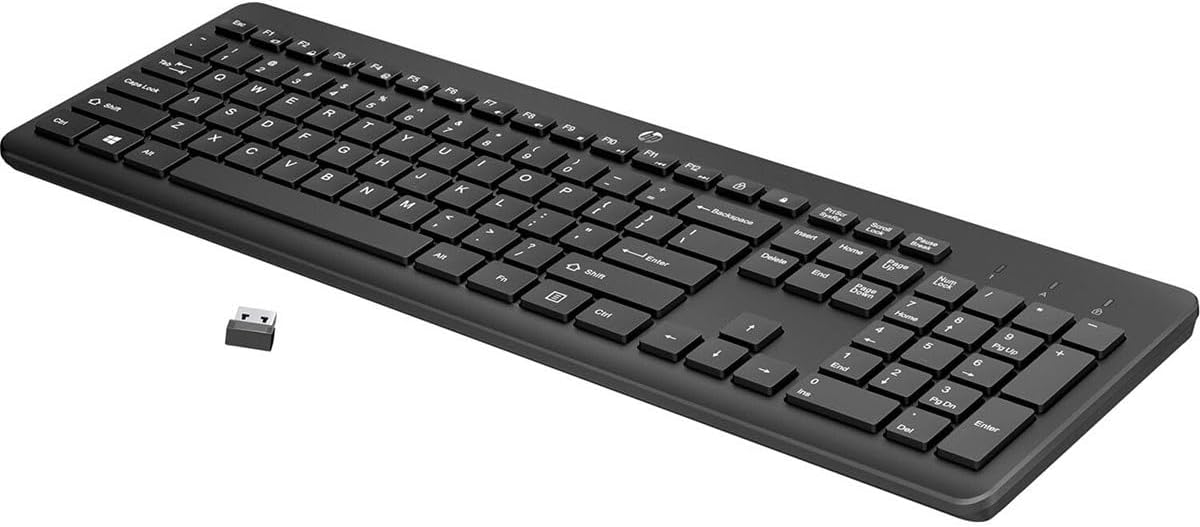
HP 230 Wireless Keyboard - Wireless Connection - Low-Profile, Quiet Design - Windows & Mac OS - Laptop, PC Compatible - Shortcut Keys & Number Pad - Long Battery Life (3L1E7AA#ABA),Black
Want the best price and purchase timing?
Our AI advisor analyzes real-time pricing across all channels to find you the best deal.
AI Verdict
A 1.09-pound wireless keyboard with low-profile chiclet keys and a number pad, designed for quiet typing on Windows or Mac.
This keyboard is a situational fit for those needing a basic, quiet, full-sized wireless keyboard with a number pad and long battery life for general productivity on a budget. Its low-profile chiclet keys and 1.09-pound weight make it portable, but the plastic build and "meh" key feel might disappoint users expecting a more premium typing experience.
If you need better typing feel or build quality, look for keyboards with mechanical switches or a more rigid chassis.
Regret Score™
High RiskLower is better — measures purchase-regret risk from real buyer complaints, review credibility, and product maturity
Issues discovered after purchase
Critically weak dimension
Amazon rating vs actual quality
Chance this product isn't for you
Pros
- Low-profile chiclet keys provide quiet typing.
- Full-sized layout includes a dedicated number pad.
- Offers up to 16 months of battery life with two AAA batteries.
- Connects wirelessly via a 2.4 GHz USB-A dongle.
- Compatible with both Windows and Mac OS.
- Features 12 easy-access keycap shortcuts for common functions.
Cons
- Key feel is described as "meh" by some users.
- Plastic construction can lead to keys sticking and an oily surface over time.
- Lacks a dedicated on/off switch, relying on an auto-sleep function.
- Battery cover can be difficult to remove.
- Occasional connectivity issues reported in crowded wireless environments.
Dimension Scores
The low-profile chiclet keys are quiet, but some users report a "meh" feel and less tactile feedback compared to other options.
The 2.4 GHz wireless connection is generally stable, but some users experience occasional drops in crowded wireless environments.
The product specifications and user reviews do not mention any backlighting feature.
Constructed entirely from plastic, some users noted keys can stick and the surface can become oily after prolonged use.
Best For
- Users needing a quiet keyboard for shared workspaces or home offices.
- Individuals requiring a full-sized keyboard with a number pad for data entry.
- Anyone seeking a basic, portable wireless keyboard for a laptop or PC.
- Budget-conscious buyers who prioritize functionality over premium features.
Not Recommended For
- Users who prefer pronounced tactile feedback or mechanical switches.
- Environments with high levels of wireless interference.
- Users who need direct power control via an on/off switch.
Watch Out For
- Key feel is reported as "meh," lacking satisfying tactile feedback.
- Plastic build quality may result in keys sticking and an oily surface after continuous use.
- No dedicated on/off switch means it relies solely on an auto-sleep feature for power management.
- The battery cover can be challenging to open, sometimes requiring tools.
- The keyboard may slide on smooth desk surfaces due to inadequate rubberized feet.
Full Specifications
| ASIN | B09W2SV2JD |
| Brand | HP |
| Color | Black |
| Series | HP 230 Wireless Keyboard |
| Batteries | 2 AAA batteries required. (included) |
| Item Weight | 1.09 pounds |
| Manufacturer | HP INC. |
| Power Source | Battery Powered |
| Special Feature | Ergonomic, Wireless Keyboard |
| Operating System | Compatibility: Windows 7, Windows 8, Windows 10, Windows 11 |
| Hardware Platform | Laptop, PC |
| Item model number | 3L1E7AA#ABA |
| Compatible Devices | Laptop, Personal Computer |
| Product Dimensions | 1.09 x 5.76 x 17.32 inches |
| Item Dimensions LxWxH | 1.09 x 5.76 x 17.32 inches |
| Connectivity Technology | wireless |
What Buyers Say
Many users point out that the HP 230 Wireless Keyboard delivers on its promise of quiet typing with its low-profile chiclet keys. The full-sized layout, including a number pad, is a recurring positive, especially for productivity tasks. However, some users have reported that the key feel is just "meh" and that the plastic build can feel cheap, with keys potentially sticking after extended use. The 16-month battery life is a definite plus, reducing the hassle of frequent battery changes.
“It's fine for basic stuff, but the keys feel a bit mushy and I had to pry the battery cover open with a knife, seriously.”
Common Praise
- Keys produce minimal noise during typing.
- Includes a full number pad for data entry.
- Battery life extends up to 16 months.
- Wireless connection is generally stable and lag-free.
- Compatible with both Windows and Mac operating systems.
- Lightweight at 1.09 pounds, making it portable.
Common Complaints
- Key feel is described as uninspiring or "meh".
- Plastic construction can feel cheap, and keys may stick over time.
- No dedicated on/off switch, relying on auto-sleep.
- Battery cover can be difficult to open.
- Occasional connectivity drops in areas with high wireless interference.
- Lack of tactile feedback compared to other keyboard types.
Ownership Tips
- The keyboard automatically enters a sleep mode after inactivity to save battery.
- The USB receiver can be stored inside the battery compartment for travel.
- The tilt legs provide a slight incline, but the keyboard can slide on smooth surfaces.
- The plastic surface can become oily with continuous use.
Frequently Asked Questions
Is this keyboard compatible with Mac computers?
Yes, the HP 230 Wireless Keyboard is compatible with both Windows and Mac OS devices.
Does the keyboard have an on/off switch?
No, the keyboard does not have a dedicated on/off switch but features an auto-sleep function to conserve battery life.
What type of batteries does it use, and are they included?
It uses two AAA batteries, and they are included in the box.
How quiet are the keys when typing?
The low-profile chiclet keys are designed for minimal noise, making it suitable for quiet environments.
How long can I expect the battery to last?
The keyboard offers up to 16 months of battery life with the included AAA batteries.
Can I store the USB receiver inside the keyboard?
Yes, there is a slot inside the battery compartment to store the USB receiver, which is convenient for travel.
Does this keyboard have backlighting?
No, there is no mention of backlighting in the product specifications or user reviews.
Buying Guide
When you're looking at a keyboard like this, you need to think about how you actually type and where you'll use it. A wireless connection means no cable mess, but you'll need a free USB-A port for the dongle. The "low-profile, quiet design" means the keys won't make a lot of noise, which is great for shared spaces, but it also usually means less travel and a softer feel than clickier keyboards.
Wireless Connectivity (2.4 GHz)
This is how the keyboard talks to your computer without a cable. It uses a small USB dongle that plugs into your PC, giving you freedom to place the keyboard where you want, like a remote control for your TV.
Low-Profile Chiclet Keys
Imagine laptop keys, but on a full-sized keyboard. They're flatter and have less distance to press down, which usually makes them quieter, like whispering instead of talking loudly.
Battery Life (Up to 16 months)
This tells you how long the keyboard will run on its two AAA batteries before you need to swap them out. Sixteen months is a long time, meaning you won't be constantly hunting for new batteries.
Integrated Number Pad
This is the block of numbers on the right side, just like a calculator. If you deal with a lot of spreadsheets or numbers, this is a must-have, making data entry much faster than using the top row of numbers.
Alternatives
If this keyboard doesn't cut it, look for models with mechanical switches for a more tactile typing experience, or Bluetooth connectivity if you need to connect to multiple devices without a dongle.
You Might Also Like

Logitech MK270 Wireless Keyboard and Mouse Combo for Windows, 2.4 GHz, 8 Multimedia Keys, PC, Laptop, Wireless Keyboard Compact Mouse Combo - Black
This is a 2.4 GHz wireless keyboard and mouse combo with a full-size QWERTY layout and 8 multimedia keys, built for basic Windows PC tasks on a tight budget.

Logitech MK270 Wireless Keyboard and Mouse Combo for Windows, 2.4 GHz, 8 Multimedia Keys, PC, Laptop, Wireless Keyboard Compact Mouse Combo - Rose
This is a 2.4 GHz RF membrane keyboard and mouse combo with a full-size layout, best suited for basic Windows PC tasks on a tight budget.

Logitech K270 Wireless Keyboard for Windows, 2.4 GHz Wireless, Full-Size, Number Pad, 8 Multimedia Keys, 2-Year Battery Life, Compatible with PC, Laptop - Rose
This is a full-size, 2.4 GHz wireless membrane keyboard with 8 multimedia keys and a number pad, designed for basic PC and laptop use.

Logitech MK270 Wireless Keyboard and Mouse Combo for Windows, 2.4 GHz, 8 Multimedia Keys, PC, Laptop, Wireless Keyboard Compact Mouse Combo - White
This is a budget 2.4 GHz wireless membrane keyboard and mouse combo with a full-size layout, 8 multimedia keys, and a compact mouse, best for basic PC tasks.