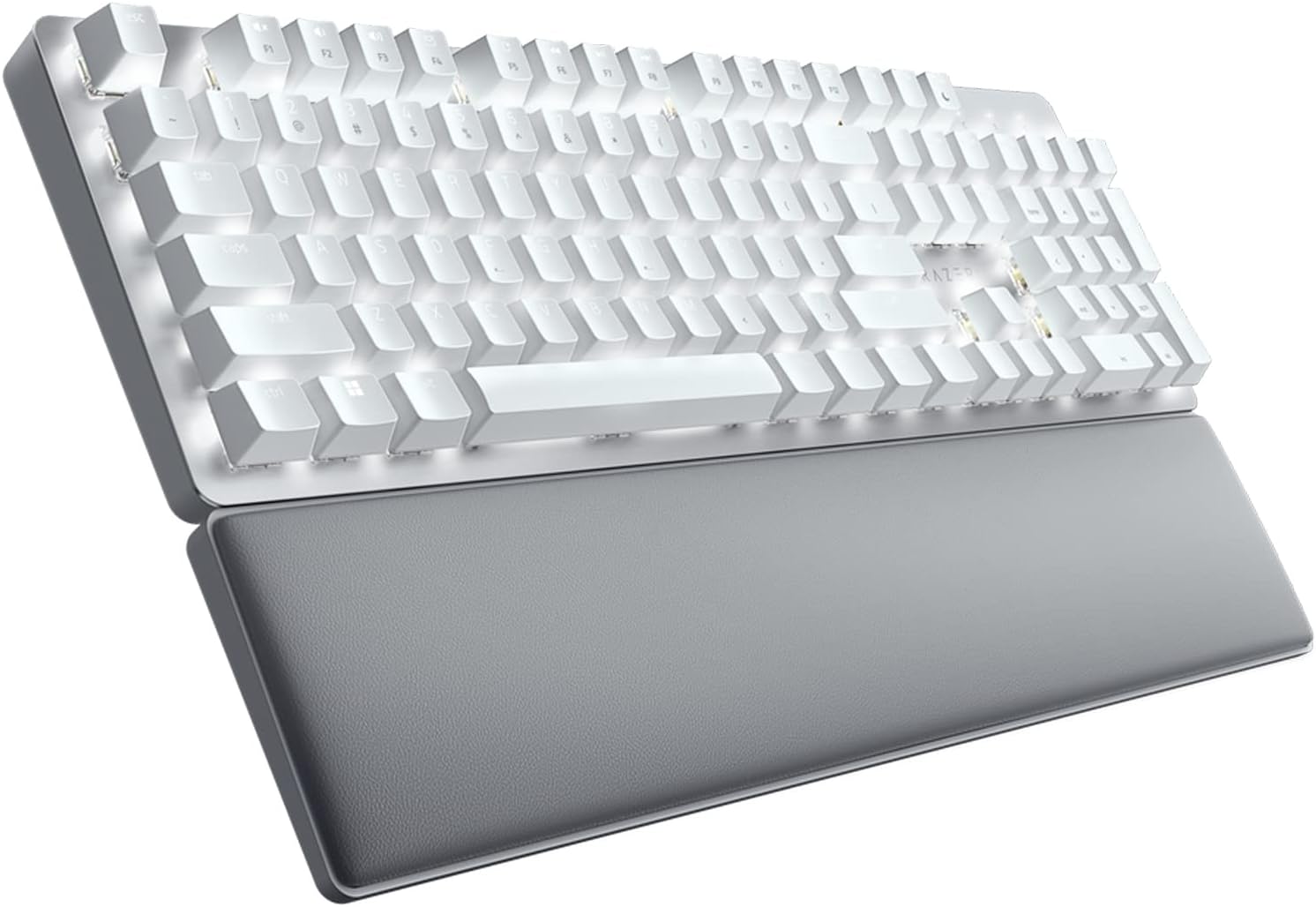
Razer Pro Type Ultra Wireless Mechanical Keyboard: Silent, Linear Switches - Ergonomic Design - HyperSpeed Technology - Connect up to 4 Devices - Fully Programmable Keys & Smart Controls
Want the best price and purchase timing?
Our AI advisor analyzes real-time pricing across all channels to find you the best deal.
AI Verdict
A wireless mechanical keyboard with silent linear switches, multi-device connectivity, and ergonomic design for productivity-focused users.
This keyboard offers multi-device connectivity for up to 4 devices and a comfortable ergonomic design with a wrist rest, making it suitable for productivity-focused users. However, the linear switches may not suit all typists, and the ABS keycaps are prone to wear and oil marks, which can detract from the premium feel over time.
If you need more keycap durability or tactile feedback, look for keyboards with PBT keycaps and a wider range of switch options (e.g., tactile or clicky).
Regret Score™
Low RiskLower is better — measures purchase-regret risk from real buyer complaints, review credibility, and product maturity
Issues discovered after purchase
Critically weak dimension
Amazon rating vs actual quality
Chance this product isn't for you
Pros
- Silent mechanical switches and sound dampening foam offer a quiet typing experience.
- Connects to up to 4 devices (1 via HyperSpeed dongle, 3 via Bluetooth) for seamless switching.
- Ergonomic design includes a cushioned wrist rest for comfort during long typing sessions.
- Keys are fully programmable for macros and shortcuts using Razer Synapse software.
- Razer HyperSpeed technology provides low-latency wireless connectivity.
- ABS keycaps feature a soft-touch coating for a cushioned feel.
Cons
- ABS keycaps show dirt and oil easily, and the paint can wear off within 6 months of use.
- Some users report metallic pings or loud key release sounds, despite the 'silent' marketing.
- The wrist rest is not magnetic, allowing it to shift out of alignment.
- Battery life is a common complaint, with some users needing to charge frequently.
- Razer Synapse 3 software requires registration and contains ads.
Dimension Scores
Razer Yellow linear switches are smooth and responsive, requiring 42-44 grams of force for actuation, but some users miss tactile feedback and report typing errors due to sensitivity.
HyperSpeed wireless offers low latency and multi-device switching, though a few users experienced minor, quick disconnections when switching devices.
It features single-color white backlighting with adjustable brightness, but lacks the per-key RGB customization found on many mechanical keyboards.
The keyboard has a plastic chassis with an aluminum top plate, but the soft-touch ABS keycaps are prone to showing oils and paint wear within 6 months of use.
Best For
- Office environments requiring a quieter mechanical keyboard.
- Users who frequently switch between multiple devices like a desktop, laptop, or tablet.
- Individuals prioritizing ergonomic comfort for extended typing periods.
- Fast typists or casual gamers who benefit from responsive linear switches.
Not Recommended For
- Users who prefer tactile feedback or an audible click from their mechanical switches.
- Those needing per-key RGB backlighting for customization.
- Users who dislike software requiring registration or containing advertisements.
Watch Out For
- The ABS keycaps are prone to showing finger oils and have been reported to have paint wear off within 6 months.
- Despite being marketed as 'silent,' some users experience metallic pings or a loud key release sound during typing.
- The included wrist rest is not magnetic, causing it to easily shift out of position.
- Some users find the battery life to be 'horrible,' requiring more frequent charging than expected.
- The Razer Synapse 3 software, necessary for customization, requires user registration and includes ads.
Full Specifications
| ASIN | B09J72K6SM |
| Brand | Razer |
| Color | White |
| Style | Modern |
| Series | Pro Type Ultra |
| Batteries | 1 Lithium Ion batteries required. (included) |
| Item Weight | 3.99 pounds |
| Manufacturer | Razer |
| Power Source | Battery Powered |
| Special Feature | Backlit, Wrist Rest |
| Operating System | Mac OS, Windows |
| Hardware Platform | PC |
| Item model number | RZ03-04110200-R3U1 |
| Compatible Devices | Laptop, PC, Tablet |
| Product Dimensions | 17.28 x 5.16 x 1.57 inches |
| Keyboard Description | Wireless |
| Item Dimensions LxWxH | 17.28 x 5.16 x 1.57 inches |
| Connectivity Technology | USB-C, Wireless |
| Recommended Uses For Product | Office |
| Keyboard backlighting color support | Single Color |
What Buyers Say
Many users are drawn to the Razer Pro Type Ultra for its quiet linear switches and multi-device connectivity, making it a strong contender for office use. However, a recurring complaint is the durability of the ABS keycaps, with reports of paint wearing off within six months. Despite being marketed as 'silent,' some users still experience metallic pings or loud key release sounds, which can be disruptive in quiet environments.
“Dude, I bought this 'silent' keyboard for my office, and it still pings sometimes, plus the keycaps are already shiny and worn after a few months, which is annoying for the price, but I do love how easy it is to switch between my work laptop and my tablet.”
Common Praise
- Quiet typing experience due to silent mechanical switches and sound dampening foam.
- Seamless switching between up to 4 connected devices (1 HyperSpeed, 3 Bluetooth).
- Comfortable typing during long sessions with the included cushioned wrist rest.
- Responsive Razer Yellow linear switches for fast typing and gaming.
- Clean, minimalist aesthetic with white backlighting.
Common Complaints
- ABS keycaps show finger oils easily and paint wears off quickly (within 6 months).
- Metallic pings or loud key release sounds, contradicting 'silent' marketing.
- Wrist rest is not magnetic and can easily shift out of place.
- Battery life is shorter than expected for some users, requiring frequent charging.
- Razer Synapse software requires registration and contains ads.
Ownership Tips
- The soft-touch coating on the ABS keycaps feels nice initially but degrades quickly, showing shine and wear.
- The 'silent' switches, while quieter than many mechanical keyboards, can still produce noticeable metallic pings or bottom-out sounds.
- The detachable wrist rest, while comfortable, lacks a magnetic attachment, so it doesn't stay perfectly aligned with the keyboard.
- Battery life can be inconsistent; some users report needing to charge weekly with heavy use, despite advertised longer durations.
Frequently Asked Questions
Is this keyboard truly silent?
While marketed as silent with linear switches and sound dampening foam, some users report metallic pings or a loud key release sound, indicating it may not be completely silent in all scenarios.
Can I connect it to multiple devices?
Yes, it supports connecting to up to 4 devices simultaneously: one via the 2.4GHz HyperSpeed dongle and three via Bluetooth, allowing for convenient switching.
Does it have RGB lighting?
No, the Razer Pro Type Ultra features single-color white backlighting only, not customizable per-key RGB lighting.
Are the keys programmable?
Yes, the keys are fully programmable, allowing you to remap them, record macros, and create personal shortcuts using the Razer Synapse software.
What kind of switches does it use?
It uses Razer Yellow linear mechanical switches, which are designed for smooth and quiet keystrokes.
Is the wrist rest attached?
No, it comes with a detachable cushioned wrist rest that aligns to the keyboard but is not magnetically attached.
Buying Guide
When picking a keyboard, think about how you type. Mechanical keyboards like this one have individual switches under each key, giving you a distinct feel. Linear switches, like the Razer Yellows here, are smooth from top to bottom, which is great for speed but might feel too sensitive if you're used to membrane keyboards or switches with a 'bump.'
Switch Type (Linear)
This means the keypress is smooth all the way down, without a bump or click. It's like pressing a button that goes straight down, which can be faster for rapid inputs but might lead to more accidental presses if you're not used to it.
Multi-Device Connectivity (4 devices)
This lets you connect the keyboard to several gadgets—your work PC, personal laptop, tablet—and switch between them with a quick button press. It's like having one remote control for all your TVs, but for your typing needs.
ABS Keycaps with Soft-Touch Coating
ABS plastic is common, but the soft-touch coating aims for a premium feel. Think of it like a matte finish on a phone; it feels smooth but can show fingerprints and wear down over time, revealing a shinier surface underneath.
Single Color Backlighting
This keyboard lights up in one color (white). It's functional for seeing keys in the dark but doesn't offer the customizable color zones or effects you'd find on gaming keyboards. It's like a simple desk lamp versus a smart light bulb with millions of colors.
Alternatives
If you need more durable keycaps, look for keyboards with PBT keycaps; if you prefer a distinct 'bump' when typing, search for tactile mechanical switches.
You Might Also Like

Logitech MK270 Wireless Keyboard and Mouse Combo for Windows, 2.4 GHz, 8 Multimedia Keys, PC, Laptop, Wireless Keyboard Compact Mouse Combo - Black
This is a 2.4 GHz wireless keyboard and mouse combo with a full-size QWERTY layout and 8 multimedia keys, built for basic Windows PC tasks on a tight budget.

Logitech MK270 Wireless Keyboard and Mouse Combo for Windows, 2.4 GHz, 8 Multimedia Keys, PC, Laptop, Wireless Keyboard Compact Mouse Combo - Rose
This is a 2.4 GHz RF membrane keyboard and mouse combo with a full-size layout, best suited for basic Windows PC tasks on a tight budget.

Logitech K270 Wireless Keyboard for Windows, 2.4 GHz Wireless, Full-Size, Number Pad, 8 Multimedia Keys, 2-Year Battery Life, Compatible with PC, Laptop - Rose
This is a full-size, 2.4 GHz wireless membrane keyboard with 8 multimedia keys and a number pad, designed for basic PC and laptop use.

Logitech MK270 Wireless Keyboard and Mouse Combo for Windows, 2.4 GHz, 8 Multimedia Keys, PC, Laptop, Wireless Keyboard Compact Mouse Combo - White
This is a budget 2.4 GHz wireless membrane keyboard and mouse combo with a full-size layout, 8 multimedia keys, and a compact mouse, best for basic PC tasks.