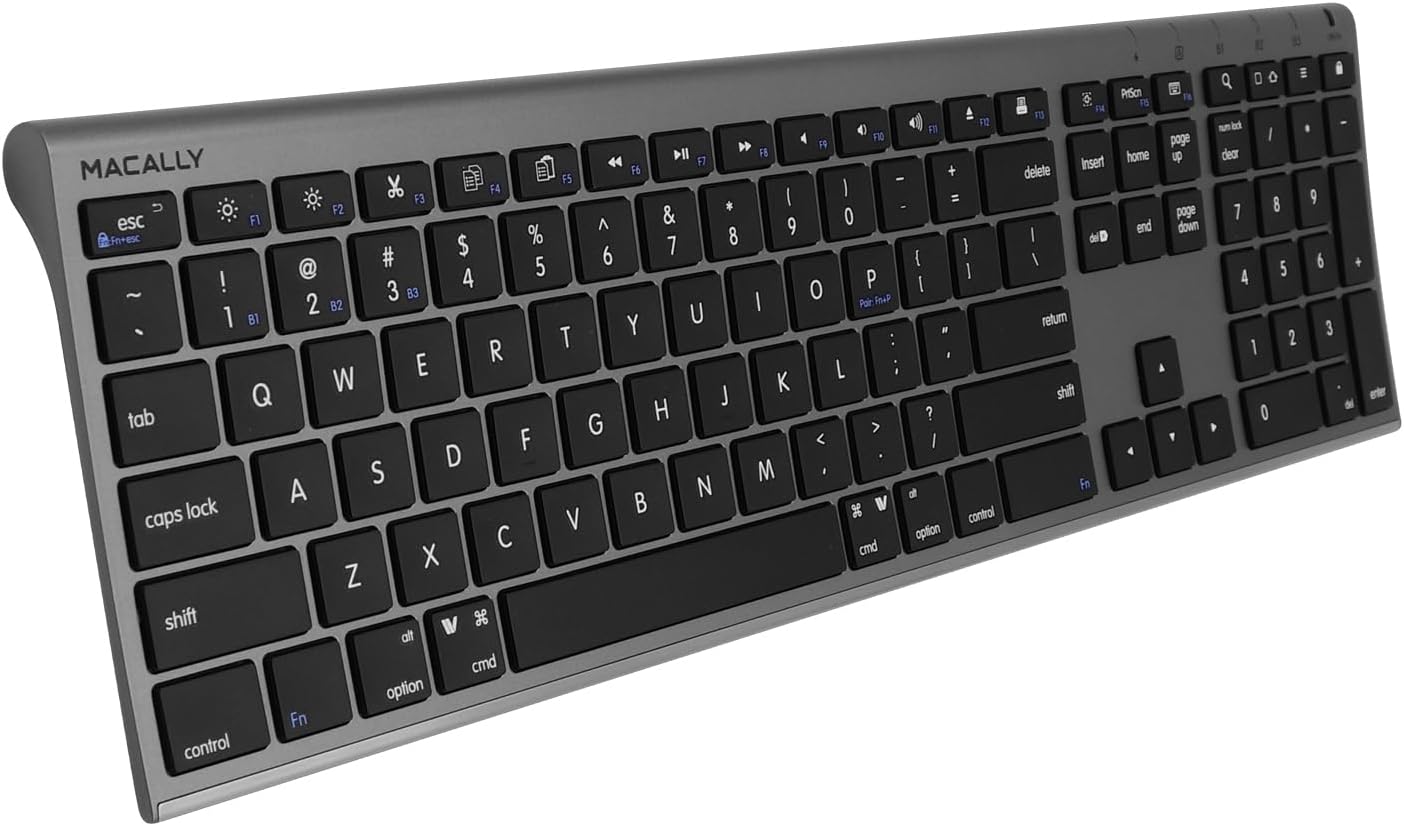
Macally Wireless Bluetooth Keyboard for Mac - Compatible Apple Keyboard or MacBook Pro/Air, iMac - Multi-Device, Up to 3 Devices with 110 Keys, 20 Shortcuts, Numeric Keypad, and Rechargeable
Want the best price and purchase timing?
Our AI advisor analyzes real-time pricing across all channels to find you the best deal.
AI Verdict
A 110-key Bluetooth keyboard with 20 MacOSX shortcuts and a numeric keypad, designed for multi-device users on a budget.
This keyboard is a strong contender if you need to manage typing across up to three devices (Mac, PC, iOS, Android) and appreciate a full 110-key layout with a numeric keypad. Its 3-month battery life and 1-hour charge time are practical for daily use. However, the absence of backlighting and the slightly louder, more raised keys compared to Apple's premium offerings might be a compromise for some.
If backlighting is a must-have, look for keyboards explicitly listing 'backlit keys' or 'RGB illumination' in their specifications.
Regret Score™
Medium RiskLower is better — measures purchase-regret risk from real buyer complaints, review credibility, and product maturity
Issues discovered after purchase
Critically weak dimension
Amazon rating vs actual quality
Chance this product isn't for you
Pros
- Connects to and switches between up to three Bluetooth devices (Mac/PC/iOS/Android/TVs) with one-tap switching.
- Features 110 scissor flex keys, including a numeric keypad and 20 MacOSX shortcuts for dedicated functions.
- Rechargeable battery lasts up to 3 months with an average of 3 hours daily use, requiring only 1 hour to fully charge.
- Constructed with an aluminum body and thin black keys, providing an aesthetic similar to Apple's Magic Keyboard.
- Keystrokes are described as quiet and smooth by users.
Cons
- Keys are slightly more raised and produce a bit more sound compared to the Apple Magic Keyboard, according to one user.
- Some users reported initial difficulty or taking several minutes to pair the keyboard with their devices.
- Lacks key backlighting, which is common in many modern keyboards.
- Weighs 14.9 ounces, which is heavier than some ultra-portable alternatives.
Dimension Scores
Features 110 scissor flex keys described as quiet and smooth, though some users note they are slightly more raised and louder than Apple Magic Keyboard keys.
Supports multi-sync technology for up to three devices with easy switching, and users report a reliable wireless connection.
The keyboard does not include any form of backlighting for its keys.
Constructed with an aluminum body and thin keys, with users describing it as 'beautifully built' and 'superbly constructed'.
Best For
- Users needing a full-size keyboard with a numeric keypad for data entry across multiple devices.
- Individuals seeking a budget-friendly alternative to Apple's Magic Keyboard with similar aesthetics.
- Anyone who frequently switches between a Mac, iPad, and iPhone for typing tasks.
- Home office setups where a single keyboard needs to serve a computer, tablet, and smart TV.
Not Recommended For
- Gamers or users who require mechanical switches or advanced customizable macros.
- Users who need a keyboard with adjustable tilt angles or ergonomic features beyond a fixed slight incline.
- Individuals who frequently work in low-light environments and require backlit keys.
Watch Out For
- Keys are reported to be slightly more raised and make more sound than an Apple Magic Keyboard.
- Initial Bluetooth pairing can take several minutes for some users.
- The keyboard does not include backlighting for keys, which can be a drawback in dim environments.
Full Specifications
| ASIN | B08JQHVM2T |
| Brand | Macally |
| Color | Space Gray |
| Style | Multi Device Keyboard, Compatible Apple Keyboard Wireless, Bluetooth Keyboard Mac |
| Language | English |
| Batteries | 1 Lithium Ion batteries required. (included) |
| Item Weight | 14.9 ounces |
| Manufacturer | Mace Group Inc / Macally Peripherals |
| Item model number | ACEBTKEYSG |
| Compatible Devices | For MacOS Windows PC iOS Android |
| Product Dimensions | 18.11 x 6.3 x 0.91 inches |
| Keyboard Description | Wireless |
| Connectivity Technology | Bluetooth |
| Recommended Uses For Product | Office |
| Keyboard backlighting color support | Single Color |
What Buyers Say
Many users are drawn to this Macally keyboard because it closely mimics the look and feel of an Apple Magic Keyboard but at a lower price point. The ability to quickly switch between three different Bluetooth devices, like a Mac, iPad, and iPhone, is a frequently highlighted convenience. While the scissor-switch keys are generally praised for being quiet and smooth, some users have noted they are a bit more pronounced and audible than Apple's own keys. Initial pairing can sometimes be a minor hurdle, but once connected, the stability seems consistent. The lack of backlighting is a recurring observation, especially for those accustomed to typing in varied lighting conditions.
“Honestly, it looks just like my iMac keyboard, and I can finally use one keyboard for my Mac, my iPad, and even my work PC without unplugging anything! Pairing was a bit finicky at first, but now it just works. I just wish the keys lit up for when I'm working late.”
Common Praise
- Seamlessly switches between up to three paired devices (Mac, iOS, PC, Android).
- Aesthetic design with an aluminum body and thin keys matches Apple devices.
- Keys provide a quiet and smooth typing experience.
- Rechargeable battery offers extended use, up to 3 months between charges.
- Includes a full 110-key layout with a numeric keypad and 20 Mac shortcuts.
Common Complaints
- Keys are slightly more raised and make a bit more noise than Apple Magic Keyboard keys.
- Some users experienced initial difficulties or took several minutes to pair the keyboard.
- Absence of key backlighting is a drawback for typing in low light.
Ownership Tips
- The multi-device switching becomes second nature after a few days, making workflow much smoother.
- Battery life is genuinely long; you'll forget when you last charged it.
- The key travel, while different from Apple's, feels consistent and responsive over time.
- The aluminum build holds up well to daily use, resisting flex.
Frequently Asked Questions
Does this keyboard have backlit keys?
No, this Macally keyboard does not feature backlit keys.
How many devices can I connect to this keyboard simultaneously?
You can connect and switch between up to three Bluetooth-enabled devices, including Mac, PC, iOS, and Android devices.
How long does the battery last on a single charge?
The rechargeable battery can last up to 3 months with an average daily use of 3 hours, and it fully charges in just 1 hour.
Is this keyboard compatible with Windows PCs?
Yes, it is compatible with Windows PCs, as well as Mac, iOS, and Android devices.
What type of keys does it use?
It uses 110 scissor flex keys, which are designed for quiet and smooth keystrokes.
Buying Guide
When you're looking for a keyboard, think about how and where you'll use it. If you jump between your computer, tablet, and phone a lot, a multi-device Bluetooth keyboard like this one saves you from needing multiple keyboards or constantly re-pairing. Also, consider if you need a numeric keypad for data entry, as many compact keyboards skip this. Finally, battery life and charging convenience are huge if you hate dealing with cables or disposable batteries.
Multi-Device Pairing (up to 3)
This means you can connect the keyboard to, say, your desktop, laptop, and tablet, and switch between them with a button press. It's like having three keyboards in one, saving desk space and hassle.
Scissor Flex Keys
This refers to the mechanism under each keycap. Scissor switches offer a stable, quiet, and relatively short key travel, similar to what you find on most laptops. They're usually quieter than mechanical switches and more tactile than membrane keys.
Rechargeable Battery (3 months / 1 hour charge)
This tells you how long the keyboard will work before needing a charge and how quickly it recharges. A 3-month battery life means you'll rarely think about charging, and a 1-hour charge time means quick top-ups if you do run low.
Alternatives
If you need key backlighting for typing in the dark, look for keyboards that explicitly state 'backlit' in their features. If you prefer a more tactile or clicky typing experience, search for keyboards with 'mechanical switches'.
You Might Also Like

Logitech MK270 Wireless Keyboard and Mouse Combo for Windows, 2.4 GHz, 8 Multimedia Keys, PC, Laptop, Wireless Keyboard Compact Mouse Combo - Black
This is a 2.4 GHz wireless keyboard and mouse combo with a full-size QWERTY layout and 8 multimedia keys, built for basic Windows PC tasks on a tight budget.

Logitech MK270 Wireless Keyboard and Mouse Combo for Windows, 2.4 GHz, 8 Multimedia Keys, PC, Laptop, Wireless Keyboard Compact Mouse Combo - Rose
This is a 2.4 GHz RF membrane keyboard and mouse combo with a full-size layout, best suited for basic Windows PC tasks on a tight budget.

Logitech K270 Wireless Keyboard for Windows, 2.4 GHz Wireless, Full-Size, Number Pad, 8 Multimedia Keys, 2-Year Battery Life, Compatible with PC, Laptop - Rose
This is a full-size, 2.4 GHz wireless membrane keyboard with 8 multimedia keys and a number pad, designed for basic PC and laptop use.

Logitech MK270 Wireless Keyboard and Mouse Combo for Windows, 2.4 GHz, 8 Multimedia Keys, PC, Laptop, Wireless Keyboard Compact Mouse Combo - White
This is a budget 2.4 GHz wireless membrane keyboard and mouse combo with a full-size layout, 8 multimedia keys, and a compact mouse, best for basic PC tasks.