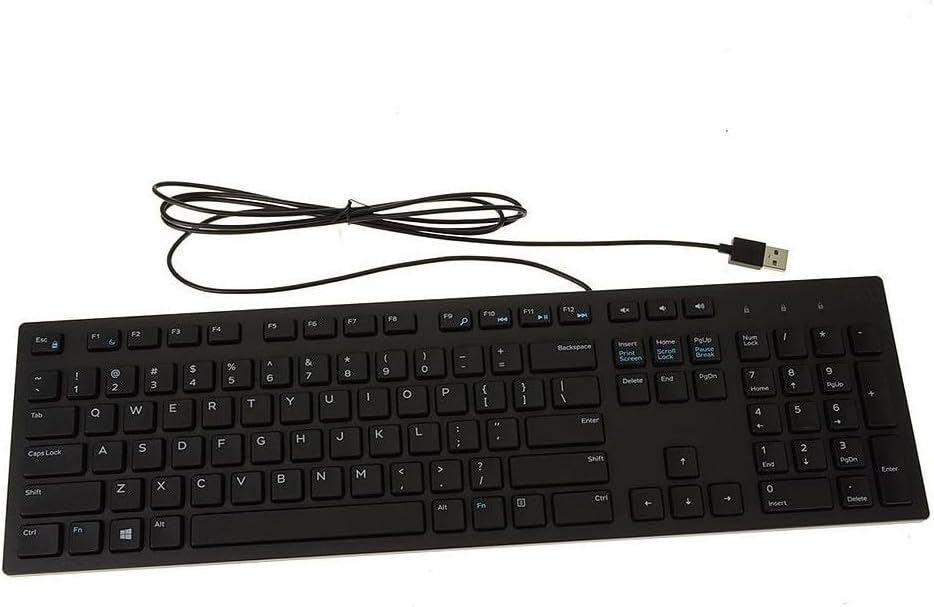
Dell Wired Keyboard - Black KB216 (580-ADMT)
Want the best price and purchase timing?
Our AI advisor analyzes real-time pricing across all channels to find you the best deal.
AI Verdict
This 1.11-pound wired chiclet keyboard is a basic PC input device for everyday home or office computing, available under $50.
This keyboard is a situational fit because its wired connectivity and chiclet keys provide a straightforward, quiet typing experience for basic tasks. However, its lack of advanced features and reported durability concerns with key mechanisms limit its appeal for more demanding users or those seeking longevity.
If you need more durability or a more tactile typing experience, look for keyboards with mechanical switches or higher-quality membrane designs.
Regret Score™
Very High RiskLower is better — measures purchase-regret risk from real buyer complaints, review credibility, and product maturity
Issues discovered after purchase
Critically weak dimension
Amazon rating vs actual quality
Chance this product isn't for you
Pros
- Chiclet-style keys offer a soft touch and are comfortable for extended typing sessions.
- Features dedicated multimedia keys for quick access to play, pause, rewind, fast-forward, and volume control.
- Plug-and-play USB interface requires no drivers or software for immediate use.
- Keys are quiet, making it suitable for shared work environments.
- Full layout includes a number pad, which is useful for data entry.
- Low-profile design contributes to comfortable use without a separate wrist rest.
Cons
- Lacks backlighting, making key visibility difficult in low-light conditions.
- Build quality is described as mediocre, with an all-plastic construction.
- Keys can wobble, particularly larger ones like the Spacebar and Shift keys.
- Typing feel can be mushy, requiring moderate force for actuation.
- Fixed tilt mechanism means no adjustable ergonomics beyond its inherent low-profile design.
- Some users report keys sticking or ceasing to function after a period of use.
Dimension Scores
Chiclet keys offer a soft touch and quiet operation, but some users report a mushy feel and key wobble, especially on larger keys.
As a wired USB keyboard, it provides a direct and reliable connection without concerns for battery life or wireless interference.
The keyboard completely lacks backlighting, making it unsuitable for use in dark environments.
Constructed entirely from plastic, the build quality is described as mediocre, with reports of key wobble and membrane wear over time.
Best For
- Basic data entry and document creation in an office setting.
- Home users needing a simple, functional keyboard for web browsing and email.
- Environments where quiet key presses are preferred or necessary.
- Users who specifically prefer the feel of chiclet-style keys.
Not Recommended For
- Competitive gaming due to latency and mediocre build quality.
- Users requiring advanced features like programmable macros or customizable backlighting.
- Anyone needing a portable solution for mobile devices or tablets, as it's wired-only.
- Users who dislike a mushy typing feel or noticeable key wobble.
Watch Out For
- Keys can start sticking, with multiple keys affected, which users report is not a physical stick but potentially a membrane issue.
- The membrane underneath the keys can wear out, leading to keys ceasing to work, especially with heavy use over time.
- Certain keys, like Control and Caps Lock, have been reported to stop working after some use.
- The fixed tilt of the keyboard might not suit everyone's ergonomic preferences, as it lacks adjustability.
- No built-in palm rest, which might necessitate an additional purchase for wrist comfort.
Full Specifications
| RAM | 1 GB |
| ASIN | B00ZYLMQH0 |
| Brand | Dell |
| Color | Black |
| Style | Other |
| Series | KB216-BK-US |
| Language | English |
| Material | Plastic (PBT or ABS) |
| Batteries | 2 AAA batteries required. |
| Department | Keyboards/Input Devices |
| Item Weight | 1.11 pounds |
| Manufacturer | Dell Marketing USA, LP |
| Power Source | Corded Electric |
| Special Feature | Ergonomic |
| Operating System | Windows 10 |
| Hardware Platform | PC |
| Item model number | 580-ADMT |
| Compatible Devices | PC |
| Product Dimensions | 17.39 x 5.01 x 0.96 inches |
| Keyboard Description | Gaming |
| Item Dimensions LxWxH | 17.39 x 5.01 x 0.96 inches |
| Connectivity Technology | Wired |
| Recommended Uses For Product | Everyday Use, Office |
| Is Discontinued By Manufacturer | No |
What Buyers Say
Despite its high rating, this Dell keyboard is a no-frills, basic option that consistently gets praised for its simplicity and quiet operation, but it's not without its flaws. Many users highlight its comfortable chiclet keys for long typing sessions and the convenience of dedicated multimedia controls. However, recurring complaints point to a less-than-durable build, with keys reportedly sticking or failing after some use, suggesting the internal membrane might be a weak point. It's a popular choice for its straightforward functionality, but don't expect premium materials or advanced features.
“Honestly, it's just a keyboard. It types, it's quiet, but my 'S' key started acting up after a year and now I gotta mash it. For the price, whatever, but don't expect it to last forever.”
Common Praise
- Chiclet-style keys are comfortable for typing long hours.
- Keys are quiet, which is beneficial for shared spaces.
- Plug-and-play setup requires no drivers or software.
- Includes a full layout with a number pad.
- Dedicated multimedia keys are handy for controlling audio and video.
- Low-profile design is comfortable for wrists.
Common Complaints
- Keys can start sticking, affecting multiple keys, not just physical obstruction.
- The internal membrane can wear out, causing keys to stop working.
- Lacks backlighting, making it hard to see keys in the dark.
- Keys, especially larger ones, can wobble during typing.
- Typing feel is described as mushy, requiring moderate actuation force.
- No built-in palm rest, which some users find uncomfortable.
Ownership Tips
- After several months, some users report a noticeable mushiness in the keypresses, different from the initial feel.
- The fixed tilt, while low-profile, can become a minor ergonomic annoyance for those used to adjustable stands.
- Dust and debris can accumulate under the chiclet keys, potentially contributing to sticking issues over time.
- The all-plastic construction, while lightweight at 1.11 pounds, doesn't inspire confidence for long-term heavy use.
Frequently Asked Questions
Is this keyboard compatible with non-Dell computers?
Yes, it uses a standard USB interface, so it's compatible with virtually any PC running Windows, regardless of brand.
Does this keyboard have backlighting?
No, the Dell KB216 does not feature any backlighting for its keys.
What type of keys does it have?
It features chiclet-style keys, which are flat, square keys with rounded corners, offering a low-profile design and a soft touch.
Can I adjust the tilt of the keyboard?
The keyboard has a fixed tilt and does not offer adjustable feet for changing the typing angle.
Does it come with a palm rest?
No, a built-in palm rest is not included with the Dell KB216, though you can purchase one separately.
Buying Guide
When you're looking at keyboards, you need to think about how you'll actually use it. For basic typing, a simple wired model like this Dell is fine. But if you're gaming or doing a lot of precise work, the 'feel' of the keys and extra features become way more important. Don't get hung up on fancy marketing; focus on key type, connectivity, and any specific features you absolutely need.
Wired connectivity
This means it plugs directly into your computer via a USB cable. You don't need batteries, and you won't have any wireless interference issues, but you're tethered to your desk.
Chiclet keys
These are the flat, often square keys you see on most laptops. They usually have a shorter travel distance and a softer, quieter press compared to traditional or mechanical keys, which some people find comfortable for long typing sessions.
Multimedia keys
These are dedicated buttons or function key shortcuts that let you control things like volume, play/pause music, or open your web browser without having to click around on your screen. It's a small convenience that can save you a few clicks throughout the day.
Alternatives
If this keyboard doesn't cut it, look for models with mechanical switches for a more tactile and durable typing experience, or wireless options if you need to reduce cable clutter and gain flexibility.
You Might Also Like

Logitech MK270 Wireless Keyboard and Mouse Combo for Windows, 2.4 GHz, 8 Multimedia Keys, PC, Laptop, Wireless Keyboard Compact Mouse Combo - Black
This is a 2.4 GHz wireless keyboard and mouse combo with a full-size QWERTY layout and 8 multimedia keys, built for basic Windows PC tasks on a tight budget.

Logitech MK270 Wireless Keyboard and Mouse Combo for Windows, 2.4 GHz, 8 Multimedia Keys, PC, Laptop, Wireless Keyboard Compact Mouse Combo - Rose
This is a 2.4 GHz RF membrane keyboard and mouse combo with a full-size layout, best suited for basic Windows PC tasks on a tight budget.

Logitech K270 Wireless Keyboard for Windows, 2.4 GHz Wireless, Full-Size, Number Pad, 8 Multimedia Keys, 2-Year Battery Life, Compatible with PC, Laptop - Rose
This is a full-size, 2.4 GHz wireless membrane keyboard with 8 multimedia keys and a number pad, designed for basic PC and laptop use.

Logitech MK270 Wireless Keyboard and Mouse Combo for Windows, 2.4 GHz, 8 Multimedia Keys, PC, Laptop, Wireless Keyboard Compact Mouse Combo - White
This is a budget 2.4 GHz wireless membrane keyboard and mouse combo with a full-size layout, 8 multimedia keys, and a compact mouse, best for basic PC tasks.