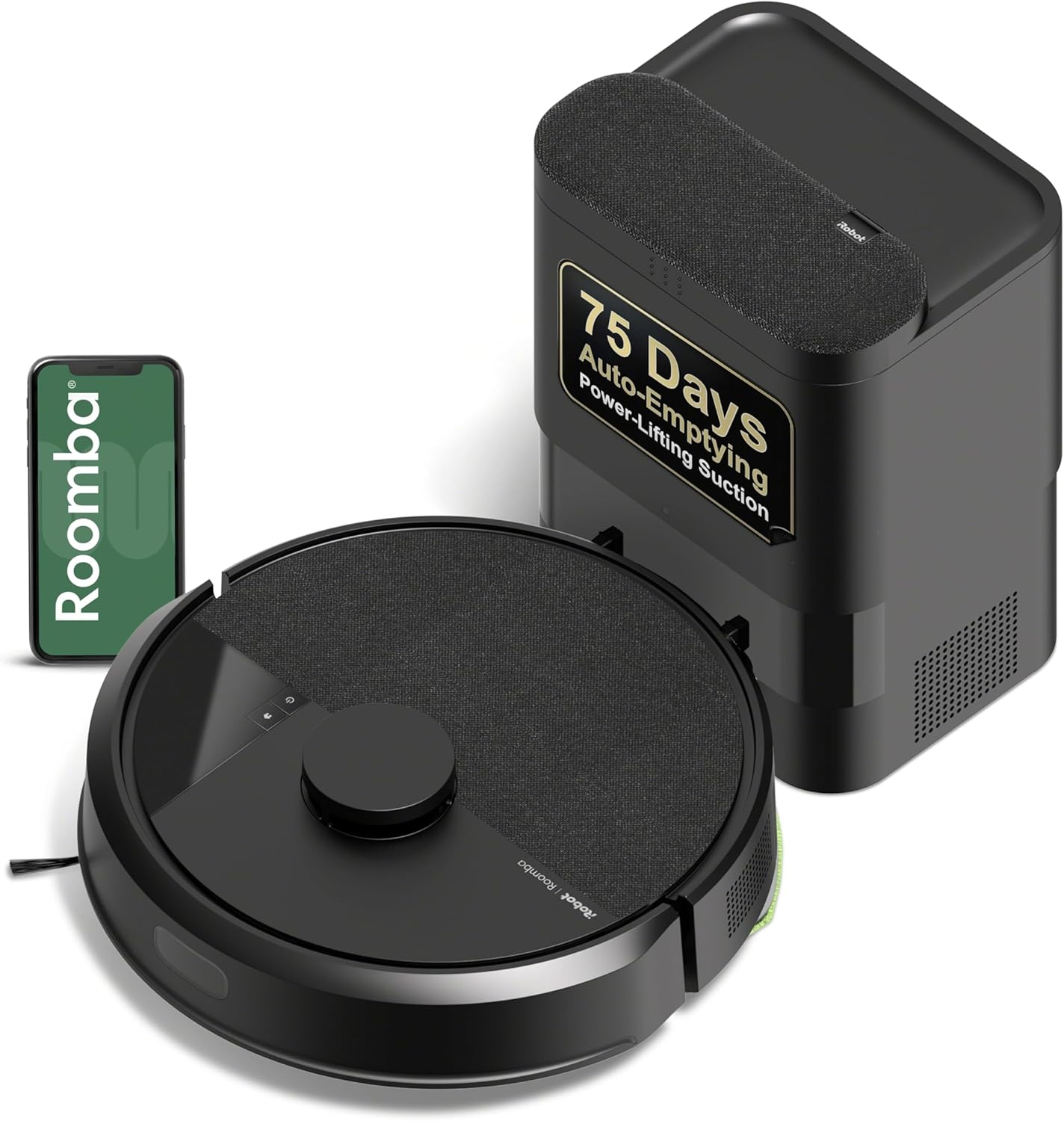
iRobot Roomba 105 Vac Robot Vacuum with AutoEmpty Dock - Self-Empties for 75 Days, Easy to use, Intense Power-Lifting Suction, LiDAR Navigation, Multi-Surface Cleaning, Cleans in Neat Rows
Want the best price and purchase timing?
Our AI advisor analyzes real-time pricing across all channels to find you the best deal.
AI Verdict
This 6.24-pound robot vacuum with LiDAR navigation and a 0.1-gallon auto-empty dock is for daily maintenance on mixed floor types.
This 6.24-pound robot vacuum offers LiDAR navigation for efficient, row-by-row cleaning and a 75-day auto-empty dock, which is great for hands-off daily maintenance. However, its lack of advanced obstacle avoidance and reported app issues make it less ideal for cluttered homes or users who value a seamless software experience.
If you need better obstacle avoidance, look for models with front-facing cameras or advanced AI object recognition.
Regret Score™
Medium RiskLower is better — measures purchase-regret risk from real buyer complaints, review credibility, and product maturity
Issues discovered after purchase
Critically weak dimension
Amazon rating vs actual quality
Chance this product isn't for you
Pros
- The AutoEmpty dock provides up to 75 days of hands-free cleaning, trapping 99% of allergens as small as 0.7 microns.
- LiDAR navigation maps homes quickly and cleans in neat rows, even in the dark.
- The 3-Stage Cleaning system includes 70X more power-lifting suction compared to Roomba 600 series.
- App control allows for custom cleaning schedules, zone targeting, and no-go zones.
- The Spot Cleaning feature targets specific areas for up to 5 minutes of repeated cleaning.
- Handles pet hair and everyday dust/debris well on hardwood and carpets.
Cons
- Lacks advanced obstacle avoidance, running over small items like cables or toys.
- The iRobot Home app is described as clunky, unintuitive, and buggy by some users.
- Can be loud during operation and very loud during the auto-emptying process.
- Some users report inconsistent docking with the AutoEmpty station.
- The brush roller can tangle with long hair, as it lacks a conical or active detangling system.
Dimension Scores
The 3-Stage Cleaning system with 70X more power-lifting suction (compared to 600 series) handles everyday dirt and pet hair, but struggles with deep carpet cleaning.
The AutoEmpty dock provides up to 75 days of hands-free cleaning, and the app allows for scheduling and zone targeting, though the app itself can be clunky.
It weighs 6.24 pounds and is described as well-made, but the brush roller is prone to hair tangles.
The 2.4 Volts and battery-powered operation are standard, but specific battery life details are not highlighted as exceptional.
Best For
- Households with mixed floor types needing daily maintenance cleaning.
- Users who prioritize hands-free operation for up to 75 days.
- Homes requiring precise mapping and cleaning in neat rows with LiDAR navigation.
- Individuals who need to schedule and target specific rooms for cleaning.
Not Recommended For
- Homes with many small obstacles like cables, toys, or clothes on the floor.
- Users expecting a quiet robot vacuum, especially during emptying cycles.
- Deep cleaning heavily soiled carpets or large debris, as suction is average for the category.
Watch Out For
- The robot lacks advanced obstacle avoidance, meaning it will run over phone cables or small toys.
- The auto-emptying process is very loud, comparable to a full-size vacuum for a few seconds.
- The iRobot Home app can be buggy and frustrating to navigate, with slow updates and occasional glitches requiring factory resets.
- Hair tangles on the brush roller are common, as it lacks a conical or active detangling system.
- Some users report the robot struggling with docking consistently to the AutoEmpty station.
Full Specifications
| UPC | 885155046482 |
| ASIN | B0DWG1K24K |
| Brand | iRobot |
| Color | Black |
| Voltage | 2.4 Volts |
| Capacity | 0.1 Gallons |
| Batteries | 1 12V batteries required. (included) |
| Model Name | Roomba 105 Vac + AE |
| Filter Type | Cartridge |
| Form Factor | Robotic |
| Item Weight | 6.24 pounds |
| Battery Life | 200 minutes |
| Manufacturer | iRobot |
| Power Source | Battery Powered |
| Control Method | App, Push Button, Voice |
| Special Feature | Anti-Fall, Dirt Detection Sensor, Eco Mode, Edge Cleaning, LiDAR Navigation |
| Item model number | Q352020 |
| Batteries required | Yes |
| Compatible Devices | Smartphones |
| Product Dimensions | 13.2"L x 13.2"W x 4.1"H |
| Cleaning Path Width | 5.8 Inches |
| Included Components | Docking Station, Filter |
| Warranty Description | 1 year manufacturer. |
| Are Batteries Included | Yes |
| Surface Recommendation | Carpet & Hard Floor |
What Buyers Say
Many users are drawn to the Roomba 105 for its LiDAR navigation and the convenience of the AutoEmpty dock, which genuinely reduces how often you interact with the vacuum. However, the experience is often hampered by an app that feels unfinished, with reports of slow updates and occasional glitches. While it handles daily dust and pet hair on hard floors and light carpets, it's not a deep-cleaning powerhouse, and its tendency to bump into small items means you still need to prep your space.
“I got this for the self-empty feature and it works, but man, the app is a pain and it still eats my phone charger cables if I forget to pick them up. My old Roomba never did that.”
Common Praise
- The AutoEmpty dock is a lifesaver, emptying the dustbin for up to 75 days.
- LiDAR navigation maps the home quickly and cleans in neat, organized lines.
- Picks up pet hair and everyday dust effectively on various surfaces.
- Easy to set up and program using the iRobot app for basic functions.
Common Complaints
- Lack of advanced obstacle avoidance means it runs over small items like cables and socks.
- The auto-emptying process is very loud, almost like a full-size vacuum.
- The iRobot Home app is often described as clunky, unintuitive, buggy, and frustrating to navigate.
- Brush roller tangles with long hair, requiring manual cleaning.
- Inconsistent docking to the AutoEmpty station is reported by some users.
Ownership Tips
- You'll still need to 'robot-proof' your floors by picking up small items like cables and socks.
- The noise during auto-emptying is significant, so avoid scheduling it during quiet times.
- Expect to manually clean the brush roller periodically, especially if you have long-haired pets or people in the house.
- The app might require patience and occasional troubleshooting due to reported glitches and slow performance.
Frequently Asked Questions
Does the Roomba 105 Vac have obstacle avoidance?
No, it does not have advanced obstacle avoidance and may run over small items like cables or toys. You'll need to tidy up before a cleaning run.
How long does the AutoEmpty dock hold debris?
The AutoEmpty dock can hold up to 75 days of dirt and dust, trapping 99% of allergens in its bag.
Can I control the Roomba 105 with my phone?
Yes, you can control it using the iRobot Home app to set custom cleans, schedules, and create keep-out zones.
Is the Roomba 105 loud?
Users report it can be noticeably loud during regular cleaning, and very loud when it auto-empties into the dock.
Does it clean in neat rows?
Yes, the ClearView LiDAR navigation allows it to map your home and clean in neat, organized rows.
Buying Guide
When you're looking at robot vacuums, think about how much 'hands-off' you really want. Models like this one with an auto-empty dock save you from emptying a tiny bin every day, but you still need to manage the bags. Also, consider your home's layout – if you have lots of small items on the floor, a robot without advanced obstacle avoidance will just push them around or get stuck.
LiDAR Navigation
This is like the robot having a super-smart map in its head. It uses lasers to see your room, so it cleans in neat, efficient rows instead of bumping around randomly.
AutoEmpty Dock Capacity
This tells you how long the robot can clean before you have to interact with it. A 75-day capacity means you only deal with the dust bag about four times a year.
Suction Power (70X more vs. 600 series)
This number indicates how strong the vacuum is at picking up dirt. While '70X more' sounds huge, it's compared to a very old model, so it means it's capable for daily dust but not necessarily for deep-set grime.
Obstacle Avoidance
This refers to the robot's ability to 'see' and go around things like shoes, cables, or pet waste. Basic models might just bump into things, while advanced ones use cameras or AI to steer clear.
Alternatives
If you need a robot that avoids small obstacles more effectively, look for models with front-facing cameras or AI object recognition. If you need deeper carpet cleaning, search for vacuums with higher kPa suction ratings or specialized brush designs for carpets.
You Might Also Like

Bissell Featherweight Stick Lightweight Bagless Vacuum with Crevice Tool, 2033M, Black
This 3.64-pound, 2033-watt corded vacuum converts to handheld, best for quick pickups on hard floors and surface debris on low-pile carpets.

LEVOIT Air Purifier for Home Allergies Pet Hair in Bedroom, Covers Up to 1073 ft² by 56W High Torque Motor, AHAM VERIFIDE, 3-in-1 Filter with HEPA Sleep Mode, Remove Dust Smoke Odor, Core300-P, Black
This 56W air purifier with 143 CFM CADR and 24dB sleep mode is for small to medium rooms needing quiet, AHAM-verified air cleaning.
CHEFMAN Multifunctional Digital Air Fryer+ Rotisserie, Dehydrator, Convection Oven, 17 Touch Screen Presets Fry, Roast, Dehydrate, Bake, XL 10L Family Size, Auto Shutoff, Large Easy-View Window, Black
This 10-liter, 1700-watt air fryer bakes, roasts, dehydrates, and rotisseries, making it a countertop oven for families needing multiple cooking functions.

Keurig K- Slim Single Serve K-Cup Pod Coffee Maker, with 3 Brew Sizes, Multistream Technology, 46oz Removable Reservoir, Scarlet Red
This 4.76-inch wide, 6.22-pound single-serve brewer with a 46oz reservoir is for K-Cup users who need counter space.