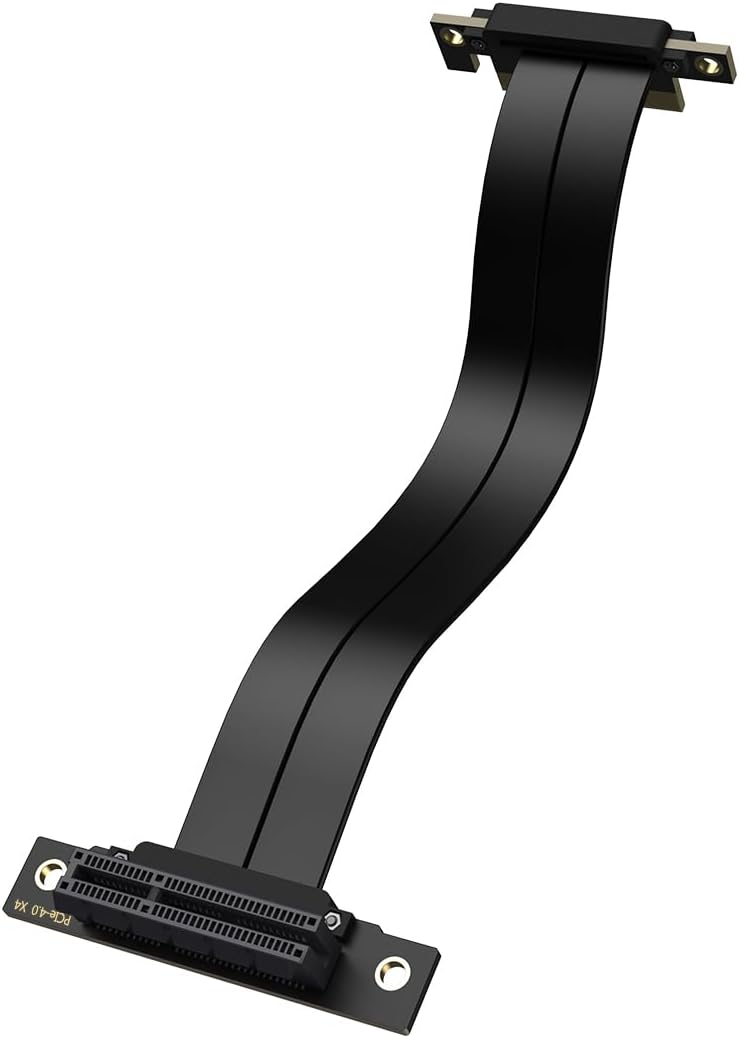
PCIe x4 4.0 Riser Cable,PCI-Express 4X Male to Female Extension Cable PCI-e Extender Adapter 20CM_Dual 90 Degrees
Want the best price and purchase timing?
Our AI advisor analyzes real-time pricing across all channels to find you the best deal.
AI Verdict
This XRIKUI PCIe x4 4.0 riser cable with dual 90-degree connectors is for tight builds needing to relocate a PCIe x1, x4, x8, or x16 device with x4 bandwidth.
This cable is a situational fit because its PCIe 4.0 x4 bandwidth and 90-degree design solve specific space and connectivity problems in compact builds. However, the x4 bandwidth limitation means it's not suitable for all PCIe devices, especially high-performance GPUs that demand x16 lanes.
If you need full PCIe x16 bandwidth for a high-end GPU, look for an 'x16 PCIe 4.0 riser cable' from a reputable brand known for signal integrity.
Regret Score™
Very High RiskLower is better — measures purchase-regret risk from real buyer complaints, review credibility, and product maturity
Issues discovered after purchase
Critically weak dimension
Amazon rating vs actual quality
Chance this product isn't for you
Pros
- Supports PCIe 4.0 with 8GB/s data transfer, maintaining high bandwidth for compatible devices.
- Backward compatible with PCIe 3.0, 2.0, and 1.0, offering flexibility for older systems.
- Dual 90-degree female PCIe X4 connector design helps with space-constrained installations.
- Open-ended female connector allows installation of PCIe X1, X4, X8, and X16 cards, though bandwidth is limited to X4.
- PCB is reinforced with bolts and nuts to prevent damage at solder points.
- Pure copper inner core is tin-plated for better signal transfer and shielded with TPE plastic for EMI protection.
Cons
- Bandwidth is limited to PCIe X4, even for X8 or X16 devices, which can bottleneck high-performance GPUs.
- Riser cables, especially longer ones, can introduce signal integrity issues, potentially causing instability or reduced speeds.
- Lack of specific user reviews for this ASIN means real-world performance and durability are unconfirmed.
- The 20CM length might be too short for some vertical GPU mounts or complex case layouts.
Dimension Scores
While it supports PCIe 4.0, the x4 bandwidth limitation will significantly bottleneck modern GPUs, reducing gaming performance compared to a direct x16 connection.
As a passive cable, it doesn't generate heat or noise itself, but its use can enable better component placement for improved system thermals.
The cable itself has negligible power draw, acting as a passive extension for the PCIe slot's power delivery.
This cable has no impact on VRAM capacity, as VRAM is a feature of the connected GPU, not the riser cable.
Best For
- Small form factor PC builds where space is extremely limited.
- Relocating a PCIe x4 NVMe SSD or capture card to improve airflow or accessibility.
- Enthusiasts wanting to vertically mount a GPU in a case that only supports x4 bandwidth for the riser.
Not Recommended For
- High-end gaming PCs where a full PCIe x16 GPU connection is critical for maximum performance.
- Users who prioritize guaranteed plug-and-play stability without potential troubleshooting.
- Anyone needing a riser cable longer than 20CM for their specific build.
Watch Out For
- You might struggle to achieve full PCIe 4.0 speeds, with some users reporting their systems defaulting to PCIe 3.0 even with advertised 4.0 cables.
- Signal integrity can be a gamble; extending the PCIe connection length can lead to instability or reduced bandwidth.
- The 20CM length might not be enough for some vertical GPU mounting brackets, requiring careful measurement before purchase.
Full Specifications
| ASIN | B0DQXRF27F |
| Brand | XRIKUI |
| Cable Type | PCIe |
| Unit Count | 1.0 Count |
| Item Weight | 2.08 ounces |
| Manufacturer | XRIKUI |
| Connector Type | Pcie X4 |
| Number of Pins | 16 |
| Special Feature | Data Transfer |
| Connector Gender | Male-to-Female |
| Item model number | XRIKUI PCIe x4 4.0 |
| Compatible Devices | Card, GPU, PCIe Device |
| Data Transfer Rate | 8 Gigabits Per Second |
| Package Dimensions | 9.76 x 3.46 x 0.94 inches |
| Indoor/Outdoor Usage | Indoor |
| Recommended Uses For Product | Connection of computer components (e.g. GPUs, SSDs, capture cards), extend the signal transmission range in computer systems |
What Buyers Say
Since there aren't specific reviews for this XRIKUI cable, I'm going off what people generally say about PCIe 4.0 riser cables. The biggest thing is that getting true PCIe 4.0 speeds can be a real headache, with many users finding their systems drop to PCIe 3.0, even with cables claiming 4.0 compatibility. The dual 90-degree design is definitely a plus for tight builds, letting you squeeze things in that wouldn't otherwise fit. People often use these for things like NVMe drives or smaller expansion cards, where the x4 bandwidth isn't a huge deal, but for a beefy GPU, it's a definite compromise.
“Man, I needed this for my tiny case, and the 90-degree bends saved my build, but I'm pretty sure my GPU ain't hitting full speed through it, feels a bit slower.”
Common Praise
- The 90-degree connectors are super handy for routing cables in cramped cases.
- It allows for flexible placement of PCIe devices, like vertically mounting a GPU or relocating an NVMe drive.
- The stated PCIe 4.0 support is a key feature for newer systems, even if achieving it can be tricky.
- The build quality, with reinforced PCB and shielded copper core, suggests durability.
Common Complaints
- Many PCIe 4.0 riser cables struggle to maintain full 4.0 speeds, often falling back to 3.0, which can be frustrating.
- Signal integrity issues are a common concern with any riser cable, potentially leading to system instability.
- The x4 bandwidth limitation is a significant drawback for high-performance graphics cards.
- Finding the right length and angle for a specific build can be a challenge.
Ownership Tips
- You'll likely need to manually set your motherboard's PCIe slot to Gen3 in the BIOS if you encounter instability or boot issues with PCIe 4.0 devices.
- The flexibility of the cable is important for routing, but too much bending can still impact signal integrity.
- The reinforced PCB with bolts and nuts feels more secure than some flimsier riser cables I've seen.
- Make sure your case actually benefits from a dual 90-degree design; sometimes a single 90-degree or straight cable is better.
Frequently Asked Questions
Will this cable work with my PCIe 5.0 motherboard and GPU?
No, this cable is designed for PCIe 4.0 and is backward compatible with older generations. It will not support PCIe 5.0 speeds.
Can I use this to vertically mount my RTX 4080?
You can physically connect it, but your RTX 4080 will operate at PCIe x4 bandwidth, which will significantly limit its performance compared to a full PCIe x16 connection.
Is the 90-degree connector on both ends useful?
Yes, the dual 90-degree connectors are specifically designed for tight spaces, allowing for cleaner cable management and fitting components where a straight connector wouldn't work.
What kind of devices can I connect with this cable?
You can connect PCIe X1, X4, X8, or X16 devices like NVMe SSDs, capture cards, remote switch cards, or even GPUs, but remember the bandwidth will be capped at PCIe X4.
Does this cable require any special drivers or software?
No, PCIe riser cables are passive extensions and do not require any specific drivers or software. They are plug-and-play.
Buying Guide
When you're looking at a PCIe riser cable, you're basically buying an extension cord for your computer's expansion slots. You need to know what generation of PCIe your motherboard and the device you're connecting (like a graphics card or an NVMe SSD) support. If you have PCIe 4.0 components, you need a PCIe 4.0 cable, but even then, stability can be a concern. The length and angle of the connectors are also super important for fitting into your case without awkward bends or strain.
PCIe 4.0 Support
This determines the maximum speed your connected device can communicate with your motherboard. PCIe 4.0 is twice as fast as PCIe 3.0, so if your GPU or SSD supports it, you want a cable that can handle it to avoid a bottleneck, like trying to pour a gallon of water through a straw.
X4 Bandwidth
This refers to the number of data lanes available. While a GPU typically uses x16 lanes, this cable only provides x4. Think of it like a highway: x16 is a 16-lane highway, and x4 is a 4-lane road. If you put a Formula 1 car (your GPU) on a 4-lane road, it can't go as fast as it could on a 16-lane highway.
Dual 90-Degree Connectors
This is all about fitting into tight spaces. Imagine trying to plug a thick power cord straight into an outlet behind a couch; a right-angle plug makes it much easier. These connectors help with cable management and allow for component placement that wouldn't be possible with straight connectors.
Alternatives
If this cable doesn't fit, look for a 'PCIe 4.0 x16 riser cable' for full GPU performance, or a 'longer PCIe 4.0 riser cable' if 20CM isn't enough for your specific case layout.
You Might Also Like

HP NVIDIA GeForce RTX 3070 8GB OEM Graphics Card (Renewed)
$150-$299This is a renewed HP OEM NVIDIA GeForce RTX 3070 with 8GB VRAM, a gamble for budget-conscious 1440p gamers who understand the risks of refurbished hardware.

ZOTAC Gaming GeForce RTX 5070 Twin Edge OC DLSS 4 12GB GDDR7 192-bit 28 Gbps PCIE 5.0 Gaming Graphics Card, IceStorm 2.0 Cooling, SFF-Ready, ZT-B50700H-10A
$600+This is a 2-slot, SFF-ready NVIDIA RTX 5070 with 12GB GDDR7 and a 2542 MHz boost clock, built for compact gaming rigs needing high 1440p performance.

ZOTAC Gaming GeForce RTX 5080 Solid CORE OC DLSS 4 16GB GDDR7 256-bit 30 Gbps PCIE 5.0 Gaming Graphics Card, IceStorm 3.0 Advanced Cooling, Spectra RGB Lighting, ZT-B50800J2-10A
$600+This ZOTAC RTX 5080 with 16GB GDDR7 and a 2640 GHz clock speed is built for high-end 4K gaming and content creation on the NVIDIA Blackwell architecture.

ZOTAC Gaming GeForce RTX 5060 Ti 8GB Twin Edge OC DLSS 4 8GB GDDR7 128-bit 28 Gbps PCIE 5.0 Gaming Graphics Card, IceStorm 2.0 Cooling, SFF-Ready, ZT-B50610H-10A
$300-$599This is a compact, 2-slot RTX 5060 Ti with 8GB GDDR7 and a 2602 MHz clock, built for SFF gaming rigs.