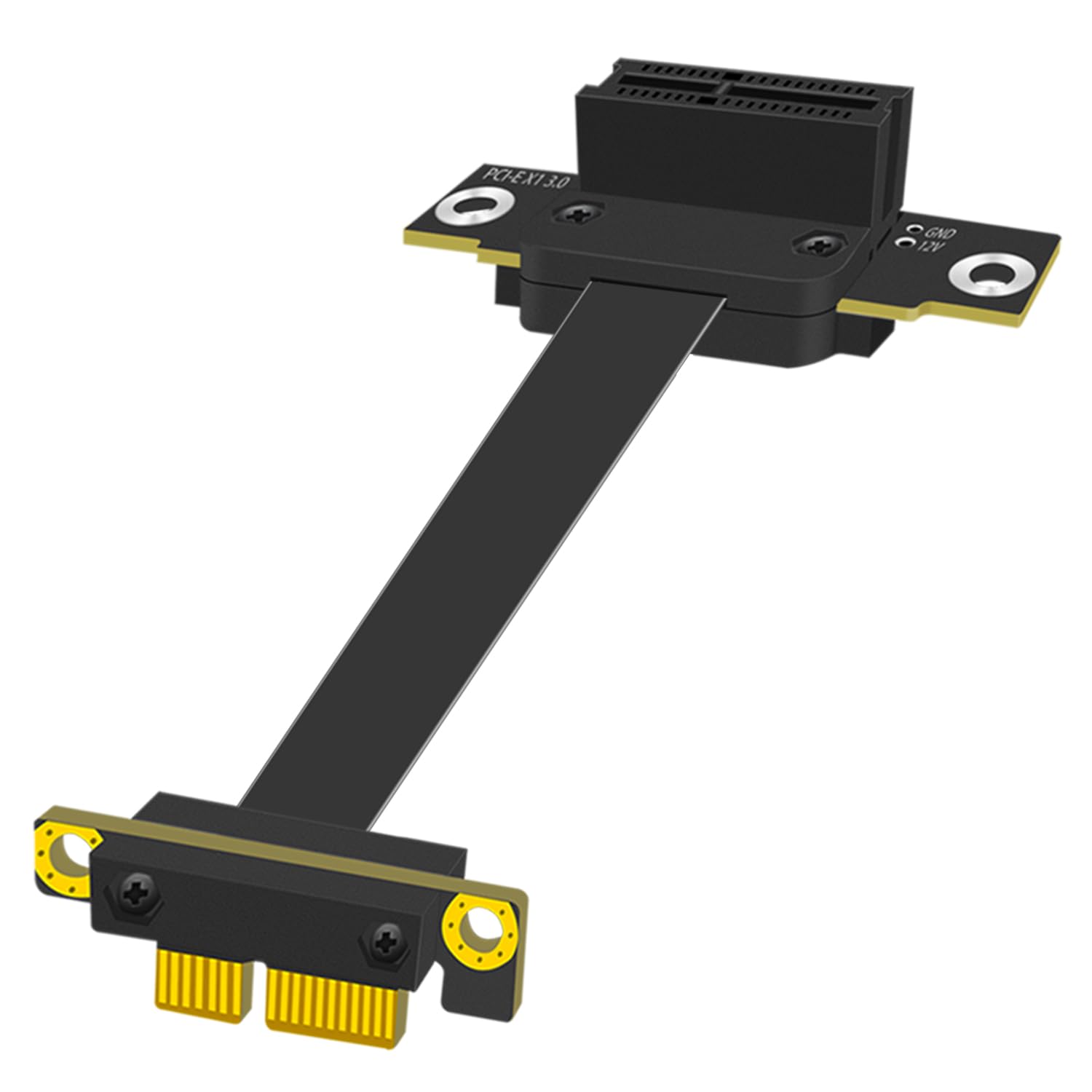
GLOTRENDS 100mm PCIe 3.0 X1 Riser Cable for M.2, WiFi, Firewire, USB, Sound Cards, etc
Want the best price and purchase timing?
Our AI advisor analyzes real-time pricing across all channels to find you the best deal.
AI Verdict
This 100mm extension cable rescues your blocked PCIe slots by sliding a 6mm-thick connector under massive GPUs, letting you relocate WiFi or sound cards to an accessible bracket.
It perfectly solves the specific problem of a giant GPU blocking your only expansion slot by using a 6mm low-profile plug. The 100mm length restricts where you can actually mount the relocated card, making it strictly for adjacent-slot moves.
If you need to mount the expansion card at the bottom of a mid-tower case, upgrade to the 200mm or 600mm version.
Regret Score™
Very High RiskLower is better — measures purchase-regret risk from real buyer complaints, review credibility, and product maturity
Issues discovered after purchase
Critically weak dimension
Amazon rating vs actual quality
Chance this product isn't for you
Pros
- 6mm low-profile male connector slides directly under 3-slot and 4-slot GPU coolers without touching the fans.
- Dual 90-degree connectors route the ribbon parallel to the motherboard instead of sticking straight up.
- Delivers full 8Gbps PCIe 3.0 x1 bandwidth, preventing bottlenecks on WiFi 6E and 2.5G network cards.
- EMI shielding stops electrical interference from the GPU above it from causing static on relocated sound cards.
- Tinned copper core wrapped in Teflon allows for 180-degree bends without breaking the internal wires.
Cons
- 100mm length barely clears a 3-slot graphics card, limiting placement to the immediately adjacent case bracket.
- Teflon-coated ribbon is stiff and fights back when trying to twist it into an S-shape.
- Foam insulation pad on the female connector is thin and peels off if rubbed against metal case standoffs.
- Exposed gold pins require a complete PSU shutdown to avoid shorting the motherboard during installation.
Dimension Scores
Limits any connected GPU to x1 speeds, making it useless for gaming.
Relocating a card away from your GPU's intake fans significantly improves system airflow.
Passes through the standard 30W from the motherboard slot without requiring extra SATA or Molex power.
This is a physical extension cable and has zero impact on your system's memory.
Best For
- Mini-ITX or Micro-ATX builds where a massive GPU covers the only available expansion slot.
- Relocating a capture card or WiFi adapter just below the graphics card cooler.
- Vertical GPU setups that block access to the motherboard's bottom x1 slots.
Not Recommended For
- Extending a secondary graphics card for gaming, as the x1 bandwidth severely chokes frame rates.
- Routing expansion cards to the bottom of a full-tower ATX case.
Watch Out For
- 100mm is shorter than you think — measure the exact routing path around your GPU cooler before buying, as the stiff cable doesn't stretch.
- Plugging a PCIe x16 card into the female end works physically, but it limits the device to x1 speeds (8Gbps).
- The cable is not hot-swappable — plugging a card in while the system is powered will short your motherboard.
- The foam padding on the female connector is thin; don't let it rest directly against bare metal case standoffs.
Full Specifications
| ASIN | B0CHRZQNRK |
| Brand | GLOTRENDS |
| Color | Black |
| Shape | Flat |
| Frequency | 8 GHz |
| Cable Type | The core is tinned copper wrapped in Teflon with a PVC protective coating on the outside |
| Model Name | PCIE30-X1 |
| Unit Count | 1.0 Count |
| Item Weight | 1.76 ounces |
| Manufacturer | glotrends |
| Connector Type | Female: 90 Degree, Male: -90 Degree |
| Number of Pins | 36 |
| Number of Items | 1 |
| Special Feature | 100mm length, -90 to 90 degree conversion |
| Connector Gender | Male-to-Female |
| Item model number | PCIE30-X1-100MM-9090D |
| Compatible Devices | M.2, WiFi, Firewire, USB, Sound Cards |
| Data Transfer Rate | 1 Gigabytes Per Second |
| Package Dimensions | 5.31 x 4.41 x 0.94 inches |
| Indoor/Outdoor Usage | Indoor, Outdoor |
| Recommended Uses For Product | PCIe WiFi Card, M.2 PCIe Card, Firewire Card, USB PCIe Card, Sound Card |
What Buyers Say
This little cable rescues modern PC builds where 3-slot and 4-slot GPUs completely smother the motherboard's lower PCIe slots. The 6mm low-profile male connector slides perfectly under massive coolers without touching the fans. The dual 90-degree design keeps the ribbon parallel to the board, looking much cleaner than standard vertical risers. The 100mm length is extremely short, and the stiff Teflon coating makes tight S-bends difficult.
“Saved my build when my massive 4080 covered my only other slot, but I really wish I bought the 200mm version because this barely reached my wifi card.”
Common Praise
- The 6mm male connector easily clears the massive heatsink on an RTX 4090.
- Dual 90-degree angles keep the cable flat against the motherboard.
- Zero signal drops or latency spikes on WiFi 6E cards.
- EMI shielding prevents static on relocated sound cards.
Common Complaints
- 100mm is barely enough to clear a 3-slot GPU and reach the next available bracket.
- The cable is surprisingly stiff and fights you when trying to twist it.
- Foam backing on the female slot feels cheap and peels off easily.
- Easy to accidentally touch the gold pins during installation.
Ownership Tips
- The stiff cable actually helps hold the relocated card in place if you don't have a secure mounting bracket.
- You must fully power down and unplug the PSU before installing; the exposed pins are unforgiving.
- Dust collects on the flat ribbon surface since it sits parallel to the motherboard.
Frequently Asked Questions
Will this work for my graphics card?
No. While an x16 GPU physically fits into the female slot, this cable only provides PCIe 3.0 x1 bandwidth (8Gbps). That severely chokes gaming performance.
Does it support PCIe 4.0?
No, it maxes out at PCIe 3.0 speeds. For x1 devices like WiFi cards, sound cards, or USB expansion boards, PCIe 3.0 provides more than enough bandwidth.
How much clearance do I need under my GPU to plug this in?
The 90-degree male connector requires exactly 6mm of clearance above the motherboard slot.
Do I need to install drivers for this cable?
No, it acts as a physical extension and is completely plug-and-play across Windows, Linux, and Mac OS.
Can I bend the cable to fit my case?
Yes, the Teflon-wrapped copper core bends up to 180 degrees. Users note the cable is quite stiff and holds its shape once routed.
Buying Guide
When your new graphics card is so thick it covers your motherboard's extra slots, a riser cable is your only option to keep your WiFi or sound card. You need to measure the exact physical distance from the blocked slot, around the GPU cooler, to where you want to mount the card. Don't guess the length — 100mm is basically the width of your palm. Remember this is an x1 cable, meaning it only supports small accessories, not a second graphics card.
PCIe 3.0 x1 Bandwidth
Think of it as a single-lane highway. It's plenty fast for a WiFi card or USB ports (up to 8Gbps), but it causes a massive traffic jam for a graphics card.
6mm Clearance
This is how far the plug sticks up from the motherboard. It's thin enough to slide under the overhanging plastic shroud of a giant GPU.
Dual 90-Degree Connectors
Instead of the cable sticking straight up and hitting your GPU fans, it immediately turns sideways to lay flat against the motherboard.
Alternatives
If you need to mount a card at the very bottom of a large ATX case, search for a 200mm or 600mm PCIe x1 riser. If you are trying to vertically mount a graphics card, you need a PCIe 4.0 x16 riser cable instead.
You Might Also Like

HP NVIDIA GeForce RTX 3070 8GB OEM Graphics Card (Renewed)
$150-$299This is a renewed HP OEM NVIDIA GeForce RTX 3070 with 8GB VRAM, a gamble for budget-conscious 1440p gamers who understand the risks of refurbished hardware.

ZOTAC Gaming GeForce RTX 5070 Twin Edge OC DLSS 4 12GB GDDR7 192-bit 28 Gbps PCIE 5.0 Gaming Graphics Card, IceStorm 2.0 Cooling, SFF-Ready, ZT-B50700H-10A
$600+This is a 2-slot, SFF-ready NVIDIA RTX 5070 with 12GB GDDR7 and a 2542 MHz boost clock, built for compact gaming rigs needing high 1440p performance.

ZOTAC Gaming GeForce RTX 5080 Solid CORE OC DLSS 4 16GB GDDR7 256-bit 30 Gbps PCIE 5.0 Gaming Graphics Card, IceStorm 3.0 Advanced Cooling, Spectra RGB Lighting, ZT-B50800J2-10A
$600+This ZOTAC RTX 5080 with 16GB GDDR7 and a 2640 GHz clock speed is built for high-end 4K gaming and content creation on the NVIDIA Blackwell architecture.

ZOTAC Gaming GeForce RTX 5060 Ti 8GB Twin Edge OC DLSS 4 8GB GDDR7 128-bit 28 Gbps PCIE 5.0 Gaming Graphics Card, IceStorm 2.0 Cooling, SFF-Ready, ZT-B50610H-10A
$300-$599This is a compact, 2-slot RTX 5060 Ti with 8GB GDDR7 and a 2602 MHz clock, built for SFF gaming rigs.