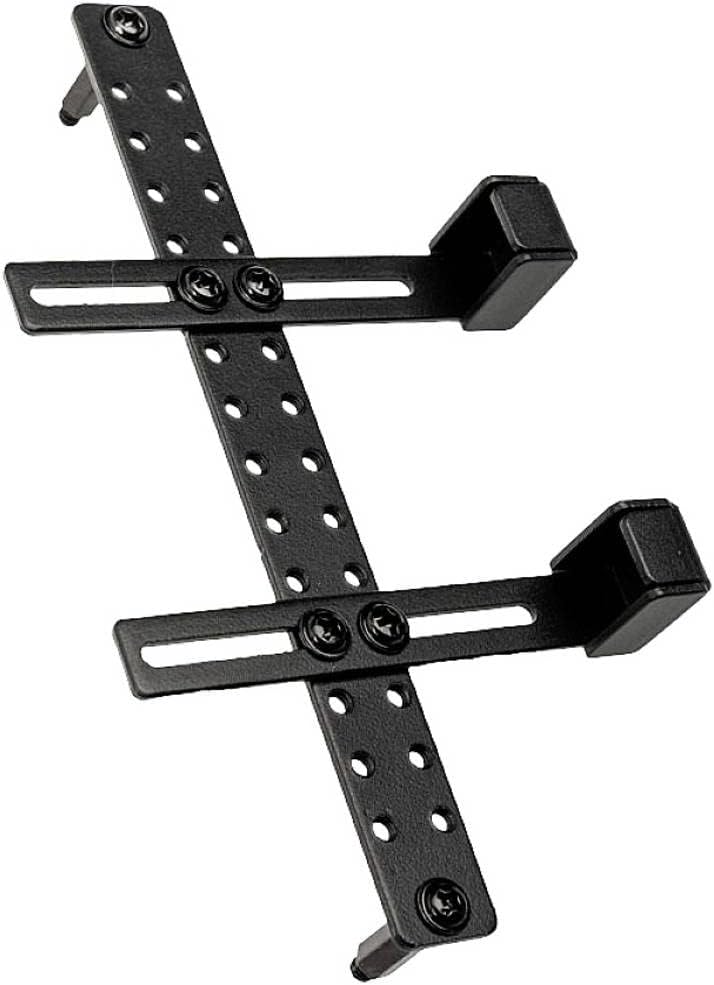
Lian Li GB-002 Graphic Card Anti-Sag Bracket - GB-002
Want the best price and purchase timing?
Our AI advisor analyzes real-time pricing across all channels to find you the best deal.
AI Verdict
This steel bracket hides behind your GPU to stop sag without ruining your build's aesthetics, but installation requires patience and clearance checks against your motherboard armor.
This bracket requires a standard ATX or E-ATX motherboard with exposed standoffs between the PCIe slots. If your board features massive M.2 heatsinks or your GPU has an extended backplate, the steel frame will physically block installation or prevent the GPU from seating.
Check your motherboard layout for thick armor between the PCIe slots; if it's covered, switch to a standard pillar-style support stand.
Regret Score™
High RiskLower is better — measures purchase-regret risk from real buyer complaints, review credibility, and product maturity
Issues discovered after purchase
Critically weak dimension
Amazon rating vs actual quality
Chance this product isn't for you
Pros
- Mounts directly to ATX and E-ATX motherboard standoffs to remain completely hidden behind the GPU.
- Supports up to two graphics cards simultaneously using the dual included sliding rails.
- Constructed from rigid steel that prevents heavy cards from drooping over time.
- Features 14 different vertical mounting holes to dial in the exact height for your specific PCIe slot.
- Eliminates the need for bulky pillar-style stands that block bottom intake fans.
Cons
- Thick GPU backplates or extended shrouds can hit the bracket and prevent the card from clicking into the PCIe slot.
- Motherboards with massive M.2 heatsinks or plastic armor block the mounting points entirely.
- The included metal standoffs lack protective washers and can scratch your motherboard traces if overtightened.
- Sheet metal manufacturing tolerances mean you often have to physically bend the bracket to align it with your motherboard holes.
Dimension Scores
This product is a steel mounting bracket, so the listed 2 GHz memory speed and NVIDIA chipset specs are catalog errors.
Mounting behind the GPU leaves the bottom case floor completely unobstructed for intake fans.
Functions entirely through mechanical steel support and draws 0 watts from the power supply.
Contains 0GB of VRAM as it is a structural support accessory, ignoring the inaccurate GDDR4 listing.
Best For
- Clean aesthetic builds where you want zero visible support pillars blocking your bottom intake fans.
- Standard ATX motherboards with minimal plastic armor around the PCIe slots.
- Dual-GPU workstations needing independent support rails for both cards.
Not Recommended For
- Motherboards with thick M.2 heatsinks or full-cover armor like the Asus ROG Formula series.
- Micro-ATX or Mini-ITX builds since the standoff spacing will not align with the bracket.
- GPUs with unusually thick backplates that extend past the PCB edge.
Watch Out For
- Motherboard armor blocks installation — if your board has thick plastic or metal shrouds between the PCIe slots, this bracket physically cannot mount to the standoffs.
- PCIe slot clearance issues — thick GPU backplates often rub against the steel bracket, preventing the card from fully clicking into the motherboard slot.
- Scratched motherboard traces — the included extended standoffs lack protective washers, requiring you to supply your own paper washers to avoid grinding into the PCB.
- Misaligned mounting holes — the stamped steel bracket often arrives slightly warped, forcing you to bend it by hand to make the screws thread into your standoffs.
Full Specifications
| ASIN | B099ZBFHKM |
| Brand | Lian Li |
| Series | GB-002 |
| Language | English, English, English, English, English |
| Batteries | 1 Lithium Ion batteries required. |
| Item Weight | 2.8 ounces |
| Manufacturer | Lian Li |
| Memory Speed | 2 GHz |
| Chipset Brand | NVIDIA |
| Card Description | Integrated graphics solution from Intel |
| Graphics RAM Type | GDDR4 |
| Item model number | GB-002 |
| Product Dimensions | 0.39 x 0.39 x 0.39 inches |
| Graphics Coprocessor | NVIDIA (unknown model, GDDR4 memory) |
| Max Screen Resolution | 3840x2160 |
| Item Dimensions LxWxH | 0.39 x 0.39 x 0.39 inches |
| Video Output Interface | DisplayPort |
| Graphics Processor Manufacturer | NVIDIA |
What Buyers Say
The invisibility of this bracket is its biggest selling point, hiding completely behind the GPU once installed. Getting it mounted requires fighting with sheet metal tolerances, as the holes rarely line up perfectly with motherboard standoffs on the first try. Motherboard armor and thick M.2 heatsinks frequently block the installation entirely. You must supply your own paper washers to prevent the bare metal standoffs from scratching your motherboard.
“spent an hour trying to get my 3080 to click into the slot before realizing the backplate was hitting this stupid bracket, but once I bent it out of the way it holds the card perfectly straight and you cant even see it.”
Common Praise
- Hides completely out of sight behind the graphics card
- Frees up the bottom of the case for intake fans
- Holds heavy cards perfectly level using rigid steel
- Includes 14 different height adjustment holes for precise leveling
Common Complaints
- Holes on the bracket do not perfectly align with motherboard standoffs
- Thick GPU backplates hit the bracket and prevent PCIe seating
- Included metal standoffs lack protective washers for the motherboard
- Incompatible with motherboards featuring thick plastic armor or M.2 heatsinks
Ownership Tips
- The black paint chips off easily around the screw holes after adjusting the sliding rails.
- You will likely need to loosen the motherboard standoffs slightly to force the bracket holes to align.
- Requires removing the GPU entirely to make any height adjustments to the support arm.
Frequently Asked Questions
Will this work with a Micro-ATX motherboard?
No. The mounting holes are specifically drilled for ATX and E-ATX standoff spacing. It will not align with mATX boards.
Do I have to remove my motherboard to install this?
You don't have to remove the motherboard, but you must remove the GPU. You replace two existing motherboard screws with the included extended standoffs.
Does this block bottom case fans?
It mounts flat against the motherboard behind the GPU. It leaves the bottom of your case completely clear for 120mm or 140mm intake fans.
Why won't my GPU click into the PCIe slot with this installed?
Some GPUs have backplates that extend past the PCB. This extra thickness hits the steel bracket before the PCIe pins fully seat.
Can it support two graphics cards at once?
Yes. The kit includes two separate sliding rails that attach to the main steel frame, allowing you to support two GPUs in different PCIe slots.
Buying Guide
You need to measure the clearance between your motherboard and your GPU backplate before buying this. Look closely at your motherboard's PCIe slots — if there are tall M.2 heatsinks or plastic shrouds right next to the mounting screws, this bracket will not fit. You will also need to find some thin paper or plastic washers to protect your motherboard, as the included hardware is bare metal.
ATX / E-ATX Compatibility
Motherboard sizes dictate where the screw holes are located. This bracket relies on the exact spacing of full-size boards, so it won't line up on smaller Micro-ATX builds.
14 Mounting Holes
Different motherboards place their PCIe slots at different heights. This gives you enough vertical adjustment to slide the support arm right up against your specific GPU.
Steel Construction
Heavy modern graphics cards will bend plastic supports over time. Steel ensures the card stays perfectly level for years.
Alternatives
Search for a magnetic base pillar-style GPU stand if your motherboard has thick armor or your GPU backplate extends past the PCB.
You Might Also Like

HP NVIDIA GeForce RTX 3070 8GB OEM Graphics Card (Renewed)
$150-$299This is a renewed HP OEM NVIDIA GeForce RTX 3070 with 8GB VRAM, a gamble for budget-conscious 1440p gamers who understand the risks of refurbished hardware.

ZOTAC Gaming GeForce RTX 5070 Twin Edge OC DLSS 4 12GB GDDR7 192-bit 28 Gbps PCIE 5.0 Gaming Graphics Card, IceStorm 2.0 Cooling, SFF-Ready, ZT-B50700H-10A
$600+This is a 2-slot, SFF-ready NVIDIA RTX 5070 with 12GB GDDR7 and a 2542 MHz boost clock, built for compact gaming rigs needing high 1440p performance.

ZOTAC Gaming GeForce RTX 5080 Solid CORE OC DLSS 4 16GB GDDR7 256-bit 30 Gbps PCIE 5.0 Gaming Graphics Card, IceStorm 3.0 Advanced Cooling, Spectra RGB Lighting, ZT-B50800J2-10A
$600+This ZOTAC RTX 5080 with 16GB GDDR7 and a 2640 GHz clock speed is built for high-end 4K gaming and content creation on the NVIDIA Blackwell architecture.

ZOTAC Gaming GeForce RTX 5060 Ti 8GB Twin Edge OC DLSS 4 8GB GDDR7 128-bit 28 Gbps PCIE 5.0 Gaming Graphics Card, IceStorm 2.0 Cooling, SFF-Ready, ZT-B50610H-10A
$300-$599This is a compact, 2-slot RTX 5060 Ti with 8GB GDDR7 and a 2602 MHz clock, built for SFF gaming rigs.