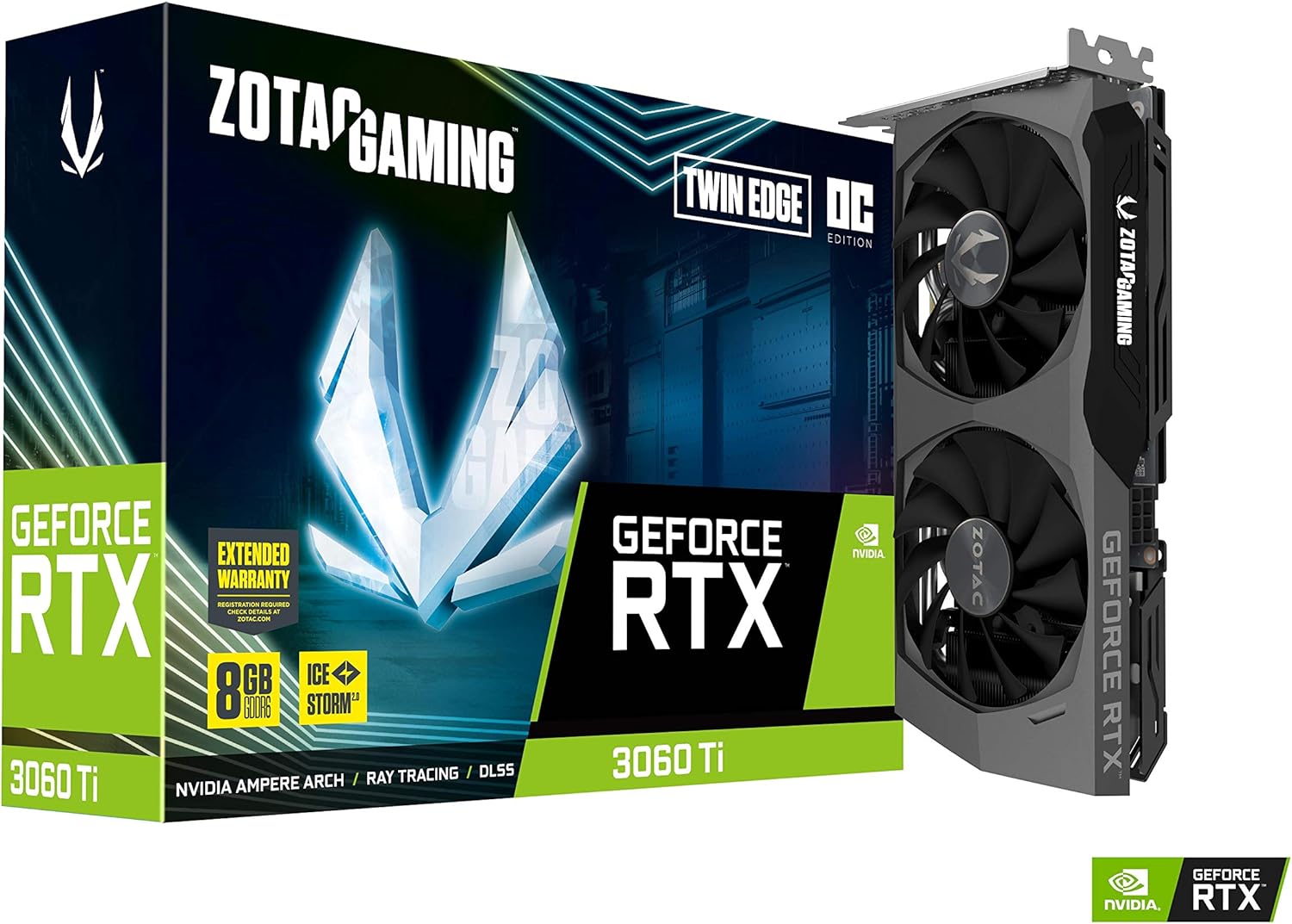
ZOTAC GAMING GeForce RTX™ 3060 Ti Twin Edge OC LHR 8GB GDDR6 256-bit 14 Gbps PCIE 4.0 Gaming Graphics Card, IceStorm 2.0 Advanced Cooling, Active Fan Control, FREEZE Fan Stop ZT-A30610H-10MLHR
Want the best price and purchase timing?
Our AI advisor analyzes real-time pricing across all channels to find you the best deal.
AI Verdict
This compact 222mm dual-slot 3060 Ti fits in almost any ITX case and crushes 1440p gaming, but you must undervolt it to stop the fans from sounding like a jet engine.
This card is a lifesaver if you have a cramped Mini-ITX case with a strict 225mm clearance limit. The 4864 CUDA cores deliver excellent 1440p rasterization, but the tiny heatsink struggles to dissipate 200W of heat quietly.
If your case fits a card longer than 280mm, look for a triple-fan RTX 3060 Ti or RX 6700 XT to get much lower noise levels.
Regret Score™
High RiskLower is better — measures purchase-regret risk from real buyer complaints, review credibility, and product maturity
Issues discovered after purchase
Critically weak dimension
Amazon rating vs actual quality
Chance this product isn't for you
Pros
- Fits easily into small form factor cases thanks to its 222.1mm length and strict 2-slot thickness
- Pushes 80-100 fps in games like The Witcher 3 and Borderlands 3 at 1080p max settings
- Requires only a single 8-pin PCIe power cable, making it compatible with older 550W power supplies
- Metal wraparound backplate prevents PCB sag and adds structural rigidity
Cons
- Stock fan curve is incredibly aggressive, pushing noise levels past 42 dBA under heavy gaming loads
- Out-of-the-box temperatures easily hit 80-82°C in standard ATX cases before thermal throttling kicks in
- Zotac's FireStorm software is clunky compared to MSI Afterburner for setting custom fan curves
- 8GB of VRAM limits texture quality settings in modern 1440p titles like Cyberpunk 2077
Dimension Scores
Pushes 100+ fps at 1080p and maintains 60+ fps at 1440p in modern titles.
Hits 82°C under load and produces 42 dBA of fan noise, making it one of the loudest 3060 Ti models.
Consumes exactly 200W and only requires a single 8-pin PCIe connector.
8GB of GDDR6 is enough for 1080p today, but already causes texture pop-in at 1440p in newer console ports.
Best For
- Mini-ITX builders needing a card under 230mm to fit inside cases like the Dan A4 or Velka 7
- 1080p gamers wanting to max out 144Hz monitors in competitive shooters like Valorant
- Upgraders with older 550W-650W power supplies who only have one 8-pin PCIe power cable available
Not Recommended For
- Silent PC enthusiasts who want a zero-RPM fan mode or whisper-quiet operation under load
- 4K gamers expecting 60fps at high settings in AAA single-player titles
- Crypto miners, since the LHR bios hard-caps Ethereum mining at 25 MH/s
Watch Out For
- The stock fan curve idles at 30% speed on some BIOS versions, meaning the fans never actually stop spinning even when you are just browsing the web.
- Temperatures will regularly hit 82°C under load unless you manually undervolt the card using MSI Afterburner.
- The white LED Zotac logo on the side cannot change colors, so it might clash with your RGB build theme.
- You lose about 100-150 MHz of boost clock speed to thermal throttling if you do not improve your case airflow or adjust the voltage.
Full Specifications
| RAM | 8 GB |
| ASIN | B097YW4FW9 |
| Brand | ZOTAC |
| Series | RTX 3060 |
| Item Weight | 2.29 pounds |
| Manufacturer | ZOTAC |
| Memory Speed | 1695 MHz |
| Chipset Brand | ZOTAC |
| Card Description | GeForce RTX 3060 Ti |
| Operating System | Windows 10 64-bit (build 2004 or later) |
| Graphics Ram Size | 8 GB |
| Item model number | ZT-A30610H-10MLHR |
| Product Dimensions | 8.74 x 4.55 x 1.5 inches |
| Graphics Coprocessor | NVIDIA GeForce RTX 3060 Ti |
| Max Screen Resolution | 7680x4320 |
| Graphics Card Ram Size | 8 GB |
| Item Dimensions LxWxH | 8.74 x 4.55 x 1.5 inches |
| Video Output Interface | DisplayPort, HDMI |
| Graphics Processor Manufacturer | ZOTAC |
What Buyers Say
The sheer volume of the fans under load dominates almost every forum thread about this card. Buyers consistently report hitting 80°C to 82°C within minutes of launching a game, prompting the fans to spin up to a distracting 80% speed. Undervolting is practically mandatory; dropping the voltage to 900mV at 1900MHz solves the heat issue and keeps the card in the 60°C range. The 222mm length is a massive selling point for SFF builders who physically cannot fit Asus Strix or MSI Gaming X Trio cards into their cases.
“Card runs great and crushes 1440p but my god the fans sound like a jet taking off from my desk until I undervolted it in afterburner.”
Common Praise
- Fits perfectly in tiny ITX cases like the NR200 without needing to remove the front panel
- Maintains 1935MHz boost clocks easily once undervolted
- Runs Cyberpunk 2077 at 1440p High settings at a stable 70 fps with DLSS enabled
- Metal backplate feels premium and prevents the card from sagging in standard ATX motherboards
Common Complaints
- Fans sound like a literal hair dryer when they hit 75% speed
- Out-of-the-box temperatures sit at 82°C, causing the core clock to throttle down to 1850MHz
- Zotac Firestorm software is buggy and sometimes forgets custom fan curves on reboot
- White LED logo cannot be turned off or color-changed without unplugging a cable on the PCB
Ownership Tips
- The thermal paste Zotac uses from the factory dries out quickly; repasting after a year drops temps by 5-8°C
- You can flash the VBIOS to the non-OC version if you want a slightly less aggressive default fan curve
- The fans have a noticeable clicking sound when they transition from 0 RPM to spinning
Frequently Asked Questions
Does this card have a zero RPM fan mode?
Some early BIOS versions locked the minimum fan speed to 30%. You can use Zotac's FireStorm software to enable FREEZE Fan Stop, but many users report the fans still ramp up aggressively the second a game launches.
What power supply do I actually need?
Zotac recommends 650W, but the card only draws 200W at peak load. A high-quality 550W Gold PSU is plenty for this GPU paired with a standard 65W CPU like a Ryzen 5600X.
Can I run games at 1440p with this?
Yes. You will get 60-80 fps in most AAA games at 1440p high settings. You might need to turn on DLSS to maintain those frames in heavier titles like Cyberpunk 2077.
Why is my card hitting 82 degrees?
The Twin Edge cooler is very small and uses a dense fin stack that struggles to clear heat quickly. Undervolting to around 875mV at 1875MHz usually drops temps down to the mid-60s.
Does the LHR version perform worse in games?
No. The Low Hash Rate limiter only triggers during specific cryptocurrency mining algorithms like Ethash. Gaming performance is identical to the non-LHR 3060 Ti.
Buying Guide
You are buying this specific card for its size, not its cooler. At 222mm, it fits where triple-fan cards simply cannot. You must be comfortable downloading MSI Afterburner and spending 10 minutes undervolting the core, or you will be stuck listening to incredibly loud fans. The 8GB of VRAM means you will need to turn down texture settings from Ultra to High in games released after 2023 to avoid stuttering.
222.1mm Length
This is the physical footprint of the card. Most modern GPUs are over 300mm long and block hard drive cages or front fans, but this one leaves plenty of breathing room.
8GB GDDR6 VRAM
Think of VRAM as the short-term memory for game graphics. 8GB holds enough high-resolution textures for 1080p gaming, but 1440p games are starting to demand 12GB or more.
LHR (Lite Hash Rate)
Nvidia added a software lock to make this card bad at mining crypto. It has zero impact on your video games or video editing software.
Alternatives
If your PC case has room for a 300mm+ card, search for a triple-fan RTX 3060 Ti or an RX 6700 XT to get significantly lower temperatures and zero fan noise.
You Might Also Like

HP NVIDIA GeForce RTX 3070 8GB OEM Graphics Card (Renewed)
$150-$299This is a renewed HP OEM NVIDIA GeForce RTX 3070 with 8GB VRAM, a gamble for budget-conscious 1440p gamers who understand the risks of refurbished hardware.

ZOTAC Gaming GeForce RTX 5070 Twin Edge OC DLSS 4 12GB GDDR7 192-bit 28 Gbps PCIE 5.0 Gaming Graphics Card, IceStorm 2.0 Cooling, SFF-Ready, ZT-B50700H-10A
$600+This is a 2-slot, SFF-ready NVIDIA RTX 5070 with 12GB GDDR7 and a 2542 MHz boost clock, built for compact gaming rigs needing high 1440p performance.

ZOTAC Gaming GeForce RTX 5080 Solid CORE OC DLSS 4 16GB GDDR7 256-bit 30 Gbps PCIE 5.0 Gaming Graphics Card, IceStorm 3.0 Advanced Cooling, Spectra RGB Lighting, ZT-B50800J2-10A
$600+This ZOTAC RTX 5080 with 16GB GDDR7 and a 2640 GHz clock speed is built for high-end 4K gaming and content creation on the NVIDIA Blackwell architecture.

ZOTAC Gaming GeForce RTX 5060 Ti 8GB Twin Edge OC DLSS 4 8GB GDDR7 128-bit 28 Gbps PCIE 5.0 Gaming Graphics Card, IceStorm 2.0 Cooling, SFF-Ready, ZT-B50610H-10A
$300-$599This is a compact, 2-slot RTX 5060 Ti with 8GB GDDR7 and a 2602 MHz clock, built for SFF gaming rigs.