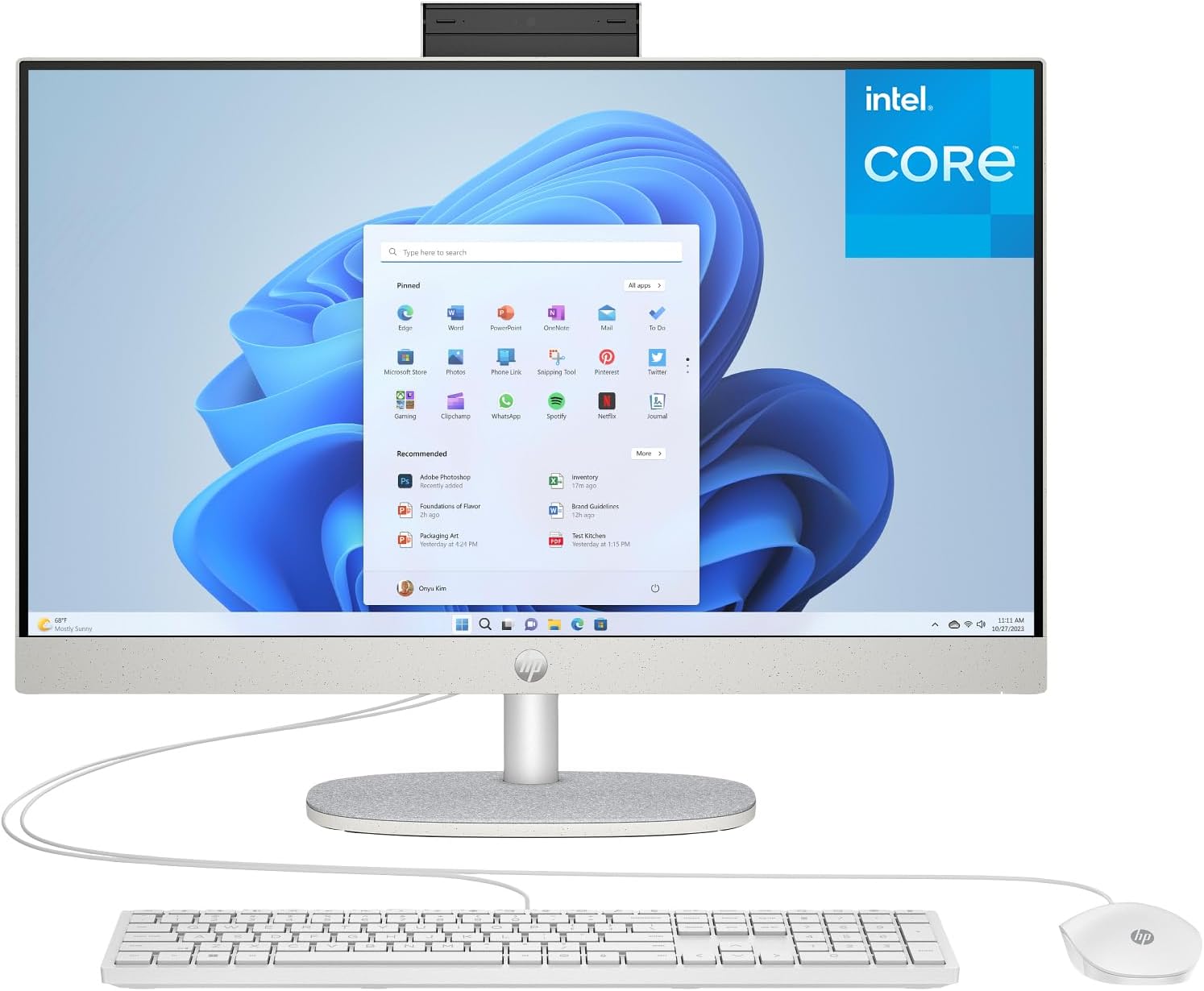
HP 24 Touchscreen All-in-One Desktop Computer for Home School and Office, 8GB DDR4 RAM, 256GB PCIe SSD, Intel Processor, 23.8" FHD, WiFi 6, Bluetooth 5.3, Business AIO, Windows 11 Home, White
Want the best price and purchase timing?
Our AI advisor analyzes real-time pricing across all channels to find you the best deal.
AI Verdict
This HP 24-inch All-in-One with an Intel N100 processor, 8GB RAM, and a 256GB SSD is for basic web browsing, email, and light office tasks in a space-saving form factor.
This HP All-in-One is a situational fit for users with very specific, light computing needs. Its Intel N100 processor, 8GB RAM, and 256GB SSD are adequate for basic tasks like web browsing and email, but will quickly become a bottleneck for anything more demanding. The 23.8-inch touchscreen is a plus for interaction, but the core components limit its utility.
If you need to run more than a few browser tabs or basic office apps, look for a system with at least an Intel Core i3 or Ryzen 3 processor, 16GB RAM, and a 512GB SSD.
Regret Score™
Very High RiskLower is better — measures purchase-regret risk from real buyer complaints, review credibility, and product maturity
Issues discovered after purchase
Critically weak dimension
Amazon rating vs actual quality
Chance this product isn't for you
Pros
- 23.8-inch Full HD (1920 x 1080) IPS touchscreen display offers wide viewing angles and touch input
- Integrated Wi-Fi 6 and Bluetooth 5.3 provide modern wireless connectivity
- All-in-one design reduces cable clutter and saves desk space
- Includes a 720p HD privacy camera with temporal noise reduction for video calls
- Comes with Windows 11 Home pre-installed, ready for immediate use
- Features a USB Type-C 5Gbps port and two USB Type-A 5Gbps ports for faster data transfer
Cons
- Intel N100 processor (4 cores, 3.40 GHz max turbo) struggles with heavy multitasking or demanding applications
- 256GB PCIe NVMe M.2 SSD provides limited storage capacity for files and applications
- 8GB DDR4 RAM can be a bottleneck for running multiple applications simultaneously
- Integrated Intel UHD Graphics are not suitable for gaming or video editing
- Includes only wired keyboard and mouse, adding to cable clutter despite the AIO form factor
- All-in-one form factor typically limits upgradeability and repair options
Dimension Scores
The Intel N100 processor is an entry-level chip with 4 cores and a 3.40 GHz max turbo frequency, suitable only for the most basic computing tasks.
All-in-one designs inherently limit internal expandability, with RAM often soldered and storage upgrades requiring significant disassembly.
The low-power Intel N100 processor typically generates minimal heat, suggesting quiet operation under light loads, which is average for an AIO in this class.
HP generally produces physically sturdy products, but without specific user feedback on this model, it's assumed to be of average build quality for its price point.
Best For
- Basic home computing like email, web browsing, and streaming video
- Students needing a dedicated machine for online classes and word processing
- Small businesses for front-desk tasks or light administrative work
- Users prioritizing a clean, minimalist desk setup with fewer cables
Not Recommended For
- Video editing, graphic design, or other CPU/GPU intensive creative work
- Gaming beyond very casual, low-demand titles
- Users who require significant local storage for large media libraries
- Heavy multitasking with many browser tabs and applications open simultaneously
Watch Out For
- The 256GB SSD fills up quickly, with users often finding it insufficient for their needs, suggesting a minimum of 512GB.
- The Intel N100 processor and 8GB RAM will show noticeable slowdowns when attempting heavy multitasking or running several applications at once.
- All-in-one PCs like this one are generally difficult to upgrade or repair, as components are often integrated and not easily accessible or replaceable.
- The included keyboard and mouse are wired, which detracts from the clean, wireless aesthetic often associated with AIO setups.
Full Specifications
| RAM | 8 GB SDRAM |
| ASIN | B0G48K39P3 |
| Brand | HP |
| Series | HP AIO |
| CPU Model | Intel N100 |
| CPU Speed | 100 MHz |
| Processor | 100 MHz intel_n100 |
| Cache Size | 6 MB |
| Hard Drive | 256 GB SSD |
| Item Weight | 5 pounds |
| Chipset Brand | Intel |
| Processor Brand | Intel |
| Card Description | Integrated |
| Operating System | Windows 11 |
| Hardware Platform | PC |
| Item model number | 24 |
| Screen Resolution | 1920 x 1080 |
| Product Dimensions | 19.43 x 6.69 x 15.07 inches |
| Computer Memory Type | DDR4 SDRAM |
| Graphics Coprocessor | Intel UHD Graphics |
| Hard Drive Interface | PCIE x 4 |
| Number of Processors | 4 |
| Max Screen Resolution | 1920x1080 |
| Item Dimensions LxWxH | 19.43 x 6.69 x 15.07 inches |
| Memory Storage Capacity | 1 TB |
| Number of USB 2.0 Ports | 2 |
| Number of USB 3.0 Ports | 2 |
| Graphics Card Description | Integrated |
| Specific Uses For Product | Business |
| Hard Drive Rotational Speed | 7000.00 |
| Standing screen display size | 23.8 Inches |
| Personal computer design type | All in One |
What Buyers Say
This HP 24-inch All-in-One is pitched as a clutter-free solution for everyday computing, but its core components mean you need to manage your expectations. Users appreciate the clean setup and the decent 23.8-inch Full HD touchscreen for media and general use. However, the Intel N100 processor and 8GB RAM are quickly overwhelmed by anything beyond light web browsing, leading to noticeable slowdowns with multiple applications. The 256GB SSD is also a common point of concern, filling up too fast for many users.
“I bought this for my mom for email and Facebook, and it's fine for that, but if you open more than 5 tabs or try to do anything else, it just chugs, and that 256GB drive is already almost full after Windows updates and a few apps.”
Common Praise
- Space-saving all-in-one form factor keeps desks tidy
- 23.8-inch Full HD IPS touchscreen provides a clear and interactive display
- Fast boot times and application loading due to the NVMe M.2 SSD (despite its small capacity)
- Anti-glare screen technology helps reduce reflections
- Integrated 720p privacy camera is convenient for video calls
Common Complaints
- Intel N100 processor struggles with heavy multitasking and demanding software
- 256GB SSD is too small for modern use, requiring frequent file management or external storage
- 8GB RAM limits the number of applications that can run smoothly simultaneously
- Lack of easy upgradeability for internal components like RAM and CPU
- Wired keyboard and mouse negate some of the clean aesthetic benefits of an AIO.
Ownership Tips
- The anti-glare coating on the touchscreen can sometimes make the display appear slightly less vibrant than glossy screens.
- The privacy camera is a manual pop-up, which is reassuring but can feel a bit flimsy over time.
- The stand likely only offers tilt adjustment, making ergonomic positioning limited without external solutions.
- The included wired peripherals, while functional, add two more cables to manage on the desk.
- Windows 11 updates and pre-installed software consume a significant portion of the 256GB SSD right out of the box.
Frequently Asked Questions
Can I upgrade the RAM or storage in this HP All-in-One?
All-in-one computers typically have limited upgrade options. The RAM is often soldered, and while the M.2 SSD might be replaceable, accessing it usually requires disassembling the unit, which can void the warranty.
Is the Intel N100 processor fast enough for everyday use?
The Intel N100 processor is designed for basic tasks like web browsing, email, and word processing. It will handle these smoothly, but you will experience slowdowns with heavy multitasking or more demanding applications.
Does this computer come with a keyboard and mouse?
Yes, it includes an HP 125 USB White Wired Mouse and an HP 125 USB White Wired Keyboard.
Can I connect an external monitor to this All-in-One?
The product specifications do not explicitly list video output ports (like HDMI or DisplayPort). Without this information, it cannot be assumed that an external monitor can be connected.
Is the screen good for watching movies?
The 23.8-inch Full HD (1920 x 1080) IPS display with anti-glare technology and 99% sRGB coverage should provide a clear and color-accurate viewing experience for media consumption.
Buying Guide
When looking at an all-in-one, you're trading raw power and upgradeability for a compact, integrated design. You need to be realistic about what you'll use it for. Don't expect a budget AIO to handle intensive tasks; they're built for simplicity and saving space, not high performance. Pay close attention to the processor, RAM, and storage, as these are usually fixed.
Processor (Intel N100)
This is the brain of the computer. The Intel N100 is like a small, efficient engine – great for cruising on the highway (web browsing, email) but it won't win any drag races (heavy software, gaming). It determines how fast your computer can think and process information.
RAM (8GB DDR4)
RAM is your computer's short-term memory. Think of it as your desk space. 8GB is like a small desk; you can have a few things open, but if you try to spread out too many documents (applications or browser tabs), things will get messy and slow down fast.
Storage (256GB PCIe SSD)
This is where all your files and programs live. An SSD is like a super-fast digital filing cabinet, but 256GB is a small one. It's quick to open files, but you'll run out of space quickly if you save a lot of photos, videos, or large applications.
Display (23.8" FHD Touchscreen)
This is your window into the computer. A 23.8-inch Full HD (1920x1080) screen is a standard size and resolution, offering clear visuals. The 'touchscreen' part means you can interact directly with the screen, which is handy for some tasks, like using Windows 11's touch gestures.
Alternatives
If this AIO doesn't fit, look for a system with at least an Intel Core i3 or AMD Ryzen 3 processor, 16GB of RAM, and a 512GB SSD for a more comfortable experience with everyday multitasking.
You Might Also Like

HP ProOne 600 G4 All-in-One Desktop Computer 21.5" FHD PC, Intel Core i5-8500T, 8GB RAM, 256GB SSD, Keyboard & Mouse, USB WiFi & BT, Windows 11 Pro (Renewed)
$150-$299This is a renewed 21.5-inch FHD All-in-One with an 8th Gen Intel Core i5-8500T, 8GB RAM, and 256GB SSD, best for basic office tasks and web browsing.

GEEKOM A9 Max AI Mini PC, with AMD Ryzen AI 9 HX 370 (80 Tops), Copilot+ PC, Radeon 890M, 32GB DDR5 (Not LPDDR), 1TB SSD, Win 11 Pro, WiFi 7, BT 5.4, USB4, HDMI 2.1, Dual 2.5GbE, 8K, 3-Year Warranty
$600+A mini PC with an AMD Ryzen AI 9 HX 370 processor and Radeon 890M graphics, designed for AI workloads and 1080p gaming.

Bmax Mini PC B1 Pro Intel Gemini Lake N4000 (Up to 2.6GHz), 8GB LPDDR4 128GB eMMC Support M.2 SSD Expansion (512GB/2TB), 4K Dual Display 2.4G/5G WiFi & BT4.2 Mini Desktop Computer for Home/Office
$150-$299This is a fanless mini PC with an Intel N4000 processor, 8GB LPDDR4, and 128GB eMMC, designed for basic office tasks and web browsing.

Lenovo 24" ThinkCentre All-in-One Desktop Computer • 6-core AMD Ryzen 5 Processor • 16GB DDR5 • 512GB SSD • Wi-Fi 6 • HDMI in&Out • Wired KB&Mouse • Windows 11 Pro
$600+This is a 24-inch FHD IPS AIO with an AMD Ryzen 5 220 processor, 16GB DDR5 RAM, and a 512GB SSD, built for everyday productivity and light creative tasks.