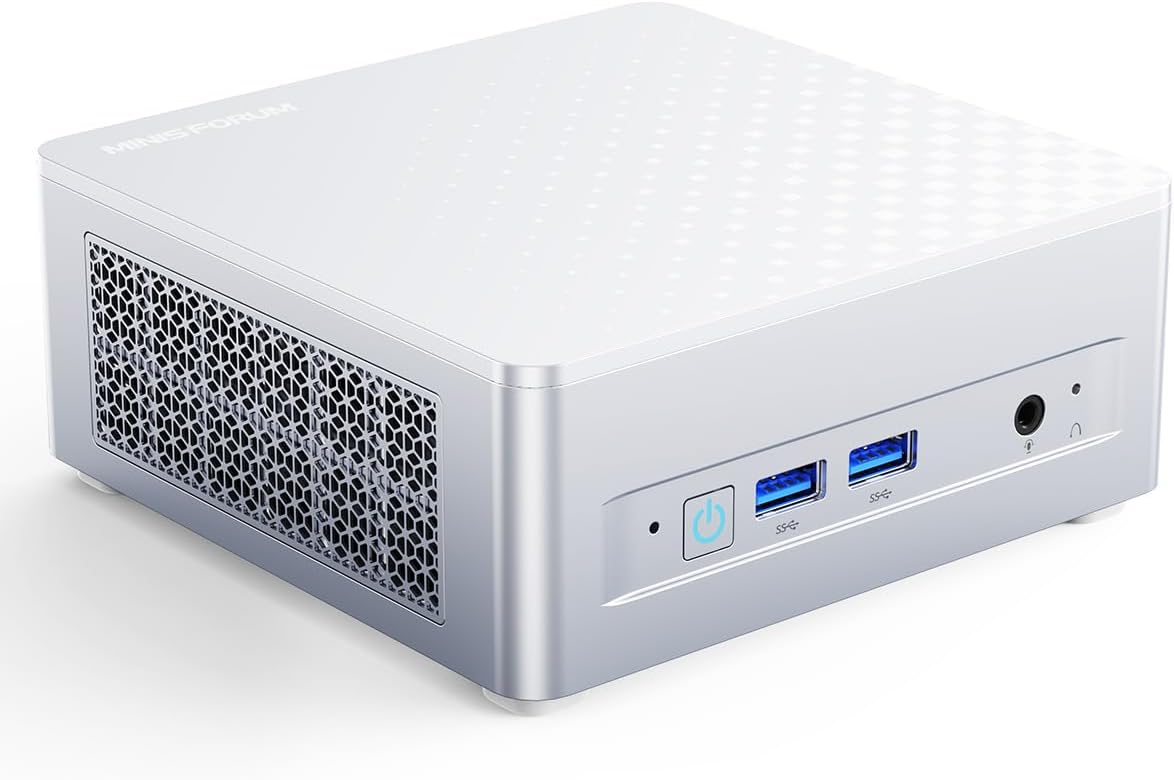
MINISFORUM M1 Plus Mini PC Intel Core i7-12800H(14C/20T, Up to 4.8GHz), 32GB DDR5 1TB SSD Desktop Computer, USB4/HDMI/DP Triple Output, 2X 2.5G LAN, 4xUSB Port, WiFi 6E, BT5.2, Intel Iris Xe Graphics
Want the best price and purchase timing?
Our AI advisor analyzes real-time pricing across all channels to find you the best deal.
AI Verdict
A 14-core i7-12800H mini PC with 32GB DDR5 and triple 4K display output, built for demanding multi-monitor workflows.
This mini PC is a strong fit for users needing a compact workstation with significant processing power and extensive display connectivity. The i7-12800H processor, 32GB DDR5 RAM, and triple 4K output are well-suited for demanding productivity and content creation tasks.
If you need dedicated graphics performance for gaming or intensive 3D rendering, look for mini PCs with an OCuLink port for eGPU support or a model with an integrated AMD APU with RDNA graphics.
Regret Score™
Medium RiskLower is better — measures purchase-regret risk from real buyer complaints, review credibility, and product maturity
Issues discovered after purchase
Critically weak dimension
Amazon rating vs actual quality
Chance this product isn't for you
Pros
- Intel Core i7-12800H processor with 14 cores and 20 threads boosts up to 4.8 GHz for robust multi-core performance.
- 32GB dual-channel 4800MHz DDR5 memory is pre-installed and expandable up to 96GB.
- 1TB M.2 2280 NVMe SSD offers PCIe 4.0 speeds and is expandable up to 4TB.
- Triple 4K display support via HDMI 2.1, DisplayPort 1.4, and USB4 enables simultaneous output.
- Dual 2.5 Gigabit Ethernet ports provide speeds 2.5 times faster than traditional Gigabit Ethernet.
- Full-featured USB4 port supports 8K@60Hz/4K@144Hz video, 40 Gbps transfer, and 65-100W PD-IN.
Cons
- Integrated Intel Iris Xe Graphics are not designed for demanding gaming.
- Fan noise can become noticeable under sustained loads, a common issue with compact PCs.
- Potential for thermal throttling under heavy, prolonged workloads due to compact form factor.
- Some Minisforum users report limited BIOS and driver updates, and inconsistent customer support.
- Clean Windows installations may require pre-downloading network drivers as they might not be included in the OS.
Dimension Scores
The Intel Core i7-12800H with 14 cores and 20 threads, boosting to 4.8 GHz, offers desktop-level performance for multi-threaded applications.
It ships with 32GB DDR5 RAM expandable to 96GB and a 1TB PCIe 4.0 SSD expandable to 4TB, providing substantial upgrade potential.
While promotional materials claim quiet operation and advanced cooling, some users of similar Minisforum models report noticeable fan noise and potential throttling under load.
The aluminum chassis is mentioned, but general Minisforum user feedback sometimes points to inconsistent thermal paste application and potential long-term reliability concerns with BIOS/driver support.
Best For
- Multi-monitor workstation setups utilizing up to three 4K displays.
- Content creation and advanced users needing multi-core CPU performance.
- Network attached storage (NAS) access or virtualization with dual 2.5GbE ports.
- Users requiring high-speed data transfer and power delivery via USB4.
Not Recommended For
- High-end gaming that requires a dedicated graphics card.
- Users expecting extensive long-term software support and frequent BIOS updates.
- Environments where absolute silence is critical during heavy computational tasks.
Watch Out For
- Fan noise can ramp up unexpectedly, even during light browsing, as reported by users of similar Minisforum models.
- Thermal throttling may occur during sustained heavy loads, reducing CPU performance to prevent overheating.
- Some Minisforum units have shown issues with thermal paste application, leading to higher temperatures (e.g., 95°C) that required user intervention to fix.
- Performing a clean Windows installation might leave you without internet access initially, as network drivers may not be pre-loaded into the OS.
- Warranty support and driver updates have been described as inconsistent for some Minisforum mini PCs, posing a risk for long-term reliability.
Full Specifications
| RAM | 32 GB DDR5 |
| ASIN | B0G3WYQ8HG |
| Brand | MINISFORUM |
| Color | Silver |
| Series | DeskMini |
| CPU Model | Intel Core i7 12800H |
| CPU Speed | 4.8 GHz |
| Processor | 4.8 GHz Intel_core_i7_12800H |
| Cache Size | 24 MB |
| Hard Drive | 1 TB SSD |
| Item Weight | 2.77 pounds |
| Memory Speed | 4800 MHz |
| Processor Brand | Intel |
| Card Description | Integrated |
| Operating System | OS |
| Item model number | DeskMini |
| Screen Resolution | 3840 x 2160 |
| Package Dimensions | 7.05 x 6.38 x 4.61 inches |
| Computer Memory Type | DDR5 RAM |
| Graphics Coprocessor | Intel Iris Xe Graphics |
| Hard Drive Interface | PCIE x 4 |
| Number of Processors | 14 |
| Max Screen Resolution | 3840x2160 Pixels |
| Memory Storage Capacity | 32 GB |
| Number of USB 2.0 Ports | 2 |
| Number of USB 3.0 Ports | 2 |
| Graphics Card Description | Integrated |
| Hard Drive Rotational Speed | 7200.0 |
| Standing screen display size | 25 Inches |
| Personal computer design type | Mini PC |
What Buyers Say
This mini PC packs a punch for its size, with users praising its raw CPU power and extensive connectivity. The triple 4K display output is a recurring highlight, making it a strong contender for multi-monitor setups. However, like many compact systems, fan noise under load and the potential for thermal throttling are common discussion points among Minisforum owners. The integrated graphics are fine for everyday use, but don't expect a gaming powerhouse.
“Man, this little box just flies through my video edits, but sometimes that fan kicks in and it sounds like a tiny jet engine taking off. Still, for the price, it's a beast for work!”
Common Praise
- The Intel Core i7-12800H processor delivers desktop-level multitasking and responsiveness.
- Triple 4K display output via HDMI, DisplayPort, and USB4 is highly functional for productivity.
- Dual 2.5GbE LAN ports are a significant advantage for fast, stable wired networking.
- The 32GB DDR5 RAM and 1TB PCIe 4.0 SSD provide fast performance and ample capacity.
- The full-featured USB4 port offers 40 Gbps transfer speeds and power delivery for portable monitors.
Common Complaints
- Fan noise can become audible and distracting when the system is under heavy load.
- Some Minisforum mini PCs have shown thermal throttling, where performance is reduced to manage heat.
- The integrated Intel Iris Xe Graphics are not sufficient for modern demanding games.
- Lack of consistent BIOS and driver updates can be a concern for long-term support.
- Initial Windows setup or reinstallation might require manual network driver installation.
Ownership Tips
- The system can get warm under prolonged heavy use, and the fan will definitely make itself known.
- You might want to check for updated drivers directly from Intel or Minisforum's website after initial setup for optimal performance.
- Consider a clean OS install if you encounter any unexpected software behavior, but be prepared to manually install network drivers.
- The compact size is genuinely desk-space saving, especially with the VESA mount option.
- The expandability for RAM and SSD is straightforward, making future upgrades relatively easy.
Frequently Asked Questions
Does this mini PC come with an operating system?
Yes, the MINISFORUM M1 Plus typically comes with Windows 11 Pro pre-installed.
Can I upgrade the RAM and storage?
Yes, the 32GB DDR5 RAM is expandable up to 96GB, and the 1TB M.2 NVMe SSD can be expanded up to 4TB.
How many monitors can I connect?
You can connect up to three independent 4K displays simultaneously using the HDMI 2.1, DisplayPort 1.4, and USB4 ports.
Is it suitable for gaming?
It features Intel Iris Xe Graphics, which are capable of light gaming and media playback, but not demanding AAA titles.
Does it support VESA mounting?
Yes, the M1 Plus supports wall mounting, and a VESA mounting bracket is included in the package.
Buying Guide
When you're looking at mini PCs, don't just focus on the processor. You need to think about how you'll use it every day. Will you be running multiple monitors? Do you need super-fast network speeds for a home server? How much storage do you actually need right now, and can you add more later? These small machines can be powerful, but their size also means trade-offs, especially with cooling and graphics. Pay attention to the ports and what kind of displays they support, as that's often a key reason to pick a mini PC.
Processor (Intel Core i7-12800H)
This is the brain of your mini PC. The i7-12800H is a high-performance laptop chip with 14 cores, meaning it's really good at handling many tasks at once, like editing videos or running several demanding apps without slowing down. It's like having a multi-lane highway for your data.
RAM (32GB DDR5)
RAM is your computer's short-term memory. 32GB of DDR5 RAM is a lot, letting you open tons of browser tabs, switch between large applications, and work with big files smoothly. DDR5 is also faster than older DDR4, so everything feels snappier, like having a bigger, quicker workbench.
Storage (1TB SSD)
This is where your operating system, programs, and files live. A 1TB SSD (Solid State Drive) means your computer boots up in seconds, and applications load almost instantly. It's much faster than old hard drives, like going from a dirt road to a superhighway for your data.
USB4 / HDMI / DisplayPort
These are your video output ports. Having all three, especially USB4, means you can connect multiple high-resolution monitors (up to three 4K displays) at once. This is crucial for productivity, letting you spread out your work across several screens instead of constantly minimizing and maximizing windows.
Alternatives
If you need more graphical horsepower for gaming or intensive 3D work, look for mini PCs with a dedicated graphics card or an OCuLink port for external GPU support. If your budget is tighter and you only need basic office tasks, a model with an Intel Core i5 or AMD Ryzen 5 processor might be sufficient.
You Might Also Like

HP ProOne 600 G4 All-in-One Desktop Computer 21.5" FHD PC, Intel Core i5-8500T, 8GB RAM, 256GB SSD, Keyboard & Mouse, USB WiFi & BT, Windows 11 Pro (Renewed)
$150-$299This is a renewed 21.5-inch FHD All-in-One with an 8th Gen Intel Core i5-8500T, 8GB RAM, and 256GB SSD, best for basic office tasks and web browsing.

GEEKOM A9 Max AI Mini PC, with AMD Ryzen AI 9 HX 370 (80 Tops), Copilot+ PC, Radeon 890M, 32GB DDR5 (Not LPDDR), 1TB SSD, Win 11 Pro, WiFi 7, BT 5.4, USB4, HDMI 2.1, Dual 2.5GbE, 8K, 3-Year Warranty
$600+A mini PC with an AMD Ryzen AI 9 HX 370 processor and Radeon 890M graphics, designed for AI workloads and 1080p gaming.

Bmax Mini PC B1 Pro Intel Gemini Lake N4000 (Up to 2.6GHz), 8GB LPDDR4 128GB eMMC Support M.2 SSD Expansion (512GB/2TB), 4K Dual Display 2.4G/5G WiFi & BT4.2 Mini Desktop Computer for Home/Office
$150-$299This is a fanless mini PC with an Intel N4000 processor, 8GB LPDDR4, and 128GB eMMC, designed for basic office tasks and web browsing.

Lenovo 24" ThinkCentre All-in-One Desktop Computer • 6-core AMD Ryzen 5 Processor • 16GB DDR5 • 512GB SSD • Wi-Fi 6 • HDMI in&Out • Wired KB&Mouse • Windows 11 Pro
$600+This is a 24-inch FHD IPS AIO with an AMD Ryzen 5 220 processor, 16GB DDR5 RAM, and a 512GB SSD, built for everyday productivity and light creative tasks.