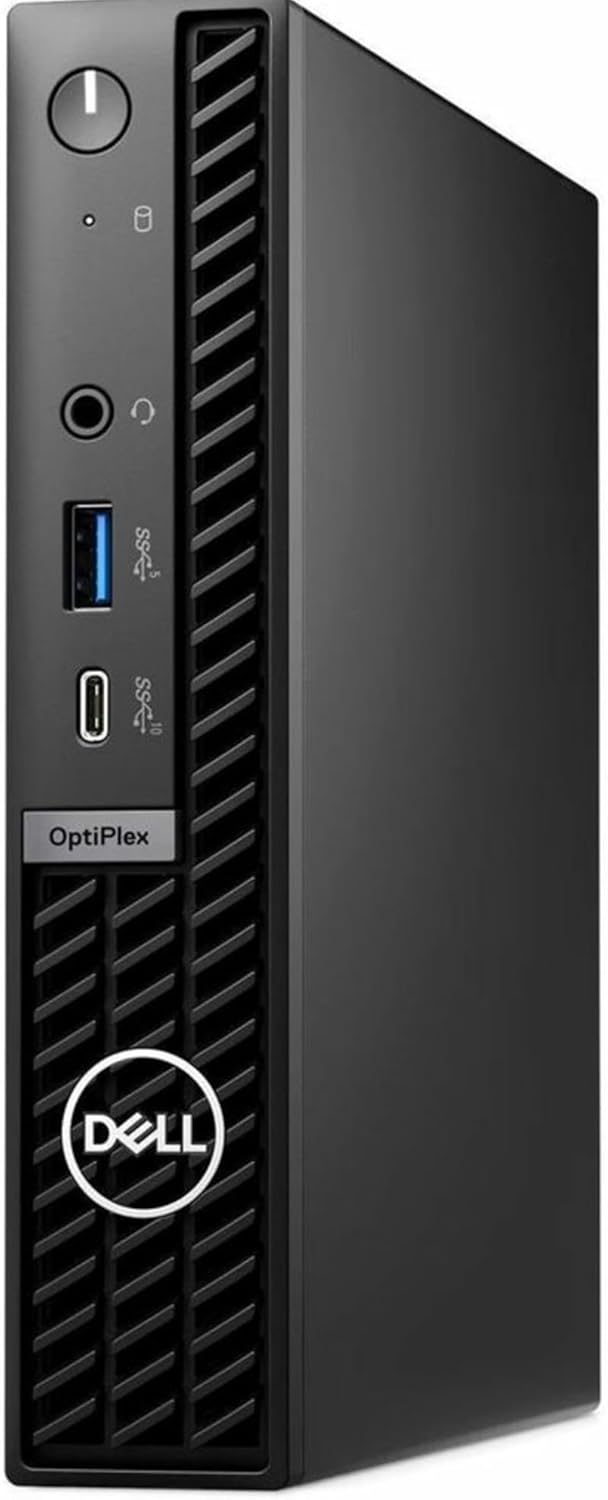
Dell OptiPlex 7020 MFF Mini PC 7000 Micro Form Factor Business Desktop Computer, Intel Hexa-Core i5-12500T (Beat i7-11700T), 16GB DDR5 RAM, 512GB PCIe SSD, WiFi6E, 2 DisplayPort + HDMI, Windows 11 Pro
Want the best price and purchase timing?
Our AI advisor analyzes real-time pricing across all channels to find you the best deal.
AI Verdict
This is a compact business desktop with an Intel Core i5-12500T, 16GB DDR5 RAM, and 512GB NVMe SSD, ideal for office tasks and multi-monitor setups.
This Dell OptiPlex 7020 MFF is a strong fit for business and home office users who prioritize a compact footprint without sacrificing core performance. Its Intel Core i5-12500T processor, 16GB DDR5 RAM, and 512GB NVMe SSD provide ample power for daily tasks and multitasking, while the extensive display output options support complex multi-monitor workflows.
If you need more raw processing power for intensive applications, look for configurations with a 14th Gen Intel Core i7 processor.
Regret Score™
Low RiskLower is better — measures purchase-regret risk from real buyer complaints, review credibility, and product maturity
Issues discovered after purchase
Critically weak dimension
Amazon rating vs actual quality
Chance this product isn't for you
Pros
- Features an Intel Core i5-12500T processor with 6 performance cores and 12 threads, boosting up to 4.4 GHz for efficient multitasking.
- Equipped with 16GB DDR5 RAM, ensuring smooth performance with multiple applications open.
- Includes a 512GB PCIe NVMe SSD for fast boot times and rapid application launches.
- Supports up to three simultaneous 4K displays via 2x DisplayPort and 1x HDMI outputs.
- Offers modern connectivity with WiFi 6E, Bluetooth, and Gigabit Ethernet.
- Compact micro form factor (7" x 7.2" x 1.4") allows for placement in tight spaces or behind a monitor.
Cons
- Integrated Intel UHD Graphics 770 is not suitable for demanding gaming or intensive graphical workloads.
- The 12th Gen i5-12500T, while capable, is not the latest generation processor available in some other configurations of the 7020 MFF.
- The rear USB ports include two older USB 2.0 Type-A ports, limiting high-speed peripheral connections.
- Some configurations of the OptiPlex 7020 MFF offer a 14th Gen i5 or i7, making this specific i5-12500T model less powerful by comparison.
Dimension Scores
The Intel Core i5-12500T with 6 performance cores and 12 threads offers strong performance for business applications and multitasking.
It offers user-upgradeable RAM and SSD, including an extra M.2 slot, which is good for a mini PC, but lacks PCIe slots for dedicated graphics or other cards.
Reviewers consistently note its whisper-quiet operation, making it suitable for quiet office environments.
Built with sturdy materials, the OptiPlex 7020 is designed for durability and reliability in an office environment.
Best For
- Multi-monitor office productivity setups requiring up to three 4K displays.
- Space-constrained home offices or business environments needing a compact desktop.
- Business users focused on everyday office applications, spreadsheets, and virtual meetings.
- Users needing fast boot times and responsive application performance from an NVMe SSD.
Not Recommended For
- High-end gaming or professional video editing due to integrated graphics.
- Users requiring extensive internal expansion options like additional PCIe cards.
- Budget-conscious buyers who don't need the specific features of a premium mini PC.
Watch Out For
- The listed weight of 7.5lbs in the product data seems inaccurate; reviewers consistently describe it as incredibly light, around 2.4lbs, which could mislead expectations about portability.
- While the title mentions an i5-12500T, some Dell OptiPlex 7020 MFF models are available with newer 14th Gen i5 or even i7 processors, which could lead to confusion about performance expectations.
- The inclusion of VGA alongside DisplayPort and HDMI is an older port standard that might not be utilized by many modern monitor setups. [Feature Highlights]
Full Specifications
| RAM | 16 GB DDR5 |
| ASIN | B0D7VZ7K1F |
| Brand | Dell |
| Color | Black |
| Series | Lenovo |
| CPU Model | Core i5-12500T |
| CPU Speed | 1.7 GHz |
| Processor | 1.7 GHz core_i5_12500t |
| Cache Size | 18 MB |
| Hard Drive | 512 GB SSD |
| Item Weight | 5.94 pounds |
| Memory Speed | 2933 MHz |
| Chipset Brand | Intel |
| Wireless Type | 802.11ax |
| Processor Brand | Intel |
| Card Description | Integrated |
| Operating System | Windows 11 |
| Hardware Platform | PC |
| Item model number | 7020 MFF |
| Screen Resolution | 4096 x 2304 |
| Product Dimensions | 15 x 19 x 10 inches |
| Computer Memory Type | DDR5 RAM |
| Graphics Coprocessor | Intel UHD Graphics 770 |
| Hard Drive Interface | PCIE x 4 |
| Number of Processors | 6 |
| Max Screen Resolution | 4096x2304 or 4096x2160 |
| Item Dimensions LxWxH | 15 x 19 x 10 inches |
| Memory Storage Capacity | 512 GB |
| Number of USB 2.0 Ports | 2 |
| Number of USB 3.0 Ports | 4 |
| Graphics Card Description | Integrated |
| Specific Uses For Product | Business |
| Hard Drive Rotational Speed | 7000.00 |
| Personal computer design type | Mini PC |
What Buyers Say
Many reviewers highlight the surprisingly powerful performance packed into such a tiny chassis, making it a favorite for decluttering workspaces. The ability to drive multiple 4K displays is a recurring positive, especially for those managing complex data or multiple applications. The fast DDR5 RAM and NVMe SSD are frequently praised for contributing to a snappy, responsive user experience. However, some users note the integrated graphics are a clear limitation for anything beyond basic visual tasks.
“Man, this little box is a beast for my work spreadsheets and a million Chrome tabs, but don't even think about trying to game on it, seriously. It's so tiny though, my desk finally looks clean!”
Common Praise
- Handles multiple office applications and browser tabs without lag due to 16GB DDR5 RAM.
- Boots up quickly and launches applications almost instantly with the 512GB NVMe SSD.
- Supports up to three 4K monitors, creating an expansive workspace.
- Fits easily into tight spaces or mounts behind a monitor for a clean setup.
- Operates very quietly, even under load, which is ideal for focused work environments.
- Includes a good selection of ports, including USB-C, DisplayPort, and HDMI.
Common Complaints
- Integrated Intel UHD Graphics 770 struggles with any kind of gaming or intensive graphical work.
- Some USB ports on the rear are older USB 2.0, which are slow for modern peripherals.
- The processor, while capable, isn't the absolute latest generation available in some other 7020 MFF variants.
- No options for dedicated graphics cards, limiting its use for certain professional applications.
Ownership Tips
- The actual weight feels much lighter than the 7.5lbs listed, making it genuinely portable for moving between workstations.
- The included wired keyboard and mouse are basic but functional, getting you started right away without extra purchases.
- The system runs cool and quiet even after hours of continuous use, which is a huge plus for concentration.
- Mounting options are available, and it truly disappears behind a monitor, which is a game-changer for desk space.
Frequently Asked Questions
Can this mini PC support multiple monitors?
Yes, it supports up to three simultaneous 4K displays using its two DisplayPort outputs and one HDMI port.
Is the RAM or storage upgradeable?
Yes, the RAM and SSD are generally user-upgradeable in these OptiPlex micro models, often with an additional M.2 slot for more storage.
Does it come with a keyboard and mouse?
Yes, Dell typically includes a wired keyboard and mouse in the box with this model, so you can start working immediately.
What kind of tasks is the integrated graphics suitable for?
The Intel UHD Graphics 770 is designed for smooth visuals in office applications, web browsing, 4K video playback, and light creative tasks, but not for demanding gaming or professional graphics work.
Does it have Wi-Fi and Bluetooth?
Yes, it comes with modern Wi-Fi 6E and Bluetooth connectivity for fast wireless internet and peripheral connections.
Buying Guide
When looking at mini PCs like this, you're trading internal expansion for a tiny footprint. You need to know exactly what ports you need for your monitors and peripherals, as you won't be adding new cards later. Focus on the processor generation and RAM type (DDR4 vs. DDR5) for performance, and ensure the storage is an NVMe SSD for speed. Don't expect gaming performance from integrated graphics.
Processor (Intel Core i5-12500T)
This is the brain of the computer. The 'i5' means it's a mid-range chip, '12th Gen' tells you it's a few years old but still very capable for most office tasks, and 'T' means it's a lower-power version, which helps keep it cool and quiet in a small chassis. More cores and higher clock speeds mean it can handle more tasks at once without slowing down.
RAM (16GB DDR5)
Think of RAM as your computer's short-term memory. 16GB is plenty for running many applications and browser tabs simultaneously without feeling sluggish. DDR5 is the newer, faster type of RAM, which helps everything feel snappier compared to older DDR4.
Storage (512GB PCIe NVMe SSD)
This is where your operating system, programs, and files live. SSDs (Solid State Drives) are much faster than old hard drives, making your computer boot up and open programs almost instantly. NVMe is the fastest type of SSD, and 512GB gives you a good amount of space for essential software and documents.
Display Outputs (2x DisplayPort, 1x HDMI, 1x VGA)
These are the connections for your monitors. Having multiple options like DisplayPort and HDMI means you can connect several screens for a multi-monitor setup, which is a huge productivity boost. VGA is an older connection, useful for legacy monitors but less common now.
Alternatives
If this doesn't fit, look for mini PCs with 14th Gen Intel Core i7 processors for more power, or models with more USB 3.2 Gen 2 ports if you have many high-speed peripherals. If gaming is a priority, you'll need a larger desktop with a dedicated graphics card.
You Might Also Like

HP ProOne 600 G4 All-in-One Desktop Computer 21.5" FHD PC, Intel Core i5-8500T, 8GB RAM, 256GB SSD, Keyboard & Mouse, USB WiFi & BT, Windows 11 Pro (Renewed)
$150-$299This is a renewed 21.5-inch FHD All-in-One with an 8th Gen Intel Core i5-8500T, 8GB RAM, and 256GB SSD, best for basic office tasks and web browsing.

GEEKOM A9 Max AI Mini PC, with AMD Ryzen AI 9 HX 370 (80 Tops), Copilot+ PC, Radeon 890M, 32GB DDR5 (Not LPDDR), 1TB SSD, Win 11 Pro, WiFi 7, BT 5.4, USB4, HDMI 2.1, Dual 2.5GbE, 8K, 3-Year Warranty
$600+A mini PC with an AMD Ryzen AI 9 HX 370 processor and Radeon 890M graphics, designed for AI workloads and 1080p gaming.

Bmax Mini PC B1 Pro Intel Gemini Lake N4000 (Up to 2.6GHz), 8GB LPDDR4 128GB eMMC Support M.2 SSD Expansion (512GB/2TB), 4K Dual Display 2.4G/5G WiFi & BT4.2 Mini Desktop Computer for Home/Office
$150-$299This is a fanless mini PC with an Intel N4000 processor, 8GB LPDDR4, and 128GB eMMC, designed for basic office tasks and web browsing.

Lenovo 24" ThinkCentre All-in-One Desktop Computer • 6-core AMD Ryzen 5 Processor • 16GB DDR5 • 512GB SSD • Wi-Fi 6 • HDMI in&Out • Wired KB&Mouse • Windows 11 Pro
$600+This is a 24-inch FHD IPS AIO with an AMD Ryzen 5 220 processor, 16GB DDR5 RAM, and a 512GB SSD, built for everyday productivity and light creative tasks.