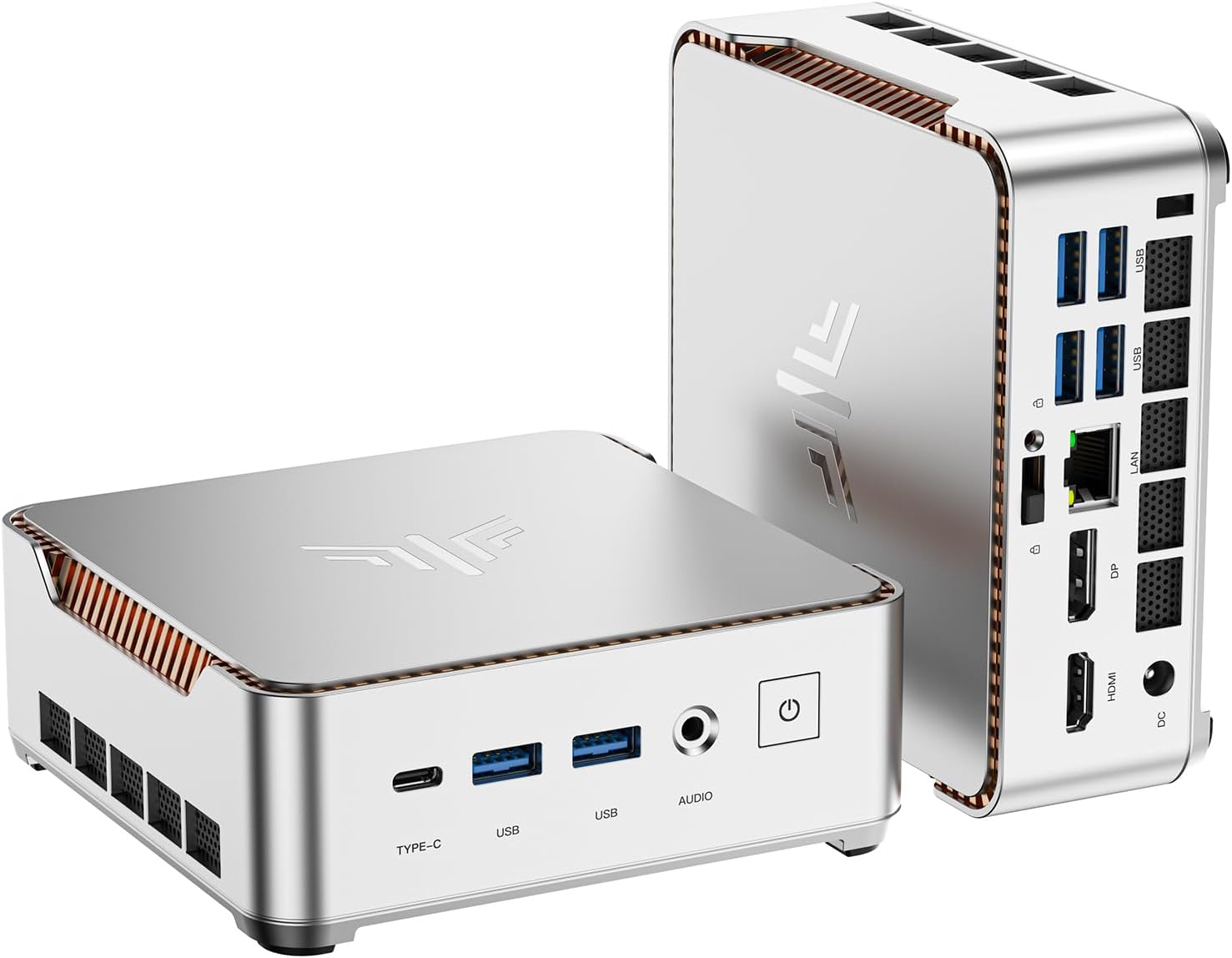
KAMRUI Pinova P2 Mini PC 16GB RAM 512GB SSD, AMD Ryzen 4300U(Beats 3500U/3550H/N150/N95,Up to 3.7 GHz) Mini Computers,Triple 4K Display/HDMI+DP+Type-C/WiFi/BT for Home/Business Mini Desktop Computers
Want the best price and purchase timing?
Our AI advisor analyzes real-time pricing across all channels to find you the best deal.
AI Verdict
This 16GB RAM, 512GB SSD mini PC with an AMD Ryzen 4300U is for users needing a compact, multi-display setup for productivity and 4K media.
This mini PC is a strong fit for productivity and media consumption, offering a Ryzen 4300U processor, 16GB RAM, and 512GB SSD. Its triple 4K display support and quiet operation make it suitable for home offices and entertainment.
If you need more raw processing power for CPU-intensive tasks or more USB-A ports, look for mini PCs with a Ryzen 5000 series processor or higher and a greater native port count.
Regret Score™
Very Low RiskLower is better — measures purchase-regret risk from real buyer complaints, review credibility, and product maturity
Issues discovered after purchase
Critically weak dimension
Amazon rating vs actual quality
Chance this product isn't for you
Pros
- AMD Ryzen 4300U processor (4-core/4-thread, up to 3.7GHz) handles demanding office applications and HD video editing.
- Supports triple 4K@60Hz displays via HDMI2.0, DP1.4, and USB3.2 Gen2 Type-C for extensive screen real estate.
- 16GB DDR4 RAM and 512GB M.2 SSD provide fast application switching and quick file transfers.
- Expandable with dual SO-DIMM slots for up to 64GB DDR4 RAM and two M.2 slots for up to 4TB total storage.
- Operates quietly, with minimal fan noise even under load, suitable for quiet environments.
- Compact 5.05x5.05x1.73 inch size and VESA mount support allow for space-saving installation.
Cons
- Integrated AMD Radeon graphics are not designed for heavy 3D gaming or intensive graphics work.
- The 16GB RAM configuration often comes as a single stick, limiting dual-channel performance.
- Only two USB3.2 Gen2 Type-A ports may require a USB hub for multiple peripherals.
- One user experienced an HDMI-connected monitor periodically going blank, requiring a driver update.
Dimension Scores
The AMD Ryzen 4300U (4-core/4-thread, up to 3.7GHz) is competent for daily tasks and light editing, outperforming older budget CPUs.
With dual SO-DIMM slots for up to 64GB RAM and two M.2 slots for up to 4TB storage, it offers significant upgrade potential for a mini PC.
The improved cooling system keeps fan noise minimal at light loads and fairly quiet under stress, allowing for concentration.
The enclosure is entirely plastic, but users describe it as durable enough for daily use.
Best For
- Multi-monitor home office setups requiring 4K resolution.
- Home entertainment systems for 4K video streaming and media consumption.
- Digital kiosks or dedicated meeting room displays.
- Users needing a space-saving desktop for web browsing and office applications.
Not Recommended For
- Hardcore gamers expecting high frame rates in demanding AAA titles.
- Professional video editors or graphic designers working with complex 3D rendering.
- Users who require numerous USB-A ports without an external hub.
Watch Out For
- The 16GB RAM often ships as a single stick, which can bottleneck performance compared to a dual-channel configuration.
- Only two USB3.2 Gen2 Type-A ports are available, potentially requiring a USB hub for users with multiple wired peripherals.
- One user reported issues with an HDMI-connected monitor periodically going blank, which was resolved by manually updating graphics drivers.
Full Specifications
| RAM | 16 GB DDR4 |
| ASIN | B0BC7S9R5C |
| Brand | KAMRUI |
| Color | Silver |
| Series | Pinova P2 |
| CPU Model | AMD R Series |
| CPU Speed | 3.7 GHz |
| Processor | 3.7 GHz amd_r_series |
| Cache Size | 4 MB |
| Hard Drive | 512 GB SSD |
| Item Weight | 1.87 pounds |
| Memory Speed | 3.7 GHz |
| Chipset Brand | AMD |
| Wireless Type | 2.4 GHz Radio Frequency, 5 GHz Radio Frequency, 802.11a/b/g/n/ac |
| Processor Brand | AMD |
| Card Description | Integrated |
| Operating System | OS |
| Flash Memory Size | 16 GB |
| Hardware Platform | PC |
| Item model number | P2 |
| Screen Resolution | 3840 x 2160 |
| Optical Drive Type | BD-R |
| Product Dimensions | 5.1 x 5.1 x 1.96 inches |
| Computer Memory Type | DDR4 SDRAM |
| Graphics Coprocessor | AMD Radeon™ Graphics |
| Hard Drive Interface | eSATA |
| Number of Processors | 4 |
| Max Screen Resolution | 4096x2160 |
| Graphics Card Ram Size | 16 GB |
| Item Dimensions LxWxH | 5.1 x 5.1 x 1.96 inches |
| Memory Storage Capacity | 512 GB |
| Number of USB 2.0 Ports | 2 |
| Number of USB 3.0 Ports | 2 |
| Graphics Card Description | Integrated |
| Personal computer design type | Mini PC |
What Buyers Say
Many users are surprised by the performance of the AMD Ryzen 4300U, finding it capable for everyday tasks, web browsing, and 4K streaming. The ability to connect three 4K monitors is a frequently highlighted benefit for productivity. However, the single-stick RAM configuration is a recurring point of concern for those looking for optimal performance. The compact size and quiet operation are consistently praised, making it a popular choice for home office setups.
“Dude, this little box actually rips for work and watching movies, but seriously, get another RAM stick if you want it to really fly, the single channel thing is a bummer.”
Common Praise
- Handles web browsing, office software, and video calls smoothly without slowdowns.
- Supports triple 4K displays, which is useful for multi-monitor productivity.
- Very quiet during operation, even under load, making it suitable for quiet environments.
- Small footprint (5.05x5.05x1.73 inches) and VESA mountable, saving desk space.
- Fast boot times and quick file transfers due to the 512GB M.2 SSD.
Common Complaints
- The 16GB RAM often comes as a single stick, which limits performance compared to dual-channel.
- Integrated graphics are not powerful enough for demanding 3D games or intensive graphics applications.
- One user experienced an HDMI monitor periodically going blank, requiring a driver update.
- Limited number of USB-A ports (only two USB3.2 Gen2 Type-A) can be restrictive for multiple peripherals.
Ownership Tips
- Upgrading the RAM to dual-channel (e.g., two 8GB sticks) significantly improves performance, especially for multitasking.
- The VESA mount is genuinely useful for decluttering a desk by mounting it behind a monitor.
- The quiet operation holds up even after extended use, making it unobtrusive in a home office.
- Manually checking for and updating graphics drivers can resolve occasional display glitches, particularly in multi-monitor setups.
Frequently Asked Questions
Can I upgrade the RAM and storage?
Yes, the KAMRUI Pinova P2 has dual SO-DIMM slots supporting up to 64GB DDR4 RAM and two M.2 slots for up to 4TB of total storage.
Is this mini PC suitable for gaming?
It can handle casual games and older titles at lower settings, like Valorant or CS:GO, but it's not designed for heavy 3D gaming or intensive graphics work.
How many monitors can I connect?
The mini PC supports up to three 4K@60Hz displays simultaneously via its HDMI2.0, DisplayPort 1.4, and USB3.2 Gen2 Type-C ports.
Does it come with Wi-Fi and Bluetooth?
Yes, the KAMRUI Pinova P2 includes built-in Wi-Fi and Bluetooth for wireless connectivity.
Is the fan noisy?
Users report the fan is practically silent at light loads and remains fairly quiet even under heavier workloads.
Buying Guide
When you're looking at mini PCs like this, you're basically trading raw power for a tiny footprint. You need to figure out if the processor and integrated graphics are enough for your daily grind, because you can't just swap in a powerful graphics card later. Pay close attention to the ports too, since their small size often means fewer options than a traditional desktop. Also, check the RAM configuration – a single stick can really hold back performance.
Processor (AMD Ryzen 4300U)
This is the brain of your mini PC. The Ryzen 4300U is a 4-core, 4-thread chip that's good for everyday tasks like browsing, office work, and even some light video editing, but it won't handle heavy gaming or professional-grade creative work.
RAM (16GB DDR4)
Think of RAM as your computer's short-term memory. 16GB is enough for smooth multitasking with many browser tabs and applications open. However, if it's a single stick, it's like having one lane on a highway instead of two, which can slow things down.
Storage (512GB M.2 SSD)
This is where your operating system and files live. An SSD (Solid State Drive) is much faster than old hard drives, meaning quicker boot times and app loading. 512GB is a decent starting point, but you can expand it if you need more space for games or large files.
Ports (HDMI, DP, USB-C for 4K displays)
These are how you connect everything from your monitor to your keyboard. Having HDMI, DisplayPort, and USB-C for video output means you can run multiple 4K screens, which is awesome for productivity. Just be aware of the number of USB-A ports if you have a lot of peripherals.
Alternatives
If this doesn't cut it, look for mini PCs with newer generation Ryzen 5 or Intel Core i5 processors for more raw power, or models with dedicated graphics for serious gaming or intensive creative applications.
You Might Also Like

HP ProOne 600 G4 All-in-One Desktop Computer 21.5" FHD PC, Intel Core i5-8500T, 8GB RAM, 256GB SSD, Keyboard & Mouse, USB WiFi & BT, Windows 11 Pro (Renewed)
$150-$299This is a renewed 21.5-inch FHD All-in-One with an 8th Gen Intel Core i5-8500T, 8GB RAM, and 256GB SSD, best for basic office tasks and web browsing.

GEEKOM A9 Max AI Mini PC, with AMD Ryzen AI 9 HX 370 (80 Tops), Copilot+ PC, Radeon 890M, 32GB DDR5 (Not LPDDR), 1TB SSD, Win 11 Pro, WiFi 7, BT 5.4, USB4, HDMI 2.1, Dual 2.5GbE, 8K, 3-Year Warranty
$600+A mini PC with an AMD Ryzen AI 9 HX 370 processor and Radeon 890M graphics, designed for AI workloads and 1080p gaming.

Bmax Mini PC B1 Pro Intel Gemini Lake N4000 (Up to 2.6GHz), 8GB LPDDR4 128GB eMMC Support M.2 SSD Expansion (512GB/2TB), 4K Dual Display 2.4G/5G WiFi & BT4.2 Mini Desktop Computer for Home/Office
$150-$299This is a fanless mini PC with an Intel N4000 processor, 8GB LPDDR4, and 128GB eMMC, designed for basic office tasks and web browsing.

Lenovo 24" ThinkCentre All-in-One Desktop Computer • 6-core AMD Ryzen 5 Processor • 16GB DDR5 • 512GB SSD • Wi-Fi 6 • HDMI in&Out • Wired KB&Mouse • Windows 11 Pro
$600+This is a 24-inch FHD IPS AIO with an AMD Ryzen 5 220 processor, 16GB DDR5 RAM, and a 512GB SSD, built for everyday productivity and light creative tasks.