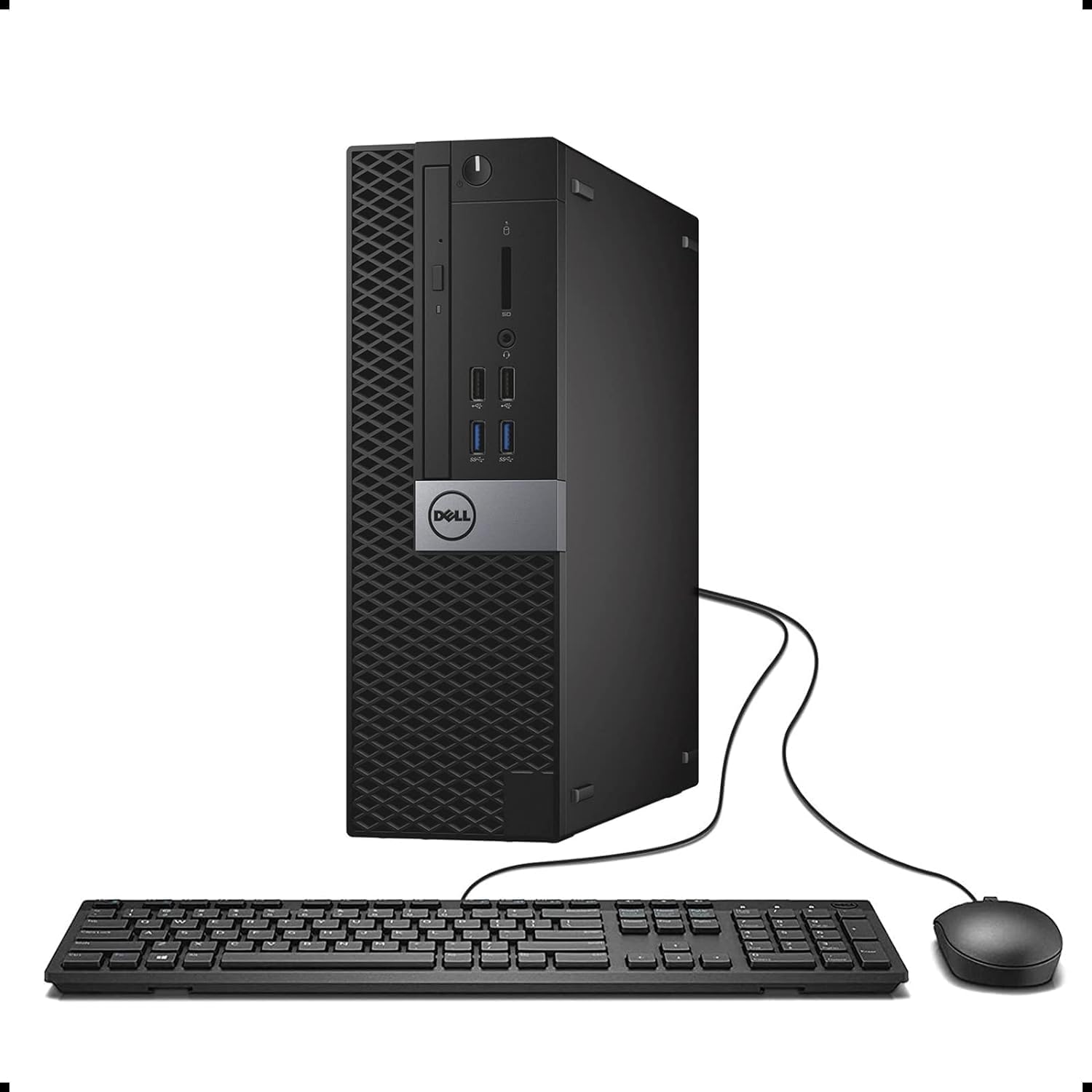
Dell Optiplex 3040 SFF Business Desktop PC, Core i3-6100 3.7GHz, 8GB RAM, 256GB Solid State Drive, HDMI, RJ45, Windows 11 Pro 64bit (Renewed)
Want the best price and purchase timing?
Our AI advisor analyzes real-time pricing across all channels to find you the best deal.
AI Verdict
This renewed Dell Optiplex 3040 SFF with a 6th Gen i3, 8GB DDR4, and 256GB SSD is for basic office tasks and web browsing, not demanding applications.
This Dell Optiplex 3040 SFF is a situational fit because its 6th Gen i3 processor and 8GB DDR4 RAM are adequate for basic computing like web browsing and office applications. However, the unofficial Windows 11 installation and limited upgrade potential for graphics or CPU make it unsuitable for anything beyond light use.
If you need more processing power or official Windows 11 support, look for a renewed desktop with an 8th generation Intel Core processor or newer, and at least 16GB of DDR4 RAM.
Regret Score™
Very High RiskLower is better — measures purchase-regret risk from real buyer complaints, review credibility, and product maturity
Issues discovered after purchase
Critically weak dimension
Amazon rating vs actual quality
Chance this product isn't for you
Pros
- Compact Small Form Factor chassis saves desk space
- Boots quickly due to the 256GB SSD
- Includes 8GB DDR4 RAM, sufficient for multiple browser tabs and document editing
- Features 8 USB ports (4x 3.0, 4x 2.0), HDMI 1.4, and DisplayPort 1.2 for varied connectivity
- Comes with Windows 11 Pro pre-installed, along with a USB keyboard, mouse, and external WiFi adapter
Cons
- The 6th Gen Intel Core i3-6100 processor is outdated and struggles with modern, demanding software
- Officially unsupported by Dell for Windows 11, potentially leading to driver or update issues
- Integrated graphics means no dedicated GPU for gaming or intensive visual tasks
- Limited to low-profile graphics cards due to the SFF chassis and 180W/240W power supply
- 256GB SSD storage fills up quickly with applications and user files
Dimension Scores
The 6th Gen Intel Core i3-6100 is an older dual-core processor that struggles with anything beyond basic tasks in 2024.
RAM is upgradable to 16GB and storage to a SATA SSD, but the SFF chassis and low-wattage PSU severely limit GPU options and CPU upgrades are restricted to other 6th Gen chips.
As an SFF business PC with a low-power CPU, it's generally quiet for light use, but older thermal paste can lead to overheating under load.
Dell Optiplex units are known for their business-grade construction and tool-less access, suggesting a durable chassis.
Best For
- Basic home office tasks like email, word processing, and spreadsheets
- Web browsing and streaming video (up to 4K via HDMI/DisplayPort)
- Light administrative duties in a small business setting
- A secondary PC for simple, non-intensive use
Not Recommended For
- Gaming beyond very old or extremely undemanding titles
- Video editing, graphic design, or CAD applications
- Running multiple virtual machines or heavy data analysis
- Users expecting official Windows 11 support from Dell
Watch Out For
- The 6th Gen i3-6100 CPU is not officially supported by Microsoft for Windows 11, meaning the pre-installed OS runs via a bypass, which could lead to future compatibility or update problems
- Some renewed units arrive with unseated RAM, causing boot failures indicated by a blinking amber light
- The included external WiFi adapter can be unreliable, with users reporting needing to replace it for stable connectivity
- Plugging in certain HDMI-to-VGA adapters can cause the PC to reboot or power cycle
- The 180W or 240W power supply is restrictive, causing system reboots when attempting to run more demanding applications or after minor GPU upgrades
Full Specifications
| RAM | 8 GB DDR4 |
| ASIN | B07N1TZS7P |
| Brand | Dell |
| Series | Optiplex 3040 SFF |
| CPU Model | Core i3 |
| CPU Speed | 3.7 GHz |
| Processor | 3.7 GHz core_i3 |
| Cache Size | 8 GB |
| Hard Drive | 256 GB 256GB SSD |
| Item Weight | 12 pounds |
| Memory Speed | 2133 MHz |
| Chipset Brand | Intel |
| Wireless Type | 802.11ac |
| Processor Brand | Intel |
| Card Description | Integrated |
| Operating System | Windows 11 Pro |
| Hardware Platform | Windows |
| Item model number | Dell Optiplex 3040 SFF Small Form |
| Screen Resolution | 1920 x 1080 |
| Optical Drive Type | DVD+RW |
| Product Dimensions | 18 x 14 x 6 inches |
| Computer Memory Type | DDR4 SDRAM |
| Graphics Coprocessor | Intel HD Graphics 530 |
| Hard Drive Interface | Solid State |
| Number of Processors | 1 |
| Max Screen Resolution | 1920x1080 |
| Item Dimensions LxWxH | 18 x 14 x 6 inches |
| Memory Storage Capacity | 256 GB |
| Number of USB 2.0 Ports | 4 |
| Graphics Card Description | Integrated |
| Specific Uses For Product | Everyday Use |
| Standing screen display size | 15.6 Inches |
| Personal computer design type | Computer Tower |
What Buyers Say
Many buyers are picking up this renewed Optiplex 3040 for its low price and compact size, finding it perfectly adequate for basic web browsing and office work. However, the biggest headache seems to be the included external Wi-Fi adapter, which frequently needs to be replaced for a stable connection. There are also recurring concerns about the unofficial Windows 11 installation and the limitations of the older processor for anything beyond light use. Some users also reported issues with HDMI adapters causing reboots.
“Man, I just needed something cheap for emails and YouTube, and this thing does that. But that Wi-Fi dongle? Trash. Had to buy a new one right away, but for the price, whatever. It's not fast, but it works.”
Common Praise
- The small form factor fits easily into tight spaces
- Starts up very quickly thanks to the SSD
- Handles everyday tasks like email and document editing without issues
- Offers a good number of USB ports for peripherals
- Easy to open and service components like RAM and storage
Common Complaints
- The included external Wi-Fi adapter often provides unreliable connectivity and needs to be replaced
- The 6th Gen i3 processor feels slow for anything more than basic applications
- Windows 11 is installed via a bypass, leading to concerns about long-term stability and updates
- Some users experienced system reboots when connecting HDMI-to-VGA adapters
- Limited power supply (180W/240W) restricts any meaningful GPU upgrades
Ownership Tips
- The external USB Wi-Fi adapter is often the first component to fail or underperform, requiring a quick replacement for consistent internet access.
- Despite Windows 11 being installed, expect to encounter messages about the system not meeting official requirements, which can be unsettling but generally doesn't stop basic functionality.
- The small case means it runs quietly for most light tasks, but if you push it, the fan can get noticeable, and older thermal paste might be an issue.
- Don't expect to run any modern games; even light titles will struggle due to the integrated graphics and CPU.
- Check the CMOS battery; renewed units sometimes have old ones that can cause boot issues.
Frequently Asked Questions
Can I upgrade the RAM in this PC?
Yes, the Dell Optiplex 3040 SFF can be upgraded to a maximum of 16GB of DDR4 RAM across its two UDIMM slots. The unit comes with 8GB installed.
Is this PC suitable for gaming?
No, this PC is not suitable for gaming. The integrated graphics and 6th Gen i3 processor will struggle with most modern games, and the low-wattage power supply limits options for adding a dedicated low-profile graphics card.
Does this computer have built-in Wi-Fi and Bluetooth?
It includes an external WiFi Adaptor in the box. Bluetooth is not specified in the product data, so assume it is not included.
Can I install a different operating system, like Windows 10?
Yes, you can install Windows 10. The Optiplex 3040 was originally designed for Windows 10 and Dell provides drivers for it. This might offer more stable performance and official support compared to Windows 11.
What kind of monitor connections does it have?
The PC has one HDMI 1.4 port and one Display Port 1.2, supporting up to 4K (3840x2160) resolution.
What is the wattage of the power supply?
The Dell Optiplex 3040 SFF typically comes with either a 180W or 240W power supply.
Buying Guide
When looking at renewed desktops like this Optiplex 3040, you're trading cutting-edge performance for a lower price. Understand that 'renewed' means it's been used before, and while it's tested, minor cosmetic imperfections or older components are possible. Focus on the core specs like processor generation and RAM for your actual needs, not just the operating system version, especially with unofficial Windows 11 installs.
processor: 3.7 GHz core_i3 (6th Gen)
This is the computer's brain. A 6th generation Intel Core i3 is like an older, smaller engine in a car – it'll get you around town for basic errands, but it won't win any races or handle heavy loads. It's fine for one or two simple tasks at a time.
ram: 8 GB DDR4
RAM is the computer's short-term memory, like your desk space. 8GB is enough room for a few open applications and browser tabs without feeling cramped, but if you open too many things, it'll start to slow down.
storage: 256 GB SSD
This is where your operating system and files live. An SSD (Solid State Drive) is like a super-fast digital filing cabinet, making the computer start up and open programs much quicker than older hard drives. However, 256GB is a small cabinet, so you'll fill it up fast if you save a lot of photos, videos, or games.
form_factor: Computer Tower (SFF)
SFF stands for Small Form Factor, meaning it's a compact desktop. Think of it like a mini-fridge instead of a full-sized one – it saves space on or under your desk, but it also means less room inside for big upgrades like powerful graphics cards.
Alternatives
If this doesn't fit, look for renewed desktops with an 8th Gen Intel Core i5 or newer processor for official Windows 11 support and better performance, or a larger SSD (500GB+) if you need more storage for applications and files.
You Might Also Like

HP ProOne 600 G4 All-in-One Desktop Computer 21.5" FHD PC, Intel Core i5-8500T, 8GB RAM, 256GB SSD, Keyboard & Mouse, USB WiFi & BT, Windows 11 Pro (Renewed)
$150-$299This is a renewed 21.5-inch FHD All-in-One with an 8th Gen Intel Core i5-8500T, 8GB RAM, and 256GB SSD, best for basic office tasks and web browsing.

GEEKOM A9 Max AI Mini PC, with AMD Ryzen AI 9 HX 370 (80 Tops), Copilot+ PC, Radeon 890M, 32GB DDR5 (Not LPDDR), 1TB SSD, Win 11 Pro, WiFi 7, BT 5.4, USB4, HDMI 2.1, Dual 2.5GbE, 8K, 3-Year Warranty
$600+A mini PC with an AMD Ryzen AI 9 HX 370 processor and Radeon 890M graphics, designed for AI workloads and 1080p gaming.

Bmax Mini PC B1 Pro Intel Gemini Lake N4000 (Up to 2.6GHz), 8GB LPDDR4 128GB eMMC Support M.2 SSD Expansion (512GB/2TB), 4K Dual Display 2.4G/5G WiFi & BT4.2 Mini Desktop Computer for Home/Office
$150-$299This is a fanless mini PC with an Intel N4000 processor, 8GB LPDDR4, and 128GB eMMC, designed for basic office tasks and web browsing.

Lenovo 24" ThinkCentre All-in-One Desktop Computer • 6-core AMD Ryzen 5 Processor • 16GB DDR5 • 512GB SSD • Wi-Fi 6 • HDMI in&Out • Wired KB&Mouse • Windows 11 Pro
$600+This is a 24-inch FHD IPS AIO with an AMD Ryzen 5 220 processor, 16GB DDR5 RAM, and a 512GB SSD, built for everyday productivity and light creative tasks.