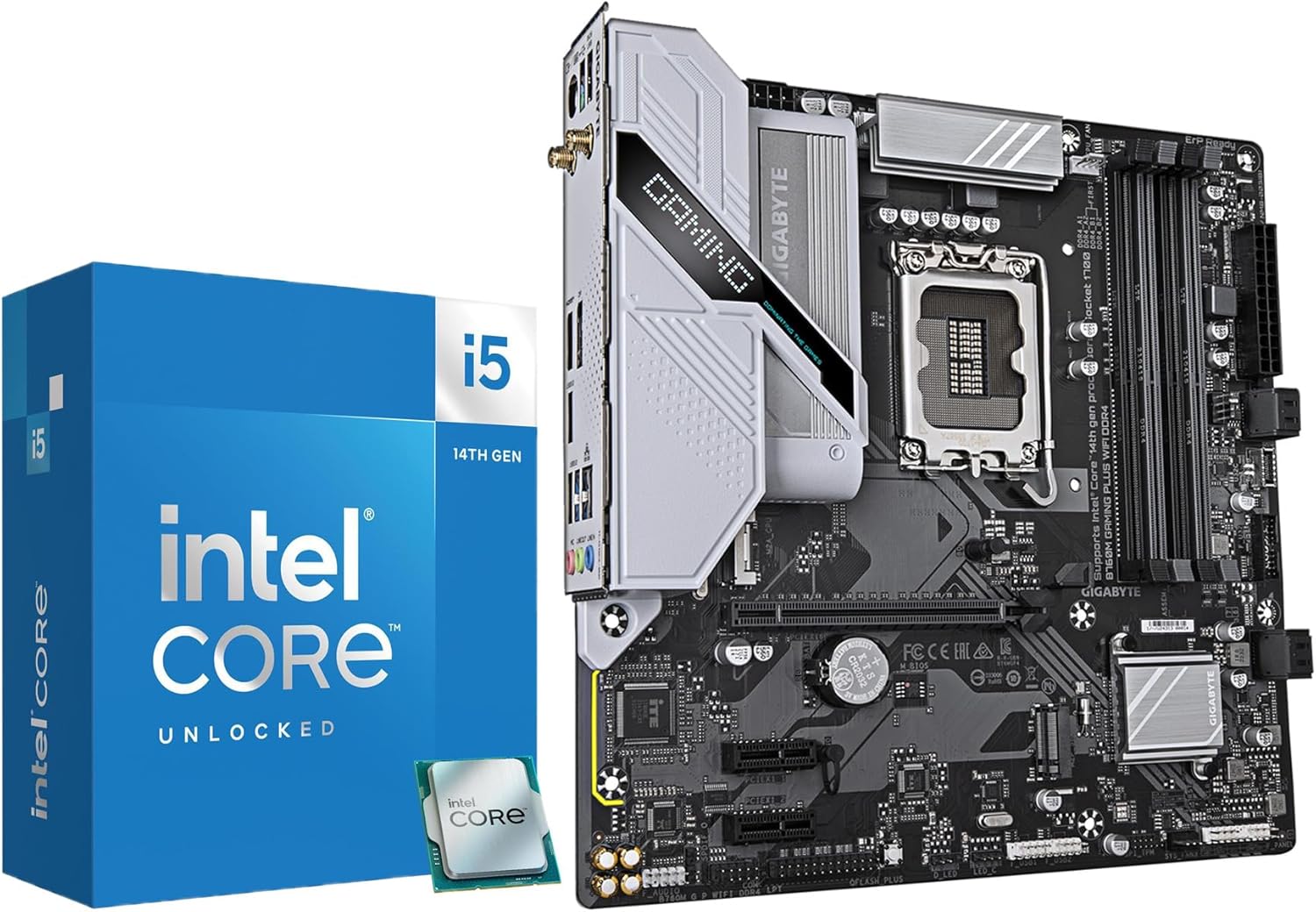
MICRO CENTER CPU Motherboard Combo - Core i5-14600K 14(6P+8E) Cores up to 5.3 GHz Unlocked Desktop Processor with GIGABYTE B760M Gaming Plus WiFi DDR4 LGA1700 Motherboard
Want the best price and purchase timing?
Our AI advisor analyzes real-time pricing across all channels to find you the best deal.
AI Verdict
This combo offers a 14-core, 20-thread i5-14600K with a DDR4 B760M motherboard, suitable for users with existing DDR4 RAM needing a CPU upgrade.
This combo is a strong fit if you're holding onto DDR4 memory and need a significant CPU upgrade for gaming or productivity, leveraging the 14 cores and 5.3 GHz turbo frequency. However, the lack of an included cooler and the B760M's VRM solution for a 125W CPU make it a situational choice, requiring careful consideration of cooling. It's not a 'set it and forget it' solution.
If you're building new and want better future-proofing and memory performance, look for a similar CPU paired with a DDR5-compatible motherboard.
Regret Score™
Medium RiskLower is better — measures purchase-regret risk from real buyer complaints, review credibility, and product maturity
Issues discovered after purchase
Critically weak dimension
Amazon rating vs actual quality
Chance this product isn't for you
Pros
- The Intel Core i5-14600K CPU features 14 cores (6 P-cores + 8 E-cores) and 20 threads, providing robust multitasking capability.
- The CPU reaches up to 5.3 GHz Max Turbo Frequency, beneficial for single-threaded applications and gaming.
- The GIGABYTE B760M Gaming Plus WiFi motherboard supports DDR4 memory, allowing re-use of existing DDR4 RAM.
- Motherboard includes Q-Flash Plus, enabling BIOS updates without a CPU, memory, or graphics card installed.
- The combo supports PCIe Gen 5.0 and 4.0, offering current and future compatibility for high-speed components.
- Integrated Intel UHD Graphics 770 provides basic display output without requiring a dedicated GPU for non-gaming tasks.
Cons
- The 125W Processor Base Power means higher electricity consumption compared to lower-TDP CPUs.
- No thermal solution is included with the i5-14600K, requiring an additional purchase for a CPU cooler.
- The integrated Intel UHD Graphics 770 is not designed for serious gaming or demanding content creation, necessitating a discrete GPU for those tasks.
- Some users report inconsistent performance in multi-threaded tasks, not always delivering expected results.
- The DDR4 platform, while cost-effective for some, is considered a 'dead platform' by some users, limiting future memory upgrade paths.
Dimension Scores
The i5-14600K's 5.3 GHz Max Turbo Frequency provides very strong single-thread performance for its category.
With 14 cores (6 P-cores + 8 E-cores) and 20 threads, the CPU offers above-average multi-thread capability, though some users report inconsistent results.
The 125W Processor Base Power is on the higher side for an i5, leading to higher power consumption and requiring robust cooling.
The LGA 1700 socket is at the end of its lifecycle, and DDR4 memory is being phased out for DDR5, limiting future upgrade options for the motherboard.
Best For
- Users upgrading from an older Intel platform who already own DDR4 RAM and want to reuse it.
- PC builders focused on gaming and productivity workloads that benefit from 14 cores and 5.3 GHz turbo frequency.
- Individuals seeking a CPU and motherboard bundle with built-in Wi-Fi and easy BIOS update features.
Not Recommended For
- Users building a new system from scratch who prioritize the latest DDR5 memory standard.
- Budget-conscious builders who cannot afford an additional high-performance CPU cooler.
- Those expecting groundbreaking performance improvements if upgrading from a recent 13th Gen Intel i5 CPU.
Watch Out For
- The CPU does not include a cooler, forcing an extra purchase to manage its 125W Processor Base Power.
- You might need a BIOS update to get the 14600K running smoothly on some 600 series motherboards, though the B760M is a 700 series board, a BIOS update might still be needed for full compatibility, which Q-Flash Plus helps with.
- Some users on Reddit express concern about VRM overheating on B760M boards when paired with a 14600K, even if not overclocking.
- The integrated Intel UHD Graphics 770 is only suitable for basic tasks, requiring a dedicated GPU for any serious gaming or content creation.
Full Specifications
| ASIN | B0FJCSW7L3 |
| Brand | Micro Center |
| Platform | Windows |
| CPU Model | Intel Core i5 |
| CPU Socket | LGA 1700 |
| Model Name | B760M Gaming Plus WiFi DDR4 |
| Item Weight | 3.23 pounds |
| Chipset Type | Intel 700 series |
| Manufacturer | MICRO CENTER |
| Item model number | 14600KB760MGPWF |
| Compatible Devices | Personal Computer, Desktop |
| Memory Clock Speed | 3200 MHz |
| Package Dimensions | 13.23 x 11.38 x 5.79 inches |
| RAM Memory Technology | DDR4 |
What Buyers Say
Many users are drawn to this combo for the value it offers, especially if they already have DDR4 RAM, but the lack of an included cooler is a consistent point of frustration. Some Reddit discussions highlight that while the 14600K is a powerful CPU, pairing it with a B760M motherboard can lead to concerns about VRM temperatures, particularly if you're pushing the CPU hard. The incremental performance gains over the 13600K also make some question the value proposition for new builds.
“Man, this thing is fast for games, but seriously, Micro Center, why no cooler? Had to drop another 50 bucks on a decent one just to keep it from melting. Still, my old DDR4 RAM works, so that's something.”
Common Praise
- The 14 cores and 20 threads handle multitasking and demanding applications effectively.
- The 5.3 GHz turbo frequency makes games and single-threaded tasks feel snappy.
- The motherboard's Q-Flash Plus feature simplifies BIOS updates, even without a CPU installed.
- Built-in WiFi on the motherboard is convenient for wireless connectivity.
Common Complaints
- The CPU requires a separate cooler purchase, adding to the total cost.
- The 125W power draw can lead to higher operating temperatures and electricity bills.
- Integrated graphics are only for basic display, not for serious gaming.
- Some users feel the performance uplift from previous generations isn't significant enough to justify the cost.
Ownership Tips
- The CPU runs hot under load, requiring a substantial aftermarket air cooler or AIO liquid cooler to maintain optimal temperatures.
- BIOS updates, while made easy by Q-Flash Plus, are often necessary out of the box for full stability.
- The integrated Wi-Fi performs adequately for general internet use, but dedicated gaming might benefit from a wired connection.
- The motherboard's VRMs can get warm with the 14600K, even without overclocking, so ensuring good case airflow is important.
Frequently Asked Questions
Does this combo come with a CPU cooler?
No, the Intel Core i5-14600K processor does not include a thermal solution, so you will need to purchase a CPU cooler separately.
Is the integrated graphics sufficient for gaming?
The integrated Intel UHD Graphics 770 is suitable for basic tasks and light gaming, but for serious gaming or content creation, a dedicated graphics card is necessary.
Will I need to update the BIOS?
While the B760M is a 700 series chipset, a BIOS update might still be required for optimal compatibility with the 14th Gen i5-14600K. The motherboard's Q-Flash Plus feature allows you to update the BIOS without a CPU installed.
What type of RAM does this motherboard support?
The GIGABYTE B760M Gaming Plus WiFi motherboard supports DDR4 memory across four DIMM slots, with a maximum capacity of 192 GB.
Is this combo good for overclocking?
The i5-14600K is an unlocked processor, but the B760M chipset does not officially support CPU overclocking. While the CPU can be tweaked, the motherboard's VRM solution might be a limiting factor for aggressive overclocking, as some users express concern about VRM temperatures.
Buying Guide
When looking at a CPU and motherboard combo like this, you're essentially buying the brain and nervous system of your computer. You need to consider what you'll be doing with it. If you're building a new PC, think about your existing components, especially RAM. This combo uses DDR4, which might save you money if you already have some, but it's not the newest memory standard. Also, remember that the CPU doesn't come with a cooler, so you'll need to factor that into your budget and build plan.
14 Cores (6 P-cores + 8 E-cores) and 20 threads
Think of cores as individual workers and threads as tasks each worker can handle simultaneously. More cores and threads mean your computer can juggle more programs and processes at once, like running a game, streaming, and having a dozen browser tabs open without slowing down.
5.3 GHz Max Turbo Frequency
This is how fast the CPU can boost itself for demanding tasks. Higher GHz means quicker processing for things like loading game levels or single-threaded applications. It's like the top speed your car can hit when you really need to accelerate.
DDR4 Motherboard
This dictates the type of RAM (Random Access Memory) your system uses. DDR4 is a mature and cost-effective standard. If you have DDR4 RAM from a previous build, this saves you money. However, newer DDR5 offers higher speeds, which can benefit some applications and games, so consider if you want to stick with the older, cheaper standard or upgrade everything.
125W Processor Base Power
This number tells you how much power the CPU typically consumes and, by extension, how much heat it generates. A higher wattage means you'll need a more capable (and often more expensive) cooling solution to keep the CPU from overheating, similar to how a more powerful engine needs a bigger radiator.
Alternatives
If this combo doesn't fit, consider a CPU with a lower power draw for less demanding cooling, or a motherboard that supports DDR5 memory for a more current platform.
You Might Also Like

INTEL INTEL XEON Gold 6246R Processor (35.75M Cache, 3.40 GHZ)
$600+This is a 1-core, 3.40 GHz Xeon Gold processor designed for highly specialized server tasks, not general computing.

INTEL INTEL XEON Gold 6250 Processor (35.75M Cache, 3.90 GHZ)
$600+This is a 1-core, 3.9 GHz Intel Xeon Gold processor with 35.75MB cache, making it an unusual fit for demanding data center workloads.

AMD Ryzen 5 3600 6-Core, 12-Thread Unlocked Desktop Processor with Wraith Stealth Cooler
This 6-core, 12-thread AM4 processor with a 4.2 GHz max boost is for budget PC builders needing 100+ FPS in 1080p games and basic multitasking.

AMD Ryzen 7 3700X 8-Core, 16-Thread Unlocked Desktop Processor with Wraith Prism LED Cooler
An 8-core, 16-thread AM4 processor with a 4.4 GHz max boost, bundled with an RGB cooler, suitable for multi-threaded tasks.