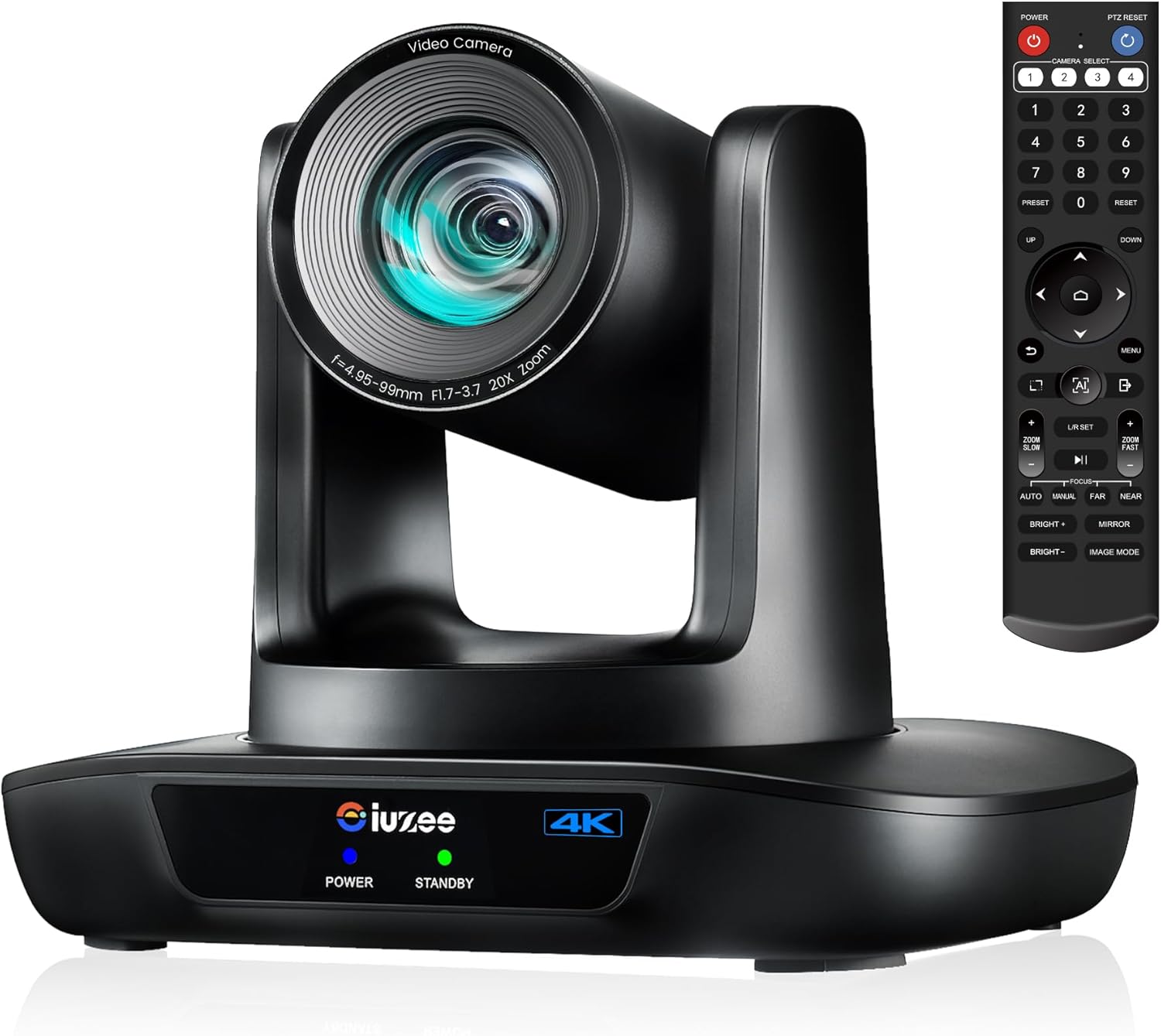
4K UHD PTZ Camera AI-Auto Tracking, 20X Optical Zoom, USB3.0/HDMI/LAN PoE, IP Live Streaming, PTZ Conference Room Camera for Church Services Education Conference Events, Work with YouTube OBS
Want the best price and purchase timing?
Our AI advisor analyzes real-time pricing across all channels to find you the best deal.
AI Verdict
This 4K@30fps PTZ camera with 20X optical zoom and AI tracking is for live streaming events requiring remote camera control and multiple output options.
This camera is a strong contender for specific live streaming and conferencing needs due to its 4K@30fps resolution, 20X optical zoom, and AI auto-tracking. However, the absence of a built-in microphone and the 30fps limit for 4K video mean it won't suit every user's requirements without additional gear or workflow adjustments.
If 4K at 60 frames per second is critical for your use case, look for cameras explicitly stating 4K60fps output capabilities.
Regret Score™
Medium RiskLower is better — measures purchase-regret risk from real buyer complaints, review credibility, and product maturity
Issues discovered after purchase
Critically weak dimension
Amazon rating vs actual quality
Chance this product isn't for you
Pros
- Captures 4K video at 30 frames per second with an 8.29 megapixel CMOS sensor, delivering detailed visuals.
- Features 20X optical zoom with a 94.4mm focal length, allowing for close-ups without image degradation.
- AI auto-tracking follows subjects using facial and figure recognition with millisecond-level response speeds.
- Offers simultaneous USB 3.0, HDMI, and LAN outputs, supporting H.264 and H.265 encoding for varied setups.
- Supports Power over Ethernet (PoE) for simplified single-cable power and data transmission.
- Includes 2D/3D noise reduction technology to enhance image clarity in varying light conditions.
Cons
- Lacks a built-in microphone, requiring an external audio solution.
- 4K resolution is limited to 30 frames per second, which may not be smooth enough for fast-action content.
- AI tracking lacks user-definable composition parameters or control over lost target behavior.
- The 5.77-pound weight makes it less portable than smaller webcams or compact cameras.
- Color balancing can be challenging when trying to match output with other cameras in a multi-camera setup.
Dimension Scores
The 1/2.8 inch 8.29 megapixel CMOS sensor delivers 4K@30fps video with 2D/3D noise reduction, providing clear visuals for its price point.
Advanced AI tracking and fast auto-zoom technology are designed for ultra-fast millisecond-level response speeds.
Offers 4K@30fps, 20X optical zoom, simultaneous USB 3.0, HDMI, and LAN outputs, plus PoE and multiple streaming protocols.
Weighing 5.77 pounds, this is a fixed-installation PTZ camera, not designed for frequent relocation like a webcam.
Best For
- Houses of worship streaming services to online platforms
- Educational institutions recording lectures or virtual classrooms
- Conference rooms needing automated speaker tracking
- Live event production requiring remote camera operation
Not Recommended For
- Users needing a compact, portable webcam for casual video calls
- Professional film production requiring 4K at 60 frames per second or higher
- Setups where a built-in microphone is a necessity
Watch Out For
- AI tracking can be inconsistent, with users reporting a lack of control over composition and framing, often not aligning with desired shots.
- Achieving consistent color balance when integrating with other camera brands can require significant manual adjustment.
- The camera does not include a built-in microphone, necessitating a separate audio input solution for any sound capture.
- While 4K is supported, the maximum frame rate is 30fps, which might not be sufficient for capturing fluid motion in certain scenarios.
Full Specifications
| ASIN | B0CFZ9N4QD |
| Brand | iuZee |
| Brand Name | iuZee |
| Color Name | black |
| Item Weight | 5.77 pounds |
| Screen Size | 2.8 Inches |
| Maximum Aperture | 3.7 f |
| Special Features | 4K 30fps & 1080P 60fps, AI-Auto Tracking, 20X Optical Zoom, USB3.0/HDMI/LAN, Support PoE, Remote Control, RS232/RS485 Support, After-sales email: [email protected] |
| Flash Memory Type | Internal flash memory |
| Item model number | UHD20U |
| Package Dimensions | 11.38 x 8.62 x 7.91 inches |
| Maximum Focal Length | 94.4 Millimeters |
| Video Capture Format | MP4 |
| Supported Audio Format | AAC, MP3, PCM |
| Connectivity Technology | Ethernet, HDMI, USB |
| Photo Sensor Technology | CMOS |
| Video Capture Resolution | 4K |
What Buyers Say
Users often highlight the camera's ability to deliver crisp 4K video at 30fps, especially for live streaming, though some note the AI tracking can be a bit of a wildcard, not always framing subjects exactly as desired. The 20X optical zoom is frequently praised for maintaining clarity even at distance, making it a strong option for larger venues. The lack of a built-in microphone is a consistent point of discussion, requiring users to plan for external audio. Many appreciate the flexible connectivity options, particularly PoE, which simplifies installation.
“This camera is pretty good for church streaming, the 4K looks sharp and the zoom is insane, but man, I wish the AI tracking would just listen to me sometimes, and yeah, you gotta get your own mic.”
Common Praise
- Delivers clear 4K video at 30 frames per second.
- 20X optical zoom maintains image quality when magnified.
- AI auto-tracking accurately follows a single speaker or group.
- Multiple output options (USB 3.0, HDMI, LAN) integrate into various setups.
- PoE support simplifies power and data cabling.
- Web interface provides straightforward control and settings adjustment.
Common Complaints
- No built-in microphone, requiring separate audio equipment.
- AI tracking can be unpredictable, lacking fine-tuned control over framing.
- 4K resolution is limited to 30 frames per second, not 60fps.
- Matching colors with other cameras in a multi-camera setup can be difficult.
- The camera's physical size and weight are substantial for a PTZ unit.
Ownership Tips
- The AI tracking, while functional, often benefits from manual intervention for precise framing during dynamic presentations.
- Running a separate audio line is essential, as there's no integrated microphone.
- The web interface is the most comprehensive way to adjust settings beyond basic PTZ control.
- A PoE switch is a must-have to fully leverage the simplified cabling benefits.
- Expect to spend some time fine-tuning color settings if you're using it alongside other cameras.
Frequently Asked Questions
Does this camera have a built-in microphone?
No, this camera does not have a built-in microphone. You will need to connect an external microphone or use a separate audio system.
Can this camera be powered using Power over Ethernet (PoE)?
Yes, it supports PoE (IEEE802.3af), allowing you to power the camera and transmit data over a single Ethernet cable, provided you have a PoE switch.
What is the maximum video resolution and frame rate?
The camera outputs 4K video at a maximum of 30 frames per second.
How many presets can I set for camera positions?
You can set up to 255 presets for camera positions, with the included remote control supporting 10 presets.
Can I control the camera from a web browser?
Yes, you can set up, preview, and control the PTZ camera from a web browser using the default password 'admin'.
Is this camera compatible with streaming software like OBS and YouTube?
Yes, it supports RTMP, RTSP, and SRT protocols, making it compatible with popular streaming platforms and software like YouTube and OBS.
Buying Guide
When looking at PTZ cameras like this, you're buying a specialized tool for remote video capture. You need to think about how you'll get video *out* of the camera and *into* your system, and how you'll get audio *into* your system separately. The 'PTZ' part means you can pan, tilt, and zoom remotely, which is huge for covering events without a dedicated camera operator. 'AI tracking' means it tries to follow people automatically, but don't expect it to read your mind; it's a helpful assistant, not a replacement for directorial control.
4K@30fps
This tells you the maximum video quality. 4K means a very detailed picture, like a high-resolution TV. The '30fps' (frames per second) means it captures 30 still images every second, which is smooth enough for most talking-head videos or presentations, but might look a little less fluid than 60fps for fast action.
20X Optical Zoom
This is how much you can zoom in without losing picture quality. 'Optical' zoom uses the lens itself, like a pair of binoculars, so the image stays sharp. 20X is a lot, letting you get tight shots from far away in a large room or auditorium without the image getting blurry.
USB3.0/HDMI/LAN PoE
These are your output options. USB 3.0 lets you connect directly to a computer like a high-end webcam. HDMI is for connecting to monitors or video switchers. LAN PoE (Power over Ethernet) is super handy because it means one Ethernet cable can carry both the video signal and power to the camera, simplifying installation and reducing cable clutter.
Alternatives
If this camera doesn't quite fit, look for models with 4K60fps if motion clarity is paramount, or those with integrated microphones if you need a simpler audio setup.
You Might Also Like

NexiGo N660P Pro 4K Webcam with Distortion-Free Lens, 1080p 60 fps Autofocus USB Streaming Camera, 3DNR, Noise-Canceling Mics & Privacy Cover, Web Cam for Gaming/Live Streaming/PC/Mac/Switch 2, Pink
$50-$99This is a 4K CMOS webcam with 3DNR and dual noise-canceling mics, designed for plug-and-play use across multiple platforms.

NexiGo N660P Pro 4K Webcam with Distortion-Free Lens, 1080p 60 fps Autofocus USB Streaming Camera, 3DNR, Noise-Canceling Mics & Privacy Cover, Web Cam for Gaming/Live Streaming/PC/Mac/Switch 2, Black
$50-$99This is a 4K 30fps or 1080p 60fps webcam with autofocus, dual noise-canceling mics, and a privacy cover, designed for streaming and video calls on various platforms.

NexiGo N660P Pro 4K Webcam with Distortion-Free Lens, 1080p 60 fps Autofocus USB Streaming Camera, 3DNR, Noise-Canceling Mics & Privacy Cover, Web Cam for Gaming/Live Streaming/PC/Mac/Switch 2, White
$50-$99This 4K webcam with 1080p 60 fps streaming, autofocus, and dual noise-canceling mics is for users needing high resolution and smooth video without external software.

4K Webcam with Autofocus & Tripod, Camera for PC Laptop with Dual Microphone, USB Computer Camera with Low Light Correction, Auto White Balance, Video Camera for Streaming, Meetings, Office, Zoom
$0-$49A 4K webcam with a CMOS sensor and f/2.8 aperture, designed for basic video calls and streaming on a budget.