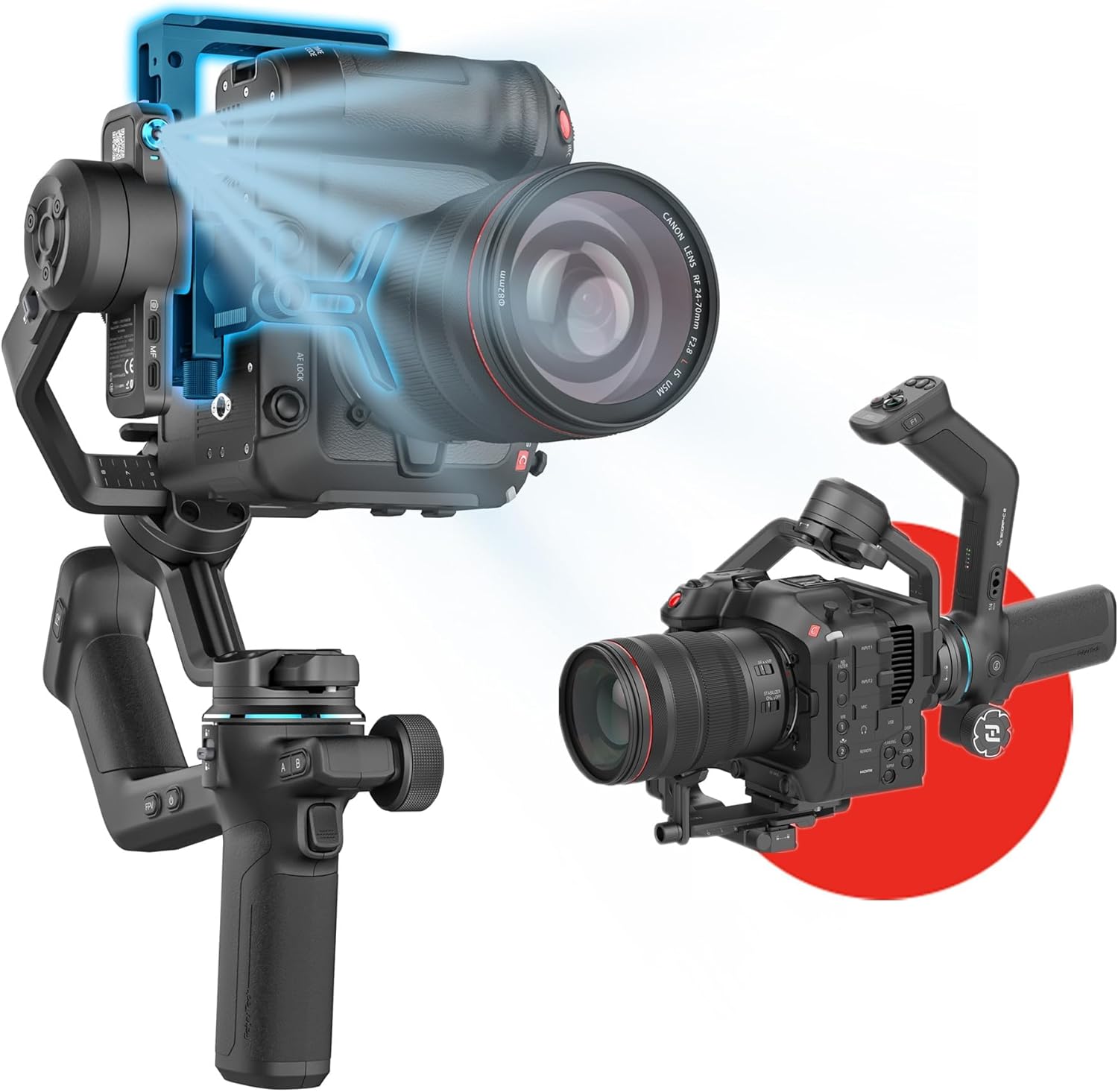
FeiyuTech SCORP-C2 Professional Camera Gimbal Stabilizer, Built-in AI Face/Object Tracking, 3.5kg/7.72lbs Load, Native Vertical Video for YouTube TikTok, for Sony A7, Canon EOS R, Nikon Z Mirrorless
Want the best price and purchase timing?
Our AI advisor analyzes real-time pricing across all channels to find you the best deal.
AI Verdict
This 2.91-pound gimbal handles 7.72 pounds, offers app-free AI tracking up to 18 meters, and switches to native vertical shooting in 1.2 seconds, making it for solo creators with full-frame mirrorless
This gimbal is a strong contender for solo creators who need reliable AI tracking and native vertical shooting for social media, especially given its 7.72-pound payload capacity. However, the non-swappable battery and imprecise joystick are compromises that might impact professional workflows.
If continuous power is critical, look for gimbals with hot-swappable battery systems or longer stated runtimes beyond 14 hours.
Regret Score™
High RiskLower is better — measures purchase-regret risk from real buyer complaints, review credibility, and product maturity
Issues discovered after purchase
Critically weak dimension
Amazon rating vs actual quality
Chance this product isn't for you
Pros
- Built-in AI tracking works without an app and uses gesture control for hands-free solo shooting, with a maximum tracking distance of 18 meters.
- Supports a 7.72-pound payload, accommodating heavier DSLR and mirrorless camera setups, including full-frame cameras.
- Switches to native vertical shooting in 1.2 seconds without needing extra accessories or manual rotation.
- Features an integrated sling handle for comfortable low-angle shots and reduced fatigue during extended use.
- Offers up to 14 hours of battery life, allowing for extended shooting sessions.
- Includes an OLED screen and a multi-function Magic Wheel for precise control over focus and zoom.
Cons
- The integrated battery cannot be hot-swapped or replaced, requiring downtime for recharging.
- The main joystick is imprecise and prone to overshooting subjects, a design flaw carried over from previous versions.
- The Magic Wheel can only control either vertical or horizontal movement at one time, limiting simultaneous fine adjustments.
- The gimbal's record button may trigger remapped camera functions instead of recording, disrupting workflow if camera buttons are customized.
- Some users report a cheaper build quality compared to competitors, and the integrated bipod from the original Scorp is absent.
Dimension Scores
As a stabilizer, the gimbal itself does not directly affect image quality, but it enables smoother footage.
The built-in AI tracking quickly locks onto faces with a 15% wider field of view and improved recognition accuracy, up to 18 meters.
It offers native vertical shooting, a 7.72-pound payload for professional cameras, and integrated AI tracking for solo content creation.
Weighing 2.91 pounds, it's relatively light for its payload capacity, but the integrated second handle might make it less compact for some backpacks.
Best For
- Solo vloggers and content creators needing hands-free subject tracking for dynamic shots.
- Filmmakers using full-frame mirrorless cameras and heavier lenses up to 7.72 pounds.
- Social media content creators frequently switching between horizontal and native vertical video for platforms like TikTok and YouTube Shorts.
- Event videographers or wedding filmmakers requiring steady shots with movement.
Not Recommended For
- Users who require continuous shooting without battery swaps, due to the integrated, non-replaceable battery.
- Professionals needing extremely precise joystick control for nuanced camera movements.
- Those prioritizing a compact setup for tight spaces, as the second handle might make it difficult to place into some backpacks.
Watch Out For
- The integrated battery means you can't hot-swap; you'll have downtime while recharging the unit, which can be an issue for sessions longer than its 14-hour runtime.
- The main joystick is imprecise and makes it easy to overshoot your subject, a reported frustration for users.
- If your camera uses a 'Sony Multi' cable, you might need to buy a specific one from FeiyuTech for $20, as generic cables reportedly don't work.
- The record button on the gimbal can trigger remapped functions on your camera, breaking your shooting flow if you've customized your camera's controls.
- The Magic Wheel's limitation to either vertical or horizontal movement at a time can be a frustrating limitation for fine adjustments.
Full Specifications
| UPC | 673400922427 |
| ASIN | B096VR7XT3 |
| Brand | FeiyuTech |
| Color | Black Camera Stabilizer |
| Batteries | 2 AA batteries required. (included) |
| Folded Size | 299.1*667*252.7 mm |
| Item Weight | 2.91 pounds |
| Manufacturer | FeiyuTech |
| Item model number | FeiyuTech SCORP-C2 |
| Product Dimensions | 3.87 x 2.72 x 5.31 inches |
What Buyers Say
Users frequently point out the non-swappable battery as a major drawback, causing workflow interruptions for longer shoots. The AI tracking, however, is a consistent highlight, performing well even for solo creators. Many appreciate the 7.72-pound payload capacity, allowing for heavier camera setups, and the quick native vertical shooting is a game-changer for social media content. The joystick's imprecision is a recurring complaint, making fine adjustments difficult.
“Honestly, the AI tracking on this thing is a lifesaver for my solo vlogs, but seriously, why can't I just swap out the battery? It's so annoying having to stop everything to charge.”
Common Praise
- The built-in AI tracking works without an app and responds well to gesture controls for solo filming.
- The 7.72-pound payload capacity comfortably handles heavier mirrorless and smaller cinema rigs.
- Native vertical shooting is fast and seamless, eliminating the need for manual adjustments or extra accessories.
- Stabilization performance is very close to more expensive gimbals, offering smooth footage for the price.
- The integrated sling handle is comfortable and useful for capturing low-angle shots.
Common Complaints
- The integrated battery cannot be removed or hot-swapped, leading to downtime during recharging.
- The main joystick is imprecise and makes it difficult to achieve accurate, smooth camera movements.
- The Magic Wheel's functionality is limited to controlling only one axis (horizontal or vertical) at a time.
- The gimbal's record button can interfere with custom camera button mappings, triggering unintended functions.
- Some users feel the build quality is less premium compared to competitors, with a noticeable absence of an integrated bipod.
Ownership Tips
- After a few weeks, you'll realize how much the non-swappable battery impacts longer shoots; always plan charging breaks.
- The AI tracking is surprisingly reliable for keeping you in frame, even when moving around a lot.
- You'll probably find yourself using the integrated sling handle more than you thought for those low-angle shots.
- Getting used to the joystick's sensitivity takes time, and you might still overshoot movements occasionally.
- If you've remapped your camera's record button, be prepared to adjust your workflow or remap it back for seamless gimbal control.
Frequently Asked Questions
Does the FeiyuTech SCORP-C2 require an app for AI tracking?
No, the SCORP-C2 features built-in, app-free AI tracking 4.0 that uses gesture controls to follow subjects automatically.
Can I shoot vertical video with this gimbal?
Yes, it supports native vertical shooting and can switch between horizontal and vertical modes instantly without extra accessories.
What is the maximum weight capacity of the SCORP-C2?
The gimbal can handle a maximum payload of 3.5 kg (7.72 lbs), making it compatible with many full-frame DSLR and mirrorless cameras.
How long does the battery last on a single charge?
The SCORP-C2 has a maximum runtime of 14 hours.
Does the gimbal have a touchscreen?
No, it features an OLED screen for display and a multi-function Magic Wheel for control, but it is not a touchscreen.
Can the gimbal charge my camera?
Yes, if your camera is connected via a compatible cable, the gimbal can recharge it during recording.
Buying Guide
When looking at gimbals, you need to think about what camera you're putting on it and how you'll be shooting. The payload capacity tells you the maximum weight the gimbal can stabilize, so make sure your camera and lens combo fits. Features like AI tracking are huge for solo creators, letting the gimbal do the 'cameraman' work. Also, consider how you'll power it; some have swappable batteries for continuous shooting, while others, like this one, have integrated batteries that require charging breaks.
Payload Capacity (3.5kg/7.72lbs)
This is how much weight the gimbal can hold and stabilize. If your camera body, lens, and any accessories (like a mic or small monitor) exceed this, the gimbal won't work correctly, or its motors will strain and fail prematurely. Think of it like a car's towing capacity; exceed it, and you're asking for trouble.
Built-in AI Tracking 4.0
This feature allows the gimbal to automatically follow a subject (like your face) without you needing to manually control it or use a separate app. It's like having a personal camera operator, especially useful for vlogging or filming yourself.
Native Vertical Video
This means the gimbal can quickly and easily switch your camera's orientation to shoot vertical video, which is essential for platforms like TikTok, Instagram Reels, and YouTube Shorts. Without this, you'd have to manually rotate your camera or crop horizontal footage, losing resolution.
Alternatives
If you need hot-swappable batteries for uninterrupted shooting, look for gimbals that explicitly state this feature. For more precise joystick control, research user reviews specifically mentioning joystick responsiveness and accuracy.
You Might Also Like

NexiGo N660P Pro 4K Webcam with Distortion-Free Lens, 1080p 60 fps Autofocus USB Streaming Camera, 3DNR, Noise-Canceling Mics & Privacy Cover, Web Cam for Gaming/Live Streaming/PC/Mac/Switch 2, Pink
$50-$99This is a 4K CMOS webcam with 3DNR and dual noise-canceling mics, designed for plug-and-play use across multiple platforms.

NexiGo N660P Pro 4K Webcam with Distortion-Free Lens, 1080p 60 fps Autofocus USB Streaming Camera, 3DNR, Noise-Canceling Mics & Privacy Cover, Web Cam for Gaming/Live Streaming/PC/Mac/Switch 2, Black
$50-$99This is a 4K 30fps or 1080p 60fps webcam with autofocus, dual noise-canceling mics, and a privacy cover, designed for streaming and video calls on various platforms.

NexiGo N660P Pro 4K Webcam with Distortion-Free Lens, 1080p 60 fps Autofocus USB Streaming Camera, 3DNR, Noise-Canceling Mics & Privacy Cover, Web Cam for Gaming/Live Streaming/PC/Mac/Switch 2, White
$50-$99This 4K webcam with 1080p 60 fps streaming, autofocus, and dual noise-canceling mics is for users needing high resolution and smooth video without external software.

4K Webcam with Autofocus & Tripod, Camera for PC Laptop with Dual Microphone, USB Computer Camera with Low Light Correction, Auto White Balance, Video Camera for Streaming, Meetings, Office, Zoom
$0-$49A 4K webcam with a CMOS sensor and f/2.8 aperture, designed for basic video calls and streaming on a budget.