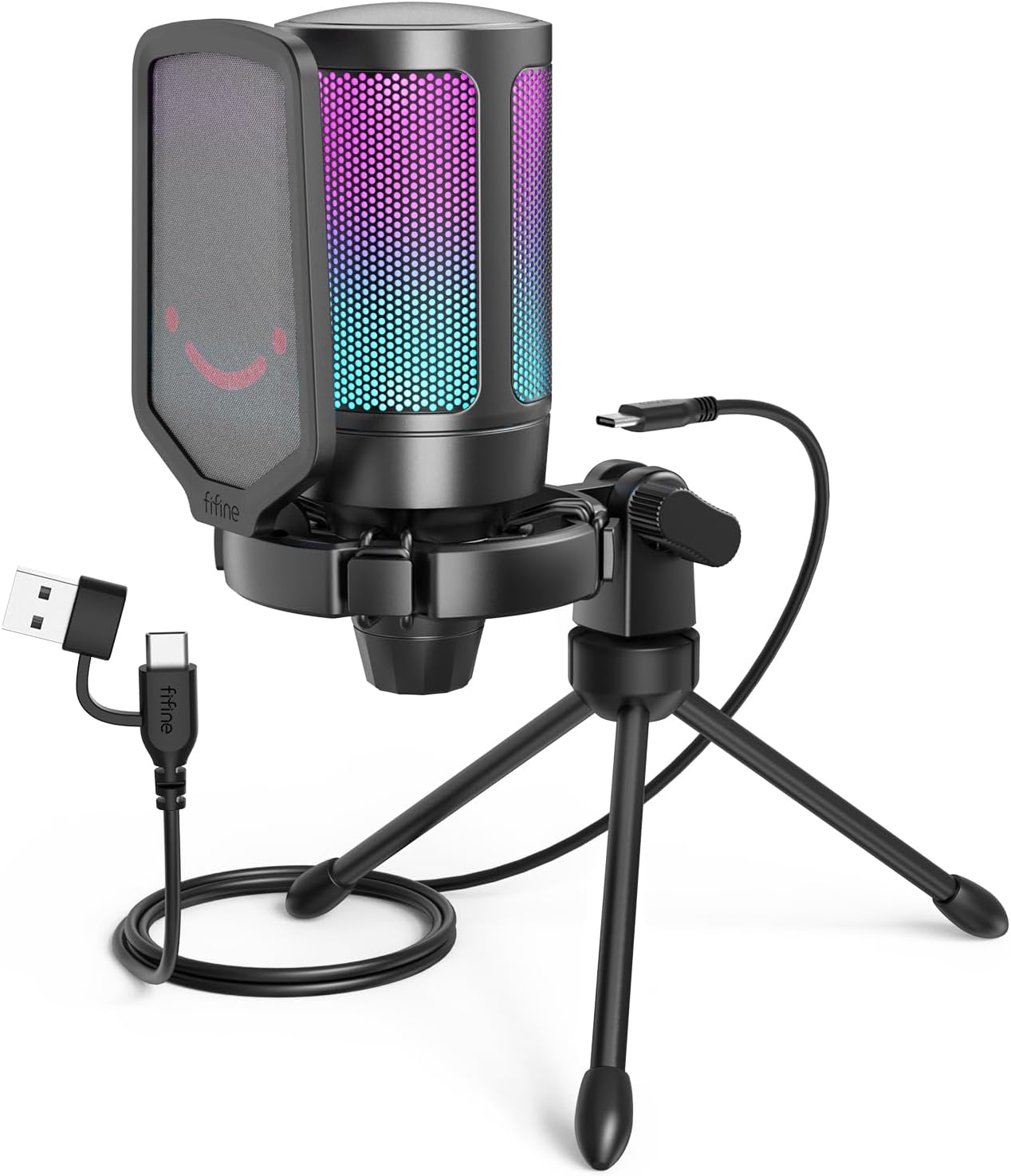
FIFINE Gaming USB Microphone for PC PS5, Condenser Mic with Quick Mute, RGB Indicator, Tripod Stand, Pop Filter, Shock Mount, Gain Control for Streaming Discord Twitch Podcasts Videos- AmpliGame
Want the best price and purchase timing?
Our AI advisor analyzes real-time pricing across all channels to find you the best deal.
AI Verdict
This is a plug-and-play USB mic for beginner gamers or streamers who want a huge audio upgrade from their headset without any complicated setup.
For its target audience of budget-conscious gamers, this is a strong fit. It delivers on the most important features: plug-and-play simplicity, a quick mute button, and audio quality that's a massive step up from any headset. The included accessories like the pop filter and shock mount add real value, even if the stand is a weak point.
If you need to eliminate more background noise, look for a dynamic microphone, which is less sensitive to ambient sounds by nature.
Regret Score™
Very Low RiskLower is better — measures purchase-regret risk from real buyer complaints, review credibility, and product maturity
Issues discovered after purchase
Critically weak dimension
Amazon rating vs actual quality
Chance this product isn't for you
Pros
- Plug-and-play setup works instantly on PC, Mac, and PlayStation with no software needed.
- Handy tap-to-mute button on top is touch-sensitive and turns off the RGB as a visual cue.
- Includes a detachable pop filter and a shock mount right in the box.
- Gain control knob on the bottom allows for easy volume adjustments without software.
- Surprisingly clear and crisp voice quality for its budget price point.
Cons
- The included metal tripod is short and can be top-heavy and unstable.
- Picks up keyboard and mouse clicks easily, especially mechanical keyboards.
- The gradient RGB lighting cannot be customized or turned off unless the mic is muted.
- Cardioid pattern is sensitive and can pick up background chatter from across the room if gain is high.
- The shock mount is integrated and cannot be easily removed or replaced.
Dimension Scores
Voice is surprisingly clear and crisp for a budget mic, easily outperforming headset mics.
The onboard gain knob is useful for adjusting input volume, but the mic is primarily for voice clarity, not deep bass response.
It's true plug-and-play via a detachable USB-C to USB-A cable, making setup effortless.
The mic itself is a lightweight plastic build, but the included metal tripod is short and makes it top-heavy and unstable.
Best For
- Upgrading from a tinny headset mic for Discord and in-game voice chat.
- Beginner streamers who want a simple, good-looking mic on a tight budget.
- Quick video call and online meeting setups where you need to sound clear without fuss.
Not Recommended For
- Recording professional vocals or musical instruments.
- Users in noisy environments who can't control background sounds like fans or other people.
- Anyone who wants to customize lighting effects or needs multiple polar patterns.
Watch Out For
- The included tripod is very short, forcing you to lean in or place it on a stack of books to get it near your mouth.
- You'll likely need to buy a separate boom arm and potentially a 3/8" to 5/8" thread adapter for proper positioning.
- The RGB lighting is a fixed, automatic cycle; you cannot set a static color or turn it off without muting the mic.
- It's a condenser mic, so it's very sensitive and will pick up every click of a mechanical keyboard if it's on the same desk.
Full Specifications
| UPC | 850035565117 860007094798 |
| ASIN | B09JG62KDJ |
| Brand | FIFINE |
| Color | Black |
| Material | Acrylonitrile Butadiene Styrene, Metal |
| Model Name | AMPLIGAME A6V |
| Item Weight | 1.1 pounds |
| Manufacturer | FIFINE |
| Power Source | Corded Electric |
| Polar Pattern | Bidirectional |
| Connector Type | USB |
| Special Feature | Changing RGB/Tap-to-Mute/Gain Knob/6.5ft Detachable USB-C Cable/Play and Plug/Desktop Mic |
| Hardware Platform | Desktop/Laptop, PS4/PS5 |
| Item model number | A6V |
| Compatible Devices | PS4/PS5, Personal Computer |
| Frequency Response | 18 KHz |
| Number of Channels | 1 |
| Product Dimensions | 6.93 x 7.05 x 3.78 inches |
| Signal-to-Noise Ratio | 70 dB |
| Microphone Form Factor | Desktop Mic |
| Connectivity Technology | USB |
| Item dimensions L x W x H | 6.93 x 7.05 x 3.78 inches |
| Recommended Uses For Product | Gaming, Streaming, Video Creation/Podcasting |
What Buyers Say
The most common reaction to this mic is shock at how good it sounds for something so cheap. It's a massive, immediate upgrade over any gaming headset mic. The tap-to-mute on top is a killer feature that users love, especially the visual confirmation of the RGB turning off. However, the included tripod is a frequent point of frustration; it's too short and wobbly for most setups. Be prepared to also buy a boom arm for it. It's also quite sensitive, so users with loud mechanical keyboards report that it picks up all their clicks and clacks.
“wow my friends on discord stopped making fun of my mic immediately, the sound is so much clearer than my old headset. the stand is useless tho, just get a boom arm from day one.”
Common Praise
- The tap-to-mute function is incredibly convenient and responsive.
- Sound quality is clear and a huge improvement for Discord calls and streaming.
- It's truly plug-and-play, working instantly with no driver installation.
- The included pop filter and shock mount are great value-adds for a budget mic.
- Bicolored RGB lighting looks cool and adds to a gaming setup's aesthetic.
Common Complaints
- The included tripod stand is too short and not very stable; the mic is top-heavy on it.
- Picks up a lot of background noise, especially keyboard and mouse clicks.
- You can't customize the RGB lighting pattern or color at all.
- The shock mount bands feel flimsy and can break.
- No headphone jack for live audio monitoring.
Ownership Tips
- You'll find yourself using the tap-to-mute button constantly, it's more useful than you'd think.
- After a few weeks, you'll realize you have to position it carefully to avoid picking up your keyboard, especially if you type loudly.
- The pop filter is not optional; 'p' and 'b' sounds are really harsh without it.
- The lack of customizable RGB becomes more annoying over time if the default rainbow cycle doesn't match your setup.
Frequently Asked Questions
Can I turn off the RGB lights?
No, you cannot turn off the RGB lights while the mic is active. Tapping the mute button on top will mute the mic and turn the lights off.
Does this work with Xbox?
No, this microphone is not compatible with Xbox consoles. It is designed for PC, Mac, and PlayStation (PS4/PS5).
Do I need to install any software?
No, it's a plug-and-play device. Your computer will automatically recognize it without needing any extra drivers or software from FIFINE.
Can I mount this on a boom arm?
Yes, the microphone has a standard 5/8" thread. You may need a 3/8" to 5/8" adapter if your boom arm uses the smaller thread size.
Does it have a headphone jack for monitoring?
No, this model does not have an AUX/headphone jack for zero-latency monitoring.
How do I stop it from picking up my keyboard?
Position the microphone with its back towards the keyboard, lower the gain, and try to place it on a separate boom arm instead of the desk stand to reduce vibrations.
Buying Guide
When you're buying a budget gaming mic, you're looking for three things: does it sound way better than your headset, is it easy to use, and does it have the key features you need without paying for extras you don't? Focus on voice clarity, a physical mute button, and whether it comes with the accessories you need to get started, like a pop filter.
Cardioid Polar Pattern
Think of it like a flashlight beam for sound. It mostly picks up what's directly in front of it (your mouth) and rejects sounds from the sides and back (like your PC fans or TV).
Gain Control
This is a physical volume knob for the microphone itself. It lets you adjust how sensitive the mic is on the fly, so you can turn it up if you're talking quietly or turn it down if you're shouting.
Plug and Play
This means you just plug the USB cable in and it works. You don't have to hunt for drivers or install clunky software to get started.
Alternatives
If this mic seems too sensitive to your room noise, search for a 'USB dynamic microphone', which will be better at isolating just your voice. For more control and upgrade options, look for an 'XLR microphone' and a 'USB audio interface'.
You Might Also Like

Computer Speakers for Desktop PC Monitor, USB Plug-in, Wired, Computer Soundbar for PC, Laptop Speakers with Adaptive-Channel-Switching, Loud Sound, Deep Bass, USB C Adapter, Easy to Clip on Monitor
Price range unavailableThis $30 clip-on USB soundbar is a massive upgrade over tinny laptop speakers, perfect for cramped home offices that need clear audio without the cable clutter of a 2.1 system.

Bluetooth Pillow Speaker for Sleeping, Mini Portable Under Pillow Speaker with White Noise Timer Wireless Sleep Aid with Stereo Bass Private Sleep Headphones for Adult Kids
$0-$49A 3-Watt stereo Bluetooth 5.4 pillow speaker with 20-hour battery life and white noise, designed for private listening without disturbing others.

Amazon Echo Pop (newest model), Our smallest speaker with Alexa+ Early Access, Fits in any room, Charcoal
This is Amazon's cheapest, smallest Alexa speaker, built for adding voice control to tight spaces like a bathroom or dorm room, not for filling a room with music.

Amazon Echo Pop (newest model), Our smallest speaker with Alexa+ Early Access, Fits in any room, Midnight Teal
This is a cheap, no-frills Alexa speaker for small spaces like bathrooms and hallways, not for anyone who actually cares about music quality.