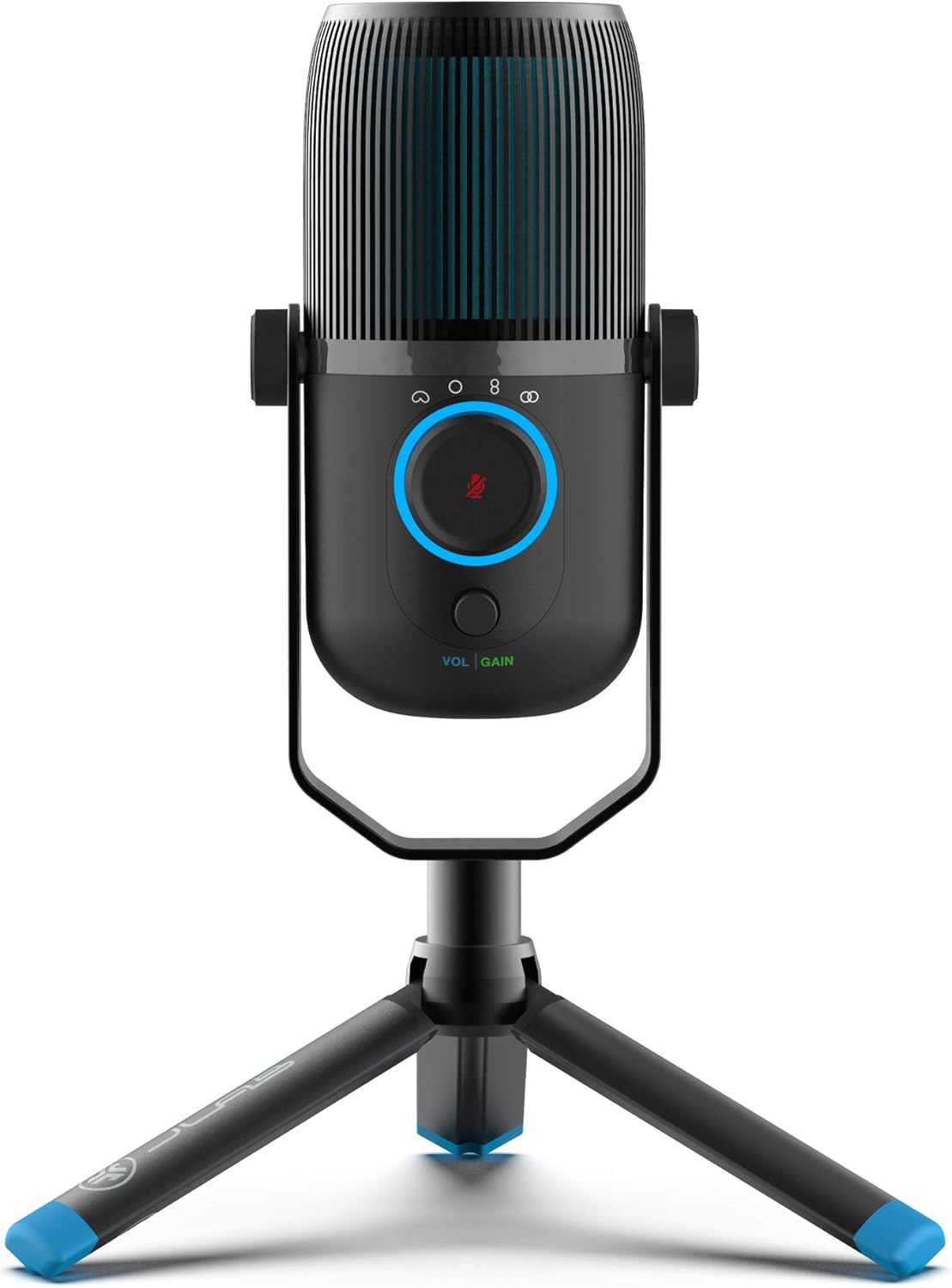
JLab Talk USB Microphone, USB-C Output, Cardioid, Omnidirectional, Stereo or Bidirectional, 96k Sample Rate, 20Hz, 20kHz Frequency Response, Volume, Gain Control, Quick Mute, Plug & Play
Want the best price and purchase timing?
Our AI advisor analyzes real-time pricing across all channels to find you the best deal.
AI Verdict
This is a super versatile USB mic for beginners who want to experiment with different recording types without breaking the bank, as long as you buy a separate stand.
The JLab Talk offers an impressive feature set, like four polar patterns and 24-bit/96kHz recording, for its budget price. This makes it a strong fit for a beginner who wants to experiment. However, the flimsy stand and sensitive gain control are significant drawbacks that require workarounds, like buying a boom arm and carefully setting levels.
If you only plan to record your own voice, consider a cardioid-only USB microphone, which may offer better build quality at a similar price by simplifying the features.
Regret Score™
Medium RiskLower is better — measures purchase-regret risk from real buyer complaints, review credibility, and product maturity
Issues discovered after purchase
Critically weak dimension
Amazon rating vs actual quality
Chance this product isn't for you
Pros
- Four switchable polar patterns (Cardioid, Omni, Stereo, Bidirectional) offer great flexibility.
- Studio-quality 96kHz/24BIT resolution is excellent for a budget mic and provides clear, detailed audio.
- True plug-and-play functionality with USB-C requires no drivers for instant setup.
- Onboard gain and volume controls allow for real-time adjustments without software.
- Includes a 3.5mm AUX input for zero-latency real-time monitoring.
Cons
- The included tripod stand is widely reported as flimsy, short, and unstable, transmitting desk vibrations.
- The physical mute button makes an audible 'click' that gets picked up in recordings.
- The gain control is very sensitive and can introduce significant hiss or static at higher levels.
- The main body is mostly plastic, which feels less premium than metal competitors.
Dimension Scores
The 96kHz/24-bit resolution provides impressive clarity for the price, though it can be prone to hiss if the gain is set too high.
Onboard controls are useful, but the gain knob is overly sensitive and has a narrow sweet spot before distortion.
It uses a modern USB-C port on the device and is true plug-and-play, requiring no driver installation.
While the mic itself is lightweight, the included plastic tripod stand is frequently cited as unstable and practically useless.
Best For
- First-time podcasters or streamers who need to learn what different polar patterns do.
- Recording multi-person interviews around a single table using the omnidirectional or bidirectional modes.
- Gamers on a budget who want a clear vocal upgrade from a headset mic.
- Recording voiceovers for YouTube videos or online courses from a quiet room.
Not Recommended For
- Musicians recording instruments, as it's primarily tuned for speech.
- Anyone who needs to record on the go and relies on the included stand's stability.
- Users who cannot tolerate any background hiss or require pristine, broadcast-quality audio.
Watch Out For
- The included tripod is so short and wobbly that most users say a separate boom arm or stand is a mandatory purchase.
- You will hear a 'thump' in your audio every time you press the physical mute button.
- Turning the gain knob past the 50-60% mark often introduces a noticeable amount of background hiss.
- Because it's a sensitive condenser mic, it will pick up every tap on your desk and keyboard click if you use the included stand.
Full Specifications
| UPC | 812887019330 |
| ASIN | B0885X4ZPH |
| Brand | JLab |
| Color | Black |
| Material | Plastic |
| Model Name | Epic Talk |
| Item Weight | 1.63 pounds |
| Manufacturer | JLab Audio |
| Special Feature | Noise Reduction |
| Audio Sensitivity | 9 Decibels |
| Hardware Platform | Camera, PC |
| Item model number | MTALKRBLK4 |
| Frequency Response | 20 KHz |
| Number of Channels | 3 |
| Product Dimensions | 9.25 x 7.68 x 7.68 inches |
| Included Components | warranty_card |
| Signal-to-Noise Ratio | 95 dB |
| Microphone Form Factor | Boundary |
| Connectivity Technology | USB |
| Item dimensions L x W x H | 9.25 x 7.68 x 7.68 inches |
| Recommended Uses For Product | Music |
| Is Discontinued By Manufacturer | No |
| Global Trade Identification Number | 00812887019330 |
What Buyers Say
The most surprising thing about the JLab Talk is that it gives you four different recording patterns, a feature usually found on mics that cost twice as much. This makes it incredibly flexible for a starter mic. The sound is clear and detailed for vocals, thanks to the 96kHz/24-bit resolution. However, the biggest letdown is the stand; it's a flimsy, short tripod that's almost guaranteed to get replaced. Many users complain that the gain knob introduces a lot of static past the halfway mark, and the mute button makes an audible click in recordings.
“honestly for the price its amazing but the stand it comes with is TRASH so just plan on buying a boom arm right away.”
Common Praise
- The four recording patterns are incredibly versatile for different situations like solo streaming or group calls.
- It's truly plug-and-play; just connect the USB cable and it works instantly.
- Audio quality is surprisingly clear and rich for a mic in this price range.
- The 3.5mm headphone jack for zero-latency monitoring is a huge plus.
- The right-angle USB-C cable is a nice touch that helps with cable management.
Common Complaints
- The included tripod stand is flimsy, unstable, and too short to be effective.
- The mute button makes a loud, audible click that gets picked up by the recording.
- The gain knob is extremely sensitive and produces noticeable hiss when turned up.
- It picks up a lot of desk vibrations and keyboard sounds when using the included stand.
- Some units have issues with randomly disconnecting from the computer.
Ownership Tips
- You'll quickly learn to use software mute (like in Discord or OBS) instead of the physical button to avoid the 'click' sound.
- After a few weeks, you'll find the 'sweet spot' on the gain dial for your voice and room, and you'll be afraid to touch it ever again.
- The omnidirectional setting is surprisingly useful for family video calls when everyone is gathered around the desk.
- You might find yourself swapping out the included USB cable if you start experiencing random disconnects, as some users report the cable can be the point of failure.
Frequently Asked Questions
Can I mount the JLab Talk on a standard boom arm?
Yes, the mic has a standard 5/8" mount, making it compatible with most third-party boom arms and mic stands.
Do I need to install any software or drivers to use it?
No, the JLab Talk is a plug-and-play device. It works automatically with Windows, macOS, and Linux without needing any special drivers.
What's the difference between gain and volume control?
Gain controls the microphone's input sensitivity for your listeners. Volume controls the output loudness in your own headphones for monitoring.
Will this microphone work with a PS4 or PS5?
Yes, users report it works with PlayStation consoles via the USB connection for game chat and streaming.
How do I stop it from picking up so much background noise?
Use the cardioid pattern, get the mic as close to your mouth as possible, and mount it on a boom arm to isolate it from desk vibrations. Lowering the gain also helps reduce sensitivity to ambient sounds.
Why does my mic keep disconnecting and reconnecting?
Some users have reported random USB connection issues. This can sometimes be caused by a faulty USB cable, an underpowered USB port, or a driver conflict on your computer.
Buying Guide
When you're buying a budget USB mic, don't just look at the price. The most important things are how it sounds out of the box and how easy it is to live with. For the JLab Talk, you're getting a ton of features, but you need to know about the trade-offs. The included stand is a big one — plan on replacing it. Also, think about your room; condenser mics like this are sensitive and will pick up echoes and background noise, so you can't just plop it anywhere and expect perfect audio.
Pickup Patterns
This is like having different lenses for a camera. 'Cardioid' is for one person talking directly at the mic. 'Omni' picks up sound from all around, perfect for a group at a table. 'Stereo' captures left and right audio for a more immersive feel. 'Bidirectional' records from the front and back, ideal for a two-person interview.
96kHz/24-bit Sample Rate
Think of this as the resolution of your sound. 96kHz is the number of audio 'snapshots' per second, and 24-bit is how much detail is in each snapshot. This is higher than the CD-quality (44.1kHz/16-bit) standard and results in a clearer, more detailed recording.
Gain Control
This is the microphone's sensitivity. It's not a volume knob. You turn the gain up if people say you're too quiet, and turn it down if your audio is distorted or 'clipping'. Finding the right gain level is the key to good audio.
Alternatives
If you only need to record your own voice for streaming or calls, look for a 'cardioid-only dynamic USB microphone'. A dynamic mic is generally less sensitive to background noise, and a cardioid-only model might have better core components for the same price since it doesn't need the complexity of multiple patterns.
You Might Also Like

Computer Speakers for Desktop PC Monitor, USB Plug-in, Wired, Computer Soundbar for PC, Laptop Speakers with Adaptive-Channel-Switching, Loud Sound, Deep Bass, USB C Adapter, Easy to Clip on Monitor
Price range unavailableThis $30 clip-on USB soundbar is a massive upgrade over tinny laptop speakers, perfect for cramped home offices that need clear audio without the cable clutter of a 2.1 system.

Bluetooth Pillow Speaker for Sleeping, Mini Portable Under Pillow Speaker with White Noise Timer Wireless Sleep Aid with Stereo Bass Private Sleep Headphones for Adult Kids
$0-$49A 3-Watt stereo Bluetooth 5.4 pillow speaker with 20-hour battery life and white noise, designed for private listening without disturbing others.

Amazon Echo Pop (newest model), Our smallest speaker with Alexa+ Early Access, Fits in any room, Charcoal
This is Amazon's cheapest, smallest Alexa speaker, built for adding voice control to tight spaces like a bathroom or dorm room, not for filling a room with music.

Amazon Echo Pop (newest model), Our smallest speaker with Alexa+ Early Access, Fits in any room, Midnight Teal
This is a cheap, no-frills Alexa speaker for small spaces like bathrooms and hallways, not for anyone who actually cares about music quality.