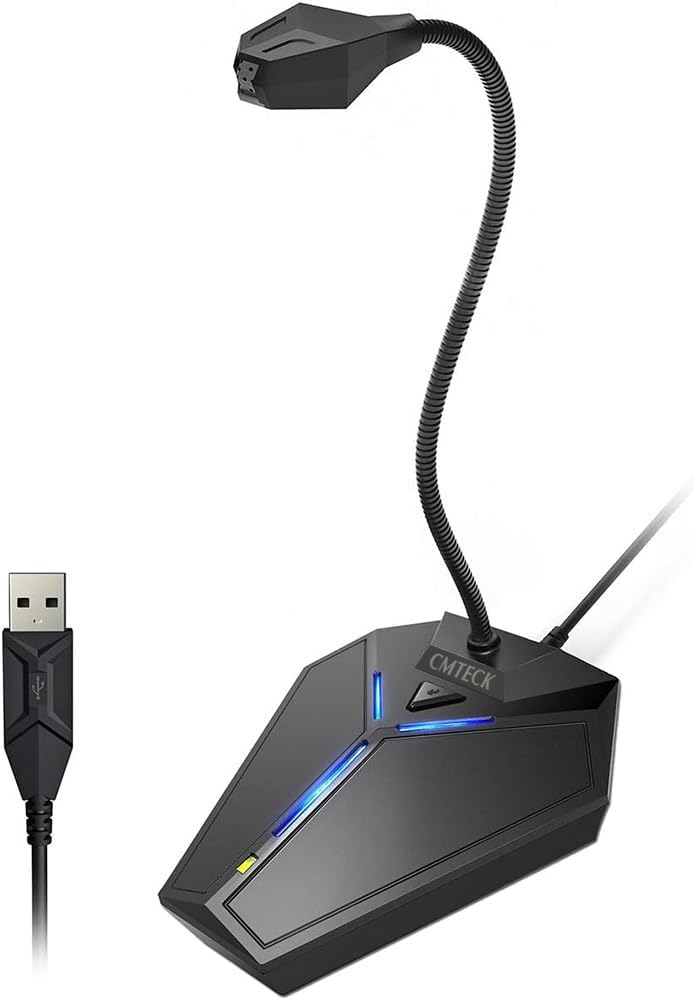
USB Computer Microphone, Plug &Play Desktop Omnidirectional Condenser PC Laptop Mic, Mute Button with LED Indicator, Compatible with Windows/Mac, Ideal for YouTube, Skype, Recording, Games(1.8m /6ft)
Want the best price and purchase timing?
Our AI advisor analyzes real-time pricing across all channels to find you the best deal.
AI Verdict
This is a dead-simple, plug-and-play USB mic that's a definite step up from your laptop's built-in audio for basic calls and meetings.
This mic is a strong fit if your only goal is to sound clearer on voice calls than your laptop's built-in mic allows. Its plug-and-play simplicity and physical mute button are its main strengths. However, its extreme sensitivity to all background noise makes it a poor choice for gaming, streaming, or any use in a less-than-silent room.
If you need to reject background noise, look for a budget USB microphone with a 'cardioid' pickup pattern instead of 'omnidirectional'.
Regret Score™
Medium RiskLower is better — measures purchase-regret risk from real buyer complaints, review credibility, and product maturity
Issues discovered after purchase
Critically weak dimension
Amazon rating vs actual quality
Chance this product isn't for you
Pros
- True plug-and-play setup requires no drivers for Windows, macOS, or PS4.
- Physical mute button with a clear red/green LED indicator is great for conference calls.
- The 6-foot USB cable offers good flexibility for desk placement.
- Flexible gooseneck is easy to position for optimal sound pickup.
- An independent switch allows you to turn off the blue LED light if it's distracting.
Cons
- The omnidirectional pattern is extremely sensitive and picks up significant background noise like keyboard typing.
- Audio quality is described by users as thin and lacking bass, making it unsuitable for music.
- The all-plastic build feels lightweight and can be knocked over easily.
- The mute button can create a loud clicking sound in the audio when pressed.
Dimension Scores
Users report the sound is clearer than a laptop mic but thin, high-pitched, and lacks bass.
The sound profile is consistently described as having very little bass or warmth, making it unsuitable for rich vocal work.
It offers true driverless plug-and-play USB connectivity with Windows, macOS, and PS4.
The 7.4-ounce plastic body is very light and portable, but users find it feels cheap and is easy to knock over.
Best For
- Replacing a laptop's poor built-in microphone for Zoom or Skype calls.
- Basic voice chat in games where a simple mute function is needed.
- Dictation or using voice-to-text software on a desktop computer.
- Conference calls in a quiet room where multiple people might speak.
Not Recommended For
- Streaming on Twitch or creating YouTube content where audio quality is critical.
- Recording podcasts, vocals, or musical instruments.
- Use in a noisy environment with mechanical keyboards, pets, or other people.
Watch Out For
- The omnidirectional pickup is so sensitive it will clearly broadcast your keyboard clicks and mouse movements to everyone on your call.
- Despite claims of a noise-canceling chip, real-world tests show it does very little to reduce ambient room noise.
- The blue 'power on' LED is quite bright and can be distracting in a dimly lit room, though it can be switched off.
- The base is lightweight plastic, making the microphone top-heavy and easy to tip over when adjusting the neck.
Full Specifications
| UPC | 795042973114 |
| ASIN | B0779PKLV9 |
| Brand | CMTECK |
| Color | with mute button |
| Material | Acrylonitrile Butadiene Styrene |
| Batteries | 1 Lithium Ion batteries required. |
| Model Name | CM-G17006P MFN |
| Item Weight | 7.4 ounces |
| Manufacturer | CMTECK |
| Power Source | Corded Electric |
| Polar Pattern | Omnidirectional |
| Connector Type | USB |
| Special Feature | Adjustable Headband, Mute Function, Volume Control |
| Audio Sensitivity | 46.9 Decibels |
| Hardware Platform | PC |
| Item model number | CM-G17006P MFN |
| Compatible Devices | Laptop, Personal Computer |
| Number of Channels | 1 |
| Product Dimensions | 5.1 x 4.3 x 13.8 inches |
| Included Components | usb computer computer,6ft cable |
| Number of Batteries | 1 Lithium Ion batteries required. |
| Signal-to-Noise Ratio | 58 dB |
| Item Dimensions LxWxH | 5.1 x 4.3 x 13.8 inches |
| Microphone Form Factor | Gooseneck |
| Connectivity Technology | USB |
| Item dimensions L x W x H | 5.1 x 4.3 x 13.8 inches |
| Recommended Uses For Product | Gaming, Podcasting, Streaming |
| Is Discontinued By Manufacturer | No |
What Buyers Say
The most surprising thing about this mic is just how much sound it picks up. While it's a huge upgrade in clarity over a standard laptop mic, the omnidirectional pattern means it captures everything—your keyboard, the fan in the room, and any other background chatter. The setup is incredibly simple; you just plug it in and it works. The physical mute button is a huge plus for conference calls, though it can make an audible click. Ultimately, it's a functional tool for basic voice chat in a quiet space, but it's not built for any quality-sensitive recording.
“it works for my zoom calls but my friends in discord said they can hear my every keystroke and my dog walking around downstairs... so yeah it's SENSITIVE.”
Common Praise
- It's truly plug-and-play, working instantly on Windows and Mac without any driver installation.
- The dedicated mute button with a red/green light is very convenient for meetings.
- Vocal clarity is a significant improvement over built-in laptop microphones.
- The long 6-foot cable provides plenty of slack for positioning on a desk.
- The flexible gooseneck holds its position well.
Common Complaints
- Picks up every sound in the room, especially keyboard clicks and background conversations.
- Sound quality is described as 'tinny' or 'high-pitched' with very little bass.
- The all-plastic construction feels cheap and lightweight.
- The blue power LED is distractingly bright, although it can be switched off.
- Pressing the mute button can create a loud click sound in the audio feed.
Ownership Tips
- You'll find yourself relying heavily on the mute button to avoid broadcasting every little noise you make.
- Positioning the mic very close to your mouth is key to getting your voice to overpower the background noise it picks up.
- After repeated adjustments, the gooseneck can sometimes feel a little less stiff than when it was new.
- You'll probably turn off the bright blue LED light almost immediately and forget the switch is even there.
Frequently Asked Questions
How long is the USB cable?
The attached USB cable is 6 feet (1.8m) long.
Can you turn off the blue LED light?
Yes, there is a separate switch on the back of the base to turn the blue LED light on and off.
Does this microphone work with Xbox or Android?
No, it is not compatible with Xbox, Raspberry Pi, or Android devices.
Do I need to install any software or drivers?
No, it's a plug-and-play device with a built-in sound card that works automatically with Windows, macOS, and PS4.
Is the microphone good for recording music?
No, users find the sound quality to be thin and lacking the bass and richness needed for music. It's best for voice only.
Does the mute button make a sound when you press it?
Yes, some users report that pressing the mute button can cause a noticeable click in the audio recording.
How well does the noise canceling work?
Reviewers note that the built-in noise reduction is not very effective and the mic still picks up a lot of ambient sound.
Buying Guide
The most important thing to understand about this mic is its 'omnidirectional' pickup pattern. Think of it like a sphere of hearing—it captures sound equally from all directions. This is why it's so sensitive to background noise. It's great for a conference table, but bad for a noisy desk. For solo use, you usually want a 'cardioid' mic that focuses on the sound directly in front of it.
Omnidirectional Pickup
This means it hears sound from 360 degrees. It's good for capturing a whole room, but it will also pick up your loud keyboard, your computer's fan, and your roommate talking.
Plug & Play USB
You don't need to be a tech expert. Just plug the USB cable into your computer, and it works instantly. There are no drivers or complicated software to install.
Mute Button with LED
You can be 100% sure you're muted. A quick tap turns the light red, so you can cough or talk to someone off-camera without worrying if your call can hear you.
Alternatives
If this mic's background noise pickup is a dealbreaker, search for a 'USB cardioid microphone'. That type is designed to reject sound from the sides and rear, focusing only on your voice.
You Might Also Like

Computer Speakers for Desktop PC Monitor, USB Plug-in, Wired, Computer Soundbar for PC, Laptop Speakers with Adaptive-Channel-Switching, Loud Sound, Deep Bass, USB C Adapter, Easy to Clip on Monitor
Price range unavailableThis $30 clip-on USB soundbar is a massive upgrade over tinny laptop speakers, perfect for cramped home offices that need clear audio without the cable clutter of a 2.1 system.

Bluetooth Pillow Speaker for Sleeping, Mini Portable Under Pillow Speaker with White Noise Timer Wireless Sleep Aid with Stereo Bass Private Sleep Headphones for Adult Kids
$0-$49A 3-Watt stereo Bluetooth 5.4 pillow speaker with 20-hour battery life and white noise, designed for private listening without disturbing others.

Amazon Echo Pop (newest model), Our smallest speaker with Alexa+ Early Access, Fits in any room, Charcoal
This is Amazon's cheapest, smallest Alexa speaker, built for adding voice control to tight spaces like a bathroom or dorm room, not for filling a room with music.

Amazon Echo Pop (newest model), Our smallest speaker with Alexa+ Early Access, Fits in any room, Midnight Teal
This is a cheap, no-frills Alexa speaker for small spaces like bathrooms and hallways, not for anyone who actually cares about music quality.