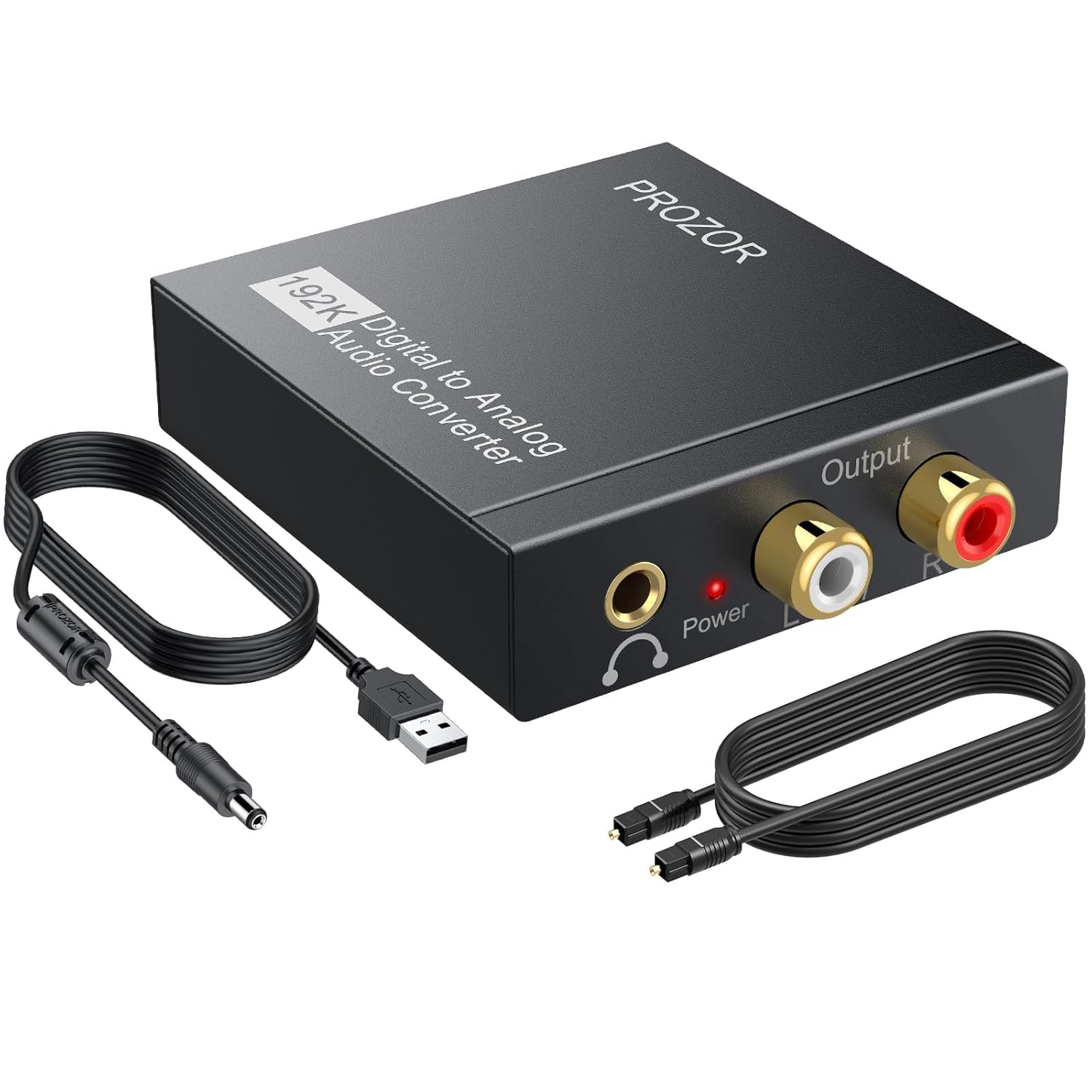
PROZOR 192KHz Digital to Analog Audio Converter DAC Digital SPDIF Optical to Analog L/R RCA Converter, Toslink Optical to 3.5mm Jack Adapter for PS3 HD DVD PS4 Amp Apple TV Home Cinema
Want the best price and purchase timing?
Our AI advisor analyzes real-time pricing across all channels to find you the best deal.
AI Verdict
This is a cheap, no-frills metal box that gets audio from a new TV's optical port to an old analog stereo or headphones.
This is a strong fit if you have a very specific problem: converting a digital PCM optical/coaxial signal to analog stereo. It's a cheap and effective tool for that one job. However, the strict requirement for a PCM signal and the lack of Dolby/DTS decoding make it a weak fit for users who don't know how or are unable to change their source's audio settings.
If you need to control volume, look for an upgraded DAC model that explicitly includes a volume knob.
Regret Score™
Medium RiskLower is better — measures purchase-regret risk from real buyer complaints, review credibility, and product maturity
Issues discovered after purchase
Critically weak dimension
Amazon rating vs actual quality
Chance this product isn't for you
Pros
- Simultaneously outputs to L/R RCA and a 3.5mm jack.
- Supports up to 192KHz/24bit resolution, higher than many budget options.
- Aluminum alloy housing provides better shielding and durability than plastic.
- Includes both an optical input and a coaxial input for flexibility.
- Users report it's a simple plug-and-play solution for PS3/PS4 audio extraction.
Cons
- Does not decode Dolby or DTS 5.1 signals; source must be set to PCM.
- No volume control on the unit itself; you have to control it from the source or the amp.
- Some audiophile measurements show very high distortion and a poor frequency response.
- Can introduce noise or hum if powered by a TV's USB port instead of a dedicated 5V 1A adapter.
Dimension Scores
While it supports 192KHz/24bit, technical measurements by audiophiles show very high distortion and a poor frequency response.
The output volume is fixed and cannot be adjusted on the device, and some critical listeners report that the bass is completely missing.
It provides Toslink and Coaxial inputs, with simultaneous RCA and 3.5mm outputs, which is very flexible for a budget device.
The aluminum alloy housing is a definite step up from the plastic used in many other cheap electronics, offering better durability and shielding.
Best For
- Connecting a new TV (with only optical out) to an older analog stereo receiver.
- Getting audio from a game console like a PS3 or PS4 to a pair of headphones or desktop speakers.
- Bypassing a noisy computer sound card by using the motherboard's optical output.
- A quick, cheap fix for sending audio from a Blu-ray player to an analog amplifier.
Not Recommended For
- Home theater systems that need to decode Dolby Digital or DTS 5.1 surround sound.
- Anyone who needs to frequently adjust the output volume directly on the converter.
- Audiophiles seeking high-fidelity, low-distortion sound for critical listening.
Watch Out For
- You MUST change your TV's audio output setting to 'PCM'. If it's set to 'Auto', 'Dolby Digital', or 'Bitstream', you will get no sound.
- Powering it from your TV's USB port can cause a buzzing or humming noise; using a separate 5V 1A power adapter is recommended for cleaner power.
- It does not have a USB audio input; the USB port is only for power. You cannot connect it to a computer as a USB sound card.
- The volume is fixed. Your TV remote likely won't control the volume going through the optical port, so you'll need to adjust volume on your amplifier or powered speakers.
Full Specifications
| UPC | 738759979185 753807580250 |
| ASIN | B00KNNSKV0 |
| Brand | PROZOR |
| Material | Aluminum Alloy |
| Item Weight | 3.2 ounces |
| Manufacturer | Proster Trading Limited |
| Mounting Type | Coaxial |
| Interface Type | Coaxial, Optical |
| Number of Pins | 6 |
| Item model number | DAC001 |
| Number of Channels | 2 |
| Product Dimensions | 1.13"L x 0.85"W |
| Maximum Supply Voltage | 5 Volts |
| Minimum Supply Voltage | 5 Volts (DC) |
| Upper Temperature Rating | 85 Degrees Celsius |
| Is Discontinued By Manufacturer | No |
| Global Trade Identification Number | 00738759979185 |
What Buyers Say
The first thing you notice is that this thing is a solid little metal brick, not cheap plastic. It gets the job done, but only if you play by its one big rule: your TV or game console MUST be set to output 'PCM' audio. If you don't dive into your device's expert audio settings and make that change, you'll get absolute silence and think the box is broken. Many users buy this to hook their new TV up to their old-school stereo, and for that, it's a lifesaver. Just don't power it from your TV's USB port, as that's a known cause of annoying background hum. Use the included cable with a separate phone charger-style adapter.
“i spent an hour thinking this was busted then i found some forum post about changing a setting on my tv called PCM and boom it worked thank god now my old speakers arent useless.”
Common Praise
- It's a simple, plug-and-play solution that just works once you set the source to PCM.
- The metal case feels surprisingly durable and high-quality for the price.
- Having both RCA and 3.5mm outputs at the same time is very convenient.
- Successfully gets sound out of a PS3/PS4's optical port for use with headphones.
- It's an inexpensive way to give life to older analog audio equipment that doesn't have digital inputs.
Common Complaints
- It doesn't decode Dolby Digital or DTS, which causes confusion and setup problems for many.
- The output volume is fixed and can't be controlled by the TV remote or the device itself.
- Can produce a noticeable hum or static if not powered by a clean source.
- Some users report the sound quality is thin and lacks bass.
- The red power LED is very bright.
Ownership Tips
- After a few weeks, you completely forget it's there, which is exactly what you want from a utility box like this.
- The bright red power light can be distracting if it's in your line of sight while watching a movie in the dark; a small piece of electrical tape solves it.
- You'll quickly realize how much you miss controlling volume with your TV remote, and have to get used to grabbing the stereo's remote instead.
- It can get slightly warm to the touch during operation, but the metal case seems to dissipate heat well.
Frequently Asked Questions
Why am I getting no sound from the converter?
You most likely need to set your TV or other source device's digital audio output format to PCM. It does not support Dolby, DTS, or other 5.1 channel formats.
Can I control the volume with my TV remote?
Probably not. Most TVs have a fixed level output for their optical port. You will need to control the volume on your connected amplifier, powered speakers, or headphones.
I hear a buzzing or humming noise. How can I fix it?
This is often caused by an unstable power supply. Try powering the DAC with a dedicated 5V 1A USB wall adapter instead of your TV's USB port.
Does this work with Netflix or YouTube?
Yes, but you may need to ensure your TV's audio settings are on PCM, as some streaming apps try to output a 5.1 signal by default.
Can I plug this into my computer's USB port to use as a sound card?
No, the USB port is only for power. You must connect it to your computer's optical or coaxial audio output.
Does it come with all the necessary cables?
It typically comes with an optical cable and a USB power cable, but you will need to provide your own RCA or 3.5mm audio cables.
Will this improve my sound quality?
For most users connecting a TV to a stereo, it simply makes the connection possible. While some audiophiles report it sounds terrible with poor measurements, many casual users find the sound to be excellent for the price.
Buying Guide
This little box is a translator. It takes the digital audio signal (light through an optical cable) that new TVs use and translates it into the analog signal (electricity in RCA cables) that older stereos and speakers understand. The most important thing to know is that it only speaks one digital language: PCM. Your TV wants to send fancier languages like Dolby Digital, so you have to go into your TV's settings and force it to speak PCM, or this box won't understand it.
Digital to Analog Converter (DAC)
Think of it like converting a website from Spanish to English. Your TV speaks 'digital' and your old stereo speaks 'analog'. This device is the translator in the middle that makes communication possible.
PCM (Pulse-Code Modulation)
This is a basic, uncompressed stereo audio format, like a universal language. This converter ONLY understands PCM. If your TV sends it a more complex format like Dolby Digital (which is for surround sound), the converter gets confused and you hear nothing.
192KHz/24bit
This refers to the quality of the digital audio it can handle. It's like the difference between a standard photo and a high-resolution one. While this box can accept a high-res signal, the actual output quality is considered basic by audio experts.
Optical/Toslink & Coaxial Inputs
These are the two types of digital audio outputs on devices. Optical (the square one with a red light) is more common on TVs. Having both gives you more options for connecting different gear.
Alternatives
If this doesn't work for you, search for a 'DAC with volume control' to solve the fixed volume issue, or a '5.1 audio decoder/extractor' if you need to handle Dolby Digital or DTS signals for a surround sound system.
You Might Also Like

Computer Speakers for Desktop PC Monitor, USB Plug-in, Wired, Computer Soundbar for PC, Laptop Speakers with Adaptive-Channel-Switching, Loud Sound, Deep Bass, USB C Adapter, Easy to Clip on Monitor
Price range unavailableThis $30 clip-on USB soundbar is a massive upgrade over tinny laptop speakers, perfect for cramped home offices that need clear audio without the cable clutter of a 2.1 system.

Bluetooth Pillow Speaker for Sleeping, Mini Portable Under Pillow Speaker with White Noise Timer Wireless Sleep Aid with Stereo Bass Private Sleep Headphones for Adult Kids
$0-$49A 3-Watt stereo Bluetooth 5.4 pillow speaker with 20-hour battery life and white noise, designed for private listening without disturbing others.

Amazon Echo Pop (newest model), Our smallest speaker with Alexa+ Early Access, Fits in any room, Charcoal
This is Amazon's cheapest, smallest Alexa speaker, built for adding voice control to tight spaces like a bathroom or dorm room, not for filling a room with music.

Amazon Echo Pop (newest model), Our smallest speaker with Alexa+ Early Access, Fits in any room, Midnight Teal
This is a cheap, no-frills Alexa speaker for small spaces like bathrooms and hallways, not for anyone who actually cares about music quality.